
JS Automation Corp EMA8308 Manual de usuario


1
Correction record
Version
Record
1.0
firmware version 1.0 up
1.1
Add System Reset
1.2
1.
Modify 3.1.21 dimension
2.
Add 4.2 dimension Image
1.3
1.
Modify Notes on hardware installation
2.
Add Warranty
3.
Add specifications to each input and output (chapt. 6)
4.
Modify Ordering information
1.4
1.
Modify AD signal pin name for single-end and differential (chapt. 5)
2.
Modify Analog input diagram for differential (chapt. 6.1)
1.5
Add Chapter 8ADP8308DIN Jumper settings

2
Contents
1. Forward ............................................................................................................................................5
2. Features.............................................................................................................................................6
2.1 EMA8308/EMA8308D..............................................................................................................6
2.2 ADP8308DIN DIN rail mounted wiring board .........................................................................6
3. Specifications....................................................................................................................................7
3.1 EMA8308/EMA8308D..............................................................................................................7
3.2 ADP8308DIN DIN rail mounted wiring board .........................................................................8
4. Layout and dimensions....................................................................................................................9
4.1 EMA8308 Layout......................................................................................................................9
4.2 EMA8308 Dimension................................................................................................................9
4.3 ADP8308DIN DIN rail mounted wiring board .......................................................................10
5. Pin definitions.................................................................................................................................11
5.1 JM1 pin definitions..................................................................................................................11
5.2 JM2 pin definitions..................................................................................................................11
5.3 JM3 pin definitions..................................................................................................................11
6. I/O Interface diagram....................................................................................................................12
6.1 Analog input diagram ..............................................................................................................12
6.2 Analog output diagram ............................................................................................................13
7. System Reset...................................................................................................................................14
7.1 Normal system reset.................................................................................................................14
7.2 Reset to default ........................................................................................................................14
8. ADP8308DIN Jumper settings and connector definition...........................................................15
8.1 Jumper setting..........................................................................................................................15
8.2 Connector definition ................................................................................................................15
9. Applications....................................................................................................................................16
10. Ordering information....................................................................................................................17

3
Notes on hardware installation
For more detail of step by step installation guide, please refer the file
“..\download\Supplemental_technical_data\Step_by_step_installation_of_EMA_module.pdf “on the CD
come with the product or download the document from
http://www.automation.com.tw/common/Supplemental_technical_data.htm

4
Warranty
The EMA8308/D are warranted against defects in materials and workmanship for a period of two
years from the date of shipment, as evidenced by receipts or serial no. on board. JS automation Corp.
will, at its option, repair or replace product that proves to be defective during the warranty period. This
warranty includes parts, labor and shipping costs of returning.
Except as specified herein, JS automation Corp. makes no warranties, express or implied, and
specifically disclaims any warranty of merchantability or fitness for a particular purpose. Customer’s
right to recover damages caused by fault or negligence on the part of JS automation Corp. shall be
limited to the amount theretofore paid by the customer. JS automation Corp. will not be liable for
damages resulting from loss of data, profits, use of products, or incidental or consequential damages,
even if advised of the possibility thereof. This limitation of the liability of JS automation Corp. will
apply regardless of the form of action, whether in contract or tort, including negligence. Any action
against JS automation Corp. must be brought within one year after the cause of action accrues.
JS automation Corp. shall not be liable for any delay in performance due to causes beyond its reasonable
control. The warranty provided herein does not cover damages, defects, malfunctions, or service failures
caused by owner’s failure to follow the JS automation Corp. installation, operation, or maintenance
instructions; owner’s modification of the product; owner’s abuse, misuse, or negligent acts; and power
failure or surges, fire, flood, accident, actions of third parties, or other events outside reasonable control.
If any defect occurs, you should email to us as the following form to get the fast response:
Detailed Company Information
Company/Organization:
Contact Person:
E-mail:
Address:
Country:
Tel/Fax:
Web Site:
Product information
product model:
serial no.:
Environment to Use: such as CPU board, Operating System, target application...
description of defect: (as detail as possible)

5
1. Forward
Thank you for your selection of Ethernet module EMA8308 analog input output interface.
Thanks to the booming of network, Ethernet become a reliable and low cost solution for data
communication. To utilize the Ethernet as data communication highway of industrial control devices is
more attractive than ever. EMA8308 module is a simple web based analog I/O control module. Standard
type EMA8308 and EMA8308D is 16 bit version. While EMA8308D are 8 channels differential input,
EMA8308 and are single or differential type. You can choose the suitable type for their application to
achieve maximum resolution/cost. We have provided the dll’s of Window’s or Linux system, enabling
you coding the flexible application as you need. Stable, high reliability and remote addressable module
give you a new approach of application.
In the same series:
EMA8308 24bit uni-polar 8 differential /16 single end analog input, 2 16bit analog output
EMA8308D 24bit bi-polar 8 differential analog input, 2 16bit analog output
Any comment is welcome,
please visit our website
http://www.automation.com.tw/
http://www.automation-js.com/ for the up to date information.

6
2. Features
2.1 EMA8308/EMA8308D
Analog input section
-Over-voltage protection on analog input
-High common mode voltage up to 10V (EMA8308D)
-24 bit accuracy
-10 samples per second
-Differential or single end analog input (EMA8308)
-Multiple analog input range: 0~5V, 0~10V, 4~20mA, 0~20mA (EMA8308)
-5~+5V, -10~+10V, 4~20mA, 0~20mA (EMA8308D)
Analog output section
-Over-load protection on analog output
--10V ~ +10V output
Ethernet section
-Direct web page control
-IP re-assignment
-10/100M auto detection
-Software key function
-Peer to peer response time <2ms
2.2 ADP8308DIN DIN rail mounted wiring board
2.2.1 Easy configuration of current or voltage input
2.2.2 Easy configuration for single end or differential input

7
3. Specifications
3.1 EMA8308/EMA8308D
Analog input
3.1.1 Input points:
EMA8308:16 channels unipolar single end or differential
EMA8308D : 8 channels differential
3.1.2 Resolution: 24-bit
3.1.3 Offset error: 2.5uV(typ), 5uV(max)
3.1.4 Offset error drift: 20nV/oC
3.1.5 Input common mode rejection: 120dB
3.1.6 Sample rate: 10 samples/second
3.1.7 Input type: differential or single end (port programmable)
3.1.8 Input range:
EMA8308:0~5V(23bit), 0~10V(24bit), 0~20mA(23bit), 4~20mA(22bit)
EMA8308D:-5V~ +5V(23bit), -10V~ +10V(24bit), 0~20mA(23bit), 4~20mA(22bit)
3.1.9 Input filter: 7.03K, 3.52K, 1.76K, 879Hz
3.1.10 Over-voltage protection: 20Vdc(max)
Analog output
3.1.11 Output points: 2 channels
3.1.12 Resolution: 16-bit
3.1.13 Output range: -10V~ +10Vdc
3.1.14 Over load protection: 50mA(peak)
Ethernet
3.1.15 10/100M auto switch x 2 port
3.1.16 Peer to peer response time <2ms
General
3.1.17 Power requirement: 12Vdc ~24Vdc
3.1.18 Operation Temperature: 0~ +70 degree C
3.1.19 Storage Temperature: -20 ~ +80 degree C
3.1.20 Operation Humidity: 5~95% RH, non-condensing
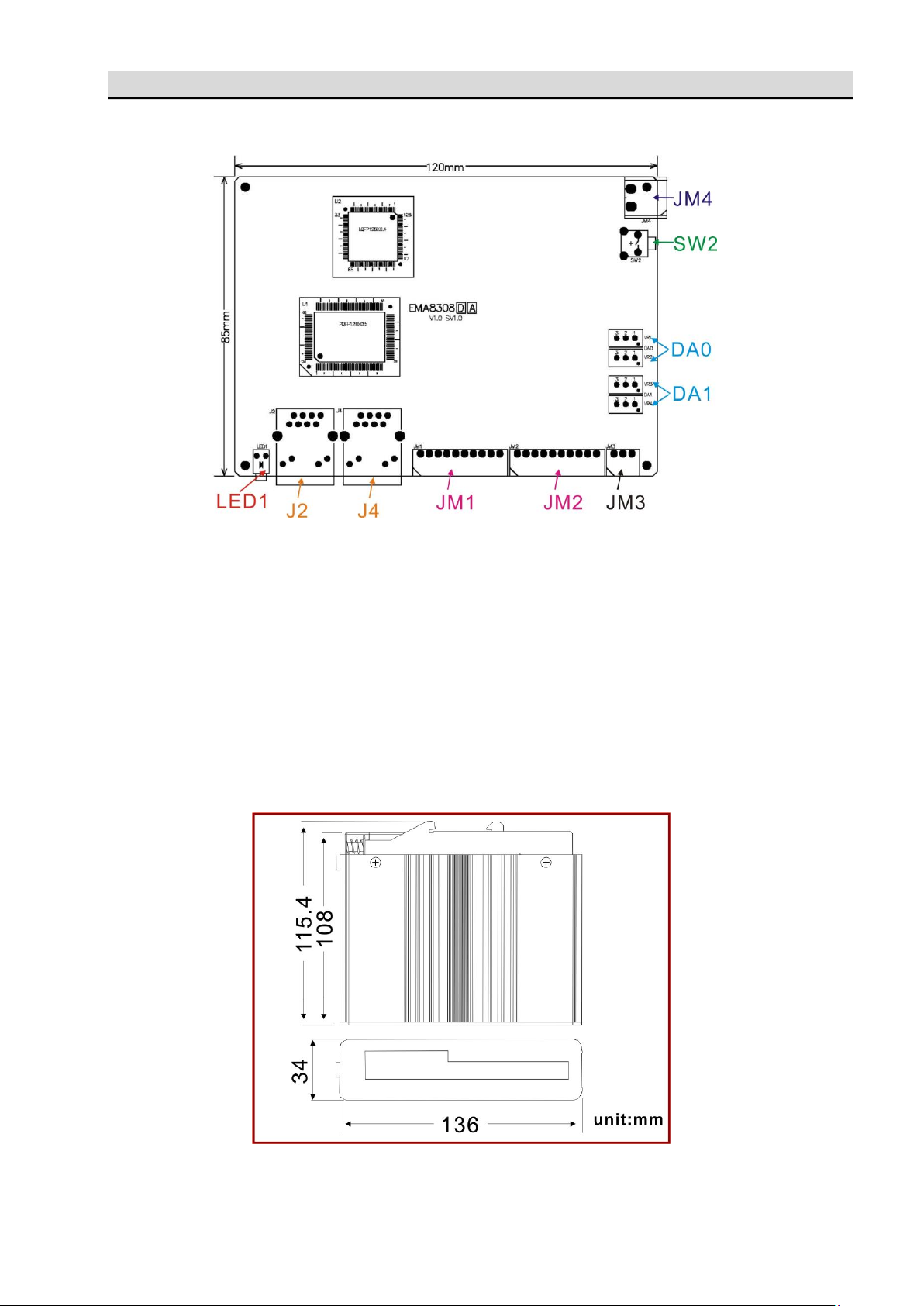
3.1.21 Dimension: 115.4(L)*136(W)*34(H) mm
4.6(L)*5.4(W)*1.4(H) in

8
3.2 ADP8308DIN DIN rail mounted wiring board
3.2.1 Connection : DB25 connector to connect EMA8308 module
3.2.2 Dimension : 86(W)*79(L)*52(H)mm , 3.4(W)*3.2(L)*2.1(H)in
9
4. Layout and dimensions
4.1 EMA8308 Layout
LED1: system active LED
J2,J4: Ethernet RJ45 socket
JM1, JM2: analog input connector
JM3: analog output connector
JM4: external power 24V connector
SW2: system reset switch
DA0,DA1: factory preset voltage trimmer
4.2 EMA8308 Dimension
Este manual sirve para los siguientes modelos
1
Tabla de contenidos
Manuales populares de Unidad de control de otras marcas

Festo
Festo Compact Performance CP-FB6-E Manual de lista de piezas

Elo TouchSystems
Elo TouchSystems DMS-SA19P-EXTME Manual de usuario

JS Automation
JS Automation MPC3034A Manual de usuario

JAUDT
JAUDT SW GII 6406 Series Guía rápida

Spektrum
Spektrum Air Module System Manual de usuario

BOC Edwards
BOC Edwards Q Series Manual de usuario


