jeri V4 Manual de usuario

Portable Power Station
User Manual
Wh
403
V4
Wh
622
V6
Wh
1036
V10

IMPORTANT
SAFETY
INSTRUCTION
Read all instructions
before use this product to
avoid personal injury and
property damage.
Do not operate or store the jeri portable power station in a
wet environment such as rain, snow, high humidity
location or any place where could cause water ingress.
Do not clean the jeri portable power station with direct
water, wet towel, or harsh chemicals.
Do not operate or store the jeri portable power station
close to a heat source such as open flames, stoves or other
device which can produce heat.
Do not cover or wrap the jeri portable power station while
it is operating. Use the product in a ventilated space.
Do not expose the product to mechanical shocks such as
dropping, crushing, or puncturing the unit.
Do not disassemble or repair the jeri portable power
station by any unauthorised person or organization.
Incorrect disassemble may cause electrical jolts, explosion,
or fire.
Do not insert foreign objects through the output ports,
input ports or ventilation holes.
Keep the device out of reach of children. If being used by
children, an adult must supervise the application.
Keep the product sitting at a stable horizontal position if it
is not operating or stored on the ground. Be mindful that
children and adults could get injured if the unit drops onto
the human body from a certain height.
Keep the unit dry and clean especially for the charge
and discharge ports. Use a dry cloth to clean the units if
needed.
Connect and operate the device according to the manual.
Misusing or incorrect connections to the jeri portable
station may cause electrical shock or damage to itself and
other devices.
Your jeri portable power station might become warm
during its operation. It is not suggested to use the product
under the direct sunlight when it is a hot weather over 40
degrees Celsius.
In the unlikely event of leakage or explosion, sand or a
chemical fire distinguisher could be used.
It is suggested to recycle or dispose the jeri portable
power station which is a battery product according to the
local guidelines.
This product is not intended to be used to power up high
power consumption equipment related to personal safety,
such as medical equipment, nuclear facility equipment,
CPAP (Sea Pap).

3
User Manual / V1.0
- Portable Power Station -
Index
Items Included
Product Information
First-time Charge
Charging Methods
How to Use Your jeri
Store and Care Your jeri Portable Power Station
Specifications
Troubleshooting
Warranty and Registration
4
5
5
6 - 7
8 - 9
9
10
11
12 - 15
Safety Signal – Activate SOS (Light)
Double click the LED light ON/OFF Button to turn on the SOS light mode.
Further press one more time to turn the SOS light mode off.

- Portable Power Station -
4User Manual / V1.0
Items Included
jeri - Portable Power Station V4
AC Power Adapter Car Charging Cable
User Manual
User Manual
V4
jeri - Portable Power Station V6
AC Power Adapter Car Charging Cable
User Manual
User Manual
V6
jeri - Portable Power Station V10
AC Power Adapter Car Charging Cable
User Manual
User Manual
V10

5
User Manual / V1.0
- Portable Power Station -
Product Information
1. Input Power LED
2. DC Input Port
3. DC Output Ports ON/OFF Button
4. 12V DC Output Car Port
5. 12V DC 5525 Output Ports
6. Collapsible Handle
7. LCD Screen ON/OFF Button
8. LCD Screen
9. USB Output ON/OFF Button
10. USB-C PD Input/Output Port
11. USB A Output Ports
12. AC Output Ports ON/OFF Button
13. 230V AC Output Ports
14. LED light ON/OFF Button
15. LED Light
The first-time Charge
Note:
jeri V4 and V10 product will look different but the buttons and functions are the same.
Make sure your jeri portable power station have been fully charge before your use it for the first time.
Note (Charging):
When it is charging, the battery sign on the LCD will flash and input power will be shown. When fully
charged, battery sign on the LED will have four solid green lines and the battery power percentage will
show 100%. The charger can be removed after being fully charged.
67
8
91
2
3
4
5
10
11
12
13
14
15

- Portable Power Station -
6User Manual / V1.0
Charging Methods
The jeri portable power station can be charged through the following 4 methods.
AC power adapter
Connect the jeri portable power station with an AC socket through
the AC charging adapter as the picture above.
Connect the jeri portable power station to the 12V output in the car
through the car charging cable as the picture above.
Car Charger
Connect the jeri portable power station USB-C port with a power
source through a USB-C cable. Charging can start at both ON and
OFF state of the Output ON/OFF Button.
Note:
A USB-C cable is not included in this package as an accessory.
USB-C Cable
*USB-C cable required.

7
User Manual / V1.0
- Portable Power Station -
Solar Panel
*Optional accessory
Connect the jeri portable power station to the a portable solar panel
which is an optional accessory through the charging cable from the
solar panel as the picture above.
Fast Charge
You can use a combination of charging ports to boost the input power for the jeri.
The combination charge methods can be as below,
• USB-C + AC power adapter
• USB-C + Car charger
• USB-C + Solar panel

- Portable Power Station -
8User Manual / V1.0
How to Use Your jeri
The jeri can be used to power up a variety of electrical appliances through its DC and AC output ports.
It will start to power up your device after pressing the corresponding ON/OFF button to an ON state as
pictures shown below.
If possible, keep your jeri connected to a power source when it is not in use. You can use your jeri as
normal while charging it.
DC and AC Output
AC Port Output USB Port Output Car Port Output
Notes:
To save power, the jeri will be automatically turned off if no output is connected for 3 hours. (This is a default 3 hour
sleep timer)
The input and output of the USB-C are not controlled by the USB button. The USB-C port can work in both ON and
OFF state of the USB button.
AC Button USB Button DC Button
Press the LED light ON/OFF Button one/two/three times for switching between the LED light’s
20% / 50% / 100% brightness. Further press the LED light ON/OFF Button for the fourth time to turn off
the LED light.
LED Light

9
User Manual / V1.0
- Portable Power Station -
Store and Care Your jeri Portable Power Station
Connecting your jeri to a power source when not using. This will prolong the battery life and ensure
the power station is always in a ready-to-use state. Keep it at a dry and in a cool environment and
avoid any place where close to an open flame.
For Daily Use and Short Trips
Follow steps above and charge the battery every 3 month to ensure the battery life.
Please note that keeping the battery at a low or empty level for a long period can cause damage to the
battery life and its peak capacity.
For Long-term Maintenance

- Portable Power Station -
10 User Manual / V1.0
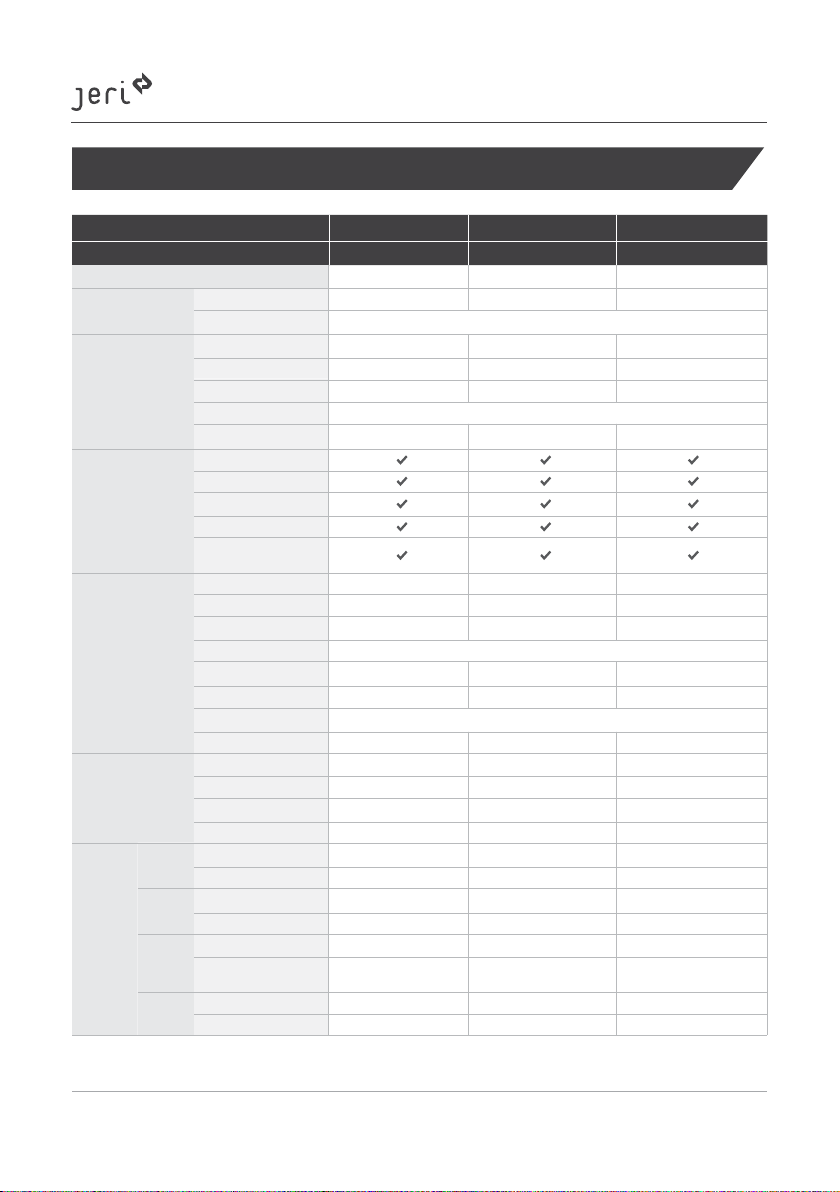
Specifications
Product Name V4 V6 V10
Model No. JER-400-PP-A1 JER-600-PP-A1 JER-1000-PP-A1
Capacity 403Wh 622Wh 1036Wh
Input ports
DC5525 1*120W 12~24V 1*120W 12~24V 1*180W 12~24V
USB C PD 1x 100W 5V 3A/9V 3A/12V 3A/15V 3A/20 V5A
Output Ports
Car port 1*13.3V 10A 1*13.3V 10A 1*13.3V 10A
DC 5525 2*13.3V 10A 2*13.3V 10A 2*13.3V 10A
USB A 3*5V 2.4A 3*5V 2.4A 3*5V 2.4A
USB C PD 1x 100W 5V 3A/9V 3A/12V 3A/15V 3A/20V 5A
AC Output 2*230V 400W, 800W Max 2*230V 600W, 1000W Max 3*230V 1000W, 2000W Max
Protection
Short circuit protection
Overcurrent protection
Overcharge protection
Low voltage protection
Over temperature
protection
Basic Info
Weight 4.8kg 6.8kg 11.2kg
Dimensions 244.5*188*200mm 290*210*205mm 377.5*232*230mm
LED light 3W (Max) 3W (Max) 3W (Max)
Operating Temperature 0°C ~ + 40°C for charge, -10°C~ + 40°C for discharge
Operating Humidity 20% - 90% RH 20% - 90% RH 20% - 90% RH
Life Cycle Around 500 Around 500 Around 500
Certification FCC, UL2743, UN38.3, PSE, RCM
Warranty 12 months 12 months 12 months
Charge
AC port 4.5 Hours 7 Hours 6 Hours
USB C 4 Hours 6.5 Hours 10.5 Hours
Car Port 3.5 Hours 5.5 Hours 8.5 Hours
Solar Panel (120W) *14~8 Hours 6~10 Hours 9~13 Hours
Dischagre
DC
Output
Car Fridge (60W) 6 Hours 9 Hours 15 Hours
Drone (50Wh) 7 Recharges 11 Recharges 19 Recharges
AC
Output
32-inch TV (40W) 9 Hours 14 Hours 24 Hours
Laptop (62Wh) 6 Recharges 9 Recharges 15 Recharges
USB A
Output
Smartphone (4352mAh) 22 Recharges 35 Recharges 55 Recharges
Motion Camera
(1180mAh)
90 Recharges 140 Recharges 230 Recharges
USB C
Output
Smartphone (3227mAh) 30 Recharges 48 Recharges 80 Recharges
Laptop (49.9Wh) 7 Recharges 12 Recharges 19 Recharges
The charging time might be varied based on the weather. A longer charging time might be required if it is a cloudy
or rainy day.
*1
Otros manuales para V4
1
Este manual sirve para los siguientes modelos
5
Tabla de contenidos