
Jedmed Combo 50 Manual de usuario
HG-0269 JedMed Otoscope Copyright © 2015 Alaska Nave Tribal Health Consorum. All rights reserved. 1
AFHCAN
www.afhcan.org
Handy
Guide JedMed Otoscope LED Combo 50
The JedMed Otoscope
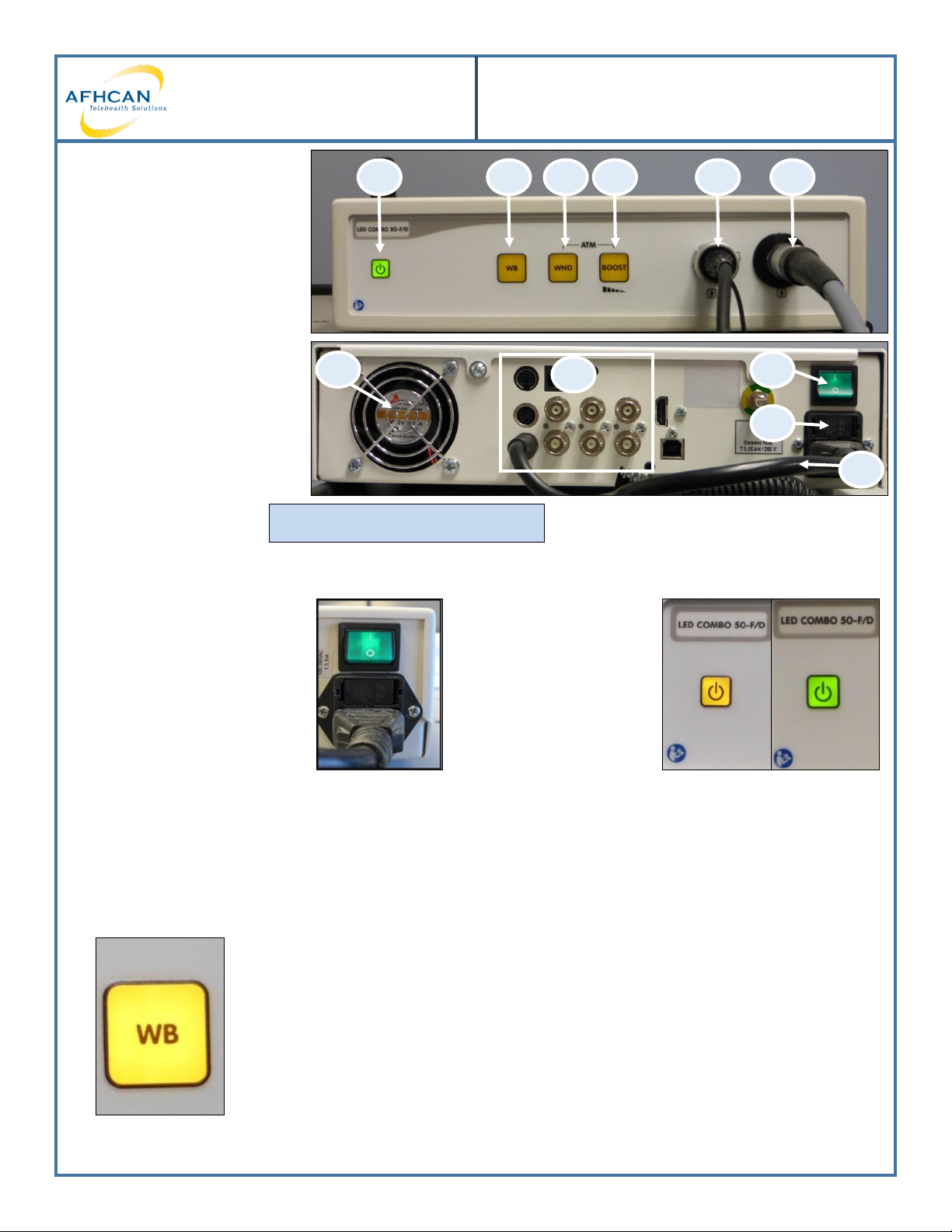
1. Stand by light and
power buon
2. WB—White balance
3. WND—Window Size
4. Boost—Brightness
5. Camera input
6. Light output
7. Main power supply
8. Main (external) fuse draw
9. Power cord
10. Video outputs
11. Cooling fan
DO NOT BLOCK THE COOLING FAN
123456
11 10
9
8
7
Operang the JedMed Otoscope
1. The Otoscope can have the
main power switch le on
when not in use.
2. Turn on the video
otoscope light source
by pressing the
yellow POWER
buon. When the
power is on, the LEDs
on the front panel
will ash and then
turn green.
3. White Balance: To be performed once a week, or when the image color appears o. Used to ensure accurate
color reproducon.
To perform a white balance:
1. Aim the otoscope p at a uniformly illuminated white sheet of paper.
2. While aiming, push and release the white balance buon.
3. Monitor will beep once, the white balance is complete.
HG-0269 JedMed Otoscope Copyright © 2015 Alaska Nave Tribal Health Consorum. All rights reserved. 2
AFHCAN
www.afhcan.org
Handy
Guide JedMed Otoscope LED Combo 50
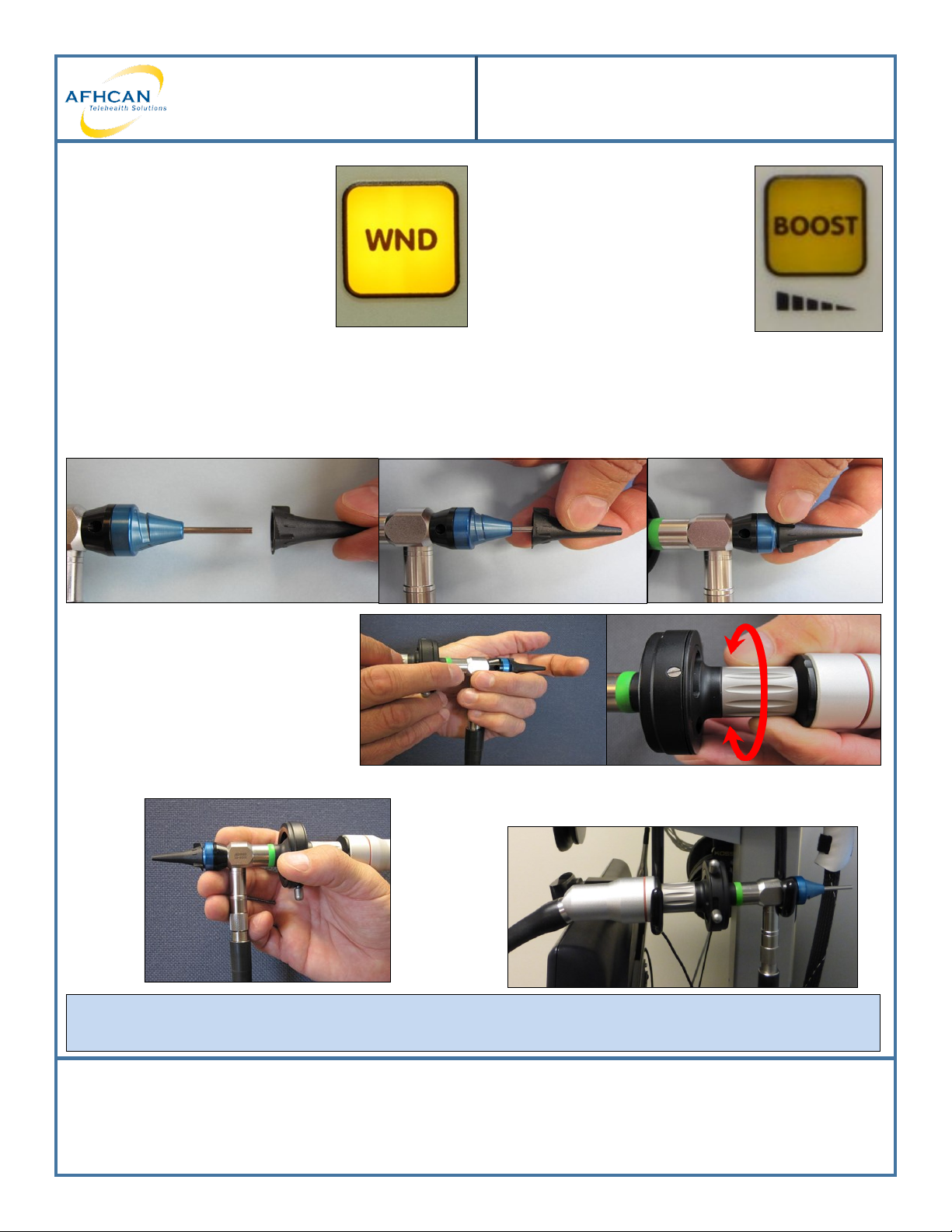
Window Funcon: Allows for three
window sizes. Each me the window
buon is pressed, it changes the size
of the window. The size of the
window determines the area used
for light measurement, which aects
the image brightness. When the
window buon is acvated, the
buon is illuminated by a yellow light.
Boost: Used in poor light condions.
To increase the image brightness,
press the buon to select the desired
level. Using the boost to increase the
image brightness will decrease image
quality.
Using the Otoscope
1. Clean p with an alcohol swab.
2. Twist a JedMed speculum onto the blue top of the JedMed otoscope as pictured below.
3. Pre-focus the otoscope by holding
the top of the otoscope close to the
palm of your hand and turning the
focusing knob unl the image is
clearly focused.
4. Hold the otoscope as instructed when imaging. 5. When nished, discard the speculum and hang the
hand piece in the bracket as pictured.
To put on Standby: Press the Power buon for about 2 seconds. The shutdown is signaled by three beeps and
the on/o switch will turn yellow.
Troubleshooting
1. No light source? Check the cords to ensure they are secure. Replace the bulb if needed (contact IT).
2. Trouble focusing? Use Image Enhance. Clean the p of the otoscope.
3. Image color not accurate? Perform a White Balance.
Otros manuales de Equipo médico de Jedmed

Jedmed
Jedmed Horus Scope Manual de usuario

Jedmed
Jedmed MACHIDA Manual de usuario

Jedmed
Jedmed PHOENIX III Manual de usuario

Jedmed
Jedmed S-II Plus Manual de instrucciones y seguridad

Jedmed
Jedmed Ergo-Flex Manual de usuario

Jedmed
Jedmed api OS1 Manual de servicio

Jedmed
Jedmed Horus Scope 3 Series Manual de usuario

Jedmed
Jedmed Classic CSC ENT Manual de instrucciones y seguridad

Jedmed
Jedmed Omni-Steth Manual de usuario


