
Jaycar Electronics QC8602 Manual de usuario

Integrated Intelligent Speed Dome
User Manual
V 1.0
1

Index
CHAPTER1MAJORFEATURES...................................................................................................................3
1.1BUILD‐INPTZ ...........................................................................................................3
1.2BUILD‐ININTEGRATEDCAMERA ....................................................................................3
1.3FEATURES .................................................................................................................3
CHAPTER2INSTALLATION ........................................................................................................................5
2.1INSTALLATIONPREPARATION .........................................................................................5
2.2INSTALLATION ............................................................................................................5
2.3INITIALSETTING .........................................................................................................8
2.4SWITCHSETTING ........................................................................................................9
CHAPTER3OPERATIONINSTRUCTION ...................................................................................................12
3.1POWER‐ONACTION..................................................................................................12
3.2BASICFUNCTIONGUIDE ............................................................................................12
3.3PRESETPOINTSFUNCTIONS ........................................................................................13
APPENDIXALIGHTNINGANDSURGINGPROTECTION ..........................................................17
APPENDIXBRS485BUSCOMMONSENSE .......................................................................18
APPENDIXCWIREDIAMETERANDTRANSMISSIONLENGTHFOR24VAC...............................21
APPENDIXDWIREGAUGECOMPARISONLISTHOMEANDABROAD ......................................22
2

Safety Instruction
These instructions are intended to ensure that user can use the product correctly to avoid danger or
property loss.
The precaution measure is divided into “Warnings” and “Cautions”:
Warnings: Serious injury or death may cause if any of the warnings is neglected.
Cautions: Injury or equipment damage may cause if any of the cautions is neglected.
Warnings Follow these
safeguards to prevent
serious injury or death.
Cautions Follow these
precautions to prevent
potential injury or
material damage.
Warnings
1. In the use of the product, you must be strict compliance with the electrical safety regulations of the nation and
region.
2. Please use the power adapter, which is provided by normal company. Please refer to the specific for the
requirements.
3. Do not connect several devices to one power adapter as adapter overload may cause over-heat or fire hazard.
4. Please make sure that the plug is firmly connected on the power socket.
5. When the product is installed on wall or ceiling, the device shall be firmly fixed.
6. If smoke, odor or noise rise from the device, turn off the power at once and unplug the power cable, and then
please contact the service center.
7. If the product does not work properly, please contact your dealer or the nearest service center. Never attempt
to disassemble the camera yourself. (We shall not assume any responsibility for problems caused by
unauthorized repair or maintenance. )
Cautions
1. Do not drop the dome or subject it to physical shock, and do not expose it to high electromagnetism radiation.
Avoid the equipment installation on vibrations surface or places subject to shock (ignorance can cause
equipment damage).
2. Do not place the dome in extremely hot, cold (the operating temperature shall be -20°C ~ +60°C), dusty or
1

damp locations, or fire or electrical shock will occur otherwise.
3. Do not aim the camera at extra bright places (e.g. the sun or the light). A blooming or smear may occur
otherwise (which is not a malfunction however), and affecting the endurance of CCD at the same time.
4. The dome cover for indoor use shall be kept from rain and moisture.
5. Exposing the equipment to direct sun light, low ventilation or heat source such as heater or radiator is
forbidden (ignorance can cause fire danger).
6. Please use the provided glove when open up the dome cover, avoid direct contact with the dome cover,
because the acidic sweat of the fingers may erode the surface coating of the dome cover.
7. Please use a soft and dry cloth when clean inside and outside surfaces of the dome cover, not to use alkaline
detergents.
2

Chapter 1 Major Features
Integrated speed dome adopts completely digital control, and its drive system is designed elaborately. There are
functions like auto-day and night functionality, auto tracing white balance, back-light compensation besides
presets, auto scan, patrol, park movement. It can realize o-overall real time surveillance. The speed dome
supports PELCO-D, PELCO-P and HIK Code protocols, and can identify them automatically.
1.1 Build-in PTZ
Integrated design with compact structure.
360 degrees horizontal rotate with endless, no surveillance blind zone, the speed can reach up to 75
degrees per second.
0 degree to 90 degrees vertical tilt, the speed can reach up to 50 degrees per second.
Elaborate electric machine drive device; move smoothly and quietly, the images have no vibration.
1.2 Build-in Integrated Camera
Auto focus
Auto back light compensation
Auto white balance tracking
Auto day and night functionality (depending on the camera)
1.3 Features
Self-adaptive to Multiple Protocols
The dome camera supports PELCO-D, PELCO-P and HIKVISION protocols, and self-adaptive to them.
Keyboard Control
The vertical and horizontal camera movement and zoom can be controlled with keyboard, DVR and client
software.
Manual Stops
When the device is controlled by keyboard with this function on, the horizontal motion of camera will be
limited within the restricted area, and users can’t see the scene outside the area.
Preset Point
Each preset point includes PTZ horizontal, vertical position and lens zooming factors, etc. When preset point is
initiated, the dome will move to the position corresponding to preset point message. Users can add, delete and
call each preset point.
Mouse Tracking
3

The speed dome can be controlled with the 2 buttons and scroll of mouse can be used under HIKVISION
protocols with devices and client software. Click on a certain area and the device will move to the scene with
corresponding point as the center. When a rectangular area is selected by left-clicking, device will move to its
center and enlarge it. With right-clicking, the lens will zoom in, and the scroller can easily make the lens
zooming, and mouse operation automatically incorporates zooming effect
Proportional Zooming
Vertical and Horizontal scan speed will be changed during zoom time, as speed down if zoom out and speed up
if zoom in to get better monitoring performance.
IR Cut Filter
IR can be set as auto illumination convert mode or manual illumination convert mode. The integrated engine
will automatically change CCD illumination with regard to environment lightening conditions. Without this
function on, users can choose “Day” or “Night” mode to choose color or B/W display.
Patrol
Users use a group of preset positions to guide the camera on the patrol path. Scan speed between 2 preset points
and dwell time on each point can be set separately.
4
Chapter 2 Installation
2.1 Installation preparation
Please check if all the items on the package list have been included with your camera before installation
and make sure they are in good condition.
[Notice]: The standard of the power adapter isAC24V/3A.
2.2 Installation
1. Install the speed dome brackets. Please refer to “Quick Installation Guide” for the details.
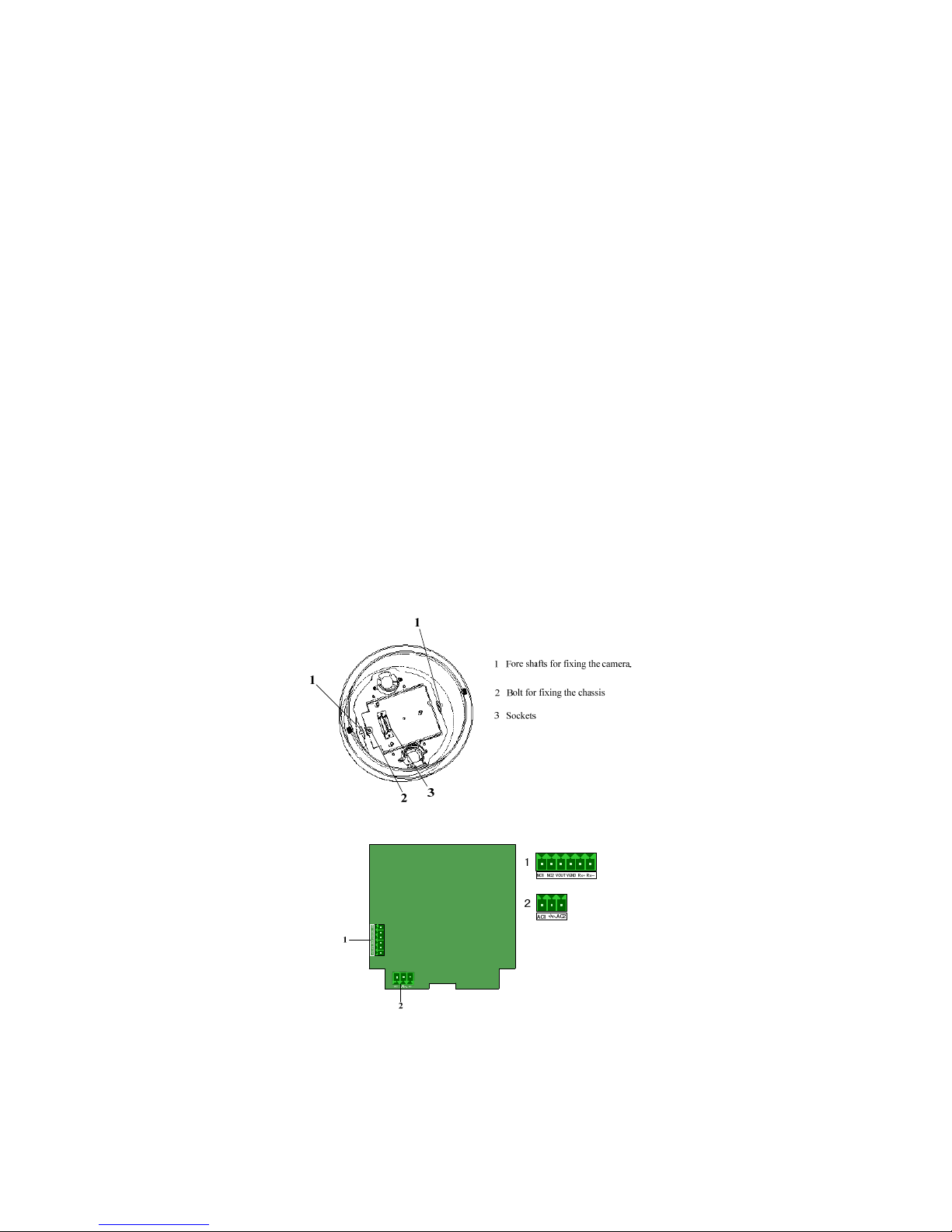
2. Open the transparent cover, remove the camera, uncover the sticking plaster that protects the camera, and
remove the pearl cotton. When remove the camera, pull the hook locks at the two sides of the camera with
two hands, and drag out the camera at the same time. Removing the camera expose the speed dome chassis,
shown in Figure 2.1(take analog speed dome as an example). Screw part 2 to loose bolt for fixing the
chassis. Open the chassis upwards and we can see the back of the chassis and the circuit board on it, shown
in figure 2.2. Part 1 are video output socket and RS-485 control wire socket, and part 2 is 24V AC power
input socket.
Figure 2.1 The Bottom of the Speed Dome
Figure 2.2 circuit board on the chassis
(Take analog speed dome as an example)
1: Video Output and RS-485 interfaces 2: 24V AC power supply interface
5

3. Set Speed Dome Address and Baud Rate. At the back of speed dome attached the dial-up switches
description, shown in figure 2.3. At the profile there are SW1 and SW2, shown in figure 2.4, used for
setting the address, baud rate, communication protocol. Please refer to section 2.4, “Switches Settings”, for
details.
Figure 2.3 Dial-up switches description
O
N
12345678 O
N
12345678
SW1 SW2
on on
Figure 2.4 Dial-up switches on the profile of the camera.
4. Install the dome cover. Open the joint interface on the cover, pull the wire twisted in the bracket into the
dome cover through the interface (Note: don’t plug in the supply power, or else wire whip may happen).
Rotate the cover onto the brackets, and lock the locking screw on the bracket, shown in figure 2.5. Fix the
cover, then install the sockets, fix the joint interface.
Note: When install a Speed dome outdoor, please wind the interface between the cover and bracket with
Teflon Tape to avoid water entering into the dome.
6

Figure 2.5 Install the cover
5. Install the camera. Install this unit by holding it with both hands, aim APRAGAZ sockets on the camera
(shown in figure 2.8) to the APRAGAZ sockets on the dome chassis (shown in figure 2.7). Plug the camera
into the cover with the guide arc along with the guide pillar on the chassis until you will hear a voice “ka”.
Figure 2-6 Installation of camera unit
Figure 2.7 APRAGAZ sockets and guide pillar on the chassis
7

Figure 2.8 APRAGAZ sockets and guide arc on the camera
6. Install the transparent cover. Please aim the two gaps on the flange of transparent cover (shown in figure 2.9)
at the hook lock on the cover (shown in figure 2.10). Finally, fasten the two fixing screws on the two sides.
Figure2.9 The transparent lower dome casing
Figure 2.10 Installation of lower dome casing
2.3 Initial setting
Address: 0
Baud rate: 2400
120Ωmatching resistance: OFF
8
Tabla de contenidos
Otros manuales de Cámara de seguridad de Jaycar Electronics


