Ixon IX2400 Manual de usuario

IXrouter3
Installation Manual
IX2400 - IXrouter3 Ethernet
IX2405 - IXrouter3 4G/LTE
IX2410 - IXrouter3 Wi-Fi
IX2415 - IXrouter3 4G/LTE & Wi-Fi
Version 5.1 January 2024

1. Contents
1. Contents................................................................................................................................1
2. Introduction...........................................................................................................................2
2.1. Help and support......................................................................................................................2
3. Safety instructions................................................................................................................ 3
3.1. Personnel.................................................................................................................................. 3
3.2. Device........................................................................................................................................3
3.3. Application................................................................................................................................3
3.4. Handling....................................................................................................................................3
4. Hardware features................................................................................................................. 4
4.1. Technical data.......................................................................................................................... 5
4.1.1. General specifications....................................................................................................5
4.1.2. Wi-Fi specifications........................................................................................................ 6
4.1.3. Cellular specifications.................................................................................................... 6
5. Mechanical installation..........................................................................................................6
5.1. Dimensions...............................................................................................................................7
5.2 Mounting and dismounting.......................................................................................................8
6. Electrical installation............................................................................................................. 9
6.1. Instructions for installation......................................................................................................9
6.2. Mains connection.....................................................................................................................9
6.3. Digital input...............................................................................................................................9
6.4. Antennas.................................................................................................................................10
6.5. Installation.............................................................................................................................. 10
7. SIM card..............................................................................................................................11
7.1. Installation.............................................................................................................................. 11
7.2. Removal.................................................................................................................................. 11
8. Commissioning................................................................................................................... 12
9. Local web interface............................................................................................................. 13
10. Reset to factory default..................................................................................................... 14
11. Connectivity requirements for local IT............................................................................... 15
11.1. Overview............................................................................................................................... 15
11.2. Servers and DNS requests...................................................................................................15
11.3. MAC or IP address filter.......................................................................................................15
12. Diagnostics and troubleshooting........................................................................................16
13. Compliance....................................................................................................................... 17
13.1. European Union....................................................................................................................17
13.2. UL.......................................................................................................................................... 17
13.3. FCC........................................................................................................................................17
13.4. IC........................................................................................................................................... 17
13.5. ANATEL.................................................................................................................................17
13.6. NBTC.....................................................................................................................................18
13.7. Carrier certifications............................................................................................................ 18
1

2. Introduction
This installation manual is for the IXrouter3 family of products.
Model
Description
Ethernet
4G/LTE
Wi-Fi
IX2400
IXrouter3 Ethernet
✔
IX2405
IXrouter3 4G/LTE
✔
✔
IX2410
IXrouter3 Wi-Fi
✔
✔
IX2415
IXrouter3 4G/LTE & Wi-Fi
✔
✔
✔
The IXrouter3 is delivered with the following accessories:
• USB flash drive for configuration
• Female 4-pin plug-in connector with screw connection
2.1. Help and support
For additional product support, installation tips and specifications go to
https://support.ixon.cloud.
For direct technical support and questions, get in touch with our
Technical Support team.
E-mail support@ixon.cloud
Phone +31 (0)85 744-1105
⚠Warning
Read this manual carefully before installing or operating the IXrouter3.
2

3. Safety instructions
Neglecting the essential safety precautions and safety guidelines outlined below could result in
significant harm to individuals and property!
It is crucial to adhere to all the safety instructions and information provided in the relevant
product documentation. Doing so is essential for ensuring safe and problem-free operation.
Please pay close attention to the specific safety instructions provided in the other sections of
this manual.
3.1. Personnel
Only qualified and skilled personnel are allowed to work with the IXrouter3 and they shall have
the following qualifications:
• They are familiar with the installation, mounting, commissioning, and operation of the
IXrouter3.
• They possess the appropriate qualifications for their tasks.
• They are familiar with all regulations for the prevention of accidents, directives, and laws
applicable at the location and are able to apply them.
3.2. Device
The hardware and software of the IXrouter3 must never be modified in a way that is not
described in the installation manual. If you carry out any modifications that are not permitted, all
your warranty claims will become null and void. This will result in exclusion of liability on the part
of IXON.
3.3. Application
The IXrouter3 is an electrical communication device. It is only suitable for installation in control
cabinets or other similar closed operating environments.
3.4. Handling
The IXrouter3 must be handled as follows:
• Connect or disconnect all pluggable terminals only when the IXrouter3 is powered off.
• Only remove the IXrouter3 from the installation when the IXrouter3 is powered off.
3

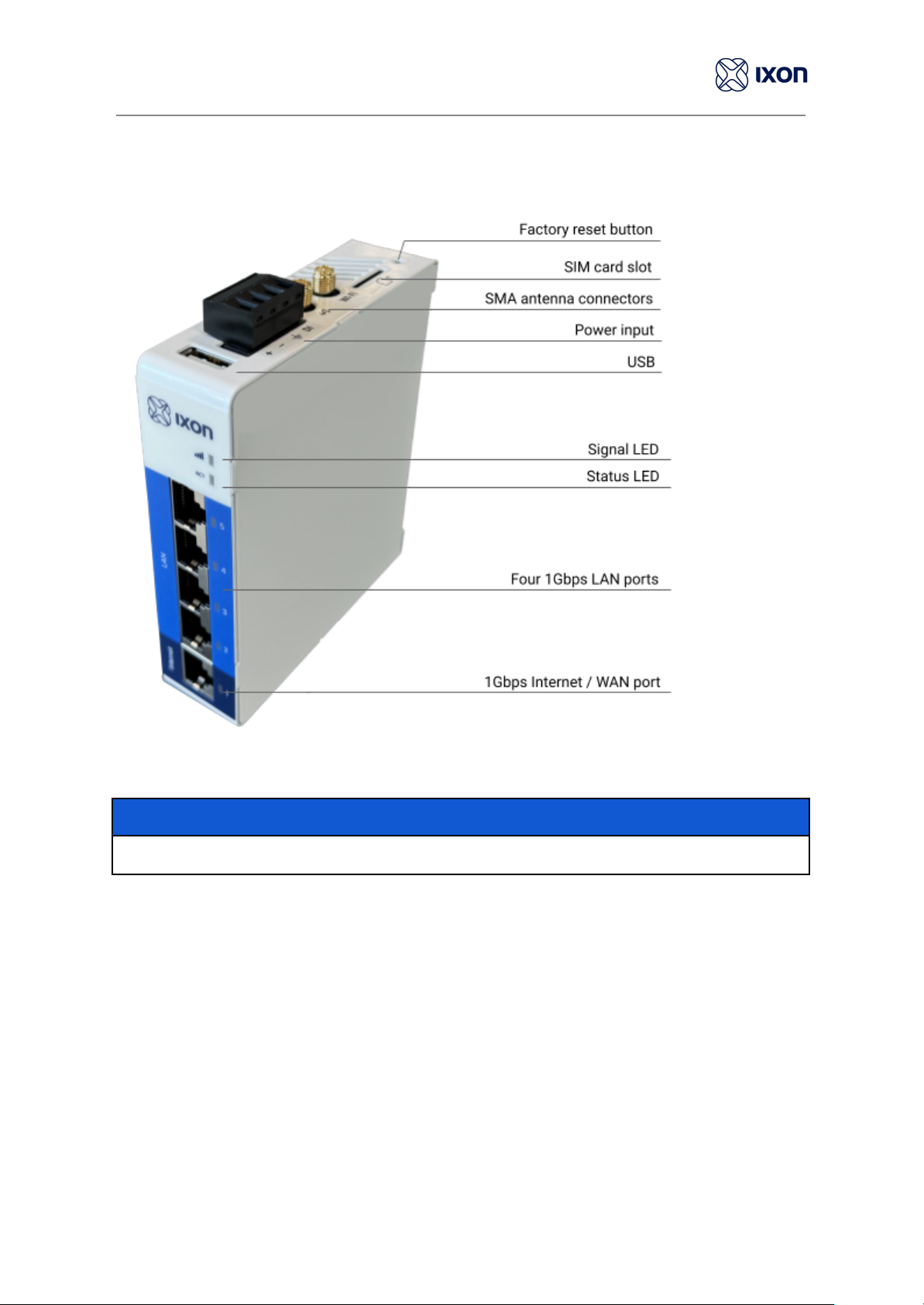
4. Hardware features
Notice
The availability of SMA antenna connectors and a SIM card slot are dependent on the model.
4

4.1. Technical data
4.1.1. General specifications
IX2400
IX2410
IX2405
IX2415
Power supply
12-24 VDC +/- 20% ES1, PS2
Rated current
2A
Rated power
2.5 W
5 W
5 W
5 W
Max. power
10 W
10 W
10 W
10 W
Operating temperature
-20℃to 55℃
Operating humidity
10 to 95% non-condensing
Operating altitude
Up to a maximum of2000m
Storage temperature
-20℃to 55℃
Storage humidity
10 to 95% non-condensing
Storage altitude
Up to a maximum of 3000m
Ethernet ports
4 LAN ports, 1 WAN port. (all 1 Gbps)
USB version
USB 2.0
Processor
MIPS 880 MHz
Digital Input
1
Mounting type
DIN rail
Size
95x116x28 mm (excl. DIN rail)
Weight
0.321 kg
0.324 kg
0.343 kg
0.344 kg
5

4.1.2. Wi-Fi specifications
IX2400
IX2410
IX2405
IX2415
Wi-Fi version
-
IEEE 802.11
version b/g/n
-
IEEE 802.11
version b/g/n
Wi-Fi modes
-
Station (Client)
Mode and
Access Point
-
Station (Client)
Mode and
Access Point
Frequency
-
2.4 GHz
-
2.4 GHz
Speed
-
72 Mbps
-
72 Mbps
Security protocol
-
WPA2-PSK
-
WPA2-PSK
Contains FCC ID
-
XPYLILYW1
-
XPYLILYW1
Contains IC ID
-
8595A-LILYW1
-
8595A-LILYW1
4.1.3. Cellular specifications
IX2400
IX2410
IX2405
IX2415
Frequency bands
-
-
LTE-FDD: B1, B2, B3, B4, B5, B7, B8, B12,
B13, B18, B19, B20, B25, B26, B28
LTE-TDD: B38, B39, B40, B41
WCDMA: B1, B2, B4, B5, B6, B8, B19
GSM/GPRS/EDGE: B2, B3, B5, B8
Data rates
-
-
LTE-FDD: Max. 150 Mbps (download) /
Max. 50 Mbps (upload)
LTE-TDD: Max. 130 Mbps (download) /
Max. 30 Mbps (upload)
DC-HSPA+: Max. 42 Mbps (download) /
Max. 5.76 Mbps (upload)
WCDMA: Max. 384 Kbps (download) /
Max. 384 Kbps (upload)
EDGE: Max. 296 Kbps (download) /
Max. 236.8 Kbps (upload)
GPRS: Max. 107 Kbps (download) /
Max. 85.6 Kbps (upload)
SIM card
-
-
Mini SIM (2FF)
Contains FCC ID
-
-
XMR201903EG25G
Contains IC ID
-
-
10224A-201903EG25G
6

5. Mechanical installation
5.1. Dimensions
The IXrouter3 is designed to be cooled using natural convection. For proper cooling, you must
provide a clearance of at least 25 mm above and below the device. Also, allow at least 25 mm of
depth between the front of the device and the inside of the control cabinet.
⚠Warning
The provided installation clearances represent the minimum dimensions required to guarantee
adequate air circulation for cooling purposes. However, these dimensions do not take into
account the bend radius of the connecting cables and screw-on antennas for devices equipped
with Wi-Fi and/or 4G capabilities.
7

5.2 Mounting and dismounting
The IXrouter3 is mounted on a standard DIN rail.
(1) Hang the device on the rail and (2) push the unit down until you feel a click. To remove the
unit, (A) pull/rotate the device up and (B) lift off the rail.
8

6. Electrical installation
6.1. Instructions for installation
Consider the following instructions for installation:
●When installing devices in a control cabinet, always separate devices that generate high
voltage and high electrical noise from low-voltage, logic-type devices such as the
IXrouter3.
●Avoid placing low-voltage signal wires and communications cables in the same tray with
AC power wiring and high-energy, rapidly-switched DC wiring.
●Always use an IEC/EN 62368 certified ES1, PS2 power supply for powering the
IXrouter3.The output voltage of the power supply must not exceed 29 VDC.
●Always use the included female 4-pin plug-in connector when wiring the IXrouter3.
●Always use twisted pair power cables with a maximum length of 3 m.
●Always use CAT5-S/FTP or higher type shielded cables to ensure a stable LAN
connection.
●Always use a shielded USB cable.
6.2. Mains connection
Mains connection
Wire size range
18 - 12 AWG
Stripping length
7 mm
Tightening torque
0.4 Nm
Max. cable length
3 m
Min. ground conductor
16 AWG
6.3. Digital input
Digital Input
Voltage range
0 - 29 VDC
Voltage range (OFF)
0 - 3 VDC
Voltage range (ON)
7 - 29 VDC
Current Voltage
2 - 5 mA
By default, the Digital Input is not configured and does not need to be wired. It provides a way to
locally control the IXrouter3's VPN connection (ON/OFF). The Digital Input can also be logged in
IXON Cloud or trigger an alarm in IXON Cloud. The wiring is depicted in the image above.
9
Otros manuales para IX2400
1
Este manual sirve para los siguientes modelos
3
Tabla de contenidos
Otros manuales de Enrutador de red de Ixon
Manuales populares de Enrutador de red de otras marcas

NETGEAR
NETGEAR FS526T - Switch Manual de usuario

Korenix
Korenix JetNet 5710G Series Manual de usuario

Automated Logic
Automated Logic ZN551 Manual del propietario

Cisco
Cisco ASR 1000 Series Manual del operador

EnGenius
EnGenius ESR-9710 Manual de usuario

Cisco
Cisco 805 Series Instrucciones de funcionamiento y seguridad