
IPitomy IP550 Manual de usuario

IPitomy Confidential i
IPitomy IP550
SIP IP Phone
User Guide

Table of Contents
IPitomy Confidential ii
Table of Contents
CHAPTER 1
INTRODUCTION............................................................................................................ 1
IP Phone Features ......................................................................................................................................... 1
Package Contents .......................................................................................................................................... 1
CHAPTER
INSTALLATION .............................................................................................................
Requirements.................................................................................................................................................
Procedure.......................................................................................................................................................
CHAPTER 3
OPERATION.................................................................................................................... 3
Phone Faceplate............................................................................................................................................. 3
Dialpad, Navigation, Soft, and Programmable Keys................................................................................ 3
0~9, *, #, A~Z, a~z
...........................................3
Navigation Keys
................................................3
Soft Keys
.............................................................3
Programmable Keys
........................................3
Function Keys...........................................................................................................................................
enu
.....................................................................4
Phonebook
..........................................................4
Transfer
...............................................................4
Service
.................................................................4
Hang Up
..............................................................4
To terminate an active session ......................................
Redial
...................................................................4
Conference
.........................................................4
Hold
......................................................................4
Vol Down
............................................................4
Vol Up
..................................................................4
Speaker/Headset
...............................................4
ute
......................................................................4
LED Indicators .........................................................................................................................................
WI/ALERT
......................................................4
Speaker/Headset
...............................................4
Hold
......................................................................4
ute
......................................................................4
L1~L4
...................................................................4
LCD Icons ................................................................................................................................................
No Serv
................................................................4
DND
.....................................................................4
FWD
.....................................................................4
3-person symbol
................................................5
ail symbol
........................................................5
Standby Mode................................................................................................................................................ 6
Making a Telephone Call.............................................................................................................................. 6
Dialing from the Call List............................................................................................................................. 6
Last Number Redialing............................................................................................................................. 6
Calling From Missed Call List ................................................................................................................. 7
Calling From Called List .......................................................................................................................... 7

Table of Contents
IPitomy Confidential iii
Answering a Call ........................................................................................................................................... 7
Muting a Call................................................................................................................................................. 8
Volume Adjustment ...................................................................................................................................... 8
Changing Ringer Volume ............................................................................................................................. 8
Transferring a Call ....................................................................................................................................... 8
Making the Second Call................................................................................................................................ 8
Switching Between Two Calls ................................................................................................................. 9
3-Way Conferencing ................................................................................................................................ 9
Using Speed Dial............................................................................................................................................ 9
Do Not Disturb............................................................................................................................................... 9
Using Headset ................................................................................................................................................ 9
Placing Calls Using Headset .................................................................................................................... 9
Switch Audio Between Headset and Speaker......................................................................................... 10
Terminating Calls Using Headset........................................................................................................... 10
Using Phone Book ....................................................................................................................................... 11
Create Contacts....................................................................................................................................... 11
Delete from List...................................................................................................................................... 11
Call from List ......................................................................................................................................... 11
CHAPTER 4
USING THE MENU....................................................................................................... 1
Accessing Menu Functions ......................................................................................................................... 1
Entering IP Address.................................................................................................................................... 1
Menu Tree.................................................................................................................................................... 13
CHAPTER 5
WEB SETUP................................................................................................................... 14
Overview ...................................................................................................................................................... 14
Configuration Program .............................................................................................................................. 14
Preparation ............................................................................................................................................. 1
Using Your Web Browser ...................................................................................................................... 1
Login ...................................................................................................................................................... 15
Network Screen ........................................................................................................................................... 16
Password Screen.......................................................................................................................................... 18
Status Screen ............................................................................................................................................... 19
Phone Lock Screen...................................................................................................................................... 0
Soft Keys Screens ........................................................................................................................................ 1
Programmable Keys Screen ....................................................................................................................... 3
Preferences Screen ...................................................................................................................................... 4
Reset Screen................................................................................................................................................. 6
Call Forward Screen................................................................................................................................... 7
System Configuration Backup Screen....................................................................................................... 8
Configuration Server Screen...................................................................................................................... 9
Firmware Upgrade Screen ......................................................................................................................... 30
Set Log Level Screen................................................................................................................................... 31
Event Logs Screen ....................................................................................................................................... 3
CHAPTER 6
SIP-RELATED SETTINGS .......................................................................................... 33
Global SIP Screen ....................................................................................................................................... 33
Line Screens................................................................................................................................................. 35
APPENDIX A
TROUBLESHOOTING ............................................................................................. 37
Overview ...................................................................................................................................................... 37
General Problems........................................................................................................................................ 37
APPENDIX B
SPECIFICATIONS .................................................................................................... 38
IP Phone ....................................................................................................................................................... 38
APPENDIX C
MMI SPECIFICATIONS ....................................................................................... 39
1. DISPLAY RULE............................................................................................................................................. 39
1.1 Idle Display ............................................................................................................................................ 39

Table of Contents
IPitomy Confidential iv
. BASIC CALL FEATURES ............................................................................................................................ 40
.1 Placing, Answering and Ending Calls ................................................................................................. 40
2.1.1 Placing Calls.................................................................................................................................. 0
Inter-Digit Timeout...............................................40
2.1.3 Incoming Call................................................................................................................................
2.1.3.1 Waiting Call ............................................................................................................................... 5
. Redial...................................................................................................................................................... 47
.3 Call Hold ................................................................................................................................................ 48
.4 Call Hold Retrieve................................................................................................................................. 49
.5 3-Way Conference................................................................................................................................. 50
.6 Call Transfer.......................................................................................................................................... 51
2.6.1 Attended Transfer.......................................................................................................................... 51
2.6.2 Blind Transfer................................................................................................................................ 52
.7 Call Mute ............................................................................................................................................... 54
.9 Volume Control ..................................................................................................................................... 55
.10 Voice Mail ............................................................................................................................................ 56
.11 Status Icon............................................................................................................................................ 57
.1 Line Status ........................................................................................................................................... 58
3. PROGRAMMING VIA PHONE UI ............................................................................................................. 60
3.1 Language................................................................................................................................................ 61
3. Time and Date ....................................................................................................................................... 6
3.2.1 Time Server ................................................................................................................................... 63
3.2.2 Time Format.................................................................................................................................. 63
3.2.6 Time Zone ..................................................................................................................................... 65
3.3 Tones ...................................................................................................................................................... 66
3.3.1 Set Ring Tone................................................................................................................................ 66
3.3.2 Tone Set......................................................................................................................................... 66
3.4 Display.................................................................................................................................................... 68
3. .1 Contrast Level ............................................................................................................................... 68
3. .2 Backlight ....................................................................................................................................... 68
3.5 Call Forward.......................................................................................................................................... 70
3.6 Network.................................................................................................................................................. 74
3.6.1 DHCP ............................................................................................................................................ 7
3.6.2 IP Address ..................................................................................................................................... 76
3.6.3 Subnet Mask.................................................................................................................................. 77
3.6. Gateway......................................................................................................................................... 78
3.6.5 DNS............................................................................................................................................... 79
3.6.6 VLAN............................................................................................................................................ 80
3.6.7 Type of Service / DiffServ............................................................................................................. 82
3.7 SIP Settings............................................................................................................................................ 83
3.7.1 Proxy IP......................................................................................................................................... 85
3.7.2 Proxy Port...................................................................................................................................... 86
3.7.3 Phone Number............................................................................................................................... 87
3.7. Screen Name.................................................................................................................................. 88
3.7.5 Authentication Name..................................................................................................................... 89
3.7.6 Authentication Password ............................................................................................................... 90
3.7.7 RTP Port Base ............................................................................................................................... 91
3.7.8 Auto Prov. ..................................................................................................................................... 92
3.8 Phone Status .......................................................................................................................................... 93
3.8.1 Network Status .............................................................................................................................. 93
3.8.2 Firmware Version.......................................................................................................................... 9
3.8.3 Restart Phone................................................................................................................................. 9
3.8. Factory Default.............................................................................................................................. 9
3.9 Password ................................................................................................................................................ 98
3.10 Phone Lock ........................................................................................................................................ 100
3.11 PHONE BOOK.................................................................................................................................. 100
3.1 Service ................................................................................................................................................ 103
3.12.1 Dialed Call list........................................................................................................................... 10
3.12.2 Missed Call list.......................................................................................................................... 10
4.SOFT KEY ..................................................................................................................................................... 106
4.1 Programmable functions .................................................................................................................... 106

Table of Contents
IPitomy Confidential v
.1.1 DND ............................................................................................................................................ 106
.1.2 Busy Lamp Field ......................................................................................................................... 107
4. State-Based Soft Keys ......................................................................................................................... 108
.2.1 Idle state ...................................................................................................................................... 109
.2.2 Connected state............................................................................................................................ 110
.2.3 Incoming state ............................................................................................................................. 111
.2. Outgoing state.............................................................................................................................. 112

IPitomy Confidential 1
Chapter 1
Chapter 1Chapter 1
Chapter 1
Introduction
IntroductionIntroduction
Introduction
This Chapter provides an overview of the IP Phone features and capabilities.
The IP Phone is a device that provides voice communication over IP network.
IP Phone Features
The IP Phone incorporates many advanced features, designed to offer sophisticated functions
together with easy operation. Key features of the IP phone include:
128 x 6 pixel based LCD with backlight
5 status icons indicating No-Service, DND, Call Forward, Conference, and Voice Mail
Manage four lines supporting four registrations and up to four simultaneous calls
Automatic provisioning via TFTP
Secondary SIP servers support
Dynamic IP address via DHCP client or statically configured
NAT traversal support (UPnP)
DTMF relay through RFC2833 or SIP INFO method
Multi-country call-progress tone sets provided
Full-duplex hands-free operation
Configuration through keypad or integrated web interface
Asterisk PBX features support
Maintaining call records for 10 dialed calls, and 10 missed calls
Up to 200 records of personal phone book
Dialing from call records
Six ring tones supported
Adjustable voice volume
Message waiting indicator
Two 10/100Base-T Ethernet switch interfaces connect to LAN and a PC
Package Contents
The following items should be included:
• The IP Phone
• Stand
• Handset
• Spiral handset connecting cable
• Power Adapter
• One Ethernet UTP cable
If any of the above items are damaged or missing, please contact your dealer immediately.
1
11
1

IPitomy Confidential 2
Chapter
Chapter Chapter
Chapter 2
22
2
Installation
InstallationInstallation
Installation
This Chapter covers the physical installation of the IP Phone.
Requirements
• Network cables. Use standard 10/100BaseT network (UTP) cables with RJ 5 connectors.
• For Internet Access, an Internet Access account from ISPs, and either a DSL or Cable
modem is required.
Procedure
1. Connect the Handset
Connect the handset to the jack on the left-hand side of the IP phone.
. Connect to the Network
Use standard Ethernet cable to connect the network to the "LAN" port on the IP Phone.
Connect your PC to the "PC" port on the back of the IP Phone, as shown in the diagram
below.
3. Power Up
Connect the supplied power adapter to the IP Phone and power up.
Use only the power adapter provided. Using a different one may cause hardware damage.
Figure 1: Connecting IP Phone and Your PC
2
22
2
Operation
IPitomy Confidential 3
Chapter
Chapter Chapter
Chapter 3
33
3
Op
OpOp
Operation
erationeration
eration
This Chapter details the operation of the IP Phone.
Key sequences of activating call features described in
this Chapter is based on factory default settings.
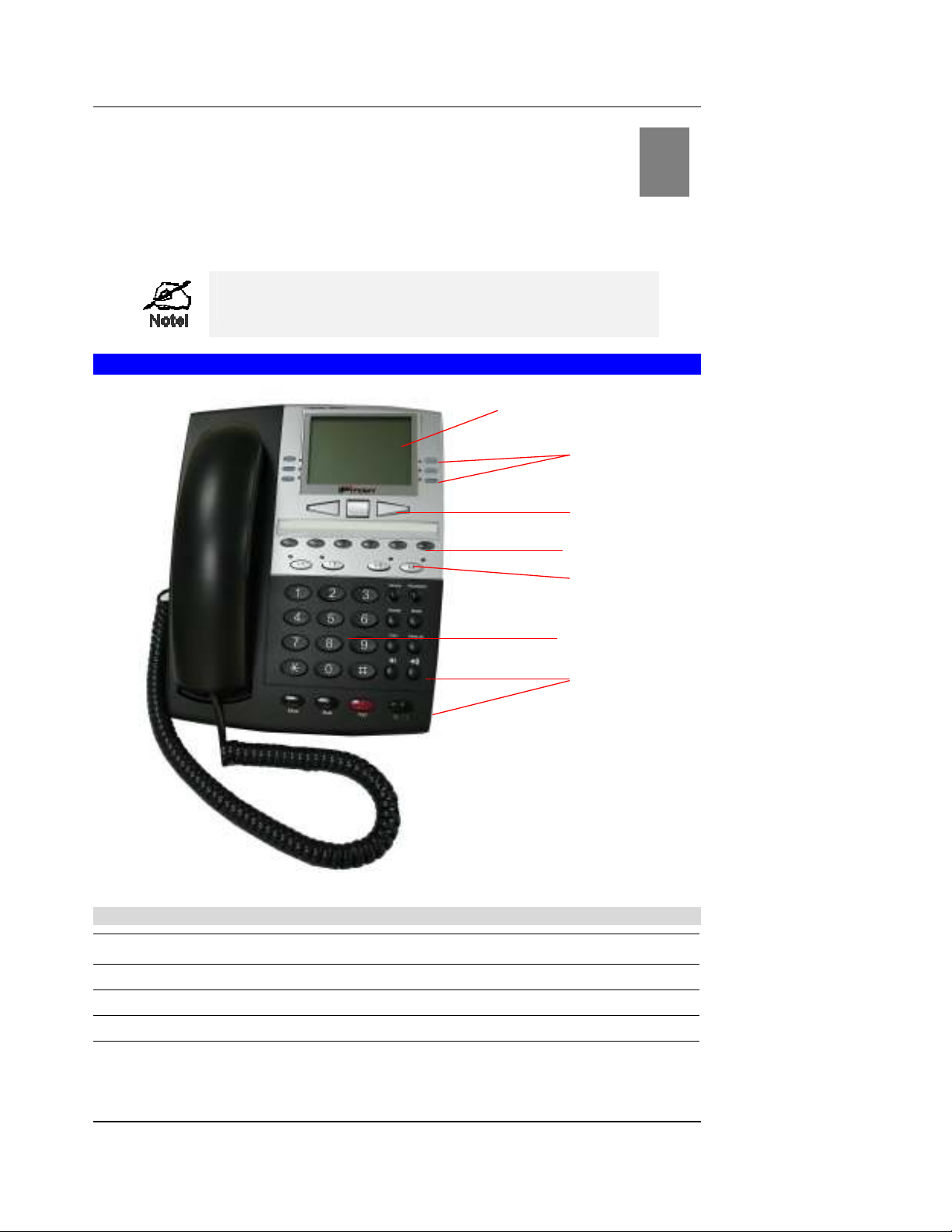
Phone Faceplate
Figure : IP Phone Faceplate
Dialpad, Navigation, Soft, and Programmable Keys
1 0~9, *, #, A~Z, a~z
Normal digits.
Navigation Keys
Navigation buttons: Up, Down, Left, and Right.
4 Soft Keys
Customer-definable keys with text display and LED
5 Programmable Keys
Customer-definable keys with LED
3
33
3
Soft Keys
Navigation Keys
LCD
Programmable Keys
Line Keys
Function Keys
Dialpad

Operation
IPitomy Confidential
Function Keys
1 Menu
Provide access to the main menu in idle mode.
Phonebook
Provide access to phone book menu.
3 Transfer
Initiate call transfer.
4 Service
Access to Dialed and Missed call list
5 Hang Up
Terminate an active session
6 Redial
Browse recently 10 outgoing call numbers.
7 Conference
Enable 3-way conference call.
8 Hold
Hold the current call for initiating second call or switch be-
tween calls.
9 Vol Down
Decrease the volume of speaker, handset and ringer.
10 Vol Up
Increase the volume of speaker, handset and ringer.
11 Speaker/Headset
Toggle between handsfree and headset modes.
1 Mute
Disable and re-enable the microphone.
LED Indicators
17 MWI/ALERT
Fast Flashing – An incoming call is ringing to the phone.
Slow Flashing – Voice messages left in voice mail server.
18 Speaker/Headset
On – in handsfree mode.
Slow Flashing – in headset mode.
19 Hold
On – A call is on hold.
Off – No call is on hold..
0 Mute
On – Mute is enabled.
Off – Mute is not enabled.
1 L1~L4
On – Line is active
Slow Flashing – Line in on hold
Off – Line is available
LCD Icons
No Serv
When lit, indicating the current Line is not registered, “No
Service”
3 DND
When lit, indicating the phone rejects any incoming call.
4 FWD
When lit, Call forward feature is enabled for the current
Line.

Operation
IPitomy Confidential 5
5 3-person symbol
When lit, indicating the phone is under 3-way conference.
6 Mail symbol
When lit, indicating the Line has voicemail(s).
Otros manuales para IP550
1
Tabla de contenidos
Otros manuales de Teléfono IP de IPitomy

IPitomy
IPitomy IP410 Manual de usuario

IPitomy
IPitomy IP120 Manual de usuario

IPitomy
IPitomy IP290 Manual de usuario

IPitomy
IPitomy T54W Manual de usuario

IPitomy
IPitomy IP290 Manual de usuario

IPitomy
IPitomy IP550 Manual de usuario

IPitomy
IPitomy IP330 Manual de usuario

IPitomy
IPitomy IP620 Manual de usuario

IPitomy
IPitomy IP410 Manual de usuario


