Inter-m IPA-100 Manual de usuario

Operation Manual
Main Controller
IPA-100

MAIN CONTROLLER
Welcome
Welcome
A personal welcome to you from the management and employees of Inter-M
All of the co-workers here at Inter-M are dedicated to providing excellent products with inherently good
value, and we are delighted you have purchased one of our products.
We sincerely trust this product will provide years of satisfactory service, but if anything is not to your
complete satisfaction, we will endeavor to make things right.
Welcome to Inter-M, and thank you for becoming part of our worldwide extended family!
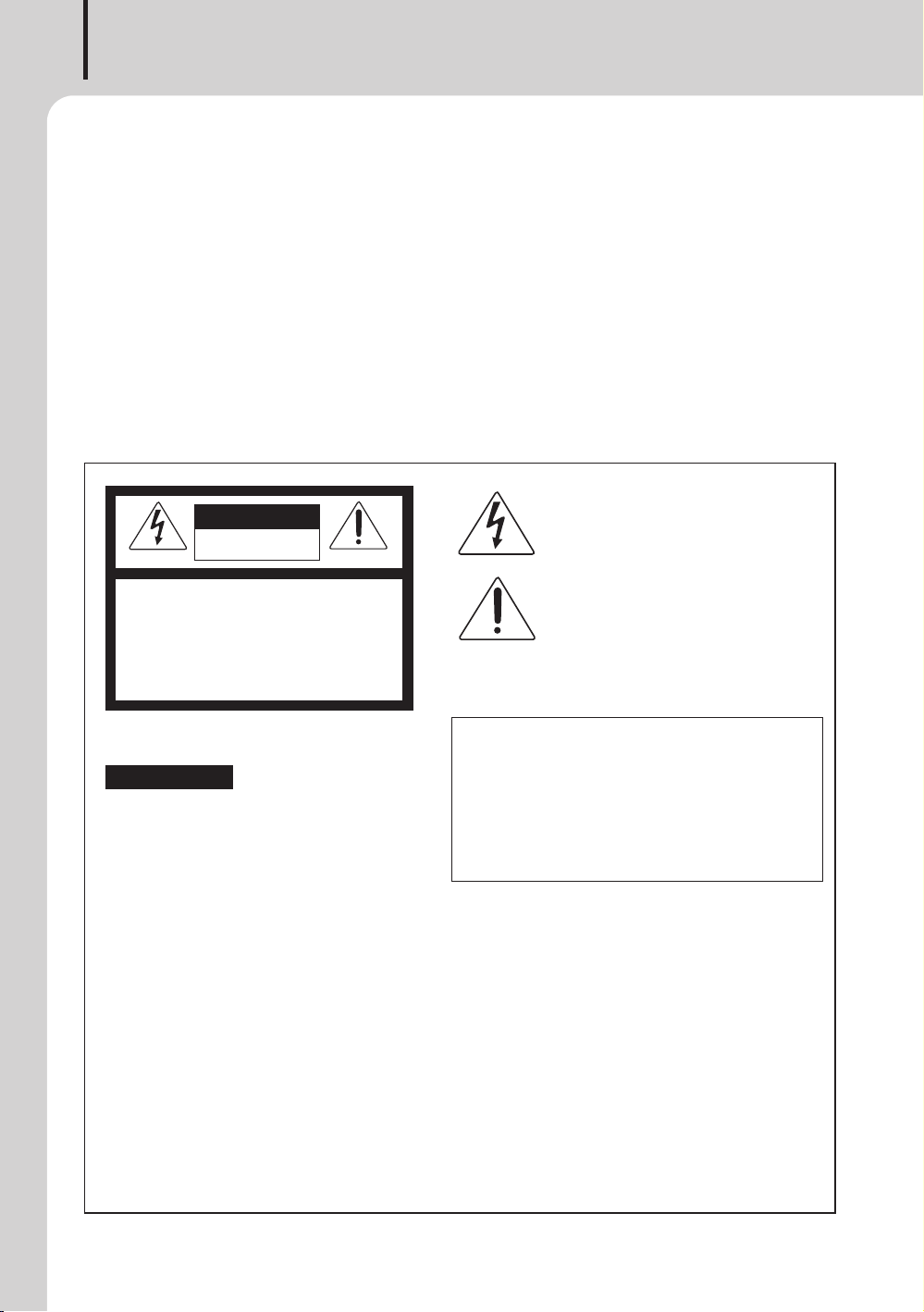
RISK OF ELECTRIC SHOCK
DO NOT OPEN
CAUTION
CAUTION: TO REDUCE THE RISK OF ELECTRIC SHOCK.
DO NOT REMOVE COVER (OR BACK).
NO USER-SERVICEABLE PARTS INSIDE.
REFER SERVICING TO QUALIFIED SERVICE PERSON-
NEL.
ATTENTION : RISQUE DE CHOC ELECTRIQUE
NE PAS QUVRIR
WARNING
To prevent fire or shock hazard, do not
expose the unit to rain or moisture.
*WARNING FOR YOUR PROTECTION PLEASE READ THE FOLLOWING-WATER AND MOISTURE: Unit should not be used near
water(e.g. near a bathtub, washbowl, kitchen sink, laundry tub, in a wet basement, or near a swimming pool, etc). Care should be
taken so than objects do not fall and liquids are not spilled into the enclosure through openings.
*Do not install this equipment in a confined space such as a book case or similar unit.
*Warning : To reduce the risk of fire or electric shock, do not expose this apparatus to rain or moisture and objects filled with liquids,
such as vases,
should not be placed on this apparatus.
*This apparatus shall be connected to a mains socket outlet with a protective earthing connection.
*
To completely disconnect this apparatus from the AC mains, disconnect the power supply cord plug from the AC receptacle.
*
The mains plug of the power supply cord shall remain readily accessible.
CAUTION
*These servicing instructions are for use by qualified service personnel only. To reduce the risk of electric shock, do not perform any
servicing other than that contained in the operating instructions unless you are qualified to do so.
NOTE
*This equipment has been tested and found to comply with the limits for a Class A digital device, pursuant to Part 15 of the FCC Rules.
These limits are designed to provide reasonable protection against harmful interference when the equipment is operated in a commercial
environment. This equipment generates, uses, and can radiate radio frequency energy and, if not installed and used in accordance with the
instruction manual, may cause harmful interference to radio communications. Operation of this equipment in a residential area is likely to
cause harmful interference in which case the user will be required to correct the interference at his own expense.
This symbol is intended to alert the user to the
presence of uninsulated “dangerous voltage”
within the product’s enclosure that may be of suf-
ficient magnitude to constitute a risk of electric
shock to persons.
This symbol is intended to alert the user to the
presence of important operation and maintenance
(servicing) instructions in the literature accompa-
nying the appliance.
Caution: To prevent electric shock do not use this (polarized) plug
with an extension cord, receptacle or other outlet unless
the blades can be fully inserted to prevent blade exposure.
Attentions: Pour prévenir les chocs électriques ne pas utiliser cette
fiche polarisée avec un prolongateur, une prise de cou-
rant on une autre sortie de courant, sauf si les lames
peuvent étre insérées à fond sans en laisser aucune
partie à découvert.
Pour deconnecter completement l’appareil du reseau
d’alimentation. deconnecter le cordon d’alimentation de
la prise murale.
La prise du reseau d’alimentation doit demeurer aise-
ment accessible.

MAIN CONTROLLER
1
IPA-100
Contents
Contents
Unpacking........................................................................................................................2
Installation
Environment .....................................................................................................................2
Important Safety Instructions ..............................................................................................2
Overview..........................................................................................................................3
Features ............................................................................................................................3
Contents and Accessories..............................................................................................3
Front Panel .......................................................................................................................4
Rear Panel........................................................................................................................5
Operation.........................................................................................................................7
Applications .....................................................................................................................8
Block Diagram.................................................................................................................9
Specifications.................................................................................................................10
Service
Procedures .....................................................................................................................12
Schematic.......................................................................................................................12
Parts List.........................................................................................................................12
Variations and Options................................................................................................12
Warranty ........................................................................................................................12

MAIN CONTROLLER
2IPA-100
Installation
Unpacking
Unpacking
Although your IPA-100 is neither complicated nor difficult to operate, we recommend you take a few
minutes to read this brief manual and familiarize yourself with the important information regarding
product features, setup and operation.
As with most electronic devices, we strongly recommend you retain the original packaging. In the un-
likely event the product must be returned for servicing, the original packaging (or reasonable equivalent)
is required.
Installation
Environment
Never place this product in an environment which could alter its performance or reduce its service life.
Such environments usually include high levels of heat, dust, moisture, and vibration.
IMPORTANT SAFETY INSTRUCTIONS
1. Read these instructions.
2. Keep these instructions.
3. Heed all warnings.
4. Follow all instructions.
5. Do not use this apparatus near water.
6. Clean only with dry cloth.
7. Do not block any ventilation openings. Install in accordance with the manufacturer’s instructions.
8. Do not install near any heat sources such as radiators, heat registers, stoves, or other apparatus (in-
cluding amplifiers) that produce heat.
9. Do not defeat the safety purpose of the polarized or grounding-type plug. A polarized plug has two
blades with one wider than the other. A grounding type plug has two blades and a third grounding
prong. The wide blade or the third prong are provided for your safety. If the provided plug does not
fit into your outlet, consult an electrician for replacement of the obsolete outlet.
10. Protect the power cord from being walked on or pinched particularly at plugs, convenience recep-
tacles, and the point where they exit from the apparatus.
11. Only use attachments/accessories specified by the manufacturer.
12. Use only with the cart, stand, tripod, bracket, or table specified by the manufacturer, or sold with the
apparatus. When a cart is used, use caution when moving the cart/apparatus combination to avoid in-
jury from tip-over.
13. Unplug this apparatus during lightning storms or when unused for long periods of
time.
14. Refer all servicing to qualified service personnel. Servicing is required when
the apparatus has been damaged in any way, such as power-supply cord or
plug is damaged, liquid has been spilled or objects have fallen into the appa-
ratus, the apparatus has been exposed to rain or moisture, does not operate
normally, or has been dropped.
S3125A

MAIN CONTROLLER
3
IPA-100
Features
Contents and Accessories
1. AC power cord x 1EA
2. 4P terminal block x 1EA
3. Screws for rack mounting x 4EA
4. User Manual x 1EA
Features
- Integrated control of all sound and video equipment connected to the network
- Device DB management connected to the network
- Apply standard network protocol
- Supports 100/1000Mbps
- DHCP, STATIC IP support
- Support network daisy chain method
- Web-based integrated control software
- Convenient broadcasting area setting
- System monitoring using web
- Support web user security function
- Log file saving function
- Up to 24 source devices (CDP, TUNER, RM, etc.) can be selected
- Up to 512 zones can be selected
- Up to 12 groups can be designated
Overview
Overview
IPA-100 is a model that acts as a server in a network system that provides an integrated transmission
solution through network infrastructure. It provides integrated control software for voice playback and
BGM control by interworking between complex and extensive systems (PA, SR, AV) and provides an
ideal solution for various spaces such as large-scale industrial complexes, hospitals, restaurants, and
schools.

MAIN CONTROLLER
4IPA-100
Front Panel
Front Panel
1. NETWORK STATUS LED
This LED indicates the operation status of network 1, 2, 3, 4.
2. OLED DISPLAY
Network status information is displayed through the OLED Display.
- IP Address, Subnet mask, DNS Server, Mac Address
3. DISPLAY PANEL CONTROLLING SWITCH
By turning the display control switch, the user can check the desired information.
4. POWER LED
The green LED lights up when the instrument is powered on.
192.168.1.99
1 2
43
34

MAIN CONTROLLER
5
IPA-100
Rear Panel
Rear Panel
1. AC POWER INPUT TERMINAL
This terminal supplies power to this instrument. The power used is AC 120-240V, 50/60Hz. Do not
excessively bend, pull, twist, heat, or cut the power cord. Doing so may damage the cord and cause
fire or electric shock.
2. AC POWER SWITCH
This switch turns the AC power of the equipment on and off.
3. DC 24V POWER INPUT TERMINAL
This is an emergency spare battery (DC 24V) connection terminal. If an AC power failure occurs, the
equipment operates with the connected spare battery. When DC 24V power is applied to the equip-
ment, the equipment always operates regardless of the power switch.
4. NETWORK (1, 2, 3, 4) CONNECTION TERMINALS
This terminal is used to connect equipment to the network. Broadcasting can be controlled through
integrated software.
※For the setting method, refer to the integrated software manual. Please download the manual from
the website (www.inter-m.net).
1 3
54
2
ACT
LINK
<100 Base-T> <1G Base-T>
PIN NO Function PIN NO Function
1 TXP 1 MX(0)+
2 TXN 2 MX(0)-
3 RXP 3 MX(1)+
4 NA 4 MX(2)+
5 NA 5 MX(2)-
6 RXN 6 MX(1)-
7 NA 7 MX(3)+
8 NA 8 MX(3)-

MAIN CONTROLLER
6IPA-100
※It is recommended to use the STP cable for the network cable of this product.
5. RESET SWITCH
If you press the switch for more than 10 seconds, the settings of the equipment will be reset to factory
defaults.
STP
18
18
18 8
[ TOP VIEW ]
DIRECT
[ CABLE COLOR ORDER ]
CROSS
[ CABLE CROSS ORDER ]
[ FRONT VIEW ]
8.Brown
7.W/Brown
6.Green
5.W/Blue
4.Blue
3.W
/
Gree
n
3.W/Green
2.Orange
1.W/Orange
3

MAIN CONTROLLER
7
IPA-100
Operation
Operation
①This is the standby screen of the device. The model name (IPA-100), software version, and network
IP are displayed.
②If you turn the control switch on the front panel to the right on the standby screen, network-related
details (IP Address, Subnet mask, DNS Server, Mac Address) are displayed. If you turn the front
display control switch to the left on the network-related detailed information screen, the standby
screen (model name (IPA-100), software version, network IP) is displayed.
③If you turn the display window control switch to the right on the network-related detailed information
screen, the network status (RX/tX data rate) is displayed. If you turn the display control switch to
the left on the network status display screen, network-related details (IP Address, Subnet mask, DNS
Server, Mac Address) are displayed.
④If you turn the display control switch to the right on the network status display screen, the standby
screen (model name (IPA-100), software version, network IP) is displayed.
IPA-100 2.2.1.8
IP. 192.168.1.99
DNS 8. 8. 8. 8
00:1d:1d:00:00:00
Mask 255.255.255.0
IP 192.168.1.99
Network Info.
①
②
TX KB/s
0.00
0.00
RX KB/s
Network Usage.
③

MAIN CONTROLLER
8IPA-100
AUDIO(MIC/LINE)
AUDIO(LOW/HIGH-Z)
CONTACT
SERIAL DATA
NETWORK(UTP)
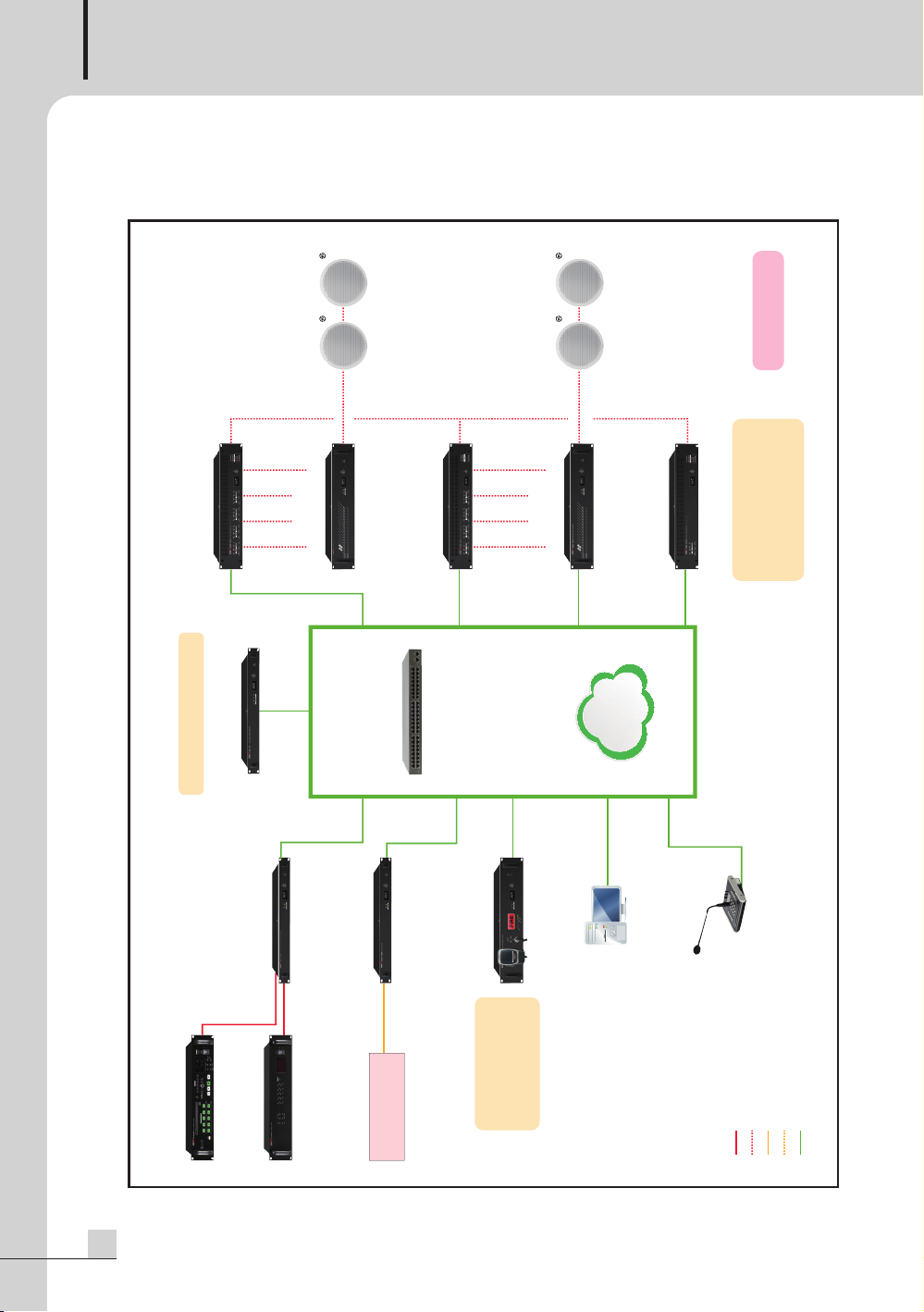
NPA NETWORK AMPLIFIER
Receiving AOE AUDIO
Built-in amp transfer function
Short circuit,
disconnection detection function
Control up to 512 zones
High quality emergency
broadcasting SPEAKER
High quality emergency
broadcasting SPEAKER
n F
1 F
NETWORK GPIO(NCIO-1000)
AUDIO
MULTI SOURCE PLAYER
(CD-6208)
NETWORK POWER
AMPLIFIER(NPA-240S)
LAN
LAN
LAN
LAN
LAN
LAN
LAN
16 Circuit
16 Circuit
LAN
LAN
SPEAKER LINE
CHECKER(NSC-1216)
SPEAKER LINE
CHECKER(NSC-1216)
Emergency sound source,
audio I/O
schedule broadcast
TTS broadcast
NETWORK EMERGENCY
PANEL(NEP-1200)
CONTROL PC
NETWORK AUDIO
INPUT CONVERTER(NAI-1104)
DIGITAL TUNER(TU-6200)
L2 SWITCHING HUB
LAN
Fire receiver
(P type/R type re signal)
REMOTE MIC
(RM-N1000)
SPARE AMPLIFIER
Built-in operating software NETWORK POWER
AMPLIFIER(NPA-240Q)
NETWORK POWER
AMPLIFIER(NPA-240Q)
NETWORK CONTROL SERVER
(IPA-100)
Applications
Applications
Este manual sirve para los siguientes modelos
1
Tabla de contenidos
Otros manuales de Controladores de Inter-m

Inter-m
Inter-m ECS-6216P Manual de usuario

Inter-m
Inter-m IMS-9000 Manual de usuario

Inter-m
Inter-m VCA-100 Manual de usuario

Inter-m
Inter-m VPC-1108 Manual de usuario

Inter-m
Inter-m VRC-1104T Manual de usuario

Inter-m
Inter-m NLM-8000C Manual de usuario

Inter-m
Inter-m ECS-6216MS Guía de instalación

Inter-m
Inter-m DLM-1108 Manual de usuario

Inter-m
Inter-m SC-6224 Manual de usuario

Inter-m
Inter-m PMC-6208 Manual de usuario