
Intellisystem IT-VCHD710-UDI Manual de usuario

IT-VCHD710-UDI
USB3.0 HD Video Conferencing Camera
User Manual
V1.3
(English)

1
Preface
Thanks for using thisUSB3.0 HD Video Conferencing Camera.
This manual introduces the function, installation and operation of the HD camera. Prior to installation
and usage, please read the manual thoroughly.
Precautions
This product can only be used in the specified conditions in order to avoid any damage to the camera:
Don’t subject the camera to rain or moisture.
Don’t remove the cover. Otherwise, you may get an electric shock. In case of abnormal
operation, contact the authorized engineer.
Never operating under unspecified temperature, humidity and power supply.
Please use the soft dry cloth to clean the camera. If the camera is very dirty, clean it with
diluted neuter detergent; do not use any type of solvents, which may damages the surface.
Note
This is class A production. Electromagnetic radiation at the specific frequency may affect the image
quality of TV in home environment
Copyright Notice
All contents of this manual cannot be cloned, copied or translated without the permission of our
company. Product specifications and information which were referred to in this document are for
reference only, and the content will be updated at any time without prior notice

2
Contents
Note.................................................................................................................... 3
Supplied Accessories ......................................................................................... 4
Quick Start ......................................................................................................... 4
Features.............................................................................................................. 5
Product Specification ......................................................................................... 6
Main Unit........................................................................................................... 7
Size..................................................................................................................... 8
IR Remote Controller Explanation .................................................................... 9
RS-232 Interface .............................................................................................. 12
VISCA Network Configuration ....................................................................... 13
Serial Communication Control ........................................................................ 14
Command List.................................................................................................. 14
Menu Setting.................................................................................................... 15
USB3.0............................................................................................................. 20
Maintenance and Troubleshooting ................................................................... 21

3
Note
Electric Safety
Installation and operation must accord with electric safety standard.
Caution to transport
Avoid stress, vibration and soakage in transport, storage and installation.
Polarity of power supply
The power supply of the product is +12V, the max electrical current is 2A .Polarity of the power supply
plug drawing as follows.
Careful of installation
Do not grasp the camera head when carrying the camera. Don’t turn camera head by hand. Doing so
may result in mechanical damage.
Don’t apply in corrosive liquid, gas or solid environment to avoid damaging the cover which is made up
of plastic material.
To make sure no obstacle in rotation range.
Never power on before installation is not completed.
Don’t dismantle the camera
We are not responsible for any unauthorized modification or dismantling.
CAUTION!
The specific frequency of electromagnetic field may affect the image of the camera!

4
Supplied Accessories
When you unpack, check that all the supplied accessories are included:
Camera ................................................................ 1PCS
AC power adaptor.................................................. 1PCS
Power cord............................................................. 1PCS
RS232 cable............................................................ 1PCS
Remote controller.................................................. 1PCS
User manual ......................................................... 1PCS
USB3.0 ................................................................... 1PCS
Quick Start
Step1. Please check connections are correct before starting
Step2. Power connected to the Camera, the front panel power lamp light.
Step3. Pan-Tilt will rotate to the maximum position of top right after the camera started, then it return
to the center, the process of initialization is finished. (Note: If the position preset 0 has been stored, the
position preset 0 will be called up after initialization)

5
Features
Completely New Look
Designed with worm gear drive, completely new look, mini size, two colors for choosing from.
Full Function USB Interface
Full function USB interface, compatibility USB3.0 and USB2.0, support audio, support compressed
video output, support UVC, UAC protocol.
Built-in Micphone (Optional)
Built-in micphone for optional, pickup distance up to 5 meters, high sensitivity and low base noise.
1080P Full HD
Apply Panasonic's 1/2.7 inch, 2.07 million effective pixels high quality HD CMOS sensor, can reach
maximum 1920 x 1080 high resolution and achieve quality image.
Ultra-high Frame Rate
The output frame rate up to 60fps in 1080P.
72.5° Wide-angle Lens + 32x Digital Zoom
Use 72.5° wide-angle high quality lens, support 12x optical zoom, and 32x digital zoom (optional).
Low-light
High SNR of CMOS sensor combined with 2D and 3D noise reduction algorithm, effectively reduce
the noise, even under low illumination conditions, picture can still keep clean and clear.
Remote Control
Using RS232/RS485and USB interface, all the parameters of the camera can be remote controlled.

6
Product Specification
Model
IT-VCHD710-UDI
Name
USB3.0 HD Video Conference Camera
Camera
Video System
1080p/60, 1080p/50, 1080p/30, 1080p/25, 720p/60,720p/50,720p/30,720/20
Sensor
1/2.7'', CMOS, Effective Pixel: 2.07M
Scanning Mode
Progressive
Lens
12x, f3.5mm ~ 42.3mm, F1.8 ~ F2.8
Digital Zoom
32x (optional)
Minimal Illumination
0.5 Lux @ (F1.8, AGC ON)
Shutter
1/30s ~ 1/10000s
White Balance
Auto, Indoor, Outdoor, One Push, Manual
Backlight Compensation
Support
Digital Noise Reduction
2D&3D Digital Noise Reduction
Video S/N
≥55dB
Horizontal Angle of View
72.5° ~ 6.9°
Vertical Angle of View
44.8° ~ 3.9°
Horizontal Rotation Range
±170°
Vertical Rotation Range
-30° ~ +30°
Pan Speed Range
1.7° ~ 100°/s
Tilt Speed Range
1.7° ~ 69.9°/s
H & V Flip
Support
Image Freeze
Support
Number of Preset
255
Preset Accuracy
0.1°
USB Featured
Operate System
Windows XP, Windows Vista, Windows 7, Windows 8, Mac OS X, Linux
Color System/Compression
YUV 4:2:2 / H.264 / MJPEG
Video Format
USB3.0: 1080p/60, 1080p/50, 1080p/30, 1080p/25, 720p/60, 720p/50,
720p/30, 720p/25USB2.0: 1080p/30, 1080p/25, 1080p/15, 1080p/10,
720p/30, 720p/25, 960x540p/30, 960x540p/25, 640x360p/60, 640x360p/50
Audio on USB
Support
USB Video Communication
Protocol
UVC 1.0 ~ UVC 1.5
UVC PTZ
Support
Input/Output Interface
USB Interface
1xUSB3.0: Type B female jack
Audio Interface
1-ch: 3.5mm Audio Interface, Line In
Communication Interface
1xRS232 In: 8pin Min DIN, Max Distance: 30m, Protocol: VISCA/Pelco-D/Pelco-P
1xRS232 Out: 8pin Min DIN, Max Distance: 30m, Protocol: VISCA network use only
1xRS485: Share with RS232 Out, Max Distance: 1200m, Protocol: VISCA/Pelco-D/Pelco-P

7
Generic Specification
Input Voltage
DC 12V
Current Consumption
1.0A (Max)
Operating Temperature
-10°C ~ 40°C (14°F ~ 104°F)
Storage Temperature
-40°C ~ 60°C (-40°F ~ 140°F)
Power Consumption
12W (Max)
MTBF
>30000h
Size
128x118x158mm
Net Weight
0.91K g
Main Unit
1. USB3.0 4. RS232 out Interface
2. Line in Interface 5.DC IN 12V jack
3. RS232 IN Interface

8
Size
9
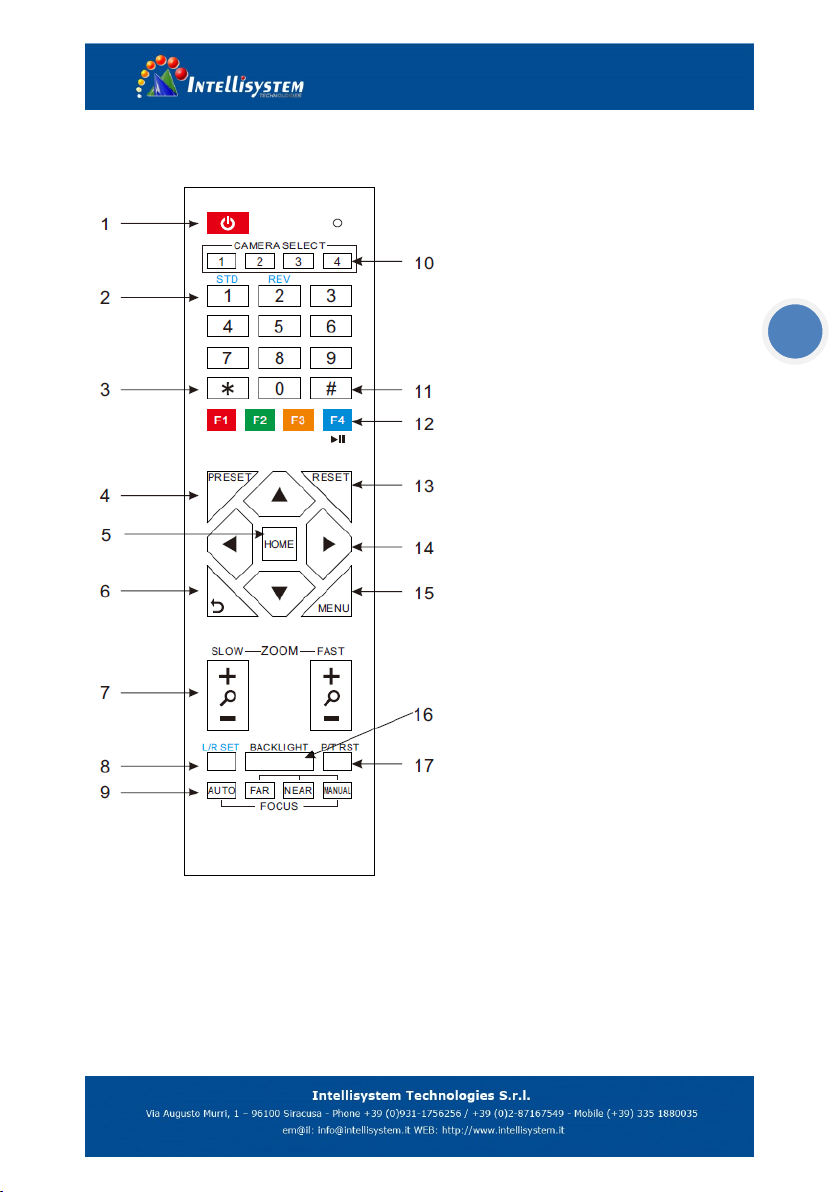
IR Remote Controller Explanation
1. Standby Button
Press this button to enter standby mode.
Press it again to enter normal mode. (Note:
Power consumption in standby mode is
approximately half of the normal mode)
2. Position Buttons
To set preset or call preset
3. *Button
Used with other buttons
4. Set/Preset Buttons
Set preset: Store a preset position
[SET PRESET] + Numeric button (0-9): Setting
a corresponding numeric key preset position
5. Pan-Tilt control Buttons
Pressing the Pan-Tilt back to the middle
position
6. MENU
MENU: enter or exit OSD MENU
7. Zoom Buttons
Slow Zoom: Zoom In [+] or Zoom Out [-]
slowly
Fast Zoom: Zoom In [+] or Zoom Out [-] fast
8. Pan-Tilt L/R set
Press with 1 buttons and 2 buttons setting the direction of the Pan-Tilt
L/R Set +1[STD]: set the Pan-Tilt turn the same direction as the L/R Set
L/R Set +2[REV]: set the Pan-Tilt turn the opposite direction as the L/R Set
Tabla de contenidos
Otros manuales de Cámara IP de Intellisystem


