9
8. Installation
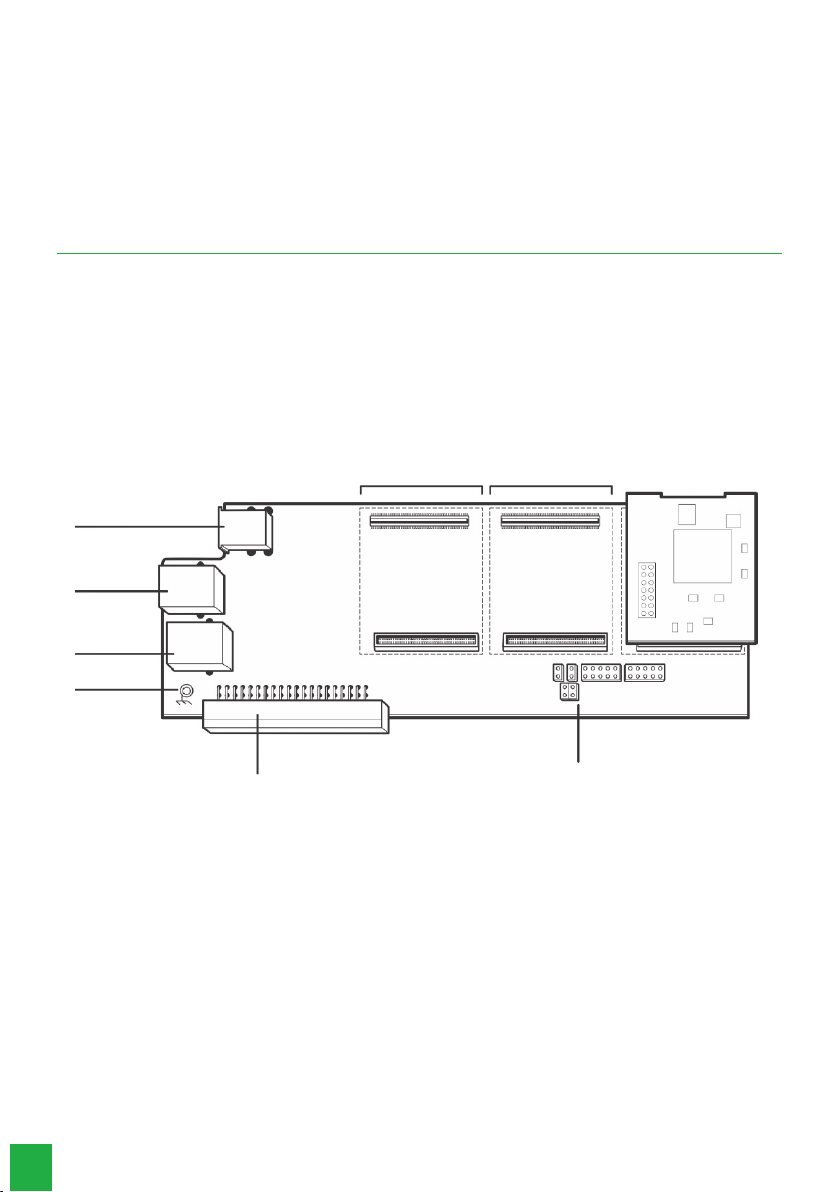
To mount the base board and ICIP 30 68i codec, follow the procedure:
1. On a grounded surface connect the antistatic wrist strap;
2. Remove the ICIP 30 68i base board and the ICIP 30 68i codec board(s) from their packaging and place them on the
grounded surface;
3. Check the condition of the boards and their connectors;
4. Stably support the ICIP 30 68i base board on the surface and insert the ICIP 30 68i codec board(s) in the available
positions, as shown below;
5. Insert the assembled assembly into antistatic packaging until the central ofce is ready to receive it;
6. Inform a person responsible for the Impacta central ofce that it will be necessary to turn it off;
7. Find the network administrator or IT technician to help you recognize in which scenario the ICIP card will be congured,
write down the IP addresses, broadband servers, SIP Proxy server, users and passwords, as well as the physical location of
the LAN and WAN network cables (you should preferably use theWAN port to connect to the customer’s internal network
and the LAN port to connect to the SIP Trunk provider’s internal network);
8. Turn off the AC power to the Impacta 68i switchboard and remove the cover;
9. The ICIP 30 68i base board must only be connected in the OPC3/ICIP position (CN2);
10. Connect the LAN and WAN network cables to the respective connectors;
11. Organize and identify the network cables along with the other cables in the switch DG;
12. Before putting the system into service, a visual check of all cable connections, modules, boards, and AC power should be
performed, and any faults should be corrected.
13. The visual check should be performed with the system turned off;
14. Replace the cover and turn on the Impacta’s AC power;
15. After booting the system, check, through the Web Programmer / Menu Interfaces / Board Disposition, if no board is
programmed to use that slot;
16. Program the necessary data through the Web Programmer.
8.1. Technical recommendations
This system uses VoIP (voice over IP) technology, and the quality of its operation depends on the trafc conditions and
prioritization of the network to which the product is connected. In order for the audio quality of the switch to be excellent,
the network where all packet trafc is transmitted/received must have sufcient bandwidth. In case of abnormalities in the
established calls, such as audio problems, check rst the network situation with the VoIP provider
The information that should be analyzed with the ISP is:
» Minimum guaranteed (%) contracted bandwidth: The contracted speed represents the maximum speed congured within
your ISP’s network. Most Internet providers guarantee a minimum speed of 10% of the contracted bandwidth (between
user and provider) within their network.
» Network latency: is the time it takes for a packet to travel over the network, from its source to its destination.
» Download Speed: is the speed at which packets are received from the Internet.
» Upload Speed: is the speed at which packets are sent to the Internet. Internet providers often offer upload speeds that
are less than or equal to download speeds..
» Check the number of computers on the network
» Consult your VoIP provider about which codecs (voice encoder/decoder) to use and the settings that you need on your
system for best voice quality.
» Fax sending or receiving depends on the quality of your Broadband Internet signal, latency, packet loss rate, and the pre-
sence of the necessary protocols at the destination. Therefore, the proper functioning of the Fax can only be guaranteed
if these conditions are favorable.
» It is recommended to congure the system so that there is no transcoding at SIP extensions. (see Codec guide)
» For IP extensions to work properly the DTMF send mode must be SIP INFO (see the General VoIP tab in the Web Pro-
grammer).
» The address of the congured DNS server should preferably be from a device belonging to the same network.Accessing a
DNS that is external to the network can cause registration problems for joiners and extensions, slowing down the system.
It is recommended to use DNS servers with fast response times.