
Intel SS4200-E - Entry Storage System NAS Server Manual de usuario

1
Copyright
Copyright ©
©Intel Corporation, 2008. All rights reserved.
Intel Corporation, 2008. All rights reserved.
Third
Third-
-party marks and brands are the property of their
party marks and brands are the property of their
respective owners. All products, dates, and figures are
respective owners. All products, dates, and figures are
preliminary and subject to change without notice.
preliminary and subject to change without notice.
Intel® Entry Storage System
SS4200-E Active Directory
Implementation and
Troubleshooting

2
Copyright
Copyright ©
©Intel Corporation, 2008. All rights reserved.
Intel Corporation, 2008. All rights reserved.
Third
Third-
-party marks and brands are the property of their
party marks and brands are the property of their
respective owners. All products, dates, and figures are
respective owners. All products, dates, and figures are
preliminary and subject to change without notice.
preliminary and subject to change without notice.
Active Directory Overview
•SS4200-E Active Directory is based on the
Samba 3 implementation
•The SS4200-E will function as a native
domain member server
•Cannot function as an Active Directory
domain controller (Samba 3 limitation)
•Interdomain trusts are not supported
•NT domain is not supported
•The SS4200-E uses Kerberos, not NT
compatible authentication protocols
•Supports Active Directory organizational
units
•Organizational units act as a container for
objects. Objects can be arranged according to
security and administrative requirement in an
organization
•No setup/configuration is required on a
working domain controller, or DNS server

3
Copyright
Copyright ©
©Intel Corporation, 2008. All rights reserved.
Intel Corporation, 2008. All rights reserved.
Third
Third-
-party marks and brands are the property of their
party marks and brands are the property of their
respective owners. All products, dates, and figures are
respective owners. All products, dates, and figures are
preliminary and subject to change without notice.
preliminary and subject to change without notice.
Active Directory Features
•After Active Directory is enabled, Active
Directory credentials can be used to login to
the Storage Manager
•Only those Active Directory users who have
logged in to the Storage Manager or have
accessed the storage device from a client will
be considered “valid storage Active Directory
users”
•Only these valid storage Active Directory
users will be displayed on the users list in
the Storage Manager
•This avoids the unnecessary overhead if
only a few users out of thousands of
Active Directory users need to access the
storage device
•A hardware reset will return the SS4200-E to
the default Workgroup mode

4
Copyright
Copyright ©
©Intel Corporation, 2008. All rights reserved.
Intel Corporation, 2008. All rights reserved.
Third
Third-
-party marks and brands are the property of their
party marks and brands are the property of their
respective owners. All products, dates, and figures are
respective owners. All products, dates, and figures are
preliminary and subject to change without notice.
preliminary and subject to change without notice.
Active Directory Features
•Any Windows user in the same domain can
access the storage device with Active
Directory credentials
•Private folders will be automatically created
for each logged in user (to storage device) or
any user who accesses the storage device
from a Windows client
Configuring Active Directory
Mode
•To switch between Workgroup mode and
Active Directory mode:
•Use Storage Manager to switch between
Workgroup mode and Active Directory mode
(Settings > Network Services > Windows File
Sharing (CIFS))
(See the visual representation in following slides)

5
Copyright
Copyright ©
©Intel Corporation, 2008. All rights reserved.
Intel Corporation, 2008. All rights reserved.
Third
Third-
-party marks and brands are the property of their
party marks and brands are the property of their
respective owners. All products, dates, and figures are
respective owners. All products, dates, and figures are
preliminary and subject to change without notice.
preliminary and subject to change without notice.
•Workgroup mode accounts will be disabled in
Active Directory mode
•Switching between Workgroup mode and
Active Directory mode will remove the
existing permissions setting of all private
folders
•After switching, a user with administrative
privilege can reassign permissions setting or
delete these private folders
•This is to enable the content of private folders
created under one mode to be accessible under
another mode
•In the case of permanent loss of the domain
controller, this feature provides a way to
recover/delete Active Directory folders under
Workgroup mode
Configuring Active Directory
Mode

6
Copyright
Copyright ©
©Intel Corporation, 2008. All rights reserved.
Intel Corporation, 2008. All rights reserved.
Third
Third-
-party marks and brands are the property of their
party marks and brands are the property of their
respective owners. All products, dates, and figures are
respective owners. All products, dates, and figures are
preliminary and subject to change without notice.
preliminary and subject to change without notice.
Join an Active Directory
Domain
Settings > Network Services > Network Settings
page of the Storage Manager
Add the domain DNS server IP
address(es)
This can be done manually or
automatically from a DHCP
server by selecting the
“Automatically configure all
network settings” box
7
Copyright
Copyright ©
©Intel Corporation, 2008. All rights reserved.
Intel Corporation, 2008. All rights reserved.
Third
Third-
-party marks and brands are the property of their
party marks and brands are the property of their
respective owners. All products, dates, and figures are
respective owners. All products, dates, and figures are
preliminary and subject to change without notice.
preliminary and subject to change without notice.
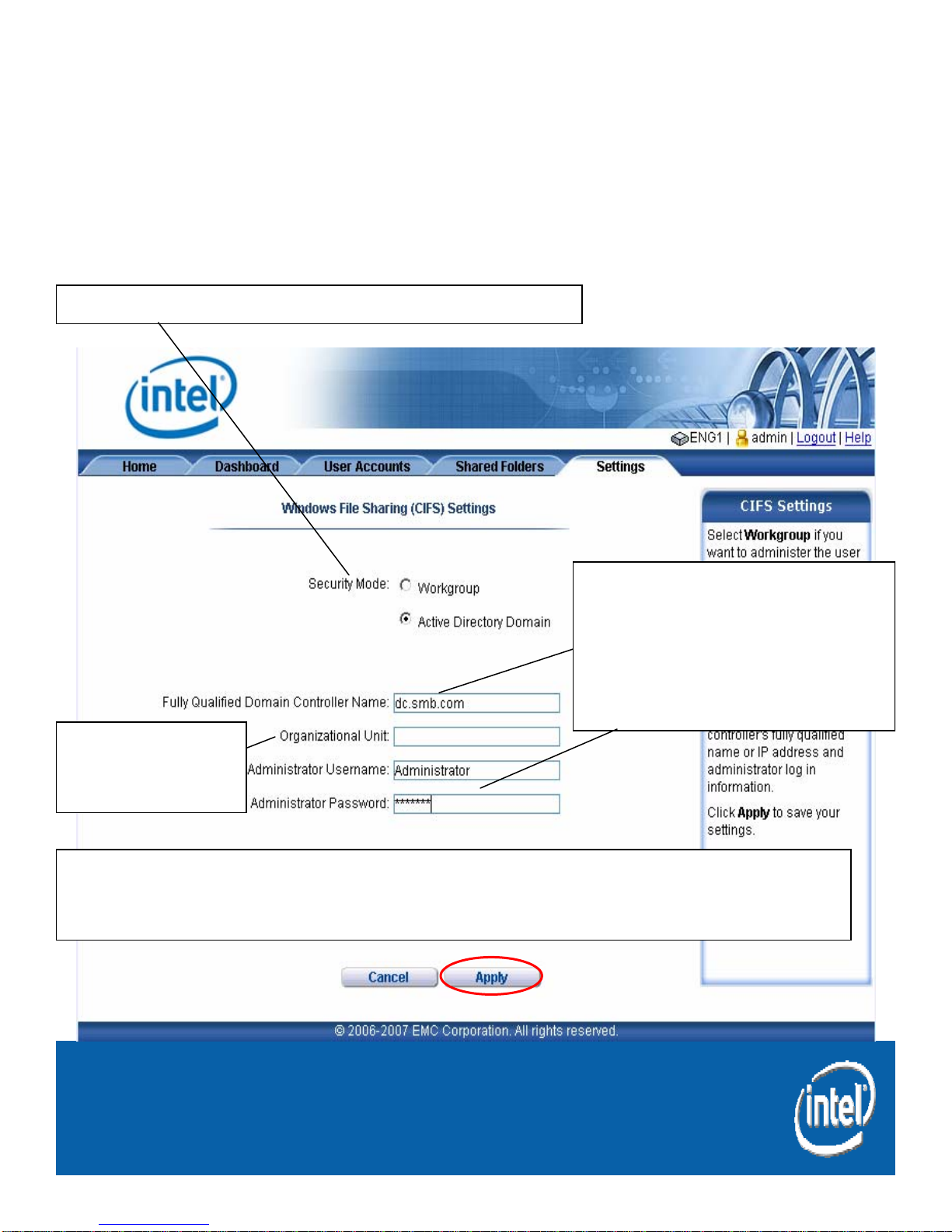
Joining an Active Directory
Domain
Settings tab > Network Services > Windows File
Sharing (CIFS) Settings page of the Storage Manager
After successfully joining the Active Directory domain, the SS4200-E
should appear on the network domain controller’s Active Directory
Users and Computers menu as a member server.
Set Security Mode to Active Directory Domain
Organizational
unit entry is
optional
Enter the fully qualified
name of the domain
controller and the
credentials of an Active
Directory domain
administrator account

8
Copyright
Copyright ©
©Intel Corporation, 2008. All rights reserved.
Intel Corporation, 2008. All rights reserved.
Third
Third-
-party marks and brands are the property of their
party marks and brands are the property of their
respective owners. All products, dates, and figures are
respective owners. All products, dates, and figures are
preliminary and subject to change without notice.
preliminary and subject to change without notice.
Log in to the Storage
Manager
After joining the Active Directory
domain, the Active Directory credentials
can be used to login to the Storage
Manager

9
Copyright
Copyright ©
©Intel Corporation, 2008. All rights reserved.
Intel Corporation, 2008. All rights reserved.
Third
Third-
-party marks and brands are the property of their
party marks and brands are the property of their
respective owners. All products, dates, and figures are
respective owners. All products, dates, and figures are
preliminary and subject to change without notice.
preliminary and subject to change without notice.
Storage Manager
User Accounts tab of the Storage Manager
As noted earlier, only the users who have
logged in will be shown on the User
Accounts list
After a user logs in, a private folder will be
automatically created for the logged in
user on the storage system

10
Copyright
Copyright ©
©Intel Corporation, 2008. All rights reserved.
Intel Corporation, 2008. All rights reserved.
Third
Third-
-party marks and brands are the property of their
party marks and brands are the property of their
respective owners. All products, dates, and figures are
respective owners. All products, dates, and figures are
preliminary and subject to change without notice.
preliminary and subject to change without notice.
Storage Manager
Shared Folder tab of the Storage Manager
The user folder “mike” is locked
and inaccessible to the
Administrator who is logged in
currently
Otros manuales para SS4200-E - Entry Storage System NAS Server
5
Tabla de contenidos
Otros manuales de Servidor de almacenamiento en red de Intel


Manuales populares de Servidor de almacenamiento en red de otras marcas

HP
HP NetStorage 6000 Manual de usuario

Seagate
Seagate U10 ST320423A Manual de usuario

Synology
Synology RackStation RS816 Manual

D-Link
D-Link ShareCenter Pro DNS-1200-05 Manual de usuario

Avid Technology
Avid Technology VideoRAID ST Guía de seguridad

Western Digital
Western Digital My Cloud Home Duo Manual de usuario


