
Imrita IMT-P-ZL6 Manual de usuario

Complete Home
Water Leak Detection Alarm
Installation Instructions
Imrita

ENVIROTECH ALARMS - IMRITA - INSTALLATION INSTRUCTIONS - VERSION 1.0
The imrita complete water leak detector combines both flow and sensor based technology to help
prevent the escape of water in the event of a leak. Installing the main unit on the mains incoming water
pipe will allow the flow of water into the property to be monitored continuously. This flow can be
compared to threshold levels set for the property and will automatically switch off the water should they
be exceeded. At the same time, the wireless sensor probes can be positioned in the most vulnerable
areas, such as kitchens and bathrooms. As soon as water comes into contact with one of them, the
water will be switched off.
Introduction
The main alarm unit houses the valve, flow meters and electronics for setting up the system. It is housed
in a waterproof case to protect the electronics and offer a long service life. All the settings are made
either via the main alarm unit or by using the E-Water app.
Main Alarm Unit
Menu Button
Press and hold for 5
seconds to enter the
settings mode.
Open Button
This will open the
valve if closed.
It is also used for
incrementing the
values during setting
Close Button
This will close the
valve if open.
It is also used to
toggle the values
during setting
Product Specification
Part Number:
Connection Size:
Minimum Detectable Flow:
Inlet Pressure:
Water Flow Rate:
Voltage Rating / Frequency:
Power:
Application:
Water temperature range:
Dimensions (Main Unit):
Remote Probes:
IMT-P-ZL6
3/4"
1-2 l/h
1 - 4 bar
4.0m³/h
100 - 240VAC ~ 50/60Hz
2W
Potable Water
5ºC ~ 38ºC
(L)183.5 x (W)85 x (H)96.5mm
30m range ~ maximum of 7

Note: The Imrita requires power. It is supplied with a 3 pin plug adapter with 1.5m of cable.
The alarm unit comes with 3/4" male BSP brass unions on the inlet and outlet sides. It has been
designed to be fitted on the mains cold water feed into a property. Optional manual valves can be fitted
before and after the unit to assist should it need to be removed.
Installing the main alarm unit
127.5mm
230mm
3/4" BSP 3/4" BSP
96.5mm
Note: Width = 85mm
ENVIROTECH ALARMS - IMRITA - INSTALLATION INSTRUCTIONS - VERSION 1.0
Installing the Battery Backup:
On the bottom of the main
unit, remove the lower of the
two battery compartment
covers.
Carefully extract the battery
connection cable.
Connect the battery to the
connection cable and insert
into the body of the main unit.
Replace the cover.

ENVIROTECH ALARMS - IMRITA - INSTALLATION INSTRUCTIONS - VERSION 1.0
Setting the time:
Use the CLOSE button to increment
the numbers to the correct time.
MENU OPEN CLOSE
Volume
Time
Leak Time
Max Flow
L
min
L/min
Press the OPEN button to toggle to
the hour setting. This will start to
flash.
MENU OPEN CLOSE
Volume
Time
Leak Time
Max Flow
L
min
L/min
MENU OPEN CLOSE
Volume
Time
Leak Time
Max Flow
L
min
L/min
Press and hold the MENU
button for 5 seconds. This
enters the setting mode.
The minute digits will start to
flash. Use the CLOSE button to
increment the numbers to the
correct time.
MENU OPEN CLOSE
Volume
Time
Leak Time
Max Flow
L
min
L/min
Press the MENU button again to
enter time setting.
MENU OPEN CLOSE
Volume
Time
Leak Time
Max Flow
L
min
L/min
MENU OPEN CLOSE
Volume
Time
Leak Time
Max Flow
L
min
L/min
Press and hold the
MENU button for 3 seconds to
store time settings.
Note: Only exit the menu if you do not wish to input any other settings. If you do wish to continue
with other settings, you can exit the menu at the end and all changes will be stored/saved.

ENVIROTECH ALARMS - IMRITA - INSTALLATION INSTRUCTIONS - VERSION 1.0
Setting the volume:
This refers to the amount of water in litres that will continuously flow through the main unit before it goes into alarm and
shuts the valve. It is important to consider this setting to avoid the water being shut off when in genuine use. Consider
what appliance or facility uses the most water on a continuous bases. In most cases running a bath will take 100 litres,
which is about the same as taking a 10 - 15 min shower. Appliances such as washing machines do not draw water
continuously and therefore can be discounted in this scenario.
This setting determines the amount of water that will escape from a leak before the unit will alarm and shut the valve.
This amount can be greatly reduced when the remote sensor probes are also used.
Note: Only exit the menu if you do not wish to input any other settings. If you do wish to continue
with other settings, you can exit the menu at the end and all changes will be stored/saved.
Use the CLOSE button to
increment the numbers to the
correct amount.
MENU OPEN CLOSE
Volume
Time
Leak Time
Max Flow
L
min
L/min
Press the OPEN button to
toggle to the 10s of litres
setting. This will start to flash.
MENU OPEN CLOSE
Volume
Time
Leak Time
Max Flow
L
min
L/min
MENU OPEN CLOSE
Volume
Time
Leak Time
Max Flow
L
min
L/min
Press and hold the MENU
button for 5 seconds. This
enters the setting mode.
The L on the right will
illuminate and the digit on the
right will start to flash. Press
the CLOSE button to
increment the amount up
MENU OPEN CLOSE
Volume
Time
Leak Time
Max Flow
L
min
L/min
Press the MENU button again
twice to enter volume setting.
Note: If still in the setting
mode, press the MENU button
once to enter volume setting
MENU OPEN CLOSE
Volume
Time
Leak Time
Max Flow
L
min
L/min
Use the CLOSE button to
increment the numbers to the
correct time.
MENU OPEN CLOSE
Volume
Time
Leak Time
Max Flow
L
min
L/min
Press the OPEN button again
to toggle to the 100s of litres
setting. This will start to flash.
MENU OPEN CLOSE
Volume
Time
Leak Time
Max Flow
L
min
L/min
MENU OPEN CLOSE
Volume
Time
Leak Time
Max Flow
L
min
L/min
Press and hold the
MENU button for 3 seconds to
store time settings.
Note: In the example above, a maximum of 135 litres of continuous water will flow through the Imrita
unit. Any amount above this will trigger an alarm and shut the valve. The maximum amount that can
be set is 9999 litres. Setting the value to zero will switch off this feature.

ENVIROTECH ALARMS - IMRITA - INSTALLATION INSTRUCTIONS - VERSION 1.0
Setting the water time:
This refers to the amount of water over time that will continuously flow through the main unit before it goes into alarm
and shuts the valve. It is important to consider this setting to avoid the water being shut off when in genuine use. If we
use the running a bath scenario again, it will take approximately 10 minutes.
This setting determines the amount of water that will escape from a leak before the unit will alarm and shut the valve.
This amount can be greatly reduced when the remote sensor probes are also used.
Note: Only exit the menu if you do not wish to input any other settings. If you do wish to continue
with other settings, you can exit the menu at the end and all changes will be stored/saved.
Use the CLOSE button to
increment the numbers to the
desired threshold time.
MENU OPEN CLOSE
Volume
Time
Leak Time
Max Flow
L
min
L/min
Press the OPEN button to
toggle to the 10s of minutes
setting. This will start to flash.
MENU OPEN CLOSE
Volume
Time
Leak Time
Max Flow
L
min
L/min
MENU OPEN CLOSE
Volume
Time
Leak Time
Max Flow
L
min
L/min
Press and hold the MENU
button for 5 seconds. This
enters the setting mode.
The min on the right will
illuminate and the digit on the
right will start to flash. Press
the CLOSE button to
increment the amount up in
minutes.
MENU OPEN CLOSE
Volume
Time
Leak Time
Max Flow
L
min
L/min
Press the MENU button again
three times to enter water time
setting.
Note: If still in the setting
mode, press the MENU button
once to enter water time
setting
MENU OPEN CLOSE
Volume
Time
Leak Time
Max Flow
L
min
L/min
Use the CLOSE button to
increment the numbers to the
desired threshold time.
Press the OPEN button again
to toggle to the hours setting.
This will start to flash.
MENU OPEN CLOSE
Volume
Time
Leak Time
Max Flow
L
min
L/min
Press and hold the
MENU button for 3 seconds to
store water time settings.
Note: In the example above, a maximum of 25 miuntes of continuous water will flow through the
Imrita unit. Any amount above this will trigger an alarm and shut the valve. The maximum amount
that can be set is 9999 minutes. Setting the value to zero will switch off this feature.
MENU OPEN CLOSE
Volume
Time
Leak Time
Max Flow
L
min
L/min
MENU OPEN CLOSE
Volume
Time
Leak Time
Max Flow
L
min
L/min

ENVIROTECH ALARMS - IMRITA - INSTALLATION INSTRUCTIONS - VERSION 1.0
Setting the leakage time:
This setting allows for small leaks to be detected. There are two different flow meters in the Imrita, the main one is used
for monitoring the volume and time. There is also a more precise flow meter capable of detecting flow as low as just 5
litres per hour. This one is used to detect small leaks, which may otherwise go undetected.
Note: Only exit the menu if you do not wish to input any other settings. If you do wish to continue
with other settings, you can exit the menu at the end and all changes will be stored/saved.
Use the CLOSE button to
increment the numbers to the
desired threshold time.
MENU OPEN CLOSE
Volume
Time
Leak Time
Max Flow
L
min
L/min
Press the OPEN button to
toggle to the 10s of minutes
setting. This will start to flash.
MENU OPEN CLOSE
Volume
Time
Leak Time
Max Flow
L
min
L/min
MENU OPEN CLOSE
Volume
Time
Leak Time
Max Flow
L
min
L/min
Press and hold the MENU
button for 5 seconds. This
enters the setting mode.
The min on the right and the
Leak Time on the left will
illuminate and the digit on the
right will start to flash. Press
the CLOSE button to
increment the amount up in
minutes.
MENU OPEN CLOSE
Volume
Time
Leak Time
Max Flow
L
min
L/min
Press the MENU button again
four times to enter water time
setting.
Note: If still in the setting
mode, press the MENU button
once to enter water time
setting
MENU OPEN CLOSE
Volume
Time
Leak Time
Max Flow
L
min
L/min
Use the CLOSE button to
increment the numbers to the
desired threshold time.
Press the OPEN button again
to toggle to the hours setting.
This will start to flash.
MENU OPEN CLOSE
Volume
Time
Leak Time
Max Flow
L
min
L/min
Press and hold the
MENU button for 3 seconds to
store water time settings.
Note: In the example above, a maximum of 45 minutes of continuous water will flow through the
Imrita unit. Any amount above this will trigger an alarm and shut the valve. The maximum amount
that can be set is 9999 minutes. Setting the value to zero will switch off this feature.
MENU OPEN CLOSE
Volume
Time
Leak Time
Max Flow
L
min
L/min
MENU OPEN CLOSE
Volume
Time
Leak Time
Max Flow
L
min
L/min
ENVIROTECH ALARMS - IMRITA - INSTALLATION INSTRUCTIONS - VERSION 1.0
Note: Only exit the menu if you do not wish to input any other settings. If you do wish to continue
with other settings, you can exit the menu at the end and all changes will be stored/saved.
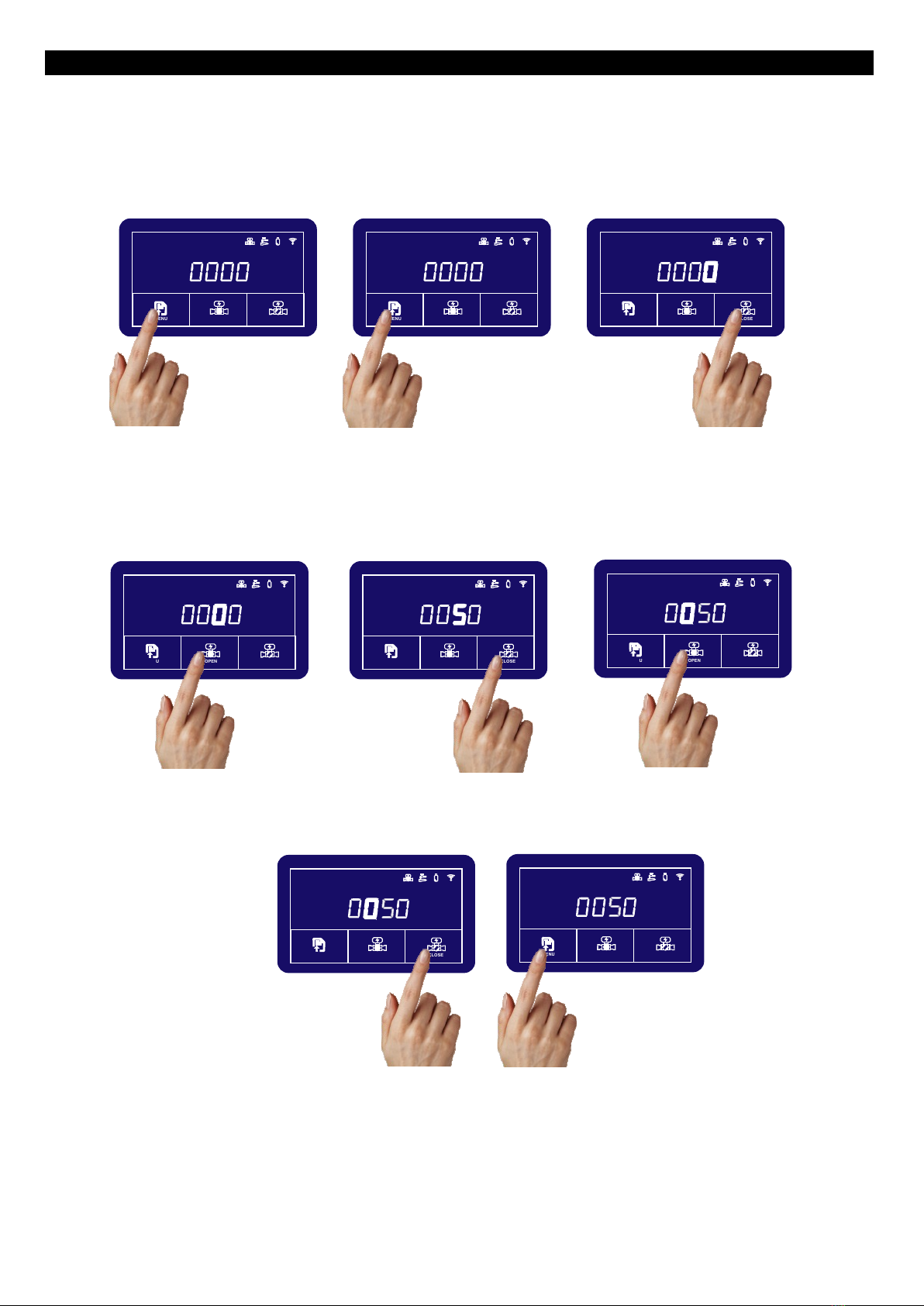
Use the CLOSE button to
increment the numbers to the
desired threshold level.
MENU OPEN CLOSE
Volume
Time
Leak Time
Max Flow
L
min
L/min
Press the OPEN button to
toggle to the 10s of litres
setting. This will start to flash.
MENU OPEN CLOSE
Volume
Time
Leak Time
Max Flow
L
min
L/min
MENU OPEN CLOSE
Volume
Time
Leak Time
Max Flow
L
min
L/min
Press and hold the MENU
button for 5 seconds. This
enters the setting mode.
The L/min on the right will
illuminate and the digit on the
right will start to flash. Press
the CLOSE button to
increment the amount up in
litres.
MENU OPEN CLOSE
Volume
Time
Leak Time
Max Flow
L
min
L/min
Press the MENU button again
five times to enter max flow
setting.
Note: If still in the setting
mode, press the MENU button
once to enter the max flow
setting
MENU OPEN CLOSE
Volume
Time
Leak Time
Max Flow
L
min
L/min
Use the CLOSE button to
increment the numbers to the
desired threshold level.
Press the OPEN button again
to toggle to the 100s of litres
setting. This will start to flash.
MENU OPEN CLOSE
Volume
Time
Leak Time
Max Flow
L
min
L/min
Press and hold the
MENU button for 3 seconds to
store max flow settings.
Note: In the example above, a maximum of 50 litres of continuous water will flow through the Imrita
unit in a 1 minute period. Any amount above this will trigger an alarm and shut the valve. The
maximum amount that can be set is 9999 litres. Setting the value to zero will switch off this feature.
MENU OPEN CLOSE
Volume
Time
Leak Time
Max Flow
L
min
L/min
MENU OPEN CLOSE
Volume
Time
Leak Time
Max Flow
L
min
L/min
Setting the max flow:
This is used to quickly detect larger leaks, such as burst pipes. Unlike the volume and water time settings, this is set in
litres per minute. Therefore a much larger quantity of water will pass through the main unit very quickly (as in the case of
a burst pipe or failed fitting).

ENVIROTECH ALARMS - IMRITA - INSTALLATION INSTRUCTIONS - VERSION 1.0
Note: Only exit the menu if you do not wish to input any other settings. If you do wish to continue
with other settings, you can exit the menu at the end and all changes will be stored/saved.
Use the CLOSE button to
increment the numbers to the
desired threshold time.
MENU OPEN CLOSE
Volume
Time
Leak Time
Max Flow
L
min
L/min
Press the OPEN button to
toggle to the 10s of seconds
setting. This will start to flash.
MENU OPEN CLOSE
Volume
Time
Leak Time
Max Flow
L
min
L/min
MENU OPEN CLOSE
Volume
Time
Leak Time
Max Flow
L
min
L/min
Press and hold the MENU
button for 5 seconds. This
enters the setting mode.
Press the CLOSE button to
increment the amount up in
seconds.
MENU OPEN CLOSE
Volume
Time
Leak Time
Max Flow
L
min
L/min
Press the MENU button again
six times to enter auto restore
setting.
Note: If still in the setting
mode, press the MENU button
once to enter the auto restore
setting
MENU OPEN CLOSE
Volume
Time
Leak Time
Max Flow
L
min
L/min
Press and hold the
MENU button for 3 seconds to
store water time settings.
Note: In the example above, if the main stop cock is manually shut within 20 seconds . Any amount
above this will trigger an alarm and shut the valve. The maximum amount that can be set is 999
seconds. Setting the value to zero will switch off this feature.
MENU OPEN CLOSE
Volume
Time
Leak Time
Max Flow
L
min
L/min
Setting the auto restore:
This is used to automatically open the valve following a volume, time or max flow alarm providing the main stop cock has
been manually shut. This is set in seconds.

ENVIROTECH ALARMS - IMRITA - INSTALLATION INSTRUCTIONS - VERSION 1.0
Note: Only exit the menu if you do not wish to input any other settings. If you do wish to continue
with other settings, you can exit the menu at the end and all changes will be stored/saved.
Use the CLOSE button to
increment the numbers to the
desired days.
MENU OPEN CLOSE
Volume
Time
Leak Time
Max Flow
L
min
L/min
Press the OPEN button to
toggle to the 10s of days
setting. This will start to flash.
MENU OPEN CLOSE
Volume
Time
Leak Time
Max Flow
L
min
L/min
MENU OPEN CLOSE
Volume
Time
Leak Time
Max Flow
L
min
L/min
Press and hold the MENU
button for 5 seconds. This
enters the setting mode.
An H will appear on the left.
Press the CLOSE button to
increment the amount up in
days.
MENU OPEN CLOSE
Volume
Time
Leak Time
Max Flow
L
min
L/min
Press the MENU button again
seven times to enter auto auto
valve setting.
Note: If still in the setting
mode, press the MENU button
once to enter the auto valve
setting
MENU OPEN CLOSE
Volume
Time
Leak Time
Max Flow
L
min
L/min
Press and hold the
MENU button for 3 seconds to
store water time settings.
Note: In the example above, the valve will automatically close if there is no flow of water for 3 days.
The maximum that it can be set to is 999 days. The valve can be re-opened by pressing the OPEN
button on the main unit or by using the key fob. Setting the value to zero will switch off this feature.
MENU OPEN CLOSE
Volume
Time
Leak Time
Max Flow
L
min
L/min
Setting the holiday feature:
This setting is used to automatically close the valve when there is no flow through the main unit for a set period of time.
This is set in number of days.
Manuales populares de Sistema de seguridad de otras marcas


EDM
EDM Solution 6+6 Wireless-AE Manual de usuario

Highway Safety Group
Highway Safety Group EA401 Manual de usuario

Siren
Siren LED GSM Manual de usuario

Detection Systems
Detection Systems 7090i Instrucciones de montaje

Se-Kure Controls
Se-Kure Controls MicroMini SK-4841 Manual de usuario

Siemens
Siemens FDM273 Manual de usuario