10 | English
I-1 CAMERA
DETACHABLE VIEWFINDER
USB CHARGING CABLE
USB DATA CABLE
ARCHIVE/DISPLAY BOX
USER MANUAL
QUICK START GUIDE
CAMERA HAND
STRAP & SCREWS
CLEANING CLOTH
I-1 APP INFO LEAFLET
CHARGE THE CAMERA
Important: The I-1 will not be
charged upon purchase – it must
be fully charged before first use.
You should charge the I-1 fully
before every use to ensure it has
enough power for the duration of
your shoot. A full charge usually
takes just one and a half to two
hours when you use the dedicated
I-1 USB charging cable (P) with
a smartphone power adapter or
computer USB port. To charge the
camera, plug the USB charging
cable Pinto the micro USB slot
on the camera door K. Then plug
the other end of the cable into
a charger such as your iPhone
charger, or into your computer’s
USB slot. The red power indicator
LED Jwill switch off as soon as
the battery is fully charged.
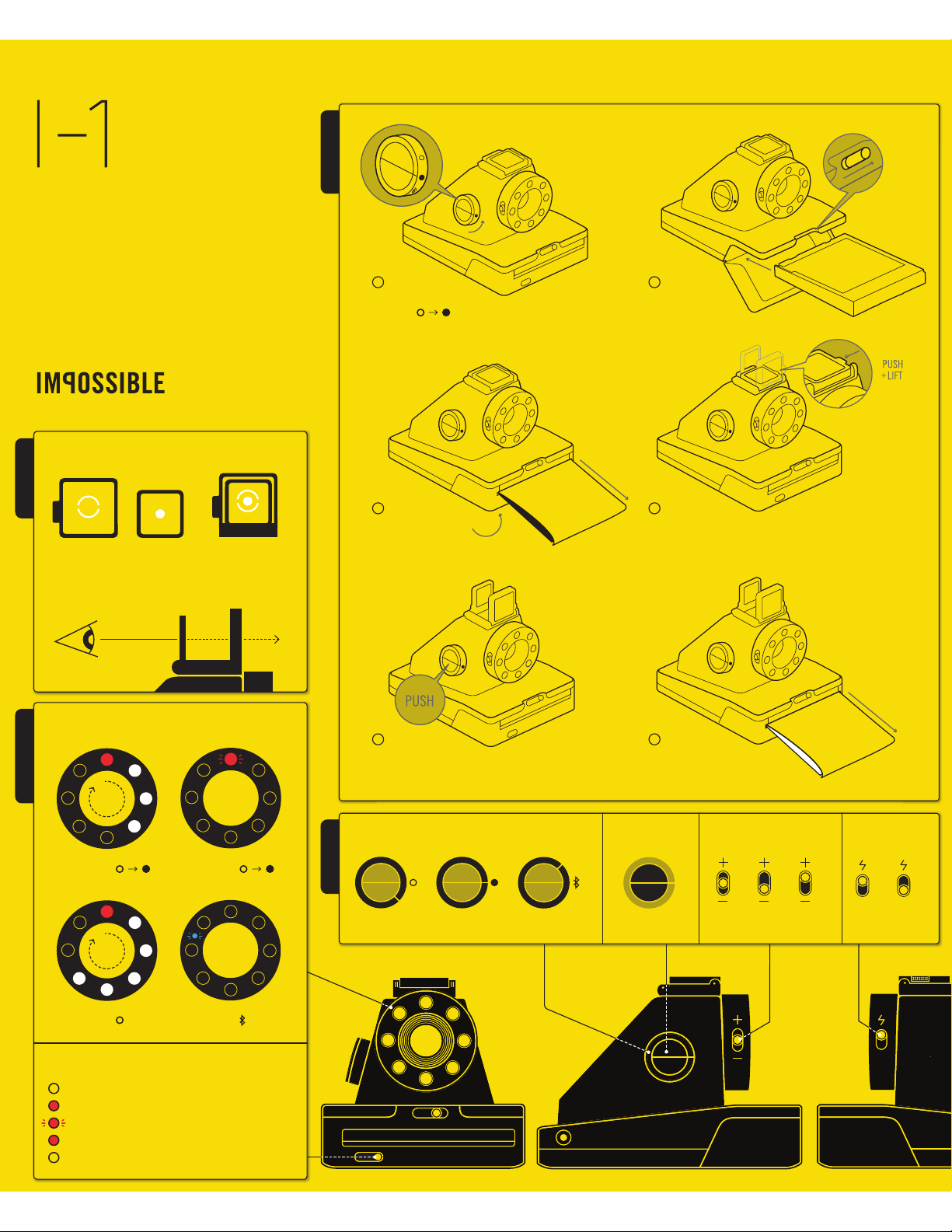
1TURN THE CAMERA ON/OFF
To turn the camera on, turn the
control knob Bcounter-clockwise
BOX CONTENTS HOW TO USE THE I-1
English | 11
until the yellow lines on the control
knob and shutter button Aline
up, and the filled circle symbol is
at the front. To turn it off again,
turn the control knob clockwise
until the empty circle symbol is
at the front and the yellow line
is pointing downwards.
2LOAD THE FILM
Slide the film door latch Hto open
the film door L. Push the film cas-
sette all the way in, with darkslide
up and plastic base at the bottom.
Note: Please check individual film
packaging for development time,
handling and storage details.
3CLOSE FILM DOOR
When you close the film door, the
darkslide will eject from the camera
automatically, underneath the frog
tongue. The plastic frog tongue is
designed to protect images from
light as they develop – it should
not be removed. Take the darkslide
out from under the frog tongue and
let the frog tongue roll back up. If
the darkslide has not ejected, take
out the film pack and re-insert it,
making sure it is pushed all the
way to the back of the camera.
4SET FLASH & LIGHTEN/DARKEN
Flash: You can find the flash on/
off switch Gon the side of the
lens barrel. To turn the flash on,
push the flash on/off switch up so
it meets the yellow lightning flash
symbol. The flash is on by default
when you unpack the camera. We
recommend that you use the flash
in all conditions except bright,
direct sunlight.
Note: the camera should be fully
charged to take best advantage
of the ring flash.
Lighten/Darken: Use the lighten/
darken switch Con the opposite
side of the lens barrel to adjust
the exposure of your shot. To get a
brighter photo, move the lighten/
darken switch up to the plus posi-
tion. For a darker photo, move the
lighten/darken switch down to the
minus position. These two settings
ENGLISH