
impact PowerSlave PSL-C Manual de usuario

PowerSlave Transmitter / Receiver
INSTRUCTIONS
PSL-C / PSL-N / PSL-R

2
Table of Contents
Introduction�����������������������������������������������������������������������������������������������������������������3
Key Features ���������������������������������������������������������������������������������������������������������������4
Precautions�����������������������������������������������������������������������������������������������������������������5
Overview��������������������������������������������������������������������������������������������������������������������� 6
Contents Include ���������������������������������������������������������������������������������������������������������8
Compatible Devices ��������������������������������������������������������������������������������������������������10
Battery Installation����������������������������������������������������������������������������������������������������11
LED Indicator Lights ��������������������������������������������������������������������������������������������������12
Channel Selection �����������������������������������������������������������������������������������������������������12
Connecting the Transmitter to the Camera ���������������������������������������������������������������13
Mounting the Receiver on a Light Stand �������������������������������������������������������������������14
Mounting the Receiver to a Studio Flash ������������������������������������������������������������������15
Mounting the receiver to the Impact Quickbox ���������������������������������������������������������16
Wirelessly Triggering Your Hot-Shoe Flash ���������������������������������������������������������������18
Wirelessly Triggering Your Studio Flash��������������������������������������������������������������������19
Wake-Up Feature������������������������������������������������������������������������������������������������������19
Using as a Camera Trigger����������������������������������������������������������������������������������������20
Specifications �����������������������������������������������������������������������������������������������������������22
Troubleshooting ��������������������������������������������������������������������������������������������������������23

3
Introduction
Thank you for choosing Impact.
Congratulations on the purchase of your Impact PowerSlave
Transmitter for Canon / Nikon with Wake-Up feature. This 2.4 GHz
wireless system opens up a new world of options for beginners
and advanced users alike who wish to trigger their devices from
a distance. This product is especially useful for those who want
to trigger their ash inside an Impact Quikbox or other softboxes
using a radio signal, eliminating the need for line-of-sight wireless
connections. It’s also a great solution for photographers interested in
controlling the camera shutter from a wired or wireless trigger.
The Impact PowerSlave’s built-in wake-up function frees the user to
remotely wake a device from a sleep mode to a ready-to-be-triggered
state without having to walk back to the device. The 16 user-selectable
channels help avoid interference from others. The Impact PowerSlave
allows ash sync speeds of up to 1/200 of a second on compatible
cameras, enabling you to take advantage of sync speeds that match
the rating of your camera.
The Impact PowerSlave transmitter wake-up function is available in
separate dedicated models for Canon or Nikon cameras. To make full
use of the device, use only the dedicated hot-shoe ashes that are
compatible with your camera brand.

4
Key Features
• Sixteen user-selectable channels: Multiple channels allow you to
change your transmitter/receiver settings to avoid interference from
other wireless remotes�
• Flash wake up: Allows the user to wake a flash device after it has
entered sleep mode by half pressing the shutter release button�
• Universal receiver: The PowerSlave receiver is universally
compatible with both Canon and Nikon versions of the transmitter
companion device and can be used with either the dedicated Canon
or Nikon transmitter�
• Multiple triggering options: Can be used to trigger a hot-shoe flash,
studio flash, or camera shutter release�
• 2.4 GHz radio signal: Using a radio signal allows you to trigger a
studio flash with less interference�
• Wireless triggering: Cable-free wireless triggering allows you to
trigger a device from up to 150-feet (50 meters) away�
• Flash sync speed up to 1/200s: Take advantage of sync speeds
that match the rating of your camera up to 1/200 of a second
(compatible cameras only)�

5
Precautions
• Please read and follow these instructions and keep this manual in a safe place.
• There are no user-serviceable parts inside the devices. Do not attempt to disassemble
or perform any unauthorized modication.
• Do not operate the Impact PowerSlave units in the presence of ammable gas or
vapors.
• Do not handle with wet hands or immerse in or expose to water or rain. Failure to
observe this precaution could result in re or electric shock.
• Keep out of reach of children. This device contains small parts which may pose a
choking hazard.
• Observe caution when handling batteries. Batteries may leak or explode if improperly
handled. Use only the batteries listed in this manual. Make certain to align the battery
with the correct polarity.
• Batteries are prone to leakage when fully discharged. To avoid damage to the product,
be sure to remove the batteries when leaving the product unattended for prolonged
periods or when no charge remains.
• Handle the units with care.
• Do not use or leave the devices in conditions of extreme heat, severe cold, or high
humidity.
• Turn off the power on your camera and ash units before inserting or removing the
remote cord.
• Dispose of used batteries, packaging, and old devices in accordance to appropriate
local environmental regulations.
• Clean the unit with a soft, dry cloth.
• Use only parts provided by the manufacturer.
• Make sure the item is intact and that there are no missing parts.
• All images are for illustrative purposes only.

6
Overview
PowerSlave Transmitter
5� Channel Selector Switches
6� Battery Compartment
7� Hot-Shoe Mount
8� 2�5 mm Input Port
1� Indicator/Confirmation Light
2� Test Button/Shutter Release
3� Hot Shoe
4� On/Off Switch
1
34
7
8
6
5
2
7
Overview (Continued)
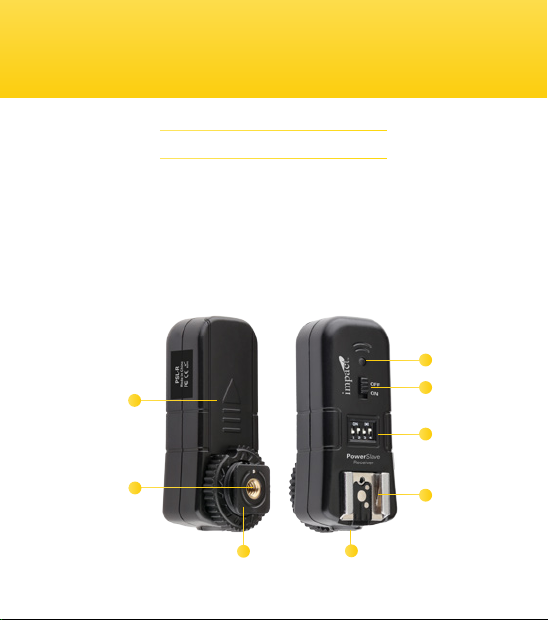
PowerSlave Receiver
1� Indicator/Confirmation Light
2� On/Off Switch
3� Channel Selector Switches
4� Hot Shoe
5� Cold Shoe
6� Battery Compartment
7� 1/4”-20 Light-stand Mount
8� 2�5 mm Output Port
1
2
3
4
85
6
7
1
6
7
58
2
4
3

8
Contents Include
1� Dedicated transmitter specific for
Canon or Nikon hot-shoe mount
2� Receiver with 1/4”-20 light stand
socket and universal shoe mount
3� 2�5 mm to PC sync cable
4� 2�5 mm to 1/4” monoplug sync
cable
5� 2�5 mm to 3�5 mm sync cable
6� Elastic light stand cold-shoe
mount
7� 1 × 23A 12-volt alkaline battery
8� 2 × AAA batteries
PSL-C / PSL-N
1
2
3
4
5
7
8
6

9
Contents Include (Continued)
1� Receiver with 1/4”-20 stand
socket
2� 2�5 mm to 1/4” monoplug sync
cable
3� 2�5 mm to 3�5 mm sync cable
4� Elastic light stand cold-shoe
mount
5� 2 × AAA batteries
PSL-R
123
4
5

10
Compatible Devices
We recommend that you use a fully manual-controlled ash with this
device. Since the PowerSlave does not transmit TTL settings, the
power output must be set manually.
The PowerSlave is compatible with most cameras, ash units, and
studio lights. However, for ash wake-up functionality, the camera,
ash, and PowerSlave transmitter must be compatible.
To take advantage of the ash wake-up feature using a Canon camera,
the ash must be Canon compatible and the PowerSlave model for
Canon must be used. Likewise, the PowerSlave for Nikon model must
be employed in order to take advantage of the ash wake-up feature
using a Nikon camera.
Note:
• If the ash does not have a wake-up function, the sleep
mode may have the option to be disabled. Refer to your
ash’s manual for instructions.
• The Sony/Minolta, Pentax, Sony Multi-shoe cameras and
ashes are not compatible with the PowerSlave system.
Este manual sirve para los siguientes modelos
2
Tabla de contenidos
Otros manuales de Receptor de impact


