
IME enginko LoRaWAN MCF-LW13IO Manual de usuario

2022/06/24 09:08 1/2 manual_mcf-lw13io
e n g i n k o . s u p p o r t . c e n t e r - https://www.enginko.com/support/
Table of Contents
MCF-LW13IO Operating Manual 1 ..................................................................................................
1. Description 1 ................................................................................................................................
2. Overview 2 ....................................................................................................................................
2.1 Technical data 2 .........................................................................................................................
2.2 Installation 3 ..............................................................................................................................
2.3 Power supply 4 ...........................................................................................................................
2.4 Configuration 4 ..........................................................................................................................
2.5 System leds 5 .............................................................................................................................
2.6 Firmware update 6 .....................................................................................................................
3 I/O 8 .................................................................................................................................................
3.1 Input 9 ........................................................................................................................................
3.2 Output 10 ...................................................................................................................................
3.3 Wiring examples 10 ...................................................................................................................
4 LoRaWAN® network 11 ................................................................................................................
4.1 Activation 12 ..............................................................................................................................
4.2 Other settings 13 .......................................................................................................................
5 Passwords 15 .................................................................................................................................
6 Configuration file 17 .....................................................................................................................
6.1 Multi devices configuration 18 ...................................................................................................
7 LoRaWEB Tool 19 ...........................................................................................................................
8 Payload 20 ......................................................................................................................................
9 Ordering code 20 ...........................................................................................................................
10 Declaration of conformity 20 ....................................................................................................
11 FCC compliance for MCF-LW13IO-US 20 ..................................................................................
12 Contacts 21 ..................................................................................................................................
www.ime.de

Last update: 2022/06/16 09:40 manual_mcf-lw13io https://www.enginko.com/support/doku.php?id=manual_mcf-lw13io
https://www.enginko.com/support/ Printed on 2022/06/24 09:08
www.ime.de

2022/06/24 09:08 1/21 manual_mcf-lw13io
e n g i n k o . s u p p o r t . c e n t e r - https://www.enginko.com/support/
MCF-LW13IO Operating Manual
Important safety information
Read this manual before attempting to install the device! Failure to observe
recommendations included in this manual may be dangerous or cause a violation of the
law. The manufacturer will not be held responsible for any loss or damage resulting from
not following the instructions of this operating manual.
Do not dismantle or modify in any way.
Avoid mechanical stress
Do not use any detergent or alcohol to clean the device.
Do not mount in horizontal position.
Disposal information for users
Pursuant to and in accordance with Article 14 of the Directive 2012/19/EU of the
European Parliament on waste electrical and electronic equipment (WEEE).
The barred symbol of the rubbish bin shown on the equipment indicates that, at the end of its useful
life, the product must be collected separately from other waste.
1. Description
The MCF-LW13IO is a LoRaWAN® actuator that allows to switch ON and OFF a 230Vac~, 8A load. It
also reads the status of a 230Vac~ input. This device can transmit the status of its input and control
the output through the LoRaWAN® network. It can be used for industrial process control and home
automation, water treatment, agriculture irrigation and similar applications. Input can be used as
pulse counter.
www.ime.de

Last update: 2022/06/16 09:40 manual_mcf-lw13io https://www.enginko.com/support/doku.php?id=manual_mcf-lw13io
https://www.enginko.com/support/ Printed on 2022/06/24 09:08
2. Overview
2.1 Technical data
CPU Cortex M0+
EEProm 32KB
Flash 64KB
Real time clock
Encryption AES 128 bit
Class C LoRaWAN® stack EU868, AS923, AU915, US915
EU868 version CE certified according to 2014/53/EU – Radio Equipment Directive (RED)
US915 version FCC compliant
Transmission band (EU version): 868 MHz
Transmission Power (EU version): 14dBm max
Power supply 110÷230Vac~ 50/60 Hz
Power consumption 1W
1 opto-isolated input, 230Vac
1 relay output with COM, NO, NC contacts, 8A@230Vac~
NFC for node setup ad FW upgrade
Storage temperature range -20°C ÷+80°C
Working temperature range -10°C ÷+70°C
Dimension: 58x44x25mm
www.ime.de

2022/06/24 09:08 3/21 manual_mcf-lw13io
e n g i n k o . s u p p o r t . c e n t e r - https://www.enginko.com/support/
2.2 Installation
The installation has to be done by a qualified electrician.
The device is intended as subassembly (component).
It is responsibility of the assembler of equipment incorporating to ensure that the overall equipment is
safe.
The MCF-LW13IO must be mounted in vertical position.
Please refer to following connections:
Name Description
L LINE Device power supply: 110÷230Vac~ Live
N LINE Device power supply: 110÷230Vac~ Neutral
L IN Digital Input monitor: 110÷230Vac~ Live
N IN Digital Input monitor: 110÷230Vac~ Neutral
C Terminal for Common contact
www.ime.de

Last update: 2022/06/16 09:40 manual_mcf-lw13io https://www.enginko.com/support/doku.php?id=manual_mcf-lw13io
https://www.enginko.com/support/ Printed on 2022/06/24 09:08
Name Description
NC Terminal for Normally Close contact
NO Terminal for Normally Open contact
Caution: NIN and NLINE are internally connected.
The device must be placed where the LoRaWAN® signal coverage is good (SF = 7 optimal, SF = 12
weak).
2.3 Power supply
Connect the power supply to pins L LINE and N LINE. Valid range is 100Vac~ to 240Vac~ 50/60Hz.
2.4 Configuration
To deploy the sensor, download the latest LoRa Tool Android App to setup LoRaWAN® credentials
and other preferences :
www.ime.de
2022/06/24 09:08 5/21 manual_mcf-lw13io
e n g i n k o . s u p p o r t . c e n t e r - https://www.enginko.com/support/
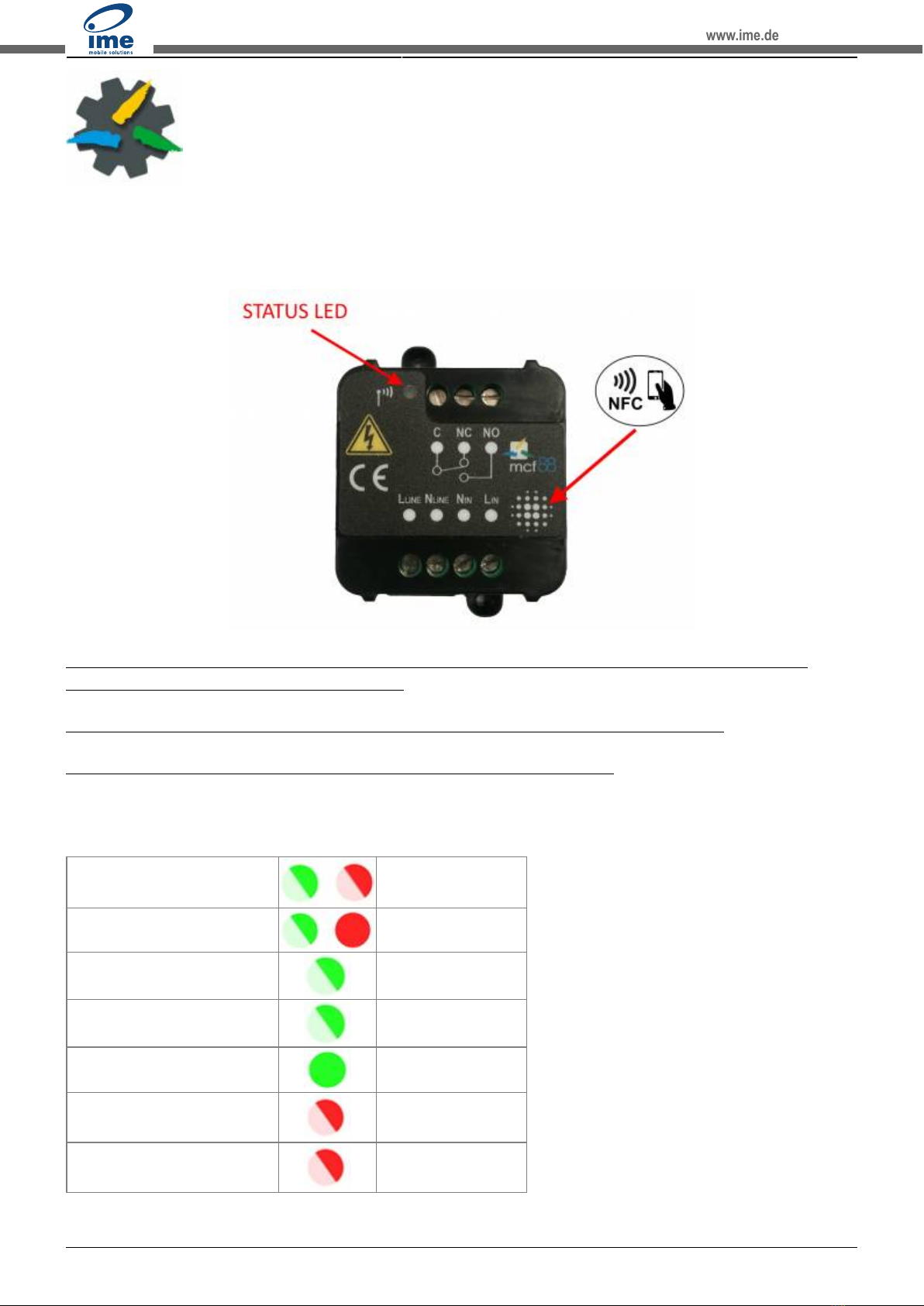
Move the NFC antenna of the mobile (the exact position varies depending on the model of the
smartphone) to the sensor antenna, in the area shown in the figure:
To use the NFC interface, the device must be powered through terminals L LINE and N LINE. The
power status is visible on the red/green led.
Always validate your settings by reading the NFC data after the sensor has restarted.
Configuration can be done only via NFC. No USB port available.
2.5 System leds
LoRaWAN® not configured Slow flashing
Joining Quick flashing
Sending Quick flashing
Receiving Quick flashing
Steady state Fixed
Data error Flashing 2 seconds
Connection error Flashing 1 second
www.ime.de

Last update: 2022/06/16 09:40 manual_mcf-lw13io https://www.enginko.com/support/doku.php?id=manual_mcf-lw13io
https://www.enginko.com/support/ Printed on 2022/06/24 09:08
2.6 Firmware update
Download the latest firmwares available on the smartphone with LoRaTool app:
www.ime.de

2022/06/24 09:08 7/21 manual_mcf-lw13io
e n g i n k o . s u p p o r t . c e n t e r - https://www.enginko.com/support/
www.ime.de

Last update: 2022/06/16 09:40 manual_mcf-lw13io https://www.enginko.com/support/doku.php?id=manual_mcf-lw13io
https://www.enginko.com/support/ Printed on 2022/06/24 09:08
Update the sensor with LoRaTool:
During the update, do not move the smartphone untill the end message.
3 I/O
www.ime.de
Este manual sirve para los siguientes modelos
3
Tabla de contenidos


