
iKey SM200 Manual de usuario

1 of 35
Copyright © 2010~2011 iKey
All other trademarks are the property of their respective owners.
www.ikeytrack.com
SM200 GPS/GSM Smartphone Tracking & Security
Operation Manual (For Smartphone)

2 of 35
Copyright © 2010~2011 iKey
All other trademarks are the property of their respective owners.
www.ikeytrack.com
Smartphone iKeyTrack SM200 Specification
Device Size and Weight:
Dimension: L:95mm, W:61mm,H: 20mm
Weight: 104g
Casing:
ABS
GSM:
UBLOX LEON G100.
Supports 850/900/1800/1900 MHz, voice, SMS, GPRS class 10 CS1-CS4
Network operation modes I to III are supported,
-Class 4 (33DBM@850/900 MHz)
-Class 1 (30DBM@1800/1900 MHz)
GPS:
UBLOX NEO-6M.
Sensitivity: -160dBm or higher
Channels: 50 channels
Environment Characteristics:
Operating Temperature: -20°C to +80°C (w/o battery equipped)
Humidity: 5%~95% non-condensing
Power Source:
DC +8V ~ +35V
Power Consumption:
Normal operation: 70mA@12V
Sleeping mode: 10mA@ 12V

3 of 35
Copyright © 2010~2011 iKey
All other trademarks are the property of their respective owners.
www.ikeytrack.com
Warning!!!
1. This system is adopting the cellphone+ passwords control, please keep which by yourself to
avoid miss operation or embezzle by someone.
2. This product is control by SMS format. Please use it with carefully lest SMS fee excessively
high.
3. Insert the SIM Card: Please push the yellow button to reject the SIM card holder out. Please
place the SIM card into the SIM card holder then slide the SIM card holder back to the original
place. Please ensure the SIM card is well placed in the holder and well contacted, otherwise
the device might not detect the SIM card successfully.
4. SIM card into control module : (It can’t have PIN code) 2G or 3G SIM card both can use, but if
you want to save the SMS fee can use 2G SIM card.
5. The SIM card for mobile should be 3G or GPRS can connect to internet for locate your car
position and your mobile must set to 3G or GPRS mode.
6. If restart the SM-200 .
GSM status:
LED on indicates the “GSM” status. (0.6 second on/ 0.6 second off not Ready or
Searching GSM signal , 100ms on / 3 seconds off Registered to GSM network
successfully )
GPS status:
LED status will show GPS status indication will be shown (0.6 second on / 0.6 seconds
off searching GPS signal , 100ms on 3 seconds off GPS signal received )

4 of 35
Copyright © 2010~2011 iKey
All other trademarks are the property of their respective owners.
www.ikeytrack.com
SM200 GPS / GSM Smartphone Tracking & Security
Operation Manual (For Smartphone)
Cellphone function table:
Remote
command
Buttons
Key
Conditions
Arm
K1
Press and hold 1 sec
Disarm
K2
Press and hold 1 sec
Status
K3
Press and hold 1 sec
Location
K4
Press and hold 1 sec
Engine / Start
K5
Press and hold 1 sec
Engine / Stop
K6
Press and hold 1 sec
Home
K7
CAR1
K8
Alert
K9
Engine Cut
K10
Others
K11

5 of 35
Copyright © 2010~2011 iKey
All other trademarks are the property of their respective owners.
www.ikeytrack.com
Main picture view:
ATTENTION:
Before begin the below operation, the configuration must be registered successes. Please see the
different OS “CAR” setting to register the system, then can begin the below operation after
received “CFG is OK” message on your Smartphone.
1. Arm
Press button once, system will lock the doors, Engine cut output ON; status LED start to
flash slowly, system will call back cellphone 15 sec and hung up. Cellphone will show " Incoming
call from active car ".
2. Disarm
Press button once, system will unlock the door, Engine cut output OFF, LED flash rapidly
30 sec.
3. Status
Press button , system will check arm or disarm / Engine ON or OFF, show list in the
cellphone. or in messages list open the Staus SMS .
6 of 35
Copyright © 2010~2011 iKey
All other trademarks are the property of their respective owners.
www.ikeytrack.com
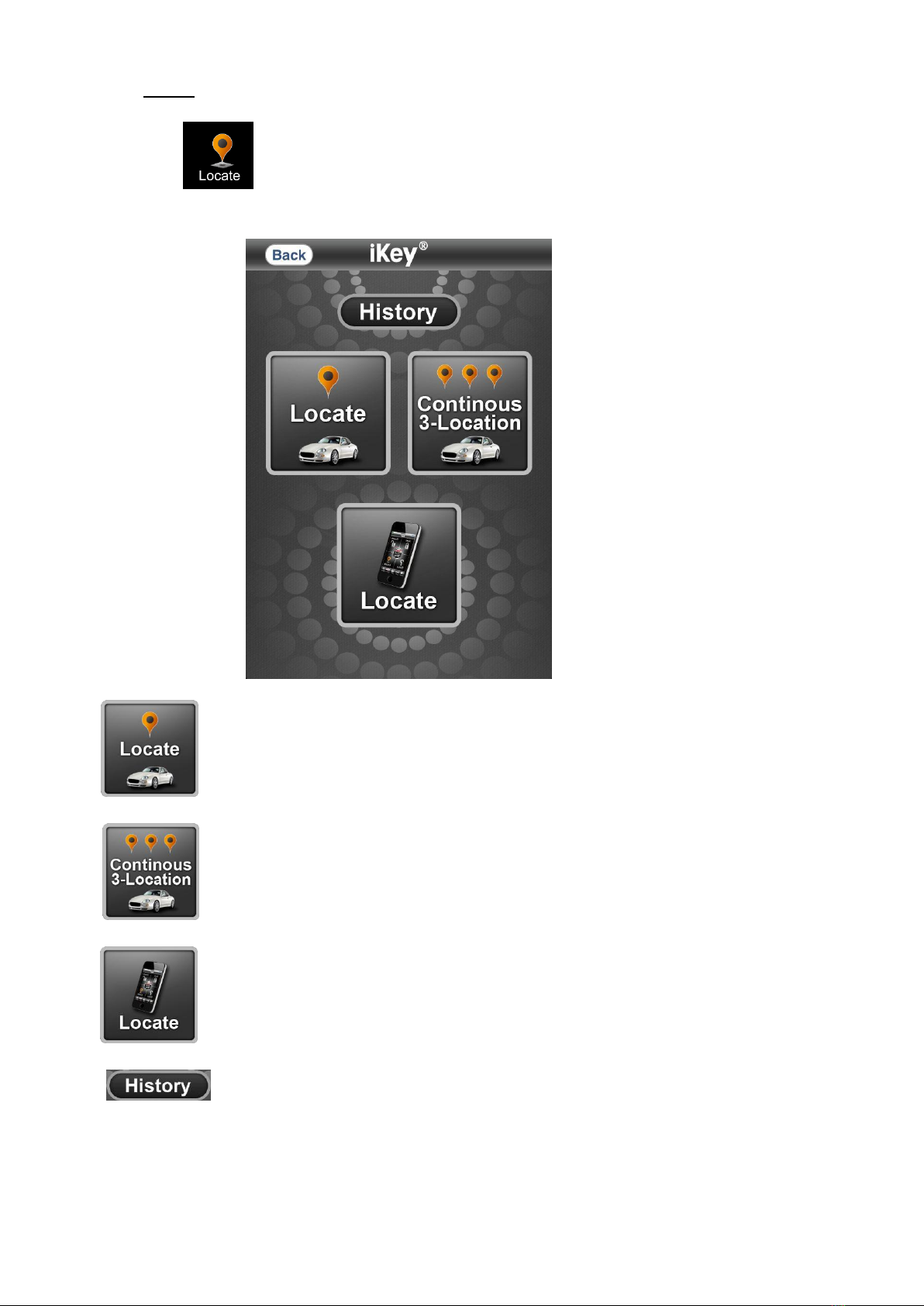
4. Locate
Press button , system will send SMS GPS data back to cellphone. cellphone link intertnet
show the main unit in E-map .
a. Locate
b. Contionus 3-Location
c. Locate myphone
d. Check Location History

7 of 35
Copyright © 2010~2011 iKey
All other trademarks are the property of their respective owners.
www.ikeytrack.com
or in the messages list open Location or Trigger SMS .press the SMS
http://maps.google.com/maps?q= link intertnet show the main unit in E-map .

8 of 35
Copyright © 2010~2011 iKey
All other trademarks are the property of their respective owners.
www.ikeytrack.com
5. Home
Press button , back to main page.

9 of 35
Copyright © 2010~2011 iKey
All other trademarks are the property of their respective owners.
www.ikeytrack.com
6. Car1/Car2/Car3
Press button or or ,Setting cellphone1 / cellphone2 /cellphone3 / Time
zone / Engine start time’s / Trigger Confirm by Call or SMS.

10 of 35
Copyright © 2010~2011 iKey
All other trademarks are the property of their respective owners.
www.ikeytrack.com
A. SMS Configuration Format:
1) The SMS message format for the set up is:
#Current_Password*CFG*New_Password*Celluler_Phone_Number1*
Celluler_Phone_Number2* Celluler_Phone_Number3*Time_ Zone
Setting*Device_Name*Remote_Starter_Timer*Confirm#
Parameter definition:
Current_Password:
This is the current password. If this password is incorrect then unit will not accept the
settings and no error message will be returned to the sender’s cellular phone number via
an SMS.
Note:
The default Password is “0000”.
Note:
The password is the same as the software password. And the password will be set
automatically by the mobile phone software after user changing the password of the
software.
CFG:
This parameter is for commanding the unit to enable the tracking/reporting function, it
cannot be changed.
New_Password:
Numeric characters only. Minimum length is 4 digits and maximum is 10 digits.
Cellular_Phone_Number 1:
Maximum length is 16 characters including the character ‘+’ if needed.
Example: +886988556362
Cellular_Phone_Number 2:
Otros manuales para SM200
1
Tabla de contenidos


