iHome iP44 Manual de usuario

Questions? Visit www.ihomeaudio.com
Model:iP44(USEnglishversion)
Printcolor:Blacktextonwhitepaper
Sizeofmanual:178mmWx178mmH
Date:June24,2010 P1
Model iP44
Pillow Shaker FM Alarm Clock
Radio for iPhone or iPod

• Place the unit on a level surface away from sources of direct sunlight or excessive heat.
• Protect your furniture when placing your unit on a natural wood and lacquered finish. A cloth or other protective material
should be placed between it and the furniture.
• Clean your unit with a soft cloth moistened only with mild soap and water. Stronger cleaning agents, such as Benzene,
thinner or similar materials can damage the surface of the unit.
Maintenance
Table of Contents
1
2-3
3
4
5
5
6
7
7
7
8
8
8
9
10
11
iP44 Quick Start
Controls and Indicators
iP44 Display
Installing/Replacing the Clock Backup Battery
Getting Started
Setting Up the iP44
Using the Alarm
Charging your iPhone/Pod
Listening to iPhone/iPod
Listening to FM Radio
Sleep Operation
Using the iP44 in Other Countries
Dimmer Operation
A Consumer Guide to Product Safety
Trouble Shooting
Warranty Information
Table of Contents
P2

P3
FCC Information
This equipment complies with the limits for a Class B digital device as specified in Part 15 of FCC Rules. These limits
provide reasonable protection against radio and TV interference in a residential area.
However, your equipment might cause TV or radio interference even when it is operating properly. To eliminate interference
you can try one or more of the following corrective measures:
• Reorient or relocate the receiving antenna.
• Increase the distance between the equipment and the radio or TV.
• Use outlets on different electrical circuits for the equipment and the radio or TV.
• Consult your dealer or an experienced radio/television technician if the problem still exists.
Modifying or tampering with your system’s internal components can cause a malfunction and might invalidate the system’s
warranty and void your FCC authorization to operate it.
This Class B digital apparatus complies with Canadian ICES-003.
Cet appareil numérique de la classe B est conforme à la norme NMB-003 du Canada.
This device complies with Part 15 of the FCC Rules, operation is subject to the following two conditions:
(1) This device may not cause harmful interference, and (2) this device must accept any interference
received, including interference that may cause undesired operation.
Battery Information
For models that use Lithium batteries
• Lithium batteries can explode or cause burns if disassembled,
shorted, recharged, exposed to water, fire, or high temperatures.
& not handled appropriately
• Do not place loose batteries in a pocket, purse, or other container
containing metal objects, mix with used or other battery types, or
store with hazardous or combustible materials.
• Store in cool, dry, ventilated area.
• Follow applicable laws and regulations for transport and disposal.
For models that require more than one battery
• Do not mix with used or other battery types/brands
• Replace all cells at the same time
• Do not open batteries
• Do not dispose of in fire
• Do not heat above 75C (167F)
• Do not expose contents to water
• Do not charge or recharge
• Do not install backwards

1
P4
NOTE: If you do not have an insert for your iPhone/iPod, please visit
www.ihomeaudio.com or call iHome toll free at 800-288-2792 to purchase one
iP44 Quick Start
2:inserts
Select the dock insert for your
iPhone/iPod model from the table
below and place insert in dock.
Never dock an iPhone or iPod
without an insert in place.
3:iPod/iPhone
Insert iPhone or iPod into dock with
proper insert (iPhone/iPod must not
be in a skin or case). iPhone/iPod
will charge while docked. Press Play
Button on iP44 to play iPhone/iPod.
1:power
Attach AC adaptor cable to jack on
back of the iP44 and plug the other
end into a wall socket.
4:time • To use time sync, dock your iPhone/iPod and press the Time
Sync/Set Button. The unit will sync to the time on your iPhone/iPod.
• To set time manually, move the DST switch on rear of unit to +1 or -1
(adds or subtracts an hour for daylight saving time or standard time).
• Press & hold the Time Sync/ Set button on the back of unit until the
hour display flashes. Press / buttons to set the current hour.
• Press the Time Sync/ Set button. The minute display flashes.
Press / buttons to set the current minutes.
• Press the Time Sync/ Set button again to confirm time setting.
nano 5G
insert 18
nano 5G
iPod touch 2G
iPod touch 2G
insert 16
For this iPhone/iPod
Use this insert iPhone 3G
iPhone 3G/3GS
Insert 15
RESET
RESET
TEST
TEST

2
P5
Controls and Indicators
Top Panel
Power On/Off/
Alarm Reset Button
Play/Pause Button
Volume Down Button
Volume Up Button
Snooze/Dimmer Button
Alarm Button
Radio/Aux Button
Forward Button
iPod / iPhone Dock
Reverse Button
alm. reset
radio / aux.
snooze / dimmer
Back Panel
Sleep Button
DST Switch
AC Adaptor Jack
FM Antenna
EXB Button
Time Sync/Set
Button
Pillow Shaker Jack

3
P6
iP44 Display
Time Display
PM Indicator
iPhone/iPod Indicator
Radio Indicator
Buzzer Indicator
Alarm Indicator
EXB Indicator
Sleep Indicator
Wake-to Indicator
Battery Low Indicator
Controls and Indicators
On/OFF Switch
Snooze Button
Pillow Shaker
Line-in Plug
Aux (pillow shaker)
Indicator

4
P7
Installing/Replacing the Clock Backup Battery
The iP44 requires a CR2032 lithium battery (included) to provide backup power to
the clock in the event of a temporary power interruption. The CR2032 backup
battery was packed in the same poly bag with this instruction manual.
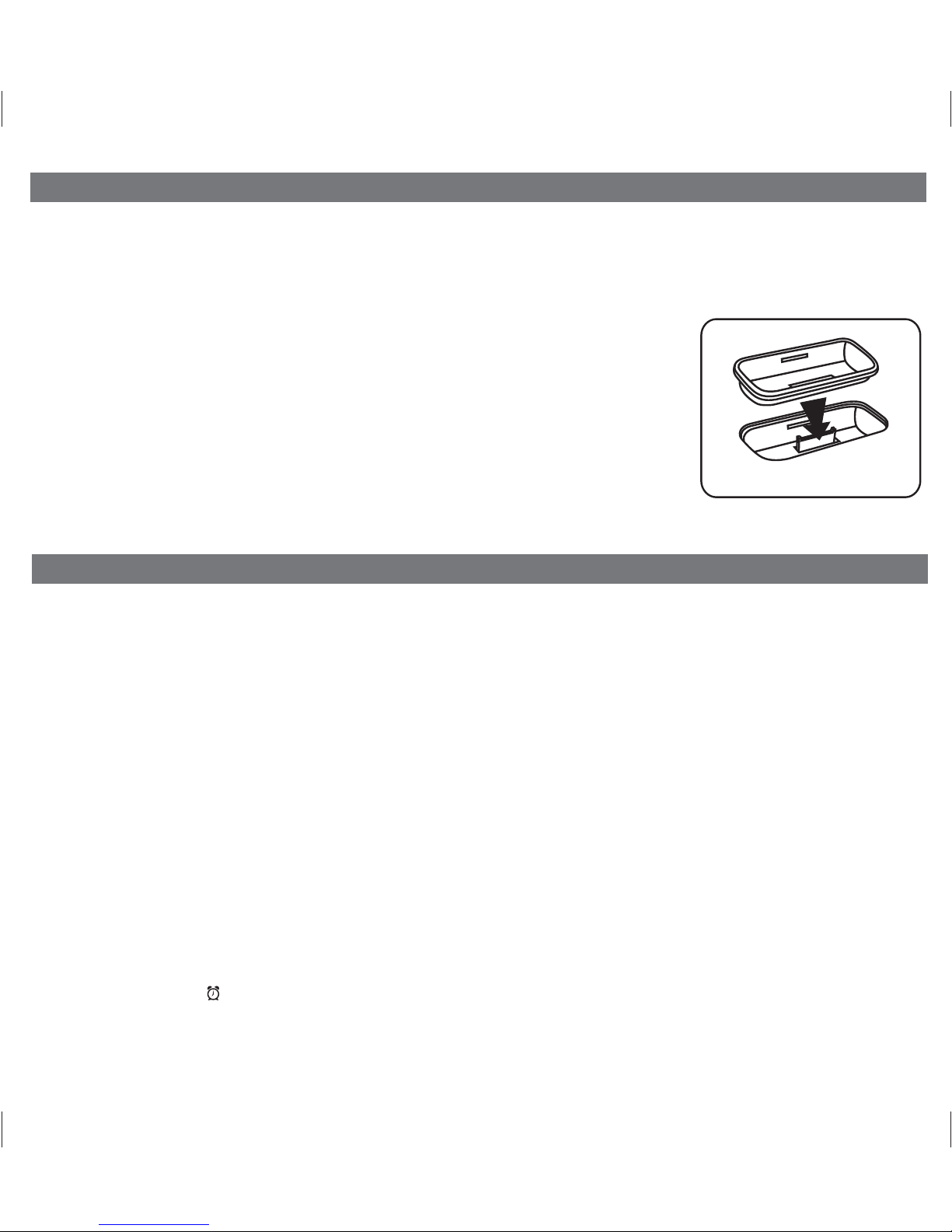
1. Place the clock radio face down on a flat surface.
2. Slide the battery door in the direction of the arrow and then lift the door by the
opposite edge to remove it from the radio.
3. Install the CR2032 backup battery in the battery compartment with the “+” side
facing up as shown in the illustration.
4. Replace the battery door.
If AC power is interrupted the backlighting in the display will go off and the radio or
docked iPod/iPhone will not play. However, the buzzer alarm will still turn on at the
selected time to wake you up, even if you had selected the Wake to Radio, or Wake
to iPod alarm modes.
When the Battery Low Icon appears in the display it is time to replace the battery. Purchase a fresh CR2032 battery,
available wherever batteries are sold. Follow steps 1 through 4 above to remove the exhausted battery and install the fresh
battery. IMPORTANT: To avoid having to reset the time and wake up time, leave the radio connected to the AC outlet when
you install the new backup battery.
Note: Make sure you dispose of the exhausted lithium battery properly, according to your local regulations.
Installing Backup Battery

P8
Thank you for purchasing the iP44. Designed specifically to work with your iPhone and iPod, this system provides high quality
audio performance that brings out the best in your music and lets you wake or sleep to it.
Please read this instruction carefully before the appliance is operated and keep it for future reference.
Install iPhone/iPod Insert
Your iP44 comes with a set of inserts to ensure your iPhone or iPod fits properly in the dock
on the top of the system.
To place an insert:
1. Select the insert for your iPhone/iPod.
2. Gently press the iPhone/iPod insert into the dock.
3. Carefully place your iPhone/iPod into the dock. The iPhone/iPod must not be in a case
or “skin”.
4. To remove/replace an insert, first remove your iPhone/iPod, grip the insert and pull
gently upwards.
Getting Started
Install Insert
Setting Up the iP44
5
Time Sync from iPhone/iPod
The iP44 Time Sync feature allows you to quickly sync the time on the iP44 to the time on your iPhone or recent model iPod
(iPod Touch, iPod Nano and iPod Classic; older iPod models such as iPod mini do not support this feature).
1. Press the Time Sync/Set Button located at the back of the unit. A cursor will flash across the display, indicating the
unit is attempting to sync.
2. Once sync is completed two beeps will confirm sync was successful and the new time will be displayed.
3. If sync was not successful, one long beep will sound. If this happens, please try again with a different iPhone/iPod, or see
Setting Time Manually on page 5 to set the time.
Note: iPhone time is automatically updated to the correct time via cell phone towers. The time on your iPod is accurate only
to the time on the computer the last time the iPod was synced to it. It’s possible to have up to 59 seconds difference between
the iP44 and synced iPhone or iPod.
Setting Clock Time Manually
1. Depending on your location and whether or not Daylight Saving Time is in effect, set the DST Switch located at
the back of the unit to +1 to add an hour or to -1 to subtract an hour.
2. Press and hold the Time Sync/Set Button located at the back of the unit for 2 seconds until the hour flashes on the
display. Press the << or >> button to set the current hour (hold to advance rapidly). Remember to set the correct AM
or PM time. The PM Indicator is located on the upper left side of the time display; there is no AM indicator
2. Press the Time Sync/Set Button again. The minutes will flash. Press the << or >> Button to set correct minutes.
3. If desired, press the Button during time setting to toggle the clock format between 12 hour and 24 hour display mode.
4. Press the Time Sync/Set Button again (or no button within 10 seconds) to exit the time setting mode. Two beeps will
confirm the time is set.

6
P9
Using the Alarm
Using the Pillow Shaker
The iP44 comes with a pillow shaker that plugs into the aux wake-to (pillow shaker) jack on the back of the unit. You can
wake to any alarm mode with or without the shaker. For example, if your alarm source is set to iPod and the pillow shaker is
connected and on, the iPod will play AND the pillow shaker will vibrate at the set alarm time.
1. Connect the pillow shaker to the aux wake-to (pillow shaker) jack found on the rear of the unit.
2. Slide the pillow shaker power switch to the ON (green) position and place the pillow shaker device under your pillow.
When the alarm goes off, the pillow shaker will vibrate and the alarm source will sound.
3. Slide the switch to the OFF (red) position to turn off the pillow shaker.
4. Press the Snooze Button on the pillow shaker to stop its vibration and silence any alarm source for the duration of
snooze time set (see Snooze Operation) before coming on again.
Setting the Alarm
1. Press and hold the Button until the alarm icon and alarm hour flashes. Press the << or >> Button to set the alarm
hour. Remember to set the correct AM or PM time.
2. Press the Button again. The minutes will flash. Press the << or >> Button to set the alarm minutes.
3. Press the Button again. The wake-to icon will flash. Press the << or >> Button to select iPhone/iPod, radio, aux
(pillow shaker) or buzzer.
Note: if selected wake-to source is iPhone/iPod but no iPhone/iPod is docked/detected, the iP44 will automatically
switch to wake to buzzer. The same is true if the selected wake-to source is aux (pillow shaker) and the pillow shaker is
either turned off or not connected.
4. Press the Button again (or no button within 10 seconds) to exit the alarm setting mode. Two beeps will confirm the
alarm is set and the corresponding alarm icon will light up.
Review, Arming and Disarming Alarm (Turn Alarm Function On and Off)
1. To arm/disarm the alarm, just press the Button to toggle it on or off, indicated by the appearance or lack of the alarm
icon on the display. The current alarm time also appears.
Resetting the Alarm to Come on the Next Day
1. When the alarm is sounding, press the Button to stop the alarm and reset it to come on the following day.
Snooze Operation
1. Press and hold the Snooze/Dimmer Button for a few seconds until the snooze time flashes. Press the << or >>
Button to set the snooze timer for 1 to 29 minutes.
2. Press the Snooze/Dimmer Button on the main unit (or the snooze button on the pillow shaker) after the alarm sounds.
The alarm will be silenced and come on again after the set snooze time. Snooze can be pressed several times during
the 1 hour alarm cycle.
Sure Alarm
The iP44 has a sure alarm feature. If the backup battery is installed, the buzzer alarm will still sound in the event of power
failure.

Charging your iPhone/Pod
7
P10
Listening to iPhone/iPod
Note: Please make sure you are using the correct insert for your iPhone/iPod and that it is properly docked into the iP44.
Failure to do so may damage your iPhone/iPod. This unit does not charge non-docking iPod models.
1. While your iPhone/iPod is docked in the unit and the unit is connected to AC power, it recharges (until fully charged).
1.
Dock the already playing iPhone/iPod, the iP44 will automatically turn on and you will hear the music playing from your
iPhone/iPod.
Note: If the playing song/music loudness is too low on the iPhone/iPod, the iP44 may not detect that your iPhone/iPod
is in play mode. Press the Button to play it. iPhone/iPod icon will turn on to show iP44 is running under iPhone/iPod
mode.
2. When the iPhone/iPod is docked and in standby mode, press the Button to play it.
3. Press the Button again to pause play; press again to resume it.
4. To skip to different music tracks or to perform high speed music search within a track, you may press the << or >>
buttons on the top panel of the iP44. These controls have the same function as the l<< or >>l buttons on your iPod
click wheel or your iPhone display.
5. Press the or Button to adjust the system volume.
6. Press EXB Button located on the rear of the unit to enhance the bass sound.
7. To turn off the unit, press the Button. Your iPhone/iPod will continue charging while in the dock.
Listening to FM Radio
Setting up Antenna
Extend wire antenna fully for best reception. Do not strip, alter or attach to other antennas.
Tuning and Playing the Radio
1. Press the Radio/Aux Button to turn the iP44 on. The radio icon in the lower part of the display will appear.
2. Press the << or >> Button to tune the radio to a desired station. Press and hold briefly to scan to next clear station.
3. Press the or Button to adjust the system volume.
4. Press the EXB Button located on the rear of the unit to enhance the bass sound.
5. To turn off the unit, press the Button.
Tabla de contenidos
Otros manuales de Radio reloj de iHome

iHome
iHome iBN97 Manual de usuario

iHome
iHome iH5 Manual de usuario

iHome
iHome iBN97 Manual de usuario

iHome
iHome iBT234 Manual de usuario

iHome
iHome iBT97 Manual de usuario

iHome
iHome iBN43 Manual de usuario

iHome
iHome iHM50R Manual de usuario

iHome
iHome IA100 Manual de usuario

iHome
iHome IP43 IP43 Manual de usuario

iHome
iHome iDL46EU Manual de usuario

iHome
iHome iBT38 Manual de usuario

iHome
iHome iH27 Manual de usuario

iHome
iHome iDL100 Manual de usuario

iHome
iHome iHC5 Manual de usuario

iHome
iHome ZN9 Manual de usuario

iHome
iHome iM30 Manual de usuario

iHome
iHome iBT280 Manual de usuario

iHome
iHome iBT233V2 Manual de usuario

iHome
iHome iPL22 Manual de usuario

iHome
iHome iP47 Manual de usuario