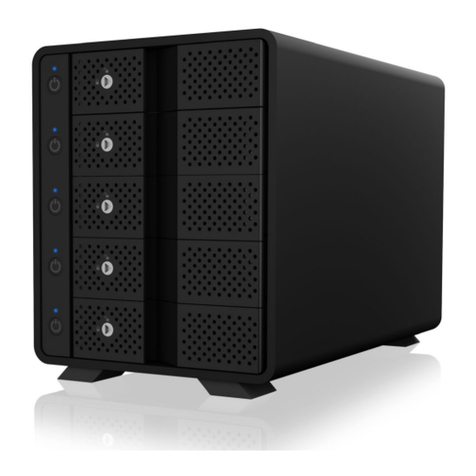
Icy Box IB-3804-C31 Manual de usuario

Handbuch
Manual
IB-3804-C31

E
Please read carefully the following information to prevent injuries,
damage to material and device as well as data loss:
Warning levels
Signal words and safety codes indicate the warning level and provide immediate information in terms of the
probability of occurrence as well as the type and severity of the consequences if the measures to prevent
hazards are not complied with.
Warns of a directly hazardous situation causing death or serious injury.
Warns of a potentially hazardous situation that may cause death or serious injury.
Warns of a potentially hazardous situation that may cause minor injury.
Warns of a potential situation that may cause material or environmental damage and
disrupt operative processes.
1. Risk of electrical shock
Contact with parts conducting electricity
Risk of death by electrical shock
• Read the operating instructions prior to use
• Make sure the device has been de-energised prior to working on it
• Do not remove contact protection panels
• Avoid contact with conducting parts
• Do not bring plug contacts in contact with pointed and metal objects
• Use in intended environments only
•Operate the device using a power unit meeting the specifications of the type plate only!
• Keep the device/power unit away from humidity, liquid, vapour and dust
• Do not modify the device
• Do not connect the device during thunderstorms
• Approach specialist retailers if you require repairs
2. Hazards during assembly (if intended)
Sharp components
Potential injuries to fingers or hands during assembly (if intended)
• Read the operating instructions prior to assembly
• Avoid coming into contact with sharp edges or pointed components
• Do not force components together
• Use suitable tools
• Use potentially enclosed accessories and tools only
3. Hazards caused by a development of heat
Insufficient device/power unit ventilation
Overheating and failure of the device/power unit
• Prevent externally heating up components and ensure an exchange of air
• Do not cover the fan outlet and passive cooling elements
• Avoid direct sunlight on the device/power unit
• Guarantee sufficient ambient air for the device/power unit
• Do not place objects on the device/power unit
DANGER
WARNING
CAUTION
IMPORTANT
WARNING
CAUTION
IMPORTANT

N
4. Hazards caused by very small parts and packaging
Risk of suffocation
Risk of death by suffocation or swallowing
• Keep small parts and accessories away from children
• Store/dispose of plastic bags and packaging in an area that is inaccessible to children
• Do not hand over small parts and packaging to children
5. Potential data loss
Data lost during commissioning
Potentially irreversible data loss
• Always comply with the information in the operating instructions/quick installation guide
• Exclusively use the product once the specifications have been met
• Back up data prior to commissioning
• Back up data prior to connecting new hardware
• Use accessories enclosed with the product
6. Cleaning the device
Harmful cleaning agents
Scratches, discolouration, damage caused by moisture or short circuit in the device
• Disconnect the device prior to cleaning
• Aggressive or intense cleaning agents and solvents are unsuitable
• Make sure there is no residual moisture after cleaning
• We recommend cleaning devices using a dry, anti-static cloth
7. Disposing of the device
Environmental pollution, unsuitable for recycling
Potential environmental pollution caused by components, recycling circle interrupted
This icon on product and packaging indicates that this product must not be disposed of as part of
domestic waste. In compliance with the Waste Electrical and Electronic Equipment Directive (WEEE)
this electrical device and potentially included batteries must not be disposed of in conventional,
domestic waste or recycling waste. If you would like to dispose of this product and potentially
included batteries, please return it to the retailer or your local waste disposal and recycling point.
If you have any questions, please do not hesitate to contact our support at
support@raidsonic.de or visit our website at www.icybox.de.
WARNING
IMPORTANT
IMPORTANT
IMPORTANT

D
Zur Vermeidung körperlicher Schäden, sowie von Sach-, Geräteschäden
und Datenverlust beachten Sie bitte folgende Hinweise:
Warnstufen
Signalwort und Sicherheitszeichen kennzeichnen die Warnstufe und geben einen sofortigen Hinweis auf
Wahrscheinlichkeit, Art und Schwere der Folgen, wenn die Maßnahmen zur Vermeidung der Gefahr nicht
befolgt werden.
warnt vor einer unmittelbar gefährlichen Situation, die zum Tod oder zu schweren Ver-
letzungen führen wird.
warnt vor einer möglicherweise gefährlichen Situation, die zum Tod oder zu schweren
Verletzungen führen kann.
warnt vor einer möglicherweise gefährlichen Situation, die zu leichten Verletzungen
führen kann.
warnt vor einer möglichen Situation, die zu Sach- und Umweltschäden führen und den
Betriebsablauf stören kann.
1. Gefahren durch elektrische Spannung
Kontakt mit elektrisch leitenden Teilen
Lebensgefahr durch Stromschlag
• vor Benutzung Betriebsanleitung lesen
• vor Arbeiten am Gerät, Spannungsfreiheit sicherstellen
• Kontaktschutzblenden nicht entfernen
• Kontakt mit Spannungsführenden Komponenten vermeiden.
• Steckkontakte nicht mit spitzen und metallischen Gegenständen berühren
• Verwendung nur in dafür vorgesehenen Umgebungen
• Gerät ausschließlich mit Typenschildkonformen Netzteil betreiben!
• Gerät/Netzteil fern von Feuchtigkeit, Flüssigkeit, Dampf und Staub halten
• Eigenständige Modifikationen sind unzulässig
• Gerät nicht während eines Gewitters anschließen
• Geben Sie Ihr Gerät im Reparaturfall den Fachhandel
2. Gefahren während Montage (wenn vorgesehen)
Scharfkantige Bauteile
Finger- oder Handverletzungen bei Zusammenbau (wenn vorgesehen) möglich
• vor Montage, Betriebsanleitung lesen
• Kontakt mit scharfen Kanten oder spitzen Bauteilen vermeiden
• Bauteile nicht mit Gewalt zusammensetzen
• geeignetes Werkzeug verwenden
• nur gegebenenfalls mitgeliefertes Zubehör und Werkzeug verwenden
3. Gefahren durch Wärmeentwicklung
Mangelhafte Belüftung des Geräts/Netzteils
Überhitzung und Ausfall des Geräts/Netzteils
•Externe Erwärmung vermeiden und Luftaustausch zulassen
• Lüfter-Auslass und passive Kühlkörper freihalten
•Direkte Sonneneinstrahlung auf Gerät/Netzteil vermeiden
DANGER
WARNING
CAUTION
IMPORTANT
WARNING
CAUTION
IMPORTANT

E
•Ausreichend Umgebungsluft für Gerät/Netzteil sicherstellen
•Keine Gegenstände auf dem Gerät/Netzteil abstellen
4. Gefahren durch Kleinstteile und Verpackung
Erstickungsgefahr
Lebensgefahr durch Ersticken oder Verschlucken
• Kleinteile, Zubehör für Kinder unzugänglich verwahren
• Plastiktüten und Verpackung für Kinder unzugänglich verwahren/entsorgen
• Kleinteile und Verpackungen nicht in Kinderhände geben
5. Möglicher Datenverlust
Datenverlust bei Inbetriebnahme
Unwiederbringlicher Datenverlust möglich
•Unbedingt Hinweise in der Bedienungsanleitung/Schnellinstallationsanleitung beachten
• Produkt nur verwenden, wenn Spezifikationen erfüllt sind
• Datensicherung vor Inbetriebnahme durchführen
• Datensicherung vor Anschluss neuer Hardware durchführen
• dem Produkt beiliegendes Zubehör verwenden
6. Reinigung des Gerätes
Schädigende Reinigungsmittel
Kratzer, Farbveränderungen, Feuchteschäden oder Kurzschluss am Gerät
• vor Reinigung, das Gerät außer Betrieb nehmen
• aggressive bzw. scharfe Reinigungs- und Lösungsmittel sind ungeeignet
• nach der Reinigung sicherstellen, dass keine Restfeuchtigkeit vorhanden ist
• Reinigung der Geräte am besten mit trockenem Antistatiktuch durchführen
7. Entsorgung des Gerätes
Umweltverschmutzung, Wiederverwertung nicht möglich
Mögliche Umweltbelastung durch Bestandteile, Recyclingkreislauf unterbrochen
Dieses auf dem Produkt und der Verpackung angebrachte Symbol zeigt an, dass dieses Produkt
nicht mit dem Hausmüll entsorgt werden darf. In Übereinstimmung mit der Richtlinie über Elektro-
und Elektronik-Altgeräte (WEEE) darf dieses Elektrogerät und ggf. enthaltene Batterien nicht im
normalen Hausmüll oder dem Gelben Sack entsorgt werden. Wenn Sie dieses Produkt und ggf.
enthaltene Batterien entsorgen möchten, bringen Sie diese bitte zur Verkaufsstelle zurück oder
zum Recycling-Sammelpunkt Ihrer Gemeinde.
Bei Fragen kontaktieren Sie gerne unseren Support unter suppor[email protected] oder besuchen Sie unsere
Internetseite www.icybox.de.
WARNING
IMPORTANT
IMPORTANT
IMPORTANT

EN
Note: All the information contained in this manual was correct at the time of publication. However, as
our engineers are always updating and improving the product, your device may have a slightly different
appearance or modified functionality than presented in this manual.
Key Features
• External 4-bay SINGLE system for 4x 3.5" SATA I/II/III HDD
• HDD capacity unlimited
• Energy saving by supporting auto power off mode for HDDs and case fan
• EASY-Swap, assembling by trayless and toolless design
• Supported RAID level: SINGLE
• External data interface: USB 3.1 (Gen 2) with UASP Support
• Transfer rates: USB 3.1 up to 10 Gbit/s
• Hard drives individual ON-/OFF-switch without loss of USB connection
• Plug & Play and HotSwap
• LED for: Power, HDD in use and access
• Windows®macOS®
Package content
•1x IB-3804-C31
•1x external power supply
•1x power cable
•1x USB Type-C®to Type-C®cable
•1x USB Type-C®to Type-A cable
•2x keys
•1x manual

. Status LED
. Independent power switch/drive
. Door lock
. Door handle
. Hard drive slot
. 90 mm fan
. Main power switch
. Power jack for external power supply
. Support for Kensington Lock
. HOST Computer USB Type-C®interface
A
B
C
D
E
F
G
H
I
J
A
B
C
D
E
F
G
H
I
J

Drive installation
Before the installation
Note!
Before installing the hard drive, please disconnect the power plug from the outlet or turn off each drive bay
individually. It may cause electric shock accident or malfunction.
When connecting the hard drive, please note the electrostatic! Body's static electricity may cause malfunction
of the device. Please touch the metal objects to discharge or wear the antistatic gloves before the operation.
Attention!
PCB of this device and HDDs are precision machinery, please be careful do not collision and please notice
the direction of HDD
Be careful the cutting edge inside may cut hand!
If hard disk already contains data, please backup data before installation to prevent data loss.
- Open the front door (make sure the lock is unlocked.).
- Insert the HDD into the corresponding slot.
Attention: Please notice the direction of HDD!
- Close the front door until it has been locked and the HDD locks into the connector.
If required, the door of each drive bay can be locked.
- To remove a hard disk, carefully pull the handle of the front flap forward and loosen the internal connection
of the hard disk so that you can then remove the drive.
Note:
- To protect the drives and the device, you can turn off each drive bay individually without disconnecting
the other drives when you add or remove a drive.
- Connect the power adapter and connect the USB cable to your computer and power on the device via
power switch of the power supply at the rear side.
If the drive bays without hard disks are switched on, the corresponding LED lights up red.
If drive bays with inserted hard disks are switched on, the corresponding LED lights up blue.
During access, the corresponding LED flashes purple
DISK INITIALISATION
About data security
To protect your files and help prevent the loss of your data, we strongly recommend that you keep two copies
of your data, one copy on your IB-3804-C31 and a second copy either on your internal drive or another
storage media such as CD, DVD, Tape or an additional external drive.
Any loss or corruption of data while using the IB-3804-C31 is the sole responsibility of the user, and under
no circumstances will the manufacturer be held liable for compensation or the recovery of this data.

Windows®
If the HDD is uninitialized, you may have to initialize it by doing steps as followed:
At first click ''Start'', ''Execute'' on your PC and key in ''diskmgmt.msc''.
After that please press ''Return'' key.
1. Start disk initialization
Note: Please enable GPT if the total capacity is more than 2 TB and enable MBR if the total capacity is less
than 2 TB.
Initialize
D
isk

2. Create new partition and format disk
3. Drive format completed
Tabla de contenidos
Idiomas:
Otros manuales de Sistema de matriz de discos de Icy Box
Manuales populares de Sistema de matriz de discos de otras marcas

Fujitsu
Fujitsu ETERNUS DX60 S2 Manual de usuario

Accom
Accom WSD/2XTREME Manual de usuario

HP
HP Compaq Presario,Presario 4400 Instrucciones de uso

ATTO Technology
ATTO Technology Diamond Storage Array V-Class Manual de usuario

National Instruments
National Instruments RMX-8268 Manual de usuario

Overland Tandberg
Overland Tandberg SnapServer DX1 Manual de usuario