
IBC P-1001 Manual de usuario

P-1001 Controller Board Replacement
IBC Technologies Inc. 1-844-432-8422 |www.ibcboiler.com
120-456E0 August, 2022 Released Document 1 of 4
Kit Instructions - AHU
Warning
This replacement kit shall be installed by a qualified service agency in accordance with the
manufacturer’s instructions and all applicable codes and requirements of the authority having
jurisdiction. If the information in these instructions is not followed exactly, a fire, an explosion or
production of carbon monoxide may result causing property damage, personal injury or loss of
life.
The qualified service agency is responsible for the proper installation of this kit. The installation
is not proper and complete until the operation of the converted appliance is checked as specified
in the manufacturer’s instructions supplied with the kit.
Control Board - AHU
Part # Description Quantity
150-014 Screw, 6-32 X 3/8 4
152-003 Cable tile, white 4.0" 1
240-168 Fuse block cover 1
255-122 Humidity sensor gasket 1
500-186 PCB controller 1
When to Install the P-1001 Control Board Replacement Kit
Install the P-1001 kit if you need to replace a damaged control board in an AHU
Note
A ladder or step may be required to have a clear vertical view of the work area.
Do not attempt to remove the assemblies without a clear view, as damage to the connectors,
screws or refractory may occur.
IBC Technologies Inc. 1-844-432-8422 |www.ibcboiler.com
120-456E0 August, 2022 Released Document 2 of 4
Removal of AHUControl Board
Preparing the AHU for servicing
1. Remove power to the AHU at a wall switch or a breaker.
2. Remove the panel from the front of the cabinet.
Removing the AHUControl Board
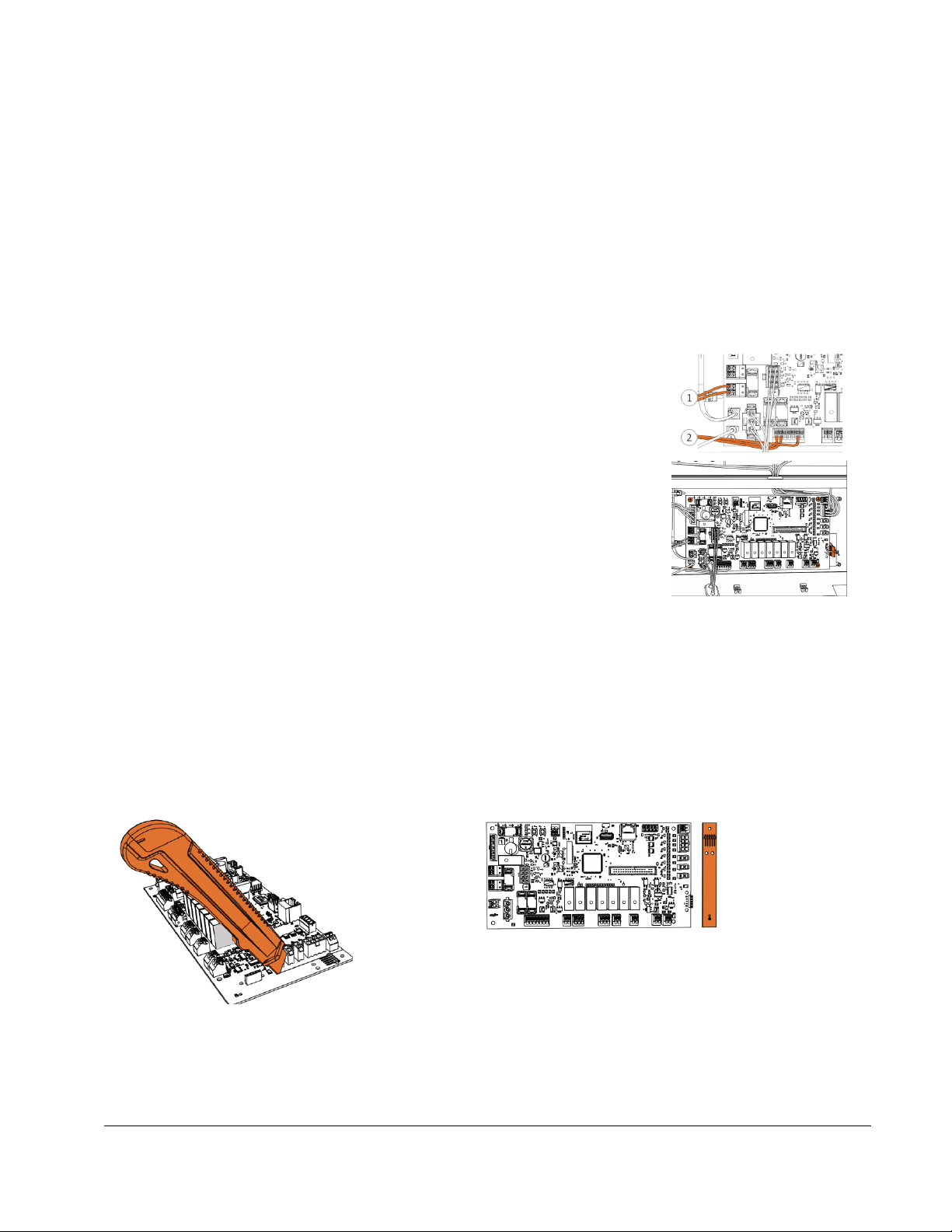
1. Remove the AC power wires (1) and other field (2) wiring from their
connectors by using a screwdriver to push the tabs in on the connectors to
release the wires.
2. Unplug all other connectors from the control board.
3. Cut and remove the cable ties from the sensor board connecting it to the
control board.
4. Remove the sensor from the board.Inspect the sensor gasket; if it is
damaged, remove and replace using the gasket provided in the kit.
5. Remove and retain the screws securing the controller board to the AHU
and remove the board.
Reassembly and Start-Up
Reassembly
1. Place the replacement board on a flat surface. Use a scoring knife to score a straight line between
the main board and the humidity sensor strip. The strip should snap off by hand without force.
2. Secure the replacement board in place using the four retained screws. If necessary, use the
replacement screws.

IBC Technologies Inc. 1-844-432-8422 |www.ibcboiler.com
120-456E0 August, 2022 Released Document 3 of 4
3. Insert the humidity sensor strip onto the controller board until the 5 pins engage the 5-pin connector
on the board. Secure the strip with supplied zip tie.
4. Wire in field wiring.
5. Plug in all connectors:
a. temperature sensor from the coil
b. transformer
c. fan power
d. fan control
e. door switch
f. ground wire
Start-up
1. Restore power to the AHU.
2. Complete Connecting the IBCconnect app on page 3 and then Configure Settings using the
IBCconnect app on page 4 .
3. Test for proper function of AHU and program settings.
Connecting the IBCconnect app
Note
While your device is connected to the air handler, you will not have internet access.
It is recommended to set the WIFI connection to 'Low Data Mode' while using the app.

IBC Technologies Inc. 1-844-432-8422 |www.ibcboiler.com
120-456E0 August, 2022 Released Document 4 of 4
1. Scan the respective QR codes above, or search for “IBCconnect” (one word) on the Google Play or
Apple App store and tap Install.
a. Connect your device to the IBC air handler'(which has a built-in WiFi access point) through the
app's WiFi network settings.
b. The WiFi password for all air handlers is '1234567890'.
2. If the IBCconnect app is unable to maintain a connection to the IBC AHU WiFi, the IBCConnect app
footer will show an "X" icon above WiFi. It is likely the device is attempting to perform uploads in the
background. To prevent cell phone data and WiFi conflict:
a. Remove the IBC AHU WiFi connection from the device.
b. Go to the device’s WiFi Setting.
c. Press and hold the IBC-AHU-xxxxx entry.
d. Tap Forget Network.
e. Place the device in "Airplane Mode".
f. Reconnect the device to the IBC AHU WiFi by selecting the "IBC-AHU-xxxxx" from the list of
access points. Ensure that the WiFi reconnect option is disabled.
g. Start the IBCconnect app again.
Configure Settings using the IBCconnect app
1. Open the IBCconnect air handler app.
2. Select Configure AHU >
a. Choose model from AHU Model dropdown >
b. Select Save
i. The AHU will restart
3. Close the app and then reopen the app again:
a. Select Basic Settings >
b. Set the Heat Mode and Cool Mode >
c. Select Save
Tabla de contenidos
Otros manuales de Unidad de control de IBC


Manuales populares de Unidad de control de otras marcas

Festo
Festo Compact Performance CP-FB6-E Manual de lista de piezas

Elo TouchSystems
Elo TouchSystems DMS-SA19P-EXTME Manual de usuario

JS Automation
JS Automation MPC3034A Manual de usuario

JAUDT
JAUDT SW GII 6406 Series Guía rápida

Spektrum
Spektrum Air Module System Manual de usuario

BOC Edwards
BOC Edwards Q Series Manual de usuario


