HWM Wi5 Manual de usuario

1
Wi5 Data Concentrator
User Manual
Version 14
Warning: This manual contains important safety and operating information.
Please read, understand and follow the instructions in the manual.

2
TABLE OF CONTENTS
1DESCRIPTION 4
1.1 Technical Specifications 4
1.2 Radio Receiver 5
1.3 Data Recording 5
1.4 Data Transfer 5
1.5 Monitoring Unit Status 6
1.6 Unit Configuration 7
2COMMISSIONING 8
2.1 Step 1: Inspecting Package Content 8
2.2 Step 2: SIM Card installation (GPRS Version) 9
2.3 Step 3: Connecting the product 9
2.4 Step 4: Interpreting Front Panel LEDs 11
2.5 Step 5: Confirming Data Transfer 12
3CONFIGURING 14
3.1 Configuration using USB port 14
3.1.1 USB Driver 14
3.1.2 Connecting the USB cable 14
3.1.3 Finding the COM Port in Windows 15
3.1.4 RS232 Communication Terminal Settings 15
3.2 Configuration using SMS (GPRS version only) 17
3.2.1 Protocol 17
3.2.2 Configuration SMS format 18
3.2.3 Acknowledgment SMS 18
3.3 Configure the unit to assist during radio transmitters installation via SMS
(GPRS version only) 20
3.4 Configuring Ethernet Model 22
4INSTALLATION 23
5TROUBLESHOOTING GUIDE 25
6CONFIGURATION COMMANDS DESCRIPTION 26
6.1 Syntax 26

3
6.2 Response Codes 26
6.3 Table of commands 26
6.3.1 HELP 29
6.3.2 STATUS 29
6.3.3 SET DATETIME 30
6.3.4 SET TZONE 30
6.3.5 SET FTP 31
6.3.6 SET GPRS 33
6.3.7 SET NTP 34
6.3.8 FORCE SYNC 34
6.3.9 CONFIG 35
6.3.10 SET NEXT FTP TIME 35
6.3.11 SET SUMMARY TIME 36
6.3.12 SET FTP RETRIES 36
6.3.13 DUMP REPORTS 37
6.3.14 UPLOAD REPORTS 37
6.3.15 GET VERSION 38
6.3.16 SET AC FAIL NUMBER 38
6.3.17 REJECT TIME FILTER 39
6.3.18 ONE PER SESSION FILTER 40
6.3.19 WHITE LIST FILTER 41
6.3.20 BLACK LIST FILTER 42
6.3.21 SET EMAIL 43
6.3.22 RESET ETHERNET (Ethernet only) 44
6.3.23 UPGRADE 44
6.3.24 FIXED IP ADDRESS (Ethernet only) 44
6FTP FILE OR EMAIL CONTENT 45
6.3 Pulse Transmitter VHF (VHF – type 81) 48
6.4 Temperature measurement (UHF – type 82) 49
6.5 Humidity & Temperature Measurement: (UHF - type 83) 50
6.6 Alarm Monitoring (UHF – type 88) 51
6.7 Contact Monitoring (UHF – type 87) 52
6.8 Legionella Flushing Unit (UHF – type 7A) 53
6.9 Current/Voltage/CO2Transmitter (UHF - type 85) 54
6.10 Checksum Calculation 55
6.11 Examples of messages 57

4
1 Description
1.1 Technical Specifications
Power supply
12V – 2A DC input provided by external PSU (supplied)
PSU compatible with AC Input: 90-264 VAC 50-60 Hz
Battery Backup – supply power to the unit for 24 hours in the event of mains power
loss (GPRS version only)
DC input requirements: 0.5 A average current with short spikes of 2A ; unit sill stop
operating below 9VDC
Radio Compatibility
Compatible with RTCOM transmitters
Mono-frequency (version dependent) :
UHF (433.92 MHz or 868.950 MHz) – short antennas supplied
VHF (169.40625 MHz or 153.100 MHz) – antennas optional
Real Time Clock
On board real time clock synchronized every 24 hours via time server (for SNTP
mode on the Ethernet model the time is updated once per week)
Data Recording
Records up to 3 months worth of data on 1GB/2GB MicroSD card (supplied)
GPRS/SMS
Uses Quadband GSM engine
Configurable filters used to reduce amount of GPRS traffic
GPRS connections established only at transfer time
FTP Protocol to transfer data to server
Ethernet
Uses Email to transfer data via SMTP server (Port 25 used by default but is
configurable)
DHCP Enabled to get dynamic IP from LAN – Static IP configurable
Internet access required to synchronize unit on public time server
Configuration
Via Local USB Connection
Via SMS (GPRS version only).

5
Installation
Wall mounting
Front panel LEDs to assist in operation diagnostic
SMS used for remote access during installation (GPRS version only)
Housing
Dimensions – 220 mm X 200 X 45 mm
Weight : 500 grams without antennas and VHF receiver
IP rating : IP66 with optional enclosure
1.2 Radio Receiver
The Wi5 concentrator can work on only one receiving frequency as the radio
receiver fitted on the PCB is different for each frequency. The part number of
the product identifies which frequency is to be used.
The product is compatible with majority of RTCOM transmitters.
As radio packets are coming in, these are time-stamped using the on-board
real time clock. The clock is synchronized periodically using a UTC Time
Server to guarantee accuracy. All time stamps will be UTC/GMT.
1.3 Data Recording
The Wi5 concentrator uses an on board microSD card to record the data
before transmission. It will keep up to 3 months worth of historical data which
can be retrieved at any time using SD card reader and standard text editor by
pressing the pushbutton on the concentrator PCB for 2 seconds. The microSD
card can then be removed from the connector.
The microSD card is required for product operation ensure you
insert it and lock it back in the connector after data upload
1.4 Data Transfer
Data is transferred at a periodical interval via GPRS FTP or email for Ethernet
versions. If the data transfer is not successful (intermittent GPRS connection,
LAN disconnection); the file will be stored and transferred on the next
occasion. In the event that the Wi5 concentrator is offline for an extended
period it will send stored data starting from the oldest record.
The FTP server or email settings can be set to send the data to HWM Data
Server or to another server.

6
Filters can be used to reduce the amount of data sent to the server (ftp or
email):
Only allow particular transmitter IDs’ or packet types
Reject particular transmitters IDs’ or packet types
Reject a packet from a transmitter if it has already transmitted within
the last x seconds
Only allow one packet per transmitter per transfer
Please Refer to Product configuration paragraph for the
procedure to change the concentrator‘s configuration.
1.5 Monitoring Unit Status
The concentrator will send at a specified rate a summary report to the server.
This report contains information on the unit status such as:
Mains Power status (GPRS Only)
GSM signal strength (GPRS Only)
Filter Settings
Concentrator ID
Firmware Revision
Statistics on data transfer
This report can also be sent via email.
GPRS versions only:
In the event of a mains power failure, a summary report will be sent
immediately, the report will indicate that the unit is working on battery.
Alternatively an alert SMS can be sent to a specific phone when this event
occurs.
Please note that in this mode the unit will not record transmitted data packets,
this is done to minimize power consumption and ensure the unit will function
on battery for 24 hours.
Please Refer to Product configuration paragraph for the
procedure to change the concentrator‘s configuration.

7
1.6 Unit Configuration
The unit operation can be configured via local USB connection, or for GPRS
versions via SMS.
Please Refer to Product configuration paragraph for the
procedure to change the concentrator‘s configuration.

8
2 Commissioning
This paragraph describes the required steps to ensure the product is fully
functional following reception. Ensure one step is covered before going to the
next.
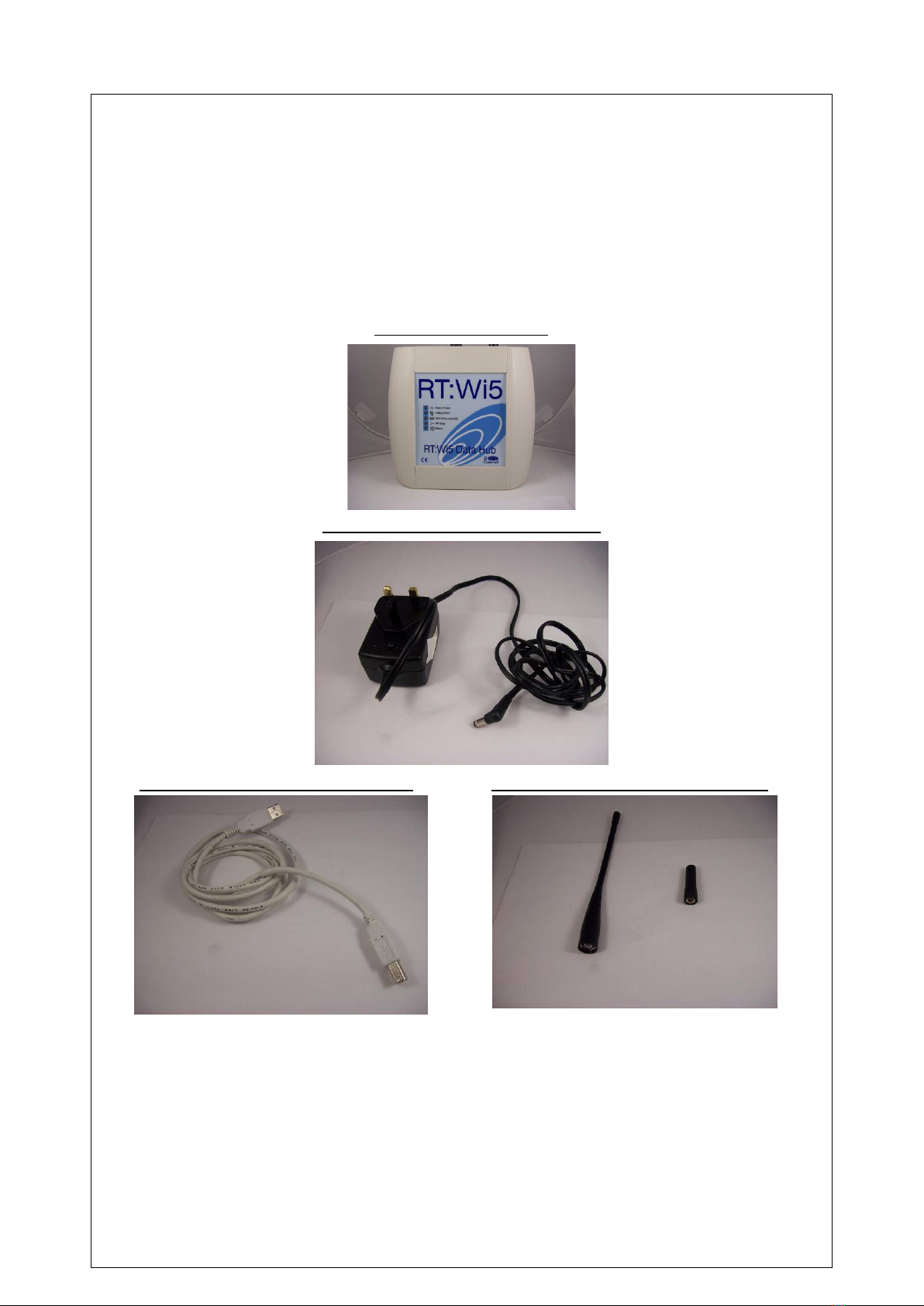
2.1 Step 1: Inspecting Package Content
RT-Wi5 Data Concentrator
Mains Power Supply Unit – 12V DC output
Configuration Cable (USB A/B) – optional Antennas (GSM SMA / UHF BNC – VHF is
optional)

9
2.2 Step 2: SIM Card installation (GPRS Version)
If not already equipped by HWM the SIM card can be installed using the
following procedure:
Remove the front cover
Install the SIM card into the SIM card connector as shown below:
Locking/Unlocking the connector Remove/insert the SIM Card
Please Refer to Product configuration paragraph for the
procedure to change the concentrator‘s configuration.
2.3 Step 3: Connecting the product
In order to avoid GPRS transmission during shipping the backup
battery is disconnected. Connect the battery connector as shown below
(not required for Ethernet versions):
Press Here

10
Only use the battery supplied with the unit. Failure to do so could
result in product damage.
Connect the Ethernet cable (if applicable)
Reinstall the top cover
Connect the external GSM and Radio antennas to the connectors as
shown below:
GSM
Antenna
Radio
Antenna
Tabla de contenidos
Otros manuales de Cambiar de HWM