
HP Pro Tablet 408 G1 Manual

HP Pro Tablet 408 G1
Maintenance and Service Guide
IMPORTANT! This document is intended for
HP authorized service providers only.

© Copyright 2015 Hewlett-Packard
Development Company, L.P.
Bluetooth is a trademark owned by its
proprietor and used by Hewlett-Packard
Company under license. Intel is a U.S.
registered trademark of Intel Corporation.
Microsoft, Windows is a U.S. registered
trademark of Microsoft Corporation. SD Logo is
a trademark of its proprietor.
The information contained herein is subject to
change without notice. The only warranties for
HP products and services are set forth in
the express warranty statements
accompanying such products and services.
Nothing herein should be construed as
constituting an additional warranty. HP shall
not be liable for technical or editorial errors or
omissions contained herein.
First Edition: January 2015
Document Part Number: 798824-001
Product notice
This guide describes features that are common
to most models. Some features may not be
available on your tablet.
Software terms
By installing, copying, downloading, or
otherwise using any software product
preinstalled on this tablet, you agree to be
bound by the terms of the HP End User License
Agreement (EULA). If you do not accept these
license terms, your sole remedy is to return the
entire unused product (hardware and
software) within 14 days for a refund subject
to the refund policy of your place of purchase.
For any further information or to request a full
refund of the tablet, please contact your local
point of sale (the seller).

Safety warning notice
WARNING! To reduce the possibility of heat-related injuries or of overheating the device, do not place
the device directly on your lap or obstruct the device air vents. Use the device only on a hard, flat surface. Do
not allow another hard surface, such as an adjoining optional printer, or a soft surface, such as pillows or
rugs or clothing, to block airflow. Also, do not allow the AC adapter to contact the skin or a soft surface, such
as pillows or rugs or clothing, during operation. The device and the AC adapter comply with the user-
accessible surface temperature limits defined by the International Standard for Safety of Information
Technology Equipment (IEC 60950).
iii

iv Safety warning notice

Table of contents
1 Product description ....................................................................................................................................... 1
2 External component identification ................................................................................................................. 3
3 Illustrated parts catalog ................................................................................................................................ 5
Locating the product number and serial number ................................................................................................. 5
Tablet major components ..................................................................................................................................... 6
Miscellaneous parts ............................................................................................................................................... 7
4 Removal and replacement preliminary requirements ....................................................................................... 9
Tools required ........................................................................................................................................................ 9
Service considerations ........................................................................................................................................... 9
Plastic parts ......................................................................................................................................... 9
Cables and connectors ........................................................................................................................ 9
Grounding guidelines ........................................................................................................................................... 10
Electrostatic discharge damage ....................................................................................................... 10
Packaging and transporting guidelines ......................................................................... 11
Workstation guidelines ................................................................................ 11
5 Removal and replacement procedures ........................................................................................................... 13
Tablet component replacement procedures ...................................................................................................... 13
Unlocking the device and disabling Always On Remote Management ............................................................... 13
Back cover ............................................................................................................................................................ 14
Middle frame and battery .................................................................................................................................... 15
WWAN antenna .................................................................................................................................................... 17
Rear-facing webcam ............................................................................................................................................ 19
System board ....................................................................................................................................................... 20
GPS antenna ........................................................................................................................................................ 23
Transfer board ..................................................................................................................................................... 24
Display panel cable .............................................................................................................................................. 26
Front-facing webcam .......................................................................................................................................... 27
WLAN antenna ..................................................................................................................................................... 28
Speakers .............................................................................................................................................................. 29
v

6 Using HP PC Hardware Diagnostics (UEFI) ...................................................................................................... 31
Downloading HP PC Hardware Diagnostics (UEFI) to a USB device .................................................................... 31
7 Specifications ............................................................................................................................................. 32
8 Backup and recovery .................................................................................................................................... 33
Backing up your information ............................................................................................................................... 33
Performing a system recovery ............................................................................................................................ 33
Changing the boot device order ........................................................................................................ 34
Using Windows Refresh or Windows Reset ...................................................................................... 34
9 Power cord set requirements ........................................................................................................................ 35
Requirements for all countries ........................................................................................................................... 35
Requirements for specific countries and regions ............................................................................................... 35
10 Statement of Volatility .............................................................................................................................. 37
Non-volatile memory usage ................................................................................................................................ 38
Questions and answers ....................................................................................................................................... 40
Using HP Sure Start (select models only) ........................................................................................................... 41
11 Recycling .................................................................................................................................................. 42
Index ............................................................................................................................................................. 43
vi

1 Product description
Category Description
Product Name HP Pro Tablet 408 G1
Processor Intel® Atom Z3736F 1.33-quad core processor soldered-on-circuit (SoC)
Panel 8.0-in, (1280×800), high-definition (HD), 10-point capacitive TouchScreen display assembly
Graphics Internal graphics: Integrated Intel universal memory architecture (UMA) graphics
Memory On-board; non-accessible
2-GB DDR3L (4-Gbit, 256-MB × 16, Qty=4)
Mass storage Supports 32- or 64-GB eMMC
Audio and video Stereo speakers (2, 0.7-W)
Single digital microphone
2.0-MP, fixed-focus front-facing webcam with activity light
8.0-MP, auto-focus rear-racing webcam with flash
Sensor Accelerometer
Ambient Light Sensor
eCompass
GPS/AGPS/Glonass
Gyroscope
Hall sensor
SAR sensor
Network GSM/GPRS/EDGE: Band 2/3/5/8
WCDMA: Band 1/2/4/5/8
Wireless networking Wireless local area network (WLAN): 802.11a/b/g/n (2.4-GHz, 5.0-GHz) dual band 2×2
Bluetooth: 4.0 LE
SIM card Micro Subscriber Identity Module (SIM) connector
Support for HP Mobile Connect
External expansion Micro Secure Digital (SD), expandable up to 128-GB
Ports ●Type B micro USB 2.0 port with host mode
●3.5-mm audio jack (4-pole stereo), support for both CTIA and OMTP
●Micro HDMI
Power requirements Supports a 4800-mAh, Li-Ion battery (non-removable), USB charging
Supports a 10-W (5.3-V / 2-A) AC adapter with duck head adapter and localized cable
plug support
Operating system Windows 8.1 with Bing and Office 365 Personal for Small Tablets AFO Multilingual 32-bit
1

Category Description
Operating system (continued) Windows 8.1 with Bing for Small Tablets Multilingual 32-bit
Windows 8.1 with Bing for Small Tablets Chinese 32-bit
Windows 8.1 Small Screen Touch 32-bit with Office, Home, and Student CPPP
Windows 8.1 Professional 32-bit
Windows 8.1 Professional 32-bit for Small Tablets
Security Firmware trusted platform module (TPM)
Serviceability End user replaceable part: AC adapter and USB cable
2 Chapter 1 Product description
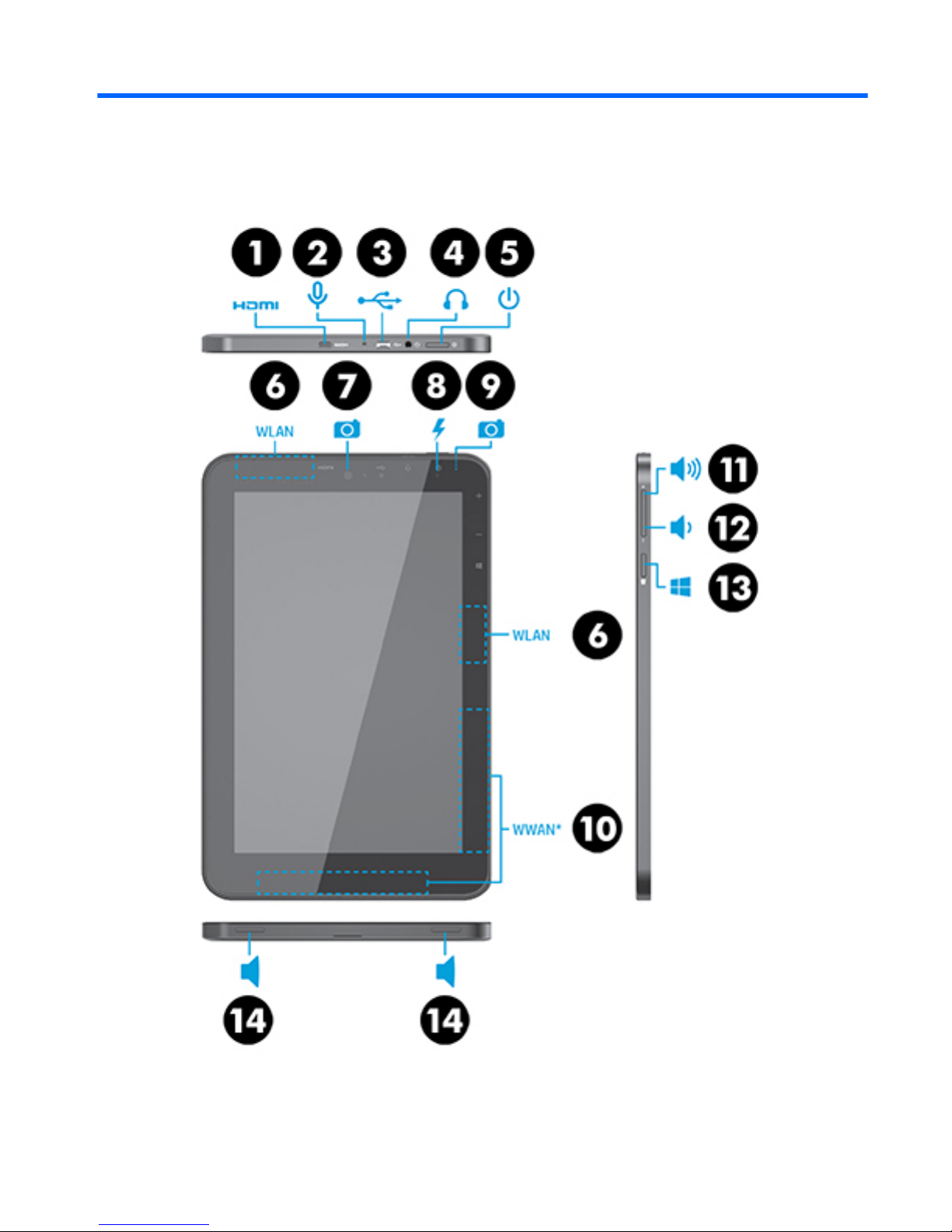
2 External component identification
3

Item Component Item Component
(1) Micro HDMI jack (8) Front-facing webcam flash
(2) Microphone (9) Rear-facing webcam
(3) Micro USB 2.0 port (10) WWAN antenna (2)
(4) Audio-out (headphone)/Audio-in
(microphone) jack
(11) Volume up button
(5) Power button (12) Volume down button
(6) WLAN antenna (2) (13) Windows button
(7) Front-facing webcam (14) Speakers (2)
4 Chapter 2 External component identification
Tabla de contenidos
Otros manuales de Tableta de HP

HP
HP Pro x2 612 G2 Manual

HP
HP Pro Tablet 608 G1 Manual

HP
HP Pro Slate 8 Manual de usuario

HP
HP 7 VoiceTab Manual

HP
HP 10 plus Manual de usuario

HP
HP HSTNH-I407G Manual de usuario

HP
HP ElitePad 1000 G2 Manual

HP
HP EliteBook Revolve 810 G2 Tablet Manual de usuario

HP
HP Student Tablet PC Manual de usuario

HP
HP Elite x2 1011 G1 Manual

HP
HP EliteBook 2760p Manual de usuario

HP
HP 7 Plus Manual

HP
HP 10 G2 2301 Manual

HP
HP 10-K010NR Manual de usuario

HP
HP TC1100 - Compaq Tablet PC Manual

HP
HP Stream 8 Tablet Manual

HP
HP Slate7 VoiceTab Manual

HP
HP Elite x2 1013 G3 Manual

HP
HP Slate Manual de usuario

HP
HP TouchPad and Keyboard Manual de usuario


