
Hides DC-103 Manual de usuario

Easy HD Expressway!
WWW.HIDES.COM.TW 1
DC-103
Quick Installation Guide
PACKAGE CONTENTS 2
POWER ON 3
CONNECT TO A DVB-T RECEIVER 3
ADJUST THE FOCUS OF THE LENS 4
CONNECT TO A CVBS MONITOR 4
MIC-IN 5
USB UART PORT 6
MONITOR BOOT MESSAGES 7
CUSTOM CONFIGURATION 8
MODULATION SETTING DESCRIPTION 9
THE CHANNEL DATA RATE MUST BE LARGER THAN THE VIDEO ENCODING BIT RATE. 10
VIDEO AND OTHER SETTING DESCRIPTION 12
UPDATE FIRMWARE 14
RF BOARD 18
Easy HD Expressway!
WWW.HIDES.COM.TW 2
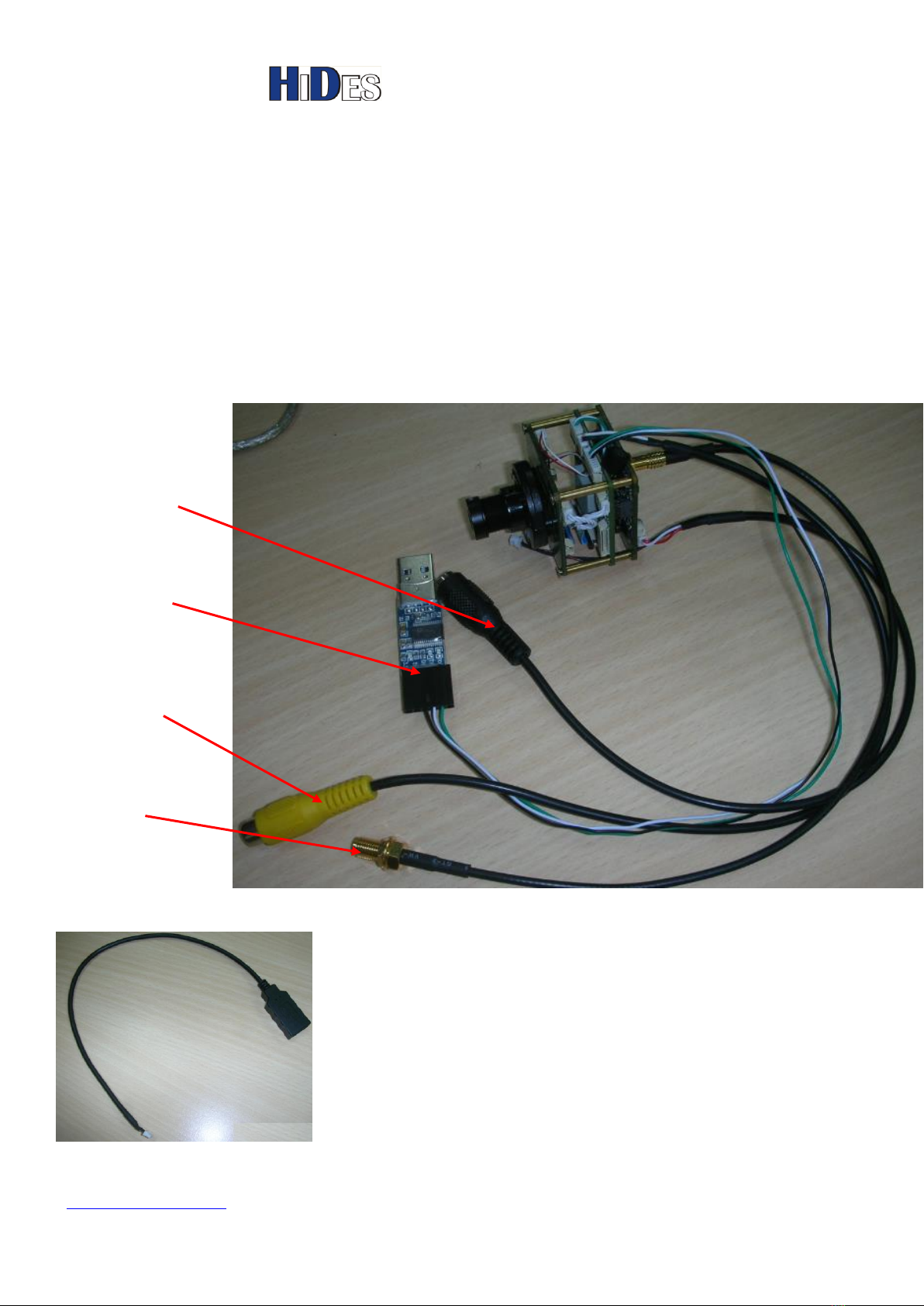
Package Contents
DC-103 Camera
USB UART configuration board
MCX to SMA female connector
A special USB cable for firmware update
Special USB cable for firmware update,
CVBS Video
Output
12 V DC-in
USB UART
Configuration board
DVB-T RF Video output
SMA Female

Easy HD Expressway!
WWW.HIDES.COM.TW 3
Power on
Apply 12V DC to DC-103.
It will take about 40 seconds for DC-103 to boot.
When the boot process is completed, it begins to transmit the camera video from the SMA
connector in DVB-T, and the CVBS output is also present.
Note:
1. Default RF channel is CH69, Frequency: 858MHz, BW:8 MHz, unless specified.
2. When initialization done, “###Camera Boot Finished###”message will be shown in the UART
debug port output; refer to more details below.
Connect to a DVB-T receiver
1. Connect the video RF output to a coaxial cable (or an antenna).A DVB-T receiver can be
either DVB-T TV, DVB-T STB or DVB-T USB receiver dongle.
2. The video output is full HD 1920x1080x30P H.264 format. Please make sure your receiver is
capable of HD decoding. (Many old DVB-T STB’s or TV’s can only decode 720x576 SD).
3. Default RF channel is CH69, Frequency: 858MHz, BW:8 MHz, unless specified.

Easy HD Expressway!
WWW.HIDES.COM.TW 4
Adjust the Focus of the Lens
By default the focus of the lens may not be correct. Please turn the lens clockwise or
anti-clockwise to get the best focus.
Connect to a CVBS monitor
A CVBS video output is optional.
If it’s enabled, when the system boot is completed, there is a standard CVBS video output (default
PAL).

Easy HD Expressway!
WWW.HIDES.COM.TW 5
Mic-in
If it’s bare bone DC-103, a condenser microphone is included.
If DC-103 with housing, a 3 .5mm Phone Jack is provided.
Note: By default MIC-in feature is disabled.
When you want to enable MIC-in feature, it’s recommended to disable CVBS output with the
configuration kit for better audio quality.

Easy HD Expressway!
WWW.HIDES.COM.TW 6
USB UART PORT
The USB UART port can be used to configure DC-103 or monitor the system boot status.
You may connect the UAB UART to a Laptop PC.
On most Windows platforms, the driver will be installed with in-box driver automatically.
However, if Windows prompts to install driver for the new device, please run
“PL2303_Prolific_DriverInstaller_v1.7.0.exe”, which can be found in the folder
“\PL2303_Prolific_DriverInstaller_v1.7.0”
If the device driver is installed well, there will be a new Com Port device, shown in Windows Device
Manager.
The com port assignment may vary depending on the PC configurations. In the following example, COM5 is
assigned.
The following picture show how the USB UART dongle is connected to DC-103.

Easy HD Expressway!
WWW.HIDES.COM.TW 7
Monitor Boot Messages
When you connect the USB UART port to a Laptop PC, and driver is well installed, you may use
any UART terminal application to monitor debug message.
The default communication parameters are 115200,n,8,1.

Easy HD Expressway!
WWW.HIDES.COM.TW 8
Custom Configuration
Users may customize the configurations with a PC tool thru the USB UART port.
Connect the USB UART port to a Laptop PC, and make sure driver is well installed as described in
previous paragraph.
Launch “iTE_SerialTool.exe “.
Specify the correct COM port which corresponds to the USB UART port, then click on “Open”button.
The following shows the USB UART port is open successfully.
Click on “Get”button to retrieve current configurations.

Easy HD Expressway!
WWW.HIDES.COM.TW 9
If it fails to open the COM port, it shows the following message on the caption bar.
Please check if the USB UART Port is currently open by any other UART terminal application.
Modulation Setting Description
Note: When you change the modulation settings, you needn’t to reboot the camera after
clicking on “Set”button.
The new settings take effect immediately.
Parameter
Description
Default
Cell ID
DVB-T TPS Cell ID
0X9503
Frequency
ccHDtv DTVCAM frequency in KHz.
Range:
DC-103/DC-103H:
70000KHz ~450000KHz
850000KHz ~950000KHz
DC-103H:
120000KHz ~ 1350000KHz
[858000]
Bandwidth
ccHDtv DTVCAM bandwidth in KHz.
Options: 1000, 2000, 3000, 4000, 5000, 6000, 7000 and 8000KHz.
[8000]
Constellation
ccHDtv DTVCAM constellation options.
0: QPSK
1: 16QAM
(In 16QAM mode, only Guad Interval 1/4 and 1/8 are supported)
Note:64QAM is not supported by DC-103
[0]
CodeRate
ccHDtv DTVCAM code rate options.
[4]

Easy HD Expressway!
WWW.HIDES.COM.TW 10
0: 1/2
1: 2/3
2: 3/4
3: 5/6
4: 7/8
GuardInterval
ccHDtv DTVCAM guard interval options.
0:1/32
1:1/16
2:1/8
3:1/4
(In 16QAM mode, only Guad Interval 1/4 & 1/8 are supported)
[1]
FFT
ccHDtv DTVCAM FFT options.
2: 2K
8: 8K
[2]
Gain
Software adjusts RF output gain.
Range: -25 ~ +5
[3]
modulation
data rate
In Kbps, find details below.
Note: it’s recommended that the [Video Bitrate] should be less
than [modulation data rate] by 20% at least.
If [modulation data rate] is too low, it may cause video glitch.
auto
The modulation data rate ( channel capacity, maximum data bit rate or throughput) varies depending on the
transmission parameters.
The maximum date bit rate can be calculated as below.
Tbandwidth = {1000,000, 2000,000, 3000,000, 4000,000, 5,000,000,6,000,000, 7,000,000,
8,000,000} in Hz for 1~8MHz
Tcode_rate = {1/2, 2/3, 3/4, 5/6, 7/8}
TConstellation = {2, 4, 6} <- QPSK = 2, 16QAM=4, 64QAM = 6
TGuardInterval = {4/5, 8/9, 16/17, 32/33}, 1/4 = 4/5, 1/8 = 8/9, 1/16 => 16/17, 1/32 => 32/33}
2K/8K mode does not matter
Maximum bit rate = 1512 / 2048 * 188 / 204 * 64 / 56 * TBandwidth * Tcode_rate * TConstellation *
TGuardInterval (bps)
= 423 / 544 * TBandwidth * Tcode_rate * TConstellation * TGuardInterval (bps)
Refer to the table shown below.
The channel data rate MUST be larger than the video encoding bit rate.
Tabla de contenidos
Otros manuales de Cámara de seguridad de Hides


