
Haylou GX1 Manual de usuario

HAYLOU GX1
Condenser Streaming Microphone
For More Language Versions,
Please Scan QR Code
Quick Sta Guide

01 Connection,Verbinden,接続
1.Connect the mic to the PC, using the Type-C to USB-A cable
Schließen Sie das Mikrofon über das mitgeliefee Type-C zu USB-A Kabel an den Computer an.
付属のType-CからUSB-Aのケーブルで、マイクをパソコンに接続します。
2.Monitor: Connect to headphones/speaker via 3.5mm audio cable.
Kopörerausgang: Schließen Sie Kopörer/Lautsprecher über ein 3,5-mm Audiokabel an.
モニター:3.5ミリのオーディオケーブルでイヤホン/オーディオを接続。
Type-C
3.5mm monitor
3,5mm Kopörerausgang
3.5mmモニター
5/8 thread
5/8 Gewinde
5/8ねじ
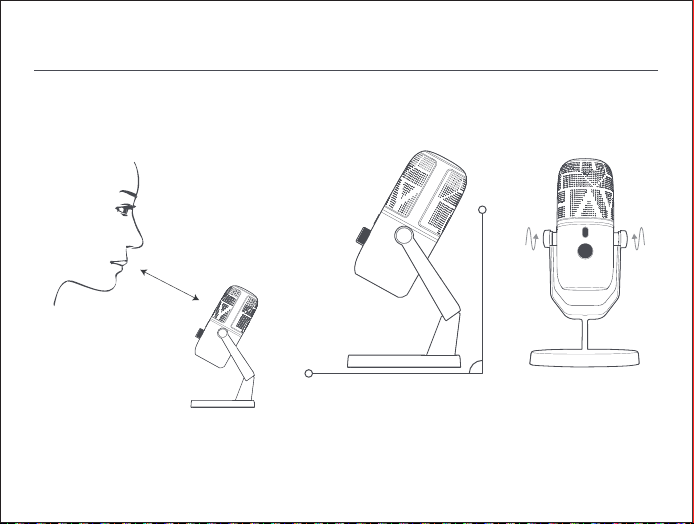
02 Adjustment,Betrieb,調整
15-30cm
Best angle of sound pickup
Optimaler Aufnahmewinkel
最適な集音角度
Attention:Screw down both sides of the product after angle adjustment.
Hinweise:Ziehen Sie nach der Anpassung des Winkels die Schrauben auf beiden Seiten des Produkts fest.
注意:角度を調整し、製品両側のネジを締める。

Cable adjustment
Kabel Platzierung
ケーブル調整
Attention:
1. Avoid cable-mic connection above the suppo, for perpetual friction between the suppo and cable may cause
damage and consequently aect user experience.
2. The mic should be connected below the suppo for utmost user experience.
Hinweise:
1. Das Kabel sollte nicht über die Oberseite der Halterung mit dem Mikrofon verbunden werden. Langfristige Reibung
zwischen der Halterung und dem Kabel füh zu Schäden und beeinträchtigt das Erlebnis.
2. The mic should be connected below the suppo for utmost user experience.
注意:
1、ケーブルはスタンドの上を通してマイクと接続しないでください。スタンドとケーブルの長期摩擦により破損し、
使用に影響することがあります。
2、最高の使用体験を実現するため、スタンドの下からマイクと接続してください。

Headphone volume,Kopörerlautstärke,イヤホン音量
Hinweise:
1. Das Kabel sollte nicht über die Oberseite der Halterung mit dem Mikrofon verbunden werden. Langfristige Reibung
zwischen der Halterung und dem Kabel füh zu Schäden und beeinträchtigt das Erlebnis.
2. The mic should be connected below the suppo for utmost user experience.
By default, users can rotate the knob to turn up or down the headphone volume, in which case, the RGB indicator
will prompt green. At its maximum/minimum volume, the indicator ashes for twice.
Standardmäßig können Sie den Knopf drehen, um die Lautstärke des Kopörers zu erhöhen oder zu verringern. Das
RGB-Licht leuchtet grün. Wenn die Lautstärke auf dem Maximum ist, blinkt es zweimal, und wenn sie auf dem Minimum
ist, blinkt es zweimal.
デフォルトではつまみを回すと、イヤホンの音量を上げたり下げたり調整することができます。この時、RGBランプ
は緑色に点灯し、音量最大時に2回、最小時に2回点滅します。
Headphone volume+
Kopörerlautstärke+
イヤホン音量+
Headphone volume-
Kopörerlautstärke-
イヤホン音量-
RGB indicator turns green
Das RGB-Licht leuchtet grün
RGBランプは緑色に点灯します。
03 Operation,Bedienung,操作

Mic Volume,Mikrofonlautstärke,マイク音量
Press the knob to switch to mic mode, in which case, the RGB indicator will prompt blue. Rotate the knob to elevate
or lower the sensitivity of mic in recording. At its maximum/minimum sensitivity, the indicator ashes for twice.
Drücken Sie den Knopf, um in den Mikrofonmodus zu wechseln. Das RGB-Licht leuchtet blau. Drehen Sie den Knopf,
um die Empndlichkeit des Mikrofons zu erhöhen oder zu verringern, wenn das Radio an ist. Wenn die Empndlichkeit
am höchsten ist, blinkt es zweimal und wenn sie am niedrigsten ist, blinkt es zweimal.
つまみを押すとマイクモードに切り替えることができます。この時、RGBランプは青色に点灯し、つまみを回すとマ
イク集音時の感度を上げたり下げたりすることができます。感度は最高時に2回、最低時に2回点滅します。
Mic volume+
Mikrofonlautstärke+
マイク音量+
Mic volume-
Mikrofonlautstärke-
マイク音量-
Press the knob for mode switch.
Klicken Sie auf den Knopf, um den
Modus zu wechseln.
つまみを押してモードを切り替えます。
RGB indicator turns blue.
Das RGB-Licht leuchtet blau.
RGBランプは青色に点灯します。

Mute&RGB,Stumm&RGB,ミュート&RGB
1. Press mic mute button to mute or unmute the mic.
2. As the mic is muted, the RGB indicator will turn red.
1. Drücken Sie die Mikrofon-Stummschalttaste, um die Stummschaltung einzuschalten oder aufzuheben.
2. Wenn das Mikrofon stummgeschaltet ist, leuchtet das RGB-Licht rot.
1.マイクのミュートボタンを押してマイクをミュートにしたり、ミュートを解除したりすることができます。
2.マイクがミュート状態の場合、RGBランプが赤色に点灯します。
Long press the knob for 5s or longer to turn o or on the RGB indicator.
Drücken Sie den Knopf länger als 5 Sekunden, um das RGB-Licht ein- oder auszuschalten.
つまみを5秒以上長押しするとRGBランプを消灯したり点灯したりできます。
Mute/unmute
Stumm/Nicht stumm
ミュート/ミュート解除
Turn red in muting
Bei Stummschaltungleuchtet
das Licht rot
ミュート時に赤色に点灯

04 Microphone FAQ
Questions Answers
No sound from computer
after connection
Game console and device
compatibility
When the mic is set to be the input device, the computer media sound will come
out from the monitoring earphone of the mic;You can enter "Control Panel" in
the search box on the taskbar, select Control Panel, then select Sound;
In the Playback tab, right-click the system speaker, select Set as Default Device,
and select OK, then the media sound will come out from the computer.
Compatible with Switch, Ps4/5, MacOS, Windows11/10/8/7, IOS, Android.
You need to purchase an adapter cable to connect to the mobile phone.
How to install the mic on the
suppo
Large background noise or
popping sound when speaking
After unscrewing the left and right knobs of the mic, you can install the threaded
po on the bottom of the mic to a mic suppo with a standard 5/8 thread or a boom
Make sure there is no fan or air conditioner directly blowing your mic.
Make sure the mic is placed close to your mouth (do not put it directly on your
mouth).
It is recommended to keep a distance of 15-30 cm from the mic (the knob is
on the front side).
Click the knob, then the RGB will turn blue. Rotate the knob to the left to reduce
the gain eect of the mic to achieve the desired sound eect.

05 Basic Parameters
Product name: Condenser Streaming
Microphone
Product model:Haylou-GX1
Dimensions: 90.2×71.5×176.5mm
Package size: 201×135×101mm
Package contents: Microphone,
Quick Sta Guide, Type-C Audio
Connection Cable, Sound Setting Card
Number of buttons: 2pcs
Working voltage: USB 5V
Working current: <150mA
Microphone attributes: 25mm condenser
RGB light eect: blue / green / red / coloul
Pickup pattern: Cardioid
Sensitivity: -8dBFS/Pa (Volume=default)
ADC/DAC frequency response: 20Hz-20KHz
Signal-to-noise ratio: -75dBFS (Volume=default)
ADC bit/sampling: 24Bit/192KHz
DAC bit/sampling: 24Bit/48KHz
USB inteace type: Type-C
Headphone RMS output: >25mW/32R
System compatibility:Compatible with Switch,
Ps4/5, Windows11/10/8/7, Mac, IOS and Android

06 Safety Information
Before using and operating the device, please read and obsee the following precautions
to ensure the best peormance of the device, and avoid dangerous or illegal situations.
Precautions for usage scenarios and operating environment:
1. Strictly prohibit children or pets to swallow this product or its accessories to avoid harm to
them.
2. Do not place this product in an area where the temperature is too high or too low,
otherwise it may cause re or explosion.
3. Strictly prohibit to bring this product close to heat sources or exposed re sources, such
as ovens and electric heaters.
4. Some people have allergies. Their skin are allergic to plastics, coex, ber and other
materials, and symptoms such as redness, swelling and inammation will occur in long-term
contact areas. Please stop using and consult a doctor when similar situation occurs.
5. Do not use unauthorized or incompatible power adapters or data cables, otherwise it may
damage the accessories, causing re, explosion or other hazards.
6. The radio waves generated by the device may aect the normal operation of implanted
medical equipment or personal medical equipment, such as pacemakers and hearing aids. If
you use these devices, please consult their manufacturers about the restrictions on using the
device.
Tabla de contenidos


