Handspring VisorPhone Manual de usuario

VisorPhone™ Module
User Guide

ii
Copyright
Copyright © 2000 Handspring, Inc. All rights reserved. Handspring, Springboard, Visor,
VisorPhone, the Handspring logo, and the Springboard logo are trademarks of Handspring,
Inc., and may be registered in some jurisdictions. Graffiti, HotSync, and Palm OS are registered
trademarks of Palm, Inc. or its subsidiaries. All other trademarks are the property of their re-
spective owners.
Disclaimer and limitation of liability
Handspring, Inc. and its suppliers assume no responsibility for any damage or loss resulting
from the use of this guide.
Handspring, Inc. and its suppliers assume no responsibility for any loss or claims by third parties
which may arise through the use of this software and hardware. Handspring, Inc. and its suppli-
ers assume no responsibility for any damage or loss caused by deletion of data as a result of mal-
function, dead battery, or repairs. Be sure to make backup copies of all important data on other
media to protect against data loss.
Important: Please read the Handspring End User Software License Agreement in the back of
this guide before using the accompanying software program(s). Using any part of the software
indicates that you accept the terms of the Handspring End User Software License Agreement.
Part #: 50-0227-00

Contents iii
Contents
Getting Started.................................................................................1
Step 1: Set up your handheld computer.............................................2
Step 2: Get to know your phone ........................................................3
Step 3: Insert your SIM card..............................................................5
Step 4: Connect the phone to your handheld....................................6
Step 5: Charge the battery..................................................................7
Step 6: Turn on your phone...............................................................8
Step 7: Activate your account .............................................................9
Congratulations ................................................................................10
Making Calls..................................................................................11
Calling a speed dial number .............................................................12
Dialing a number with the Dialpad .................................................13
Redialing the last number ................................................................14
Redialing previous numbers.............................................................14
Calling a number in your Address Book..........................................15
Dialing a number from other applications.......................................16
Returning a missed call.....................................................................17
Calling an emergency number .........................................................18
Receiving Calls...............................................................................19
Answering the phone........................................................................20
Responding to call waiting ...............................................................21
Forwarding calls ...............................................................................22

iv Contents
Handling Multiple Calls...................................................................23
Placing a call on hold .......................................................................24
Dialing another number while a call is on hold ..............................25
Switching between two calls ............................................................26
Using 3-way calling..........................................................................27
Checking Messages ........................................................................29
Reviewing missed calls .....................................................................30
Checking voicemail ..........................................................................31
Checking text messages....................................................................32
Displaying call history......................................................................33
Purging call history ..........................................................................34
Managing Your Speed Dial List .......................................................35
Defining speed dial buttons .............................................................36
Adding an Address Book entry to your speed dial list.....................37
Changing a speed dial entry.............................................................38
Deleting speed dial entries ...............................................................39
Arranging the speed dial list.............................................................40
Working With SMS Text Messages ..................................................41
Viewing messages .............................................................................42
Replying to messages .......................................................................43
Creating messages ............................................................................44
Creating message greetings and signatures .....................................47
Setting message options ...................................................................48
Saving incoming messages ...............................................................48
Modifying messages .........................................................................49

Contents v
Copying message text.......................................................................49
Forwarding incoming messages .......................................................50
Sorting messages...............................................................................51
Deleting messages ............................................................................52
Enabling SMS Email........................................................................53
Using VisorPhone as a Wireless Modem..........................................55
Establishing a TCP/IP connection with VisorPhone .....................56
Preparing for a direct wireless HotSync operation .........................57
Preparing for a network wireless HotSync operation .....................58
Performing a wireless HotSync operation.......................................59
Customizing Your Phone.................................................................61
Setting dialing prefixes .....................................................................62
Assigning dialing applications ..........................................................63
Changing the phone display.............................................................64
Selecting the ringer settings.............................................................65
Preventing unauthorized use............................................................66
Disabling call waiting .......................................................................67
Blocking your phone number for outgoing calls.............................68
Selecting a service provider network................................................69
Connecting a headset .......................................................................70
Using the Menus ............................................................................71
Phone application Edit menus .........................................................71
Phone application Record menu......................................................71
Phone application Options menu.....................................................72
SMS Message Manager application Message menus.......................73

vi Contents
SMS Message Manager application Edit menu...............................74
SMS Message Manager application Option menu..........................75
Troubleshooting and Maintenance...................................................77
Caring for your VisorPhone module...............................................82
Caring for the battery ......................................................................83
How do I dispose of the battery? .....................................................84
Warranty and Other Product Information ........................................85
Handspring, Inc. Limited Warranty ...............................................85
Handspring, Inc. End User Software License Agreement..............88
Canadian RFI Statement..................................................................93
Acknowledgments ............................................................................93
Index .............................................................................................95

Getting Started 1
Getting Started
Congratulations on the purchase of your new VisorPhone™ module. Your
VisorPhone module integrates the power of a state-of-the-art digital mobile
phone with the simplicity of your Handspring handheld computer. Your
VisorPhone includes all of the most popular features such as speed dial and
call screening. Plus, it handles multiple calls, sends and receives text
messages, and fully integrates with your handheld to take advantage of your
existing Address Book.
To use your VisorPhone, you must first establish an account with a mobile
phone service provider.
Your account information is located on your SIM (Subscriber Identity
Module) card. If a SIM card did not come with your VisorPhone, your
service provider will provide one when you subscribe to their service. Your
SIM card must be inserted into your VisorPhone before you can use it.
Just follow the seven easy steps in this chapter to get up and running quickly.

2 Getting Started
Step 1: Set up your handheld computer
1. If you haven’t already set up your handheld, follow the steps that came
with your handheld to set it up.
2. (Recommended) Synchronize your handheld with your computer.
Tip: If you need additional information about synchronizing, refer to the
Quick Reference guide and Visor Handheld User Guide that came with
your handheld.
Place your handheld
in the cradle and
press the HotSync
button

Getting Started 3
Step 2: Get to know your phone
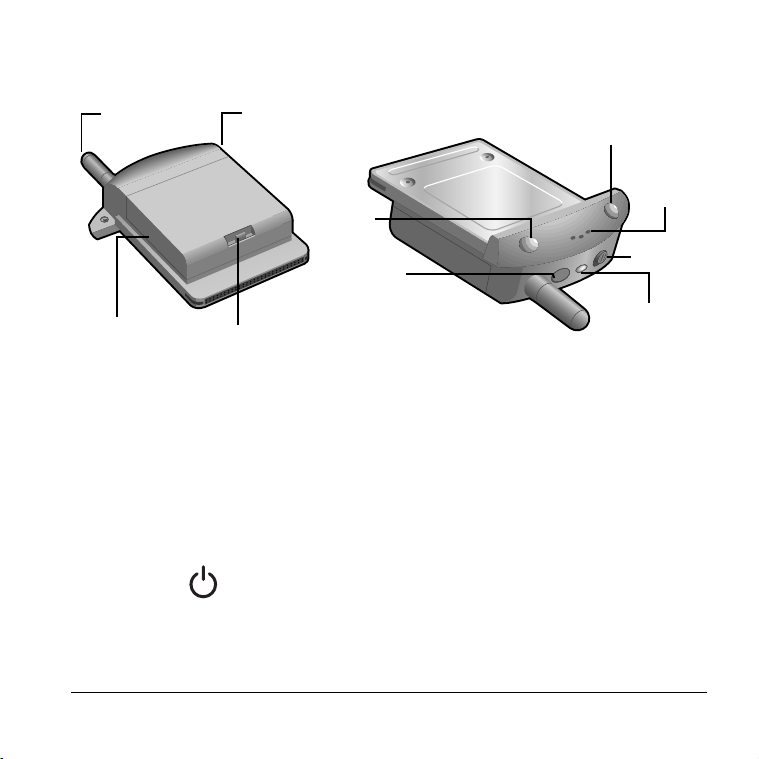
Antenna Receives and sends signals on your VisorPhone. The
antenna does not telescope out of the phone.
Headset jack Enables you to connect a headset so you can view your
handheld screen while talking on the phone.
Battery Powers your VisorPhone.
Battery latch Secures the battery to your VisorPhone.
Power
button
Turns on your VisorPhone and activates the signal.
Your phone stays on until you remove it from your
handheld or press the power button to turn it off.
Antenna Hea
d
set jac
k
Battery latch
Power
button
Speaker
Phone
button
SMS Message
Manager button
LED
Slider
Battery

4 Getting Started
Speaker Functions as the earpiece on your VisorPhone.
Tip: To adjust the volume during a call, press the
scroll buttons on the front of your handheld.
Phone
button
Turns on your handheld and starts the Phone
application. If another application is running, press this
button to switch to the Phone application. If the phone
is ringing, press this button to answer calls.
SMS
Message
Manager button
Turns on your handheld and starts the SMS Message
Manager application so you can view, send, and receive
text messages.
Slider Controls the ringer setting. See “Selecting the ringer
settings” on page 65 for details on changing the settings.
LED Provides status information for your VisorPhone. The
color of the light and the blink state indicate the status
as follows:
No light = Phone off
Red/solid = Charger on; battery charging
Green/solid = Charger on; battery fully charged
Red/slow blink = Phone on; no network service
Green/slow blink = Phone on; in service
Red/fast blink = Battery low
Green/fast blink = Data call active
Otros manuales para VisorPhone
2
Tabla de contenidos
Manuales populares de Unidad de control de otras marcas

Festo
Festo Compact Performance CP-FB6-E Manual de lista de piezas

Elo TouchSystems
Elo TouchSystems DMS-SA19P-EXTME Manual de usuario

JS Automation
JS Automation MPC3034A Manual de usuario

JAUDT
JAUDT SW GII 6406 Series Guía rápida

Spektrum
Spektrum Air Module System Manual de usuario

BOC Edwards
BOC Edwards Q Series Manual de usuario