
Greenfield ATLAS Manual de usuario

ATLAS 5-STAGE
UNDERSINK SYSTEM
INSTALLATION GUIDE

Inventory Parts Received
1. This Instruction Sheet
2. Filter Housing (assembled)
3. 2 small mounting screws
4. Water Supply Tee Connector (3/8 push connector x 3/8 male
compression x 3/8 female compression)
5. Inlet/Outlet 1/2” mpt x 3/8” push connector
6. Faucet assembly
7. Connecting tubing (3/8 plastic)
8. Faucet connector (white plastic) with blue locking clips
9. Filter housing wrench
10. Direct connect kitchen faucet parts
11. In-line Flow Restrictor
Note: Instructions for installation of In-Line Flow Restrictor
can be found at the end of this manual.
Step 1 - Prepare Filter Housing
1. Gently place the vortexer into the bracket
2. Attach fittings to Inlet/Outlet - 1/2” mpt x 3/8” push connector - Use teflon tape for
threaded fittings.
3. Select a suitable location for the filter housing under the sink.
a. Location should be accessible for filter cleaning and/or replacement.
Parts and Preparation:

(NOTE: The flow arrow embossed on the top of the head indicates the filter inlet)
Step 2 - Install the Water Supply Tee Connector
1. Turn off the cold water supply valve under the sink. If there is no valve, turn off the water to
your house at the main meter.
2. Open the cold water faucet to let off the pressure. Make sure the valve is off and the faucet
is not dripping.
3. Unscrew the nut that holds the cold water supply line into the pipe where you just turned the
water off from.
4. Install the Tee Connector onto the exposed threads and tighten. BE CAREFUL NOT TO
CROSS THREAD. **Overtightening will crack the plastic threaded push connector fitting.**
5. Screw water faucet supply line back onto the tee connector.
NOTE: Do NOT turn the cold water line back on yet, the water will flow directly out of the tee
connector and flood your kitchen.
Step 3 Alternative Option: Direct to Kitchen Faucet Install
If connecting directly to the cold water faucet and not using the provided water dispenser, use
the two fittings supplied with your Direct Connect Faucet Kit.
1. A stainless female thread x push connector (Connects to the water supply valve then to filter
housing inlet)
2. A brass 3/8” male compression fitting x push connector. (Connects to the cold water faucet
to filter housing outlet)
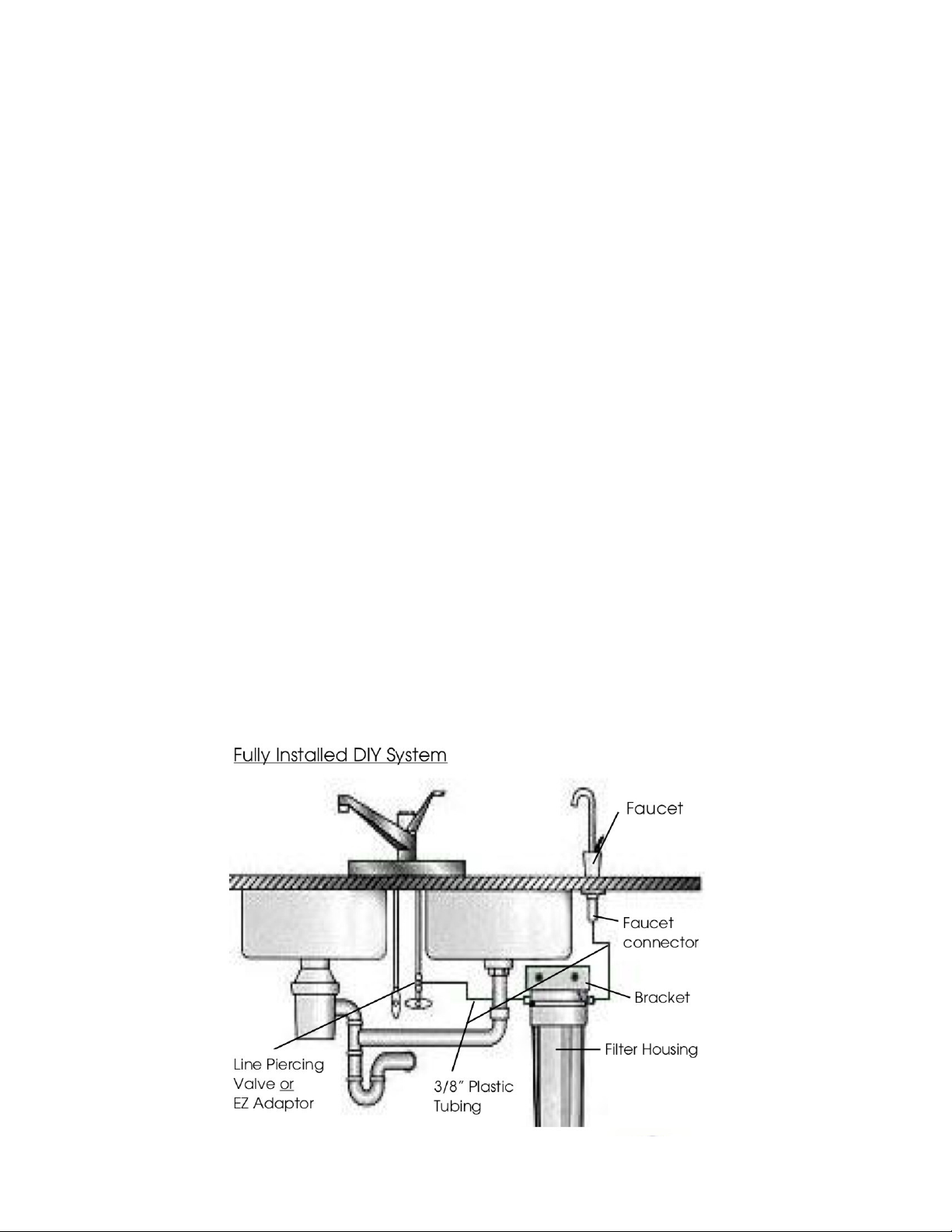
Step 4 - Install the Accessory Water Dispenser
1. Select a suitable location for the accessory water dispenser as close to the sink as possible
allowing convenient space under the sink for assembly. If not using the extra sink hole, drill the sink
top with a 1/2” bit to accommodate the inlet pipe.
2. Assemble the water dispenser to the sink top:
A. Insert the valve through the sink top with the rubber washer underneath the chrome plate on
top of sink surface.
B. Thread lock washer and brass/plastic nut onto the thread assembly underneath the sink and
tighten by hand and if necessary, carefully with a wrench.
C. Attach the push-fit faucet connector directly onto the metal pipe end.
Step 5 - Install Connecting Tube
1.Cut two pieces of the 3/8” plastic tubing to fit from the water supply to the inlet of the filter
housing and from the outlet of the filter to the water dispenser.
A. Tubing from water supply to filter housing inlet:
a. Insert one end of tubing into outlet push connector of the tee fitting.
(seat completely into push connector fitting), and insert lock clip.
b. Insert other end of tubing into inlet push connector of filter housing.
(seat completely into push connector fitting), and insert lock clip.
B. Tubing from filter outlet on top of the housing to the water dispenser.
a. Both ends of tubing are to be inserted into the push connectors.
b. Insert blue lock clips onto the sleeve of all push connectors.

Step 7- Start-Up
Remove the CarbonBlock TS3 from stage 3 of the filter housing.
2. Leave the PHA & Fluoride filters in their respective housings.
3. Open the tap fully by lifting the lever to its vertical position to allow trapped air and water to
flow out of the system.
4. Turn water on at the main inlet of the cold water supply. Water should start flowing out of the
faucet once housing has filled with water.
5. Once water begins to flow out of the faucet after air is expelled, turn off water flow and let it
stand for 20 minutes.
6. Turn water flow back on and flush the system for a five to ten minutes or until all carbon fines
are flushed from the system. Reinsert the CarbonBlock filter into the stage 3 filter housing.
7. The system is now ready for use. Taste will improve once filters are completely flushed of
residual particles.
8. Note and record the date; check the condition of the filter element in about six months, or
earlier if flow rate drops off noticeably.
9. As water passes through the new filters, tiny oxygen bubbles will be created causing your
water to appear white or murky. This is normal and harmless and will disappear after a few days
of use.
10. For a 24 hour period after installation, periodically check your unit to ensure there are no
leaks.
Troubleshooting
1. No flow of water through the system: Check the plastic tubing for kinks, or obstructions.
2. Water leaks:
a. At the push fittings: inspect to be sure tubing has been fully sealed into the push connector.
b. At the tee connector: insure all fittings are tight.
c. At the housing: verify that the housing has been fully tightened.
Rated Service Flows For Filters: 1 gpm or less for optimal filtration.
Maximum Working Pressure: (125 psig) Maximum Working Temperature: 38° C (100° F)
Minimum Operating Pressure: (10 psig) Minimum Operating Temperature: 5° C (41° F)
1.
For Support Call 208-462-0626 or 208-596-6858
Cleaning and Maintenance
Sanitizing Your Filter Housing:
1.Your under sink filter housings should be sanitized yearly when you change filters.
2.Turn off water supply to your filter housing and open faucet to relieve pressure.
3.Remove water and filter from stage 1 and pour a 32 oz bottle of Hydrogen Peroxide 6%
solution into filter housing canister and reattach filter housing.
4.Turn on water supply and allow water to run until hydrogen peroxide is at the faucet and
then close the faucet and don’t use for two to three hours.
5.After two or three hours, open the faucet and flush the system of hydrogen peroxide and
replace filter in stage 1.
Cleaning the Cerametix Filter:
1. If your water supply contains a lot of solid particles, the flow rate from the filter may drop
rather quickly. If this happens, the ceramic filter can be cleaned
2. Shut off water supply to cold water line.
3. Remove the ceramic cartridge from the housing.
4. Scrub the ceramic candle, using a scouring pad (3M
ScotchBrite pad recommended) under cold running water to remove the accumulated material
and expose a fresh ceramic surface.
5. DO NOT USE SOAPS, DETERGENTS, OR BLEACH TO CLEAN THE CERAMIC CARTRIDGE.
6. Only the ceramic filter cartridges can be cleaned.
For Support Call 208-462-0626 or 208-596-6858

Specifications:
- Flow Restrictor: 1 gpm
- Quick Connect (QC) Size: 3/8" QC x 3/8" QC
Product Overview:
The Inline Flow Restrictor is designed to regulate the flow of water in any drinking water system.
It ensures proper contact time with your filter media and prevents the flow from exceeding 1 gpm.
Installation Instructions:
1. Prior to installation, make sure to turn off the water supply to your drinking water system.
2. Identify the appropriate location in your water line where you intend to install the Inline Flow Restrictor.
Ensure that there is sufficient space and accessibility for the restrictor.
3. Take note of the flow direction indicated by arrows on the flow restrictor. Ensure that the arrows align
with the direction of water flow in your system.
4. Cut the water line at the desired installation point, using a pipe cutter or appropriate cutting tool.
Ensure a clean and straight cut.
5. Insert the cut ends of the water line into each end of the Inline Flow Restrictor's Quick Connect fittings.
Push the tubing firmly into the fittings until it locks securely in place.
6. Once the connections are made, verify that the tubing is tightly secured and does not leak. If any leaks
are detected, recheck the connections and make necessary adjustments.
7. Turn on the water supply to your drinking water system
8. Periodically inspect the Inline Flow Restrictor for any signs of damage or leaks. Replace if necessary to
maintain optimal performance.
Inline Flow Restrictor
Installation Manual

For further assistance or inquiries, please contact our customer support at 208-462-0626
Warning:
- Always follow safety guidelines and turn off the water supply before installing or making any
adjustments to your drinking water system.
- If you are unsure about the installation process, consult a professional plumber or contact
Greenfield Water Solutions for assistance at 208-462-0626.
Maintenance:
- Regularly inspect the Inline Flow Restrictor for any signs of damage or leaks. Replace if
necessary.
- Follow the maintenance guidelines provided by the manufacturer of your drinking water system
or POU UV disinfection system to ensure optimal performance and longevity.
Disclaimer: The Inline Flow Restrictor is intended for use in POU drinking water systems. Ensure
compatibility with your specific system and follow all safety guidelines and instructions provided by
the manufacturer. The manufacturer is not responsible for any damage or accidents resulting from
improper installation or usage.
Tabla de contenidos
Manuales populares de Sistema de agua de otras marcas

Spirotech
Spirotech SPIROVENT SUPERIOR S250 Manual de usuario

Culligan
Culligan Aqua-Cleer Aqua-Cleer Advanced Drinking Water... Manual de usuario

A.O. Smith
A.O. Smith Dura-Max AJH - 1000A - P Manual de usuario

Microline
Microline T.F.C.-4 Manual

Eureka Forbes
Eureka Forbes Aquaguard Select Manual de usuario

Cetetherm
Cetetherm AquaEfficiency Manual de usuario


