
Geonav 3 Manual

User and Installation Guide


3
English
INTRODUCTION
The GEONAV is a handheld chartplotter that displays the
boat’s current position with respect to an electronic chart.
The unit is equipped with a built-in GPS receiver that can
track up to 12 satellites simultaneously.
The unit can be installed onboard and, at the same time, work
as a portable instrument, thanks to rechargeable Li Polymer
batteries. The car navigation functions make the unit a com-
plete car navigator, with turn-by-turn driving functions as-
sisted by voice instructions.
The unit is also equipped with a built-in battery charger that
starts operating automatically when the unit is powered. To-
tally waterproof and dustproof (IP57), the unit is equipped with
a daylight visible, color TFT display.
Thanks to the GEONAV and a NAVIONICS Platinum™ or Gold™
electronic chart, you will never get lost even in case of fog,
bad weather or dark.
The ROUTE function will allow you to plan a trip, MARKERS
will allow you to mark points of interest whereas the TRACK
function will allow you to record the actual route. Thanks to
the unlimited capacity of the SD Card - that can also be used
on PCs as personal hard disks - the instrument can store a
large amount of route, track and marker data.
NAVIONICS Platinum™ charts provide a detailed coverage of
all the most popular boating areas, offer new functions - such
as 3D display, satellite photographs, etc. - and can be used in
addition to official paper charts to obtain further information
such as the availability of port services, as well as tides and
currents data. NAVIONICS Platinum™ or Gold™ electronic
charts are available worldwide from authorized NAVIONICS
dealers.
Introduction

4
English
NOTE: This guide applies to the GEONAV 3 and GEONAV 3S models. The functions
and figures peculiar to the GEONAV 3S model are highlighted in the text. Unless
otherwise specified, functions are intended as common to all models.
The technical characteristics and functions described in this manual are subject to
change as a result of improvements or changes to the product.
Introduction

5
English
CHARACTERISTICS
General characteristics
• Portable chart plotter with built-in GPS receiver and an-
tenna
• 12-channel internal GPS supporting WAAS/EGNOS
• Satellite acquisition time:
Approx. 15 seconds (hot start)
Approx. 2 minutes (cold start)
• 3D magnetic compass
• Built-in barometer
• GOTO function (Port, Nearest Service, Marker, Lat/Lon)
• Chart rotation
• Screen Amplifier™ function
• Autozoom™ function
• Overzoom™ function
• Easy View™ function
• X-Plain™ function
• 8 marker shapes, 8-character name
• Reverse route function
• Selectable depth units (meters, feet and fathoms)
• Navionics Gold™, Platinum™ and Land™ & Platinum™
electronic charts
• Road maps assisted by voice instructions with turn-by-turn
driving functions
• 16 zoom levels
• Heading vector
• SD Card
• Storage of routes, tracks and markers in separate files on
SD Cards
• Built-in world map
• Waterproof and dustproof (IP57)
• Weight: 110 g.
Electrical characteristics
• Input voltage: 5 VDC with external 12/24 VDC power sup-
ply protected against reverse polarity and overvoltage.
5 VDC with 100/240 VAC power supply.
Characteristics
3S

6
English
Characteristics
• Battery pack: rechargeable, Li Polymer batteries (3.7V - 1250
mAh)
• Battery operation: approx. 9 h (with backlight off and un-
used battery. Battery life may become shorter as batteries
wear)
• Built-in battery charger; recharge life: approx. 2½ h
• Max. power consumption (during recharge): 6 W
• Operating temperature: -10° to +55° C. Humidity 93%
• Storage temperature: -20°C to +70°C. Humidity 93%
• Color LCD, transflective, TFT 2.2”, sunlight visible
• Adjustable display backlight
• Pixel resolution: 240 x 320
• ARM9 RISC processor
Memory characteristics
• Up to 20 waypoints per route
• Up to 500 trackpoints
• Up to 99 markers per group
• Number of routes, tracks and markers: unlimited, depend-
ing on the size of the SD Card used
Accessories
• Accessory for panel installation with mounting screws
• Cradle with jack for battery charger and speaker
• Bracket with suction cup for car mounting
• Adapter for bicycle’s handlebar
• Battery charger for electric network
• Battery charger with lighter plug
• Battery charger speaker with lighter plug
• Earphone
• Lanyard
• Case
• User and Installation Guide
NOTE: The accessory set may change according to the different sales packages.
For further information, please refer to the product catalog and price list.

7
English

8
English
INSTALLATION AND PRECAUTIONS
Precautions
To avoid electromagnetic interference, the GEONAV must be
positioned at least 15 cm (or 60 cm if the speaker is used)
away from magnetic compasses or flux-gate sensors, such as
those used on autopilots and remote electronic compasses.
To prevent the built-in compass from providing incorrect val-
ues, the unit must be installed as far as possible from mag-
netic field sources, such as engines or transformers, or from
parts containing ferromagnetic material (iron and steel). The
compass provides correct values provided that the unit’s incli-
nation with respect to the horizon does not exceed 45°.
The GEONAV is totally waterproof and dustproof (IP57).
It is essential that the slot cover on the unit’s right side is
firmly inserted and opened only when the SD Card needs
replacing. Always make sure that, during the replacement op-
erations, the unit is perfectly dry and clean and that neither
water nor dirt enters the cartridge slot.
NOTE: Should any drop of salt water enter the cartridge slot, turn the unit off, wash the
unit with fresh water and let it dry with its cover open.
NOTE: Any damage caused by the presence of water inside the unit, due to the lack
or incorrect installation of the cover on the right-hand side, is specifically excluded
from the warranty.
Cleaning
It is recommended that you use a nonalcoholic product to clean
the glass, since alcoholic products may damage the glass surface
or make it opaque.
When using the unit in a particularly dirty or muddy environ-
ment, dust or mud may accumulate inside the keyboard, thus
making its use difficult. In this case, it is recommended to
wash the keyboard with abundant fresh water.
Installation and Precautions
3S
9
English
Installation
The GEONAV package includes several accessories. The cradle,
a standard accessory, allows connecting the unit to the mains
battery charger, the battery charger with lighter plug, the loud-
speaker battery charger with cigarette lighter plug or the ear-
phone.
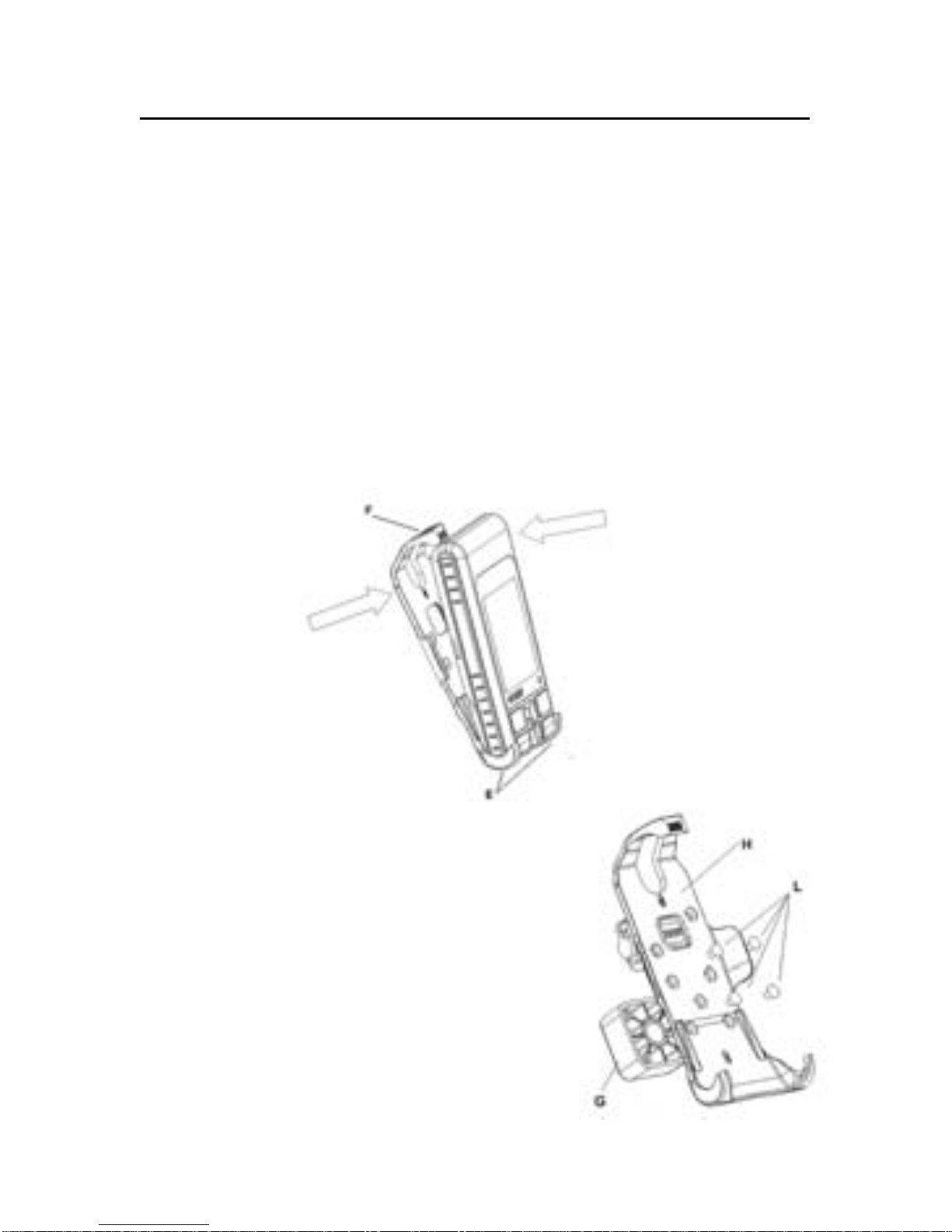
To mount the unit in the cradle, position the lower side of the
instrument between the two lower hooks (E) of the cradle and
then push the cradle against the instrument until the upper
hook (F) will lock the unit. To dismount the unit from the
cradle, release the upper hook (F).
The accessory set includes a panel-
mount bracket. Mount the bracket (G)
on the cradle (H) by using the 4 screws
(L) provided. The bracket (G) can be fixed
to any plain surface, using either
screws or double-face adhesive tape.
Please note that, regardless of the
mounting technique, the support will
not allow rotating the instrument once
fixed: for this reason, make sure to fix

10
English
the unit in the best position as far as the LCD visibility is
concerned.
When mounting the unit, make sure it is heading to the
vehicle’s moving direction, so as to allow the compass and the
inclinometer to show correct course and inclination of the
vehicle. Be aware that the compass works properly only if the
inclination of the instruments does not exceed 45° from the
horizontal surface.
Lanyard
The lanyard lace can be fixed either to the upper (1) or to the
lower (2) holes of the cradle. The lace should not tie the in-
strument. Insert the lace from behind the cradle, as shown in
the picture below.
Returning used electrical and electronic devices in EU countries
Users of electrical and electronic devices are obligated to collect used devices
separately. Electrical (electronic) used devices may not be disposed of together with
unsorted household refuse. The separate collection is a condition for reuse, recycling
and utilisation of used electrical (electronic) devices, which ensures the protection of
resources. Electrical (electronic) used devices from private household can be re-
Installation and Precautions
3S
Otros manuales para 3
1
Este manual sirve para los siguientes modelos
1
Tabla de contenidos
Otros manuales de GPS de Geonav


