
Gemtek WRTB-283N Manual de usuario

User Manual for WRTB-283N

Preface
Gemtek reserves the right to revise this publication and to make changes in the content hereof without obligation to notify any person
or organization of such revisions or changes.
Manual Revisions
Revision
1.0
Date
March 15, 2013
• Initial release
Description
Trademarks
Gemtek and the Gemtek logo are trademarks or registered trademarks of Gemtek Corporation or its subsidiaries in the United States or
other countries.
All other company or product names mentioned herein are trademarks or registered trademarks of their respective companies.
Copyright © 2013 by Gemtek Inc.
All rights reserved. This publication may not be reproduced, in whole or in part, without prior expressed written permission from Gemtek Inc.

Product Overview
WRTB-283N
Ethernet Cable
Power Adapter
CD-ROM with Manual and Setup Wizard
If any of the above items are missing, please contact your reseller.
Note: Using a power supply with a different voltage rating than the one included with the WRTB-283N will cause damage and void the warranty.

System Requirements
• An Ethernet-based Cable or DSL modem
Network Requirements
Web-based Configuration
Utility Requirements
CD Installation Wizard
Requirements
• IEEE 802.11n or 802.11g wireless clients
• IEEE 802.11a wireless clients
• 10/100/1000 Ethernet
Computer with the following:
• Windows®, Macintosh, or Linux-based operating system
• An installed Ethernet adapter
Browser Requirements:
• Internet Explorer 6.0 or higher
• Chrome 2.0 or higher
• Firefox 3.0 or higher
• Safari 3.0 or higher (with Java 1.3.1 or higher)
Windows® Users: Make sure you have the latest version of Java
installed. Visit www.java.com to download the latest version.
Computer with the following:
• Windows® 7, Vista®, or XP with Service Pack 2
• An installed Ethernet adapter
• CD-ROM drive

TOTAL PERFORMANCE
Introduction
Combines award winning router features and 802.11a/n/g wireless technology to provide the best wireless performance.
TOTAL SECURITY
The most complete set of security features including Active Firewall and WPA2™ to protect your network against outside intruders.
TOTAL COVERAGE
Provides greater wireless signal rates even at farther distances for best-in-class Whole Home Coverage.
ULTIMATE PERFORMANCE
The Gemtek WRTB-283N is a 802.11n/802.11a compliant device that delivers real world performance of up to 13x faster than
an 802.11g wireless connection (also faster than a 100Mbps wired Ethernet connection). Create a secure wireless network to share photos, files,
music, video, printers, and network storage throughout your home. Connect the WRTB-283N to a cable or DSL modem and share your
high-speed Internet access with everyone on the network. In addition, this Router includes a Quality of Service (QoS) engine that keeps digital
phone calls (VoIP) and online gaming smooth and responsive, providing a better Internet experience.
EXTENDED WHOLE HOME COVERAGE
This high performance router provides superior Whole Home Coverage while reducing dead spots. The WRTB-283N is designed for use
in bigger homes and for users who demand higher performance networking. Add a notebook or desktop adapter and stay connected to your
network from virtually anywhere in your home.
TOTAL NETWORK SECURITY
The WRTB-283N supports all of the latest wireless security features to prevent unauthorized access, be it from over the wireless network
or from the Internet. Support for WPA standards ensure that you’ll be able to use the best possible encryption method, regardless of your client
devices. In addition, this WRTB-283N utilizes dual active firewalls (SPI and NAT) to prevent potential attacks from across the Internet.
* Maximum wireless signal rate derived from IEEE Standard 802.11a, 802.11g, and 802.11n specifications. Actual data throughput wil vary. Network conditions and environmental
factors, including volume of network traffic, building materials and construction, and network overhead, lower actual data throughput rate. Environmental conditions will
adversely affect wireless signal range.

Features
• FasterWirelessNetworking - The WRTB-283N provides up to 900Mbps* wireless connection with other 802.11n wireless clients.
This
capability allows users to participate in real-time activities online, such as video streaming, online gaming, and real-time audio.
The performance of this 802.11n wireless router gives you the freedom of wireless networking at speeds 13x faster than 802.11g.
• Compatiblewith802.11a/gDevices - The WRTB-283N is still fully compatible with the IEEE 802.11g and 802.11a
standards, so it can connect with existing 802.11g and 802.11a PCI, USB, and Cardbus adapters.
• AdvancedFirewallFeatures - The Web-based user interface displays a number of advanced network management features
including:
• Content Filtering - Easily applied content filtering based on MAC Address, URL, and/or Domain Name.
• Filter Scheduling - These filters can be scheduled to be active on certain days or for a duration of hours or minutes.
• SecureMultiple/ConcurrentSessions - The WRTB-283N can pass through VPN sessions. It supports multiple and
concurrent IPSec and PPTP sessions, so users behind the WRTB-283N can securely access corporate networks.
• User-friendlySetupWizard - Through its easy-to-use Web-based user interface, the WRTB-283N lets you control what information
is accessible to those on the wireless network, whether from the Internet or from your company’s server. Configure your router
to
your specific settings within minutes.
* Maximum wireless signal rate derived from IEEE Standard 802.11a, 802.11g, and 802.11n specifications. Actual data throughput will vary. Network conditions and environmental
factors, including
volume of network traffic, building materials and construction, and network overhead, lower actual data throughput rate. Environmental conditions will adversely affect wireless signal
range.


• FastandGuaranteeWirelessStreamingforVideoQuality-Whether set-top box or gaming console streaming media directly
from the Internet, a NAS or PC, these devices share in common the need to connect with a router in order to communicate and
establish the wireless media stream. The WRTB-283N offers stability, fast wireless, and guaranteed performance for media streaming
using the newest streaming engine technology.
• StorageforPhotosandStreamingMusic/Video-A compact SD Card can be placed inside this router to act as network storage.
Without any cumbersome cables or protruding antennas, you can wirelessly share this disk space among family members,
stream
stored music and video to media players attached to stereo systems or TV, and provide remote access to your personal
documents
from the Internet.
• ShareMultifunctionPrintersandDirectConnectiontoUSBStorage-Through the SharePort™ Plus Utility, you can connect
multifunction printers to the USB ports to share printing and scanning functions among family members.
• OtherFeaturesInclude-
• Wi-Fi Protected Setup (WPS) Push Button
• UPnP Support
• HD Fuel™ for smooth video streaming and online gaming
• Gemtek Green™
• Wi-PnP for easy wireless setup (required USB thumb drive)
• Supports IPv6
• True Gigabit Routing Connectivity
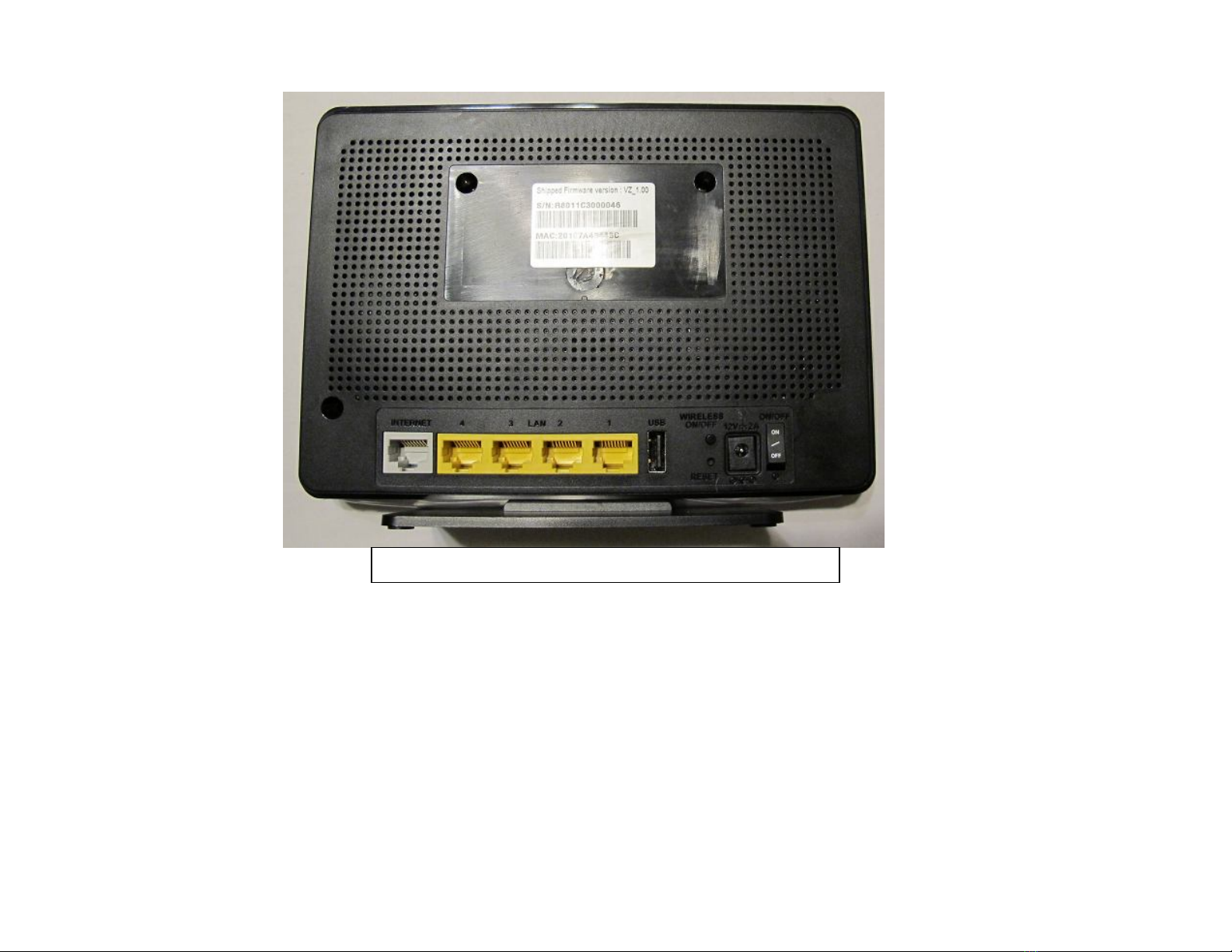
Hardware overview
1. Internet Port : The auto MDI/MDIX Internet port is the connection for the Ethernet cable to the cable or DSL modem.
2. LAN Ports(1-4) : Connect Ethernet dvices such as computers, switches, and hubs.
3. USB : Connect a USB1.1, 2.0, or 3.0 flash drive to configure the wireless settings using WCN.
4. Rest : Press and hold the reset button to restore the router to its original factory settings.
5. Power Receptor : DC power input
6. Power Switch : Power ON/OFF switch
1 2 3 4 5 6

Power LED: A solid light indicates a proper connection to the power supply.
LAN LED: A solid light indicates a proper connection to the LAN
WAN LED: A solid light indicates a proper connection to the WAN
USB LED: A solid light indicates a proper connection to the USB
Tabla de contenidos
Otros manuales de Enrutador de red de Gemtek


Manuales populares de Enrutador de red de otras marcas


NETGEAR
NETGEAR FS526T - Switch Manual de usuario

Korenix
Korenix JetNet 5710G Series Manual de usuario

Automated Logic
Automated Logic ZN551 Manual del propietario

Cisco
Cisco ASR 1000 Series Manual del operador

EnGenius
EnGenius ESR-9710 Manual de usuario

Cisco
Cisco 805 Series Instrucciones de funcionamiento y seguridad