
Gemini 810 Manual de usuario

USER MANUAL

Meticulous
Structured
CREATIVE
INCREDIBLY
Innovative
TECHNOLOGY
FEDERAL LAW RESTRICTS THIS DEVICE TO
SALE BY OR ON THE ORDER OF A DENTIST
OR PHYSICIAN OR OTHER LICENSED MEDICAL
PRACTITIONER

Inspiration
The true sign of intelligence is not
knowledge but imagination.
Albert Einstein
Laser technology enables clinicians to provide less invasive treatment for
many preventative, restorative, cosmetic, and surgical soft tissue procedures.
The Gemini 810 + 980 diode laser represents a new advancement in dental
laser technology. With its unique eye-catching design, simple user interface,
and multiple wavelength modes, you can perform a range of soft-tissue pro-
cedures with ease.
The Gemini 810 + 980 diode laser is the first soft tissue dental laser to provide
a choice of two laser wavelengths in one system. You have the ability to se-
lect laser settings that best suit specific procedures and patient needs based
on tissue type and optimal wavelength absorption characteristics.
You will discover that the Gemini 810 + 980 diode laser cuts faster, reduc-
es tissue tagging and generates less collateral thermal heat than other di-
ode lasers you may have used, allowing you to provide a higher standard of
care. The laser also features an incredible, innovative transparent display
designed to wow your patients.
Choosing to integrate laser technology into your practice yields many bene-
fits, including increased patient comfort and satisfaction and more efficient
treatment. To get the maximum benefits of laser technology, consider joining
a study group so that you can exchange tips and ideas with fellow clinicians. A
study group is also an excellent way to keep abreast of the latest procedures
and technological advances. A great place to start is the Academy of Laser
Dentistry, www.laserdentistry.org.

Failure to comply with precautions and warnings described in this User Manual may lead to exposure
to dangerous optical radiation sources. Please comply with all safety instructions and warnings.
CAUTION: Do not use in the presence of combustible or combustion-supporting gases.
CAUTION: Always test activate the device outside the mouth before using on a patient.
CAUTION: This unit has been designed and tested to meet the requirements
of electromagnetic, electrostatic, and radio frequency interference standards.
However, the possibility of electromagnetic or other interference may still
exist. Relocating the device may help to eliminate the interference.
CAUTION: Do not modify this equipment without authorization of the manufacturer.
CAUTION: Medical electrical equipment needs special precautions regarding
electromagnetic compatibility (EMC) and needs to be installed and put into service
according to the EMC information provided in pages 44-48 of this manual.
CAUTION: Periodically inspect laser eyewear for pitting and cracking.
CAUTION: Read these instructions carefully prior to using your Gemini 810 + 980
diode laser.
CAUTION: Always wind the fiber optic cable in a clockwise manner around the fiber
wrap to avoid fiber breakage (See Page 26).
Safety is paramount when using any energy-based surgical instrument, and your office should
implement a safety program for the Gemini 810 + 980 diode laser. If your office does not already
have a safety officer, one should be appointed to be responsible for understanding proper use, safe
operation, and maintenance of the Gemini laser system. Their duties should include training office
personnel in all aspects of system safety and management of the Gemini laser and all accessories.
CAUTION: Ensure that all users are properly trained prior to use. Consult your
distributor for training recommendations.
4
WARNINGS & CAUTIONS

WARNING: Laser aperture at the end of the handpiece.
WARNING: Laser aperture warning label affixed to system handpiece.
WARNING: Laser Safety Eye Protection MUST BE WORN by the Operator, Patient,
Assistant, and anyone present when the laser is activated. Eye Protection must
conform to Specification DIN EN207 Annex II of the Directive 89/686/EEC with
wavelength protection of 810 nm-980 nm, and ±10 nm of OD 5+ such as NoIR Laser
WARNING: Visible and Invisible Laser Radiation – Avoid eye or skin exposure to
direct or scattered radiation. Class IV Laser Product
WARNINGS & CAUTIONS
WARNING: Use of controls or adjustments or performance of procedures other than
those specified herein may result in hazardous radiation exposure.
WARNING: Do not open unit housing at any time. Danger from optical radiation may
exist.
WARNING: The use of accessories, other than those specified, except those supplied or sold
by Ultradent Products, Inc., as replacement parts for internal or external components, may
result in increased EMMISSIONS or decreased IMMUNITY of the Gemini 810 + 980 diode laser.
Refer to pages 44-48 for additional information.
WARNING: Do not aim the laser at metallic or reflective surfaces, such as surgical
instruments or dental mirrors. If aimed directly at these surfaces the laser beam will
reflect and create a potential hazard.
WARNING: Never direct or point the beam at a person’s eyes.
WARNING: Always place the system into STANDBY mode when leaving the Gemini 810
+ 980 diode laser unattented for few minutes or between patients.
WARNING: Never operate the laser without a fiber tip attached.
WARNING: Do not look directly into the beam or at specular reflections.
5
Company filter model CYN.
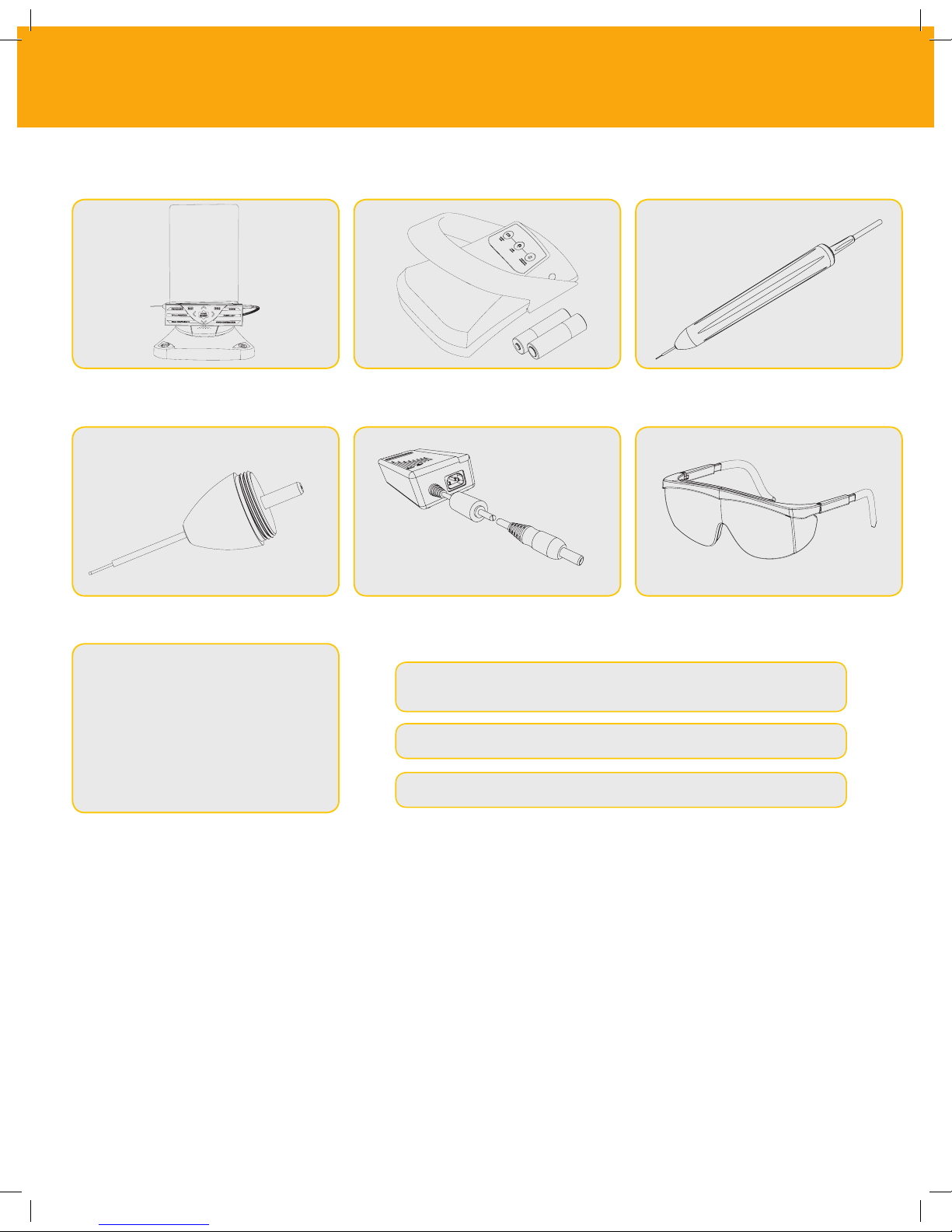
WHAT IS IN THE BOX
Purchase of the Gemini 810 + 980 diode laser includes the following.
Laser Unit
Disposable Tips (10)
• Laser Warning Sign
• Warranty Information
• USB Cable
• User Manual
Activation Pedal with 2 AA Batteries
*DC Power Supply
*Actual Power supply may vary from image *Actual eyewear may vary from image
Fiber Delivery System
*Protective Eyewear (3)
NOTE: The laser ships with the lithium ion battery and fiber delivery
system already installed
WARNING: No modification of this equipment is allowed
NOTE: Use proper care when transporting the unit
UNPACKING INSTRUCTIONS
SHIPPING CONTAINER INFORMATION
A manufacturer or dealer representative can provide assistance when you are ready to remove the
Laser from its shipping container. Please do not attempt to unpack theGemini 810 + 980 diode laser
and install the system without reading this manual first. If you are unsure about any aspect of the
assembly, call your customer service representative or dealer for assistance.
The shipping container you received with your Gemini 810 + 980 diode laser was specially designed
to safely transport the device. In the unlikely event that you need to return the laser for service or
repair, please retain the original shipping container.
6

Display ........................................................................................................................................................................ 08
Keypad ..........................................................................................................................................................................09
Laser Unit .................................................................................................................................................................... 10
Activation Pedal ..........................................................................................................................................................11
Fiber Delivery System ................................................................................................................................................12
Quick Start ................................................................................................................................................................... 13
01 - Electronic Key Passcode ................................................................................................................ 14
02 - Selecting a Wavelength .................................................................................................................. 15
03 - Activation Pedal Connection ........................................................................................................ 16
04 - Manual Power Adjustment ............................................................................................................17
05 - Laser Standby and Active Modes ................................................................................................ 18
06 - 08 - Preset Procedures Settings ............................................................................................. 19-21
09 - Disposable Tip Operation ............................................................................................................. 22
10 - Initiation of Fiber Tips ................................................................................................................... 23
11 - Tip Illumination ................................................................................................................................ 23
12 - Sound .................................................................................................................................................. 24
13 - Aiming Light ...................................................................................................................................... 24
14 - Battery and Battery Level Indications ...................................................................................... 25
15 - Power Supply .................................................................................................................................... 25
16 - Fiber Wraping ................................................................................................................................... 26
17 - Hand Piece Magnet ........................................................................................................................... 27
18 - Operating Mode ............................................................................................................................... 27
19 - Emergency Stop ............................................................................................................................... 28
20 - Remote Interlock .............................................................................................................................28
21 - Transparent Electroluminescent Display ................................................................................... 29
Cleaning and Sterilization Procedures .................................................................... 30
Procedural Recomendations...................................................................................... 32
Facility & Environmental Considerations................................................................ 33
General Safety Considerations...............................................................................34-37
System Specifications................................................................................................... 38
Service and Troubleshooting................................................................................. 39-42
Regulatory Compliance................................................................................................ 43
Electromagnetic Environment Guidance............................................................44-48
Labeling ...................................................................................................................... 49-52
Overview
Controls - Operation & Use
TABLE OF CONTENTS
7

Whitening
8
OVERVIEW DISPLAY
01
02
03
04
05
06
07 08 09 10 11 12
13
14
15
16
17
01 ELECTRONIC PASSCODE 07 VOLUME INDICATION 13 980 STANDBY MODE
02 PRESET PROCEDURES 08 REMOTE INTERLOCK 14 980 WAVELENGTH
03 SOUND LEVEL 09 POWER DIAL 15 980 ACTIVE MODE
04 810 ACTIVE MODE 10 BLUETOOTH 16 POWER INDICATION
05 810 WAVELENGTH 11 BATTERY LEVEL 17 AIMING LIGHT
06 810 STANDBY MODE 12 POWER ADAPTER

9
OVERVIEW KEYPAD
14 15
01 PRESET PROCEDURES 07 RIGHT ARROW 13 DOWN ARROW
02 TIP ILLUMINATION 08 980 WAVELENGTH 14 EMERGENCY STOP
03 DUAL WAVELENGTH 09 SOUND 15 ON/OFF
04 810 WAVELENGTH 10 AIMING LIGHT
05 LEFT ARROW 11 VOICE CONFIRMATION
06 UP ARROW 12 ACTIVE/STANDBY
01 02 03 04 05 06 07 08 09 10 11
12 13

Transparent Display
Strain Relief
Base
ON/OFF
Emergency
Stop
Optical Fiber
LED Tip
Micro USB
(factory use only)
Power Plug
Remote Interlock Port
Surgical Handpiece
Optical Fiber with Protection Tube
Keypad
OVERVIEW LASER UNIT
10
Este manual sirve para los siguientes modelos
1
Tabla de contenidos
Otros manuales de Instrumento de medición de Gemini


Manuales populares de Instrumento de medición de otras marcas


Endress+Hauser
Endress+Hauser Proline Promag 50 Especificaciones técnicas

Siemens
Siemens SITRANS F Coriolis FCT030 Manual de lista de piezas

KLINGER
KLINGER CMF V Series Manual de usuario

EXFO
EXFO FTB-2 Manual de operación y mantenimiento

Keysight
Keysight M8290A Manual de usuario

ADTEK
ADTEK MW-5 Manual de usuario