
Gembird ACAM-003 Manual de usuario

USER MANUAL
HANDBUCH
HANDLEIDING
MANUEL DESCRIPTIF
РУКОВОДСТВО ПОЛЬЗОВАТЕЛЯ
КЕРІВНИЦТВО КОРИСТУВАЧА
FULL HD WIFI ACTION CAMERA WITH
WATERPROOF CASE
USER MANUAL
ACAM-003

2
GEMBIRD EUROPE B.V. http://www.gembird.eu
All brands and logos are registered trademarks of their respective owners
ACAM-003
FULL HD WIFI ACTION CAMERA WITH WATERPROOF CASE
Features
Full HD 1080p (60 fps) action camera with built-in microphone and
speaker
IP68 full waterproof case included
170 degrees ultra wide angle lens (fisheye)
WiFi function - for easy wireless control with smartphone or tablet
Free remote control app available in iOS and android app stores
Stores hours of video material on removable SD card (not included)
Built-in 2” color LCD screen
Supports single-, triple- and interval photo shooting
Practical instant snapshot button
Complete set with multiple accessories
Specifications
Interfaces: USB 2.0, HDMI 1.3
LCD: 2'' TFT display 480 x 240 pixels
Image sensor: CMOS 8 Mega pixels, fixed focus, 2.9 mm focal
length, F3.1 aperture

3
GEMBIRD EUROPE B.V. http://www.gembird.eu
All brands and logos are registered trademarks of their respective owners
ACAM-003
FULL HD WIFI ACTION CAMERA WITH WATERPROOF CASE
Video resolution:1920x1440 (30FPS) / 1920x1080(60FPS) /
1920x1080(30FPS)/1280x720(60FPS)/1280x720(120fps) ,about 100
MB/minute.
Video format: H.264 (MOV)
Photo resolution: 16 / 12 / 8 / 5M Megapixel JPG
Electronic shutter speed: 1/2 - 1/2000 second
Card slot: supports up to 32 GB SD Card (SDHC Speed class 10)
Output: Mini-HDMI & Micro-USB
Buzzer with speaker
WiFi: 802.11 b/g/n
Battery: replaceable 1200 mA Lithium battery (about 100 mins)
Charging time: 3 hours
AC charger: 100 - 240 V AC input, 5 V DC output up to 1 A
Dimensions: 59 x 44 x 26 mm
Weight: 50 g
Operating conditions: -10 - 60 Celsius degrees at 10-80% humidity

4
GEMBIRD EUROPE B.V. http://www.gembird.eu
All brands and logos are registered trademarks of their respective owners
ACAM-003
FULL HD WIFI ACTION CAMERA WITH WATERPROOF CASE
I
In
nt
tr
ro
od
du
uc
ct
ti
io
on
nt
to
oa
ap
pp
pe
ea
ar
ra
an
nc
ce
ea
an
nd
dk
ke
ey
ys
s
Display/Menu key
2.0’’ HD
LCD
Lens
Infrared
remote control
lamp
Charging /Busy
indicator
Busy indicator
Microphone

5
GEMBIRD EUROPE B.V. http://www.gembird.eu
All brands and logos are registered trademarks of their respective owners
ACAM-003
FULL HD WIFI ACTION CAMERA WITH WATERPROOF CASE
Start using
1. Charge the built-in lithium battery
Wifi/List key
HDMI
port
Power/Mode
key
Battery
door
Micro SD
Card
Shutter/OK key
USB cable
Micro USB
port
Buzzer

6
GEMBIRD EUROPE B.V. http://www.gembird.eu
All brands and logos are registered trademarks of their respective owners
ACAM-003
FULL HD WIFI ACTION CAMERA WITH WATERPROOF CASE
Connect the camera to the computer for charging, at this time, the charging
indicator will be in blue, and it will be off after charging. Generally, it takes 2-
4 hours to charge the battery.
2. Use the storage card
1. Push the Micro SD card into the slot
till it is in place as per the instruction in
concavely engraved words by the
storage card slot.
2. To take out the Misco SD card, press
the tail of the storage card inwardly
softly and it will be popped out.
Note: There’s no built-in memory unit in
the camera, so make sure to insert a storage card into it prior to use (it is
recommended at least Class 6 high speed Misco SD card).
3. Power on/off
3.1 Power on: Press Power key for 3 seconds, the screen will be on and
the camera will be started.

7
GEMBIRD EUROPE B.V. http://www.gembird.eu
All brands and logos are registered trademarks of their respective owners
ACAM-003
FULL HD WIFI ACTION CAMERA WITH WATERPROOF CASE
3.2. Power off: Hold on Power key for 3 seconds when the camera is in the
idle state to turn it off.
3.3. Auto screen off: The screen will be turned off automatically when the
time that the camera is in the idle state for automatic screen off to save
power. After that, the lamp for screen off will be on.
3.4. Power off when the camera is lack of electricity. When electrical
quantity of the battery is very low, an icon of will be displayed on the
LCD screen, prompting you to charge it in time. When the icon turns red and
flickers, the camera will be turned off automatically.
4. Shift among functional modes
The camera has 4 modes, namely video recording mode, car-carrying mode,
shooting mode and replay mode. After power is on, press Power key to shift
among them.
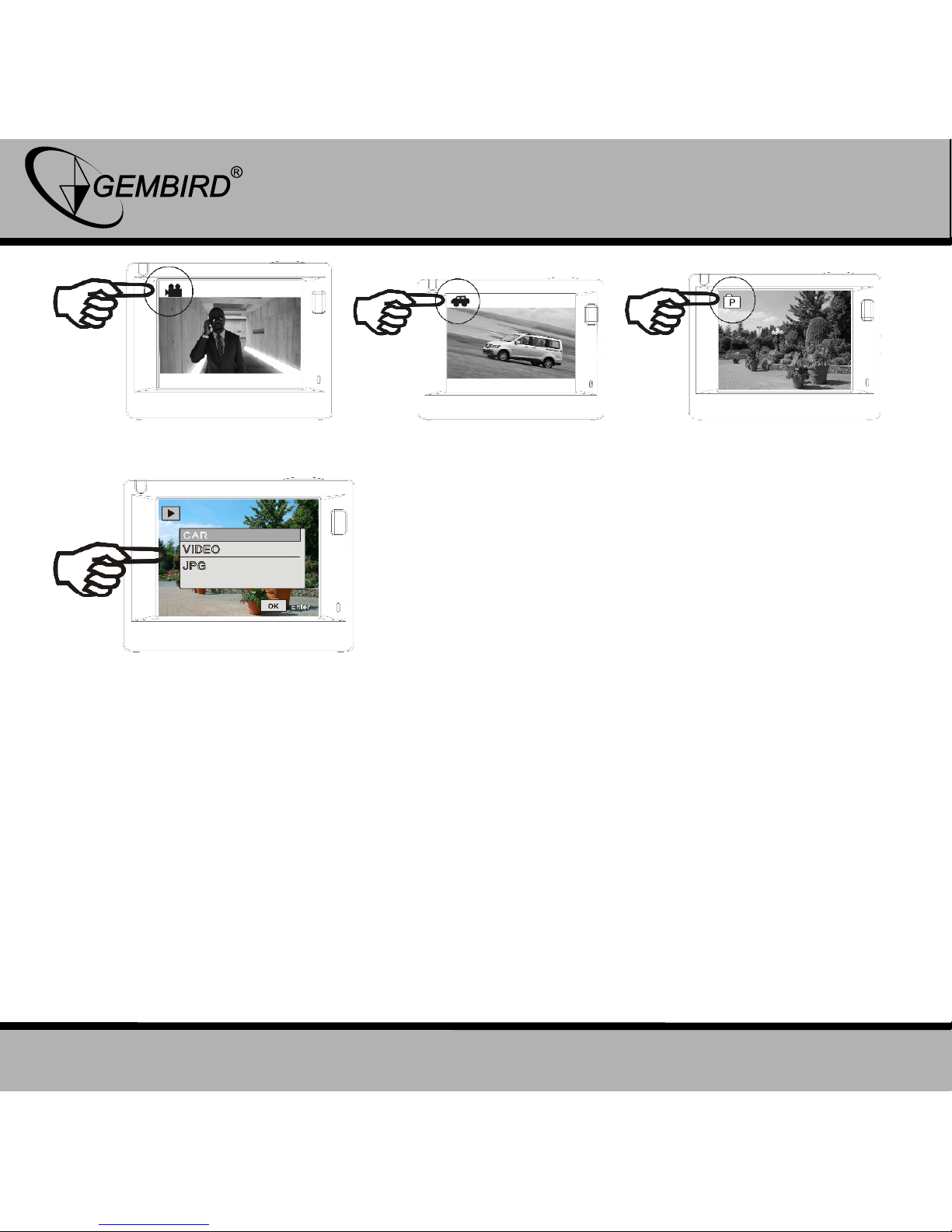
8
GEMBIRD EUROPE B.V. http://www.gembird.eu
All brands and logos are registered trademarks of their respective owners
ACAM-003
FULL HD WIFI ACTION CAMERA WITH WATERPROOF CASE
Video recording mode Car-carrying mode Shooting mode
Replay mode
Note: after the shutdown of the system will save the current setting pattern,
the next open opportunity automatically entered into the model.
5. Indicators
Busy indicator (red): When the camera is busy such as recording videos,
shooting photos and turning off screen automatically, the work indicator will
flicker.

9
GEMBIRD EUROPE B.V. http://www.gembird.eu
All brands and logos are registered trademarks of their respective owners
ACAM-003
FULL HD WIFI ACTION CAMERA WITH WATERPROOF CASE
Charging indicator (blue): When it is on, the user is prompted that the
camera is being charged and it will be off after charging is completed.
6. Video recording mode
After power is on, the video camera will enter video recording mode directly
and in preview mode, press Shutter key to start video recording; Press it
again to stop shooting. If the memory card is full or electrical quantity is low,
it will also stop shooting:
1. Icon of mode, indicating video recording
mode;
2. Indicate quality of video;
3. Indicate size of video:1440P
(30FPS)/FHD 1080P(60FPS)
/ FHD 1080P(30FPS)/HD 720P(120FPS) /
HD 720P(60FPS)
is optional;
4. Recording time, indicating recordable
length of time;
5. Icon of battery, indicating current
electrical quantity;
Note: short press power key to realize the camera video process
and save the image.

10
GEMBIRD EUROPE B.V. http://www.gembird.eu
All brands and logos are registered trademarks of their respective owners
ACAM-003
FULL HD WIFI ACTION CAMERA WITH WATERPROOF CASE
7. Car-carrying mode
After power is on, press Power key to enter car-carrying mode
1. Icon of mode, indicating car-carrying
mode;
2. Indicate quality of video;
3. Indicate size of video:1440P
(30FPS)/FHD 1080P(60FPS)
/FHD 1080P(30FPS)/HD 720P(120FPS) /
HD 720P(60FPS)
is optional.
4. Recording time, indicating recordable
length of time.
5. Icon of battery, indicating current
electrical quantity
Prompt:
1.In car-carrying mode, a passage of video is kept every three minutes in
recording. After the storage card is full, the earliest passage will be deleted,
and video will be recorded in a circulating way.
2. Boot after choosing to car-carrying mode, normal shutdown again after
boot, connect the car charger will automatically enter the vehicle model and
start the video.
Tabla de contenidos
Idiomas:
Otros manuales de Cámara de acción de Gembird

Gembird
Gembird ACAM-001 Manual de usuario

Gembird
Gembird ACAM-1 Manual de usuario

Gembird
Gembird ACAM-04 Manual de usuario

Gembird
Gembird ACAM-002 Manual de usuario

Gembird
Gembird ACAM-W-01 Manual de usuario

Gembird
Gembird ACAM-W-01 Manual de usuario

Gembird
Gembird ACAM-001 Manual de usuario

Gembird
Gembird ACAM-001 Manual de usuario


