GE 343A6768-0001 Manual de usuario

INTRODUCTION
YourTelephone is designed to give you flexibility in use, and high quality
performance.To get the most from your new telephone, we suggest that you
take a few minutes right now to read through this instruction manual.
If you have any questions or problems, consult theTable of Contents, the
Troubleshooting Guide, or the Index for the solution.
TABLE OF CONTENTS
PARTS CHECKLIST .........................................................................................................2
INSTALLATION AND SETUP ..................................................................................................2
TABLETOP INSTALLATION ................................................................................................3
WALL MOUNT INSTALLATION ..........................................................................................4
USING FEATURES .............................................................................................................5
VOLUME CONTROL ........................................................................................................5
FLASH BUTTON ............................................................................................................5
REDIAL BUTTON ...........................................................................................................5
TEMPORARY TONE FEATURE ...........................................................................................5
MEMORY DIALING ............................................................................................................6
STORING ANUMBER IN MEMORY WHILE CALLING ............................................................... 6
STORING ANUMBER IN MEMORY (WITHOUT CALLING).........................................................6
DIALING ANUMBER FROM MEMORY ................................................................................7
BATTERY INSTALLATION ......................................................................................................8
TROUBLESHOOTING TIPS .................................................................................................... 9
CARE AND MAINTENANCE ................................................................................................ 10
ACCESSORY ORDER FORM ............................................................................................... 11
WARRANTY ................................................................................................................... 12
MODEL 2-9169A
343A6768-0001 (REV. 1 E/S)
SHT. 3 OF 28

2
PARTS CHECKLIST
Your package should contain the following items:
Base unit
#
0
OPER
*
TONE
9
WXY
8
TUV
7
PRS
6
MNO
5
JKL
4
GHI
3
DEF
2
ABC
1
MEM DIAL
REDIAL
STORE
FLASH
1
2
3
4
5
6
7
8
9
A
B
C
Handset Phone line cord Long handset cord
INSTALLATION AND SETUP
Your GE Memory PhoneTelephone can be mounted on the wall or placed on a
counter top or table top. After you decide which type of installation you want,
refer to the appropriate installation diagram.
MODULAR JACK REQUIREMENTS
You need an RJ11 type modular jack, which is the
most common type of phone jack and might look like
the one pictured here. If you don’t have a modular
jack, call your local phone company to find out how to
get one installed.
BEFORE YOU BEGIN
MODEL 2-9169A
343A6768-0001 (REV. 1 E/S)
SHT. 4 OF 28

3
TABLETOP INSTALLATION
1. Plug the telephone line cord into a modular jack (RJ11C) and into the
PHONE LINE jack on the back of the unit.
2. Plug the handset cord into the handset, and into the telephone jack on the
left side of the unit.
3. Set the PULSE/TONE switch toTONE if you useTouch-Tone service; set it to
PULSE if you have rotary service.
4. Adjust the RINGER volume switch to the desired setting.
12
3
4
MODEL 2-9169A
343A6768-0001 (REV. 1 E/S)
SHT. 5 OF 28

4
WALL MOUNT INSTALLATION
TheTelephone can be mounted on a wall
phone plate (not included).
2. Wrap extra cord and retain in space
provided in the back of the phone.
1. Plug the phone cord into the phone
jack on the back of the unit.
7. Set the PULSE/TONE switch to
TONE if you useTouch-Tone service;
set it to PULSE if you have rotary
service.
6. Set the RINGER VOLUME switch to
the desired setting.
5. Plug the handset cord into the
handset and into the unit, and then
hang up the phone.
4. Slip the mounting holes over the
wall plate posts and slide the unit
down firmly into place.
3. Connect the phone cord to the
modular jack on the wall.
PULSE/TONE
Switch
76
Ringer Volume
Switch
PULSE • • TONE OFF LO HI
RINGER
5
3
4
1
2
MODEL 2-9169A
343A6768-0001 (REV. 1 E/S)
SHT. 6 OF 28

5
FLASH BUTTON
Press the FLASH button instead of using the
hook switch to activate customer calling ser-
vices such as call waiting or call transfer, which
are provided by your local phone company.
REDIAL BUTTON
Redial the last number you called by pressing
the REDIAL button after you get a dial tone.
TEMPORARY TONE FEATURE
If you have Pulse (rotary) service, and want to
access customer calling services that require
touch-tone dialing, such as getting information
from a local bank, you can use this feature.
1. Press the TONE button ( *) after you have
connected to the service in order to enable
touch-tone dialing.
2. When you hang up, the phone automati-
cally returns to Pulse dialing mode.
USING FEATURES
VOLUME CONTROL
Use the RINGER VOLUME switch on the side of the phone to adjust the volume
of the ringer.
MEM DIAL
REDIAL
STORE
FLASH
MEM DIAL
REDIAL
STORE
FLASH
#
0
OPER
*
TONE
9
WXY
8
TUV
7
PRS
6
MNO
5
JKL
4
GHI
TONE button
Redial button
Flash button
MODEL 2-9169A
343A6768-0001 (REV. 1 E/S)
SHT. 7 OF 28

6
MEMORY DIALING
Store as many as 12 numbers in memory for easy dialing. Three can be stored
in the Emergency Quick Dial locations, and nine additional numbers can be
stored in the numbered keys (1-9).
STORING ANUMBER IN MEMORY WHILE CALLING
1. Pick up the handset.
2. Dial the phone number.
3. Press STORE twice.
4. Press an A, B ,C button, or Memory Location (1-9 on the keypad).
5. Record the phone number on the memory directory (located under the
plastic cover).
STORING ANUMBER IN MEMORY (WITHOUT CALLING)
1. Pick up the handset.
2. Press STORE.
3. Dial the number to be stored.
4. Press STORE.
5. Press an A, B ,C button, or Memory Location (1-9 on the keypad).
6. Record the phone number on the memory directory (located under the
plastic cover).
STORING THE LAST NUMBER DIALED
1. Pick up the handset.
2. Press STORE twice.
3. Press an A, B ,C button, or Memory Location (1-9 on the keypad).
4. Record the phone number on the memory directory (located under the
plastic cover).
MODEL 2-9169A
343A6768-0001 (REV. 1 E/S)
SHT. 8 OF 28

7
ADDING APAUSE TO THE DIALING SEQUENCE
Use the REDIAL button to insert a delay in the dialing sequence when storing a
number. For example, when you need to dial 9 to get an outside line, press
REDIAL at the point in the dialing sequence in which a pause is required:
1. Pick up the handset.
2. Press STORE.
3. Press 9.
4. Press REDIAL to add a pause, and then dial the number.
5. Press STORE.
6. Press an A, B ,C button, or Memory Location
(1-9 on the keypad).
CLEARING ASTORED NUMBER
1. Pick up the handset.
2. Press STORE button.
3. Press REDIAL button.
4. Press STORE button.
5. Press an A, B ,C button, or Memory Location
(1-9 on the keypad).
DIALING ANUMBER FROM MEMORY
You can dial numbers from memory when using the handset.When you get a
dial tone, press the MEM DIAL button followed by the memory location (1-9) for
the number you want to dial.
DIALING THE EMERGENCY QUICK DIAL NUMBERS (A, B, OR C)
To dial one of these numbers, just press its button after you get a
dial tone.
CAUTION: If you make test calls to emergency numbers, remain on the line
and explain the reason for the call. Also, make these calls in off-peak hours,
such as early morning or late evening.
MODEL 2-9169A
343A6768-0001 (REV. 1 E/S)
SHT. 9 OF 28

8
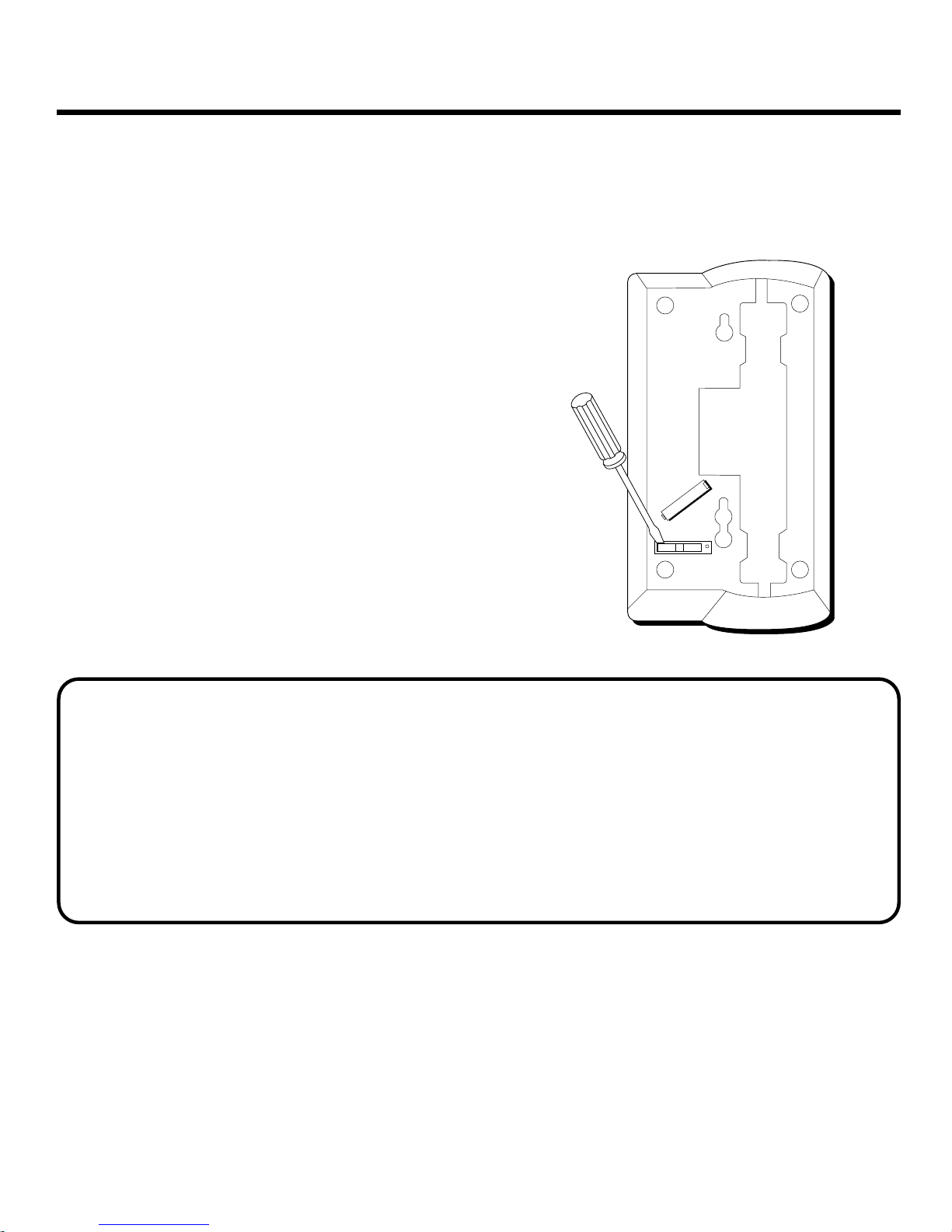
BATTERY INSTALLATION
A consumer replaceable long life Lithium Battery (3V) is installed in the phone
to provide backup power for retaining numbers in memory.
BATTERY SAFETY PRECAUTIONS
For your safety, please follow these precautions:
• Do not recharge, disassemble, mutilate, wet, or dispose of batteries in fire.
• Keep batteries out of reach of children.
• Replace only with GE Cat. #5-1923.
• When replacing batteries, be sure to unplug the phone line from the phone
before inserting the batteries.
1. Unplug modular jack from phone wall
outlet.
2. Remove battery cover.
3. Remove battery by inserting a pointed
object in opening at either end of
battery cartridge.
4. Insert replacement battery with “_”
facing back of phone.
5. Replace battery cover.
6. Plug modular jack into phone wall
outlet.
7. Reprogram numbers into memory.
MODEL 2-9169A
343A6768-0001 (REV. 1 E/S)
SHT. 10 OF 28

9
• Check RINGER VOLUME.
• Could have too many phones on one line.
(See FCC information regarding REN)
TROUBLESHOOTING TIPS
• Check hook switch to make sure it pops up.
• Make sure TONE/PULSE is set to correct
position.
• Unplug the phone, wait 30 seconds, and
plug the phone back in.
No dial tone
Can't dial out
Phone doesn’t ring
PROBLEM SOLUTION
Can’t be heard by
other party • Make sure phone cord is securely plugged in.
• Make sure you entered numbers correctly.
(See "Memory Dialing.")
Memory dialing
problems
MODEL 2-9169A
343A6768-0001 (REV. 1 E/S)
SHT. 11 OF 28

CARE AND MAINTENANCE
To keep your GE telephone working and looking good, follow these few simple
guidelines:
• Avoid putting the phone near heating appliances and devices that generate
electrical noise. (i.e., motors, fluorescent lamps.)
• Phone should not be exposed to direct sunlight or moisture.
•
Avoid dropping the handset and other rough treatment.
• Clean telephone with a soft cloth. (Remember to first unplug the phone
from the wall outlet.)
• Never use a strong cleaning agent or abrasive powder, as this will
damage the finish.
• Retain the original packaging for future use.
SERVICE
The FCC requires this product be serviced only by the manufacturer or its
authorized service agents. In accordance with FCC requirements, changes or
modifications not expressly approved by Thomson Consumer Electronics could
void the user’s authority to operate this product. For instructions on how to
obtain service, refer to the warranty included in this guide or call customer
service's telephone number: 800-448-0329.
Attach your sales receipt to the booklet for future reference or jot down the date
this product was purchased or received as a gift. This information will be
valuable if service should be required during the warranty period.
Purchase date
Store Name
MODEL 2-9169A
343A6768-0001 (REV. 1 E/S)
SHT. 12 OF 28
Este manual sirve para los siguientes modelos
1
Tabla de contenidos
Otros manuales de Teléfono de GE

GE
GE 29297GE3 Manual de usuario

GE
GE 21009GE3 Manual de usuario

GE
GE 29257GC1 Manual de usuario

GE
GE 25922EE1 Manual de usuario

GE
GE 29267GE1 Manual de usuario

GE
GE 29480C Manual de usuario

GE
GE 28128 Series Manual de usuario

GE
GE 26971 Manual de usuario

GE
GE 29253GC1 Manual de usuario

GE
GE InfoLink 28320 Manual de usuario

GE
GE DECT 00015924 Manual de usuario

GE
GE EX30044 Manual de usuario

GE
GE VERTICAL ZONELINE 2010 Manual de usuario

GE
GE 29318 Manual de usuario

GE
GE 29585FE1 Manual de usuario

GE
GE 29568 Manual de usuario

GE
GE DECT 0007634 Manual de usuario

GE
GE 55927860 Manual de usuario

GE
GE BedroomPhone 16224640 Manual de usuario

GE
GE 30544 Manual de usuario