
G-Technology G-DRIVE ev ATC Manual de usuario

Product Manual

p.2
Table of Contents
Table of Contents
About Your G-DRIVE ev ATC
Introduction .......................................................................................................................................... 4
What’s in the Box ................................................................................................................................ 5
System Requirements ....................................................................................................................... 5
Overview of the Drive....................................................................................................................... 6
Easy Installation for Mac ................................................................................................................... 9
Disconnect the Drive ......................................................................................................................... 9
Using Your Drive on Mac
Use with Time Machine.................................................................................................................... 11
Initialize Drive for Mac...................................................................................................................... 13
Restore the Drive Icon...................................................................................................................... 16
Reformat with Partitions................................................................................................................. 18
Using Your Drive on Windows
Windows Use ..................................................................................................................................... 23
Cross Platform Use............................................................................................................................ 24
Safety & General Use
Safety Precautions ............................................................................................................................. 28
Backup Your Data ............................................................................................................................... 29
Support & Warranty
Technical Support ........................................................................................................................... 31
Limited Warranty................................................................................................................................ 32
Copyright.............................................................................................................................................. 34

Table of Contents
• Introduction ...................................................... p.4
• What’s in the Box .......................................... p.5
• System Requirements .................................. p.5
• Overview of the Drive ................................ p.6
• Easy Installation for Mac ............................ p.9
• Disconnect the Drive ................................... p.9
About Your G-DRIVE®ev ATC

p.4
About Your G-DRIVE ev ATC
Introduction
Thank you for purchasing the G-DRIVE® ev ATC from G-Technology. Made from a lightweight,
shock-resistant compound, this all-terrain drive solution with tethered USB cable shields a
high quality, lightweight (approximately 35% lighter than the G-DRIVE ev), removable, stand-
alone G-DRIVE ev RaW USB hard drive. When coupled with the All-Terrain case, the data on your
G-DRIVE ev RaW is further protected from pressure, shock and dust. Equipped with a watertight
drive compartment, the G-DRIVE ev ATC oats; should it be dropped into a pool of water up
to 1ft for 30 seconds your data will remain protected. Perfect for in-the-eld back-up, editing,
transferring and storage, this durable 7200 RPM drive is formatted for Mac®, it can be easily
reformatted for Windows® and comes with a 3-Year limited warranty.
As part of Evolution Series, the G-DRIVE ev RaW can be used as a standalone device, inside the
ev All Terrain Case or with the G-DOCK ev® with Thunderbolt™ for ultra-fast transfer rates and
editing. The ev All-Terrain case is compatible with ev Series drives including the G-DRIVE® ev or
G-DRIVE® ev SSD.

p.5
About Your G-DRIVE ev ATCAbout Your G-DRIVE ev ATC
System Requirements
The drive is set up at the factory for use with Mac OS® systems, formatted as ‘HFS+
with Journaling’, and supports the following Operating Systems:
Mac: Mac OS 10.7+.
Windows: Windows® 8.1, 8 and 7
See how to congure for Windows here.
What’s in the Box
The following items are included in the box:
• G-DRIVE® ev ATC hard drive solution with tethered USB cable
- G-DRIVE® ev ATC hard drive solution consists of an outer‘ev All-Terrain case’ and a
removable hard drive known as ‘G-DRIVE ev RaW’
• USB 3.0 cable (for use with G-DRIVE ev RaW)
• Quick Start Guide
• 3-Year limited warranty
If any items are missing, please contact G-Technology at g-technology.com/support.

p.6
About Your G-DRIVE ev ATC
Overview of the Drive
Your G-DRIVE ev ATC is designed for providing easy access to your precious content
stored on the drive and providing everyday protection. The G-DRIVE ev ATC drive
solution consists of two parts:
1. ev All-Terrain case (with tethered USB 3.0 cable)
2. Removable G-DRIVE ev RaW USB hard drive
ev All-Terrain case
The ev All-Terrain Case provides easy connectivity with its tethered USB cable. The cable
can be accessed from the left hand side of the drive.
Simply remove the cover which protects the connector and plug-in to the USB port on your
laptop or desktop. The cover remains attached to the cable so that you don’t have to worry
about losing it.
The Power & Activity LED on the front of the unit will glow when power is applied via the USB
port. The light will ash more brightly as data is transferred to or from the hard drive.
p.7
About Your G-DRIVE ev ATCAbout Your G-DRIVE ev ATC
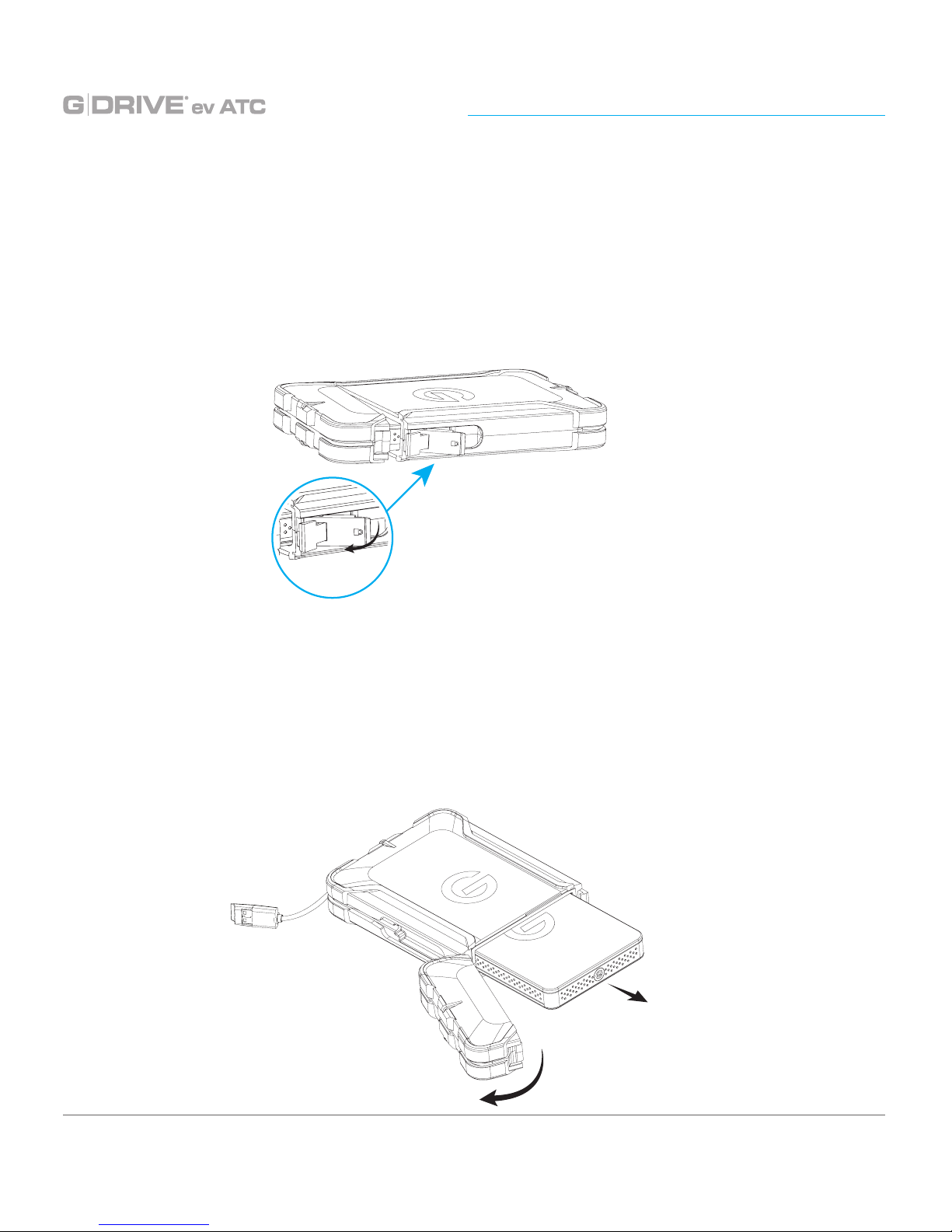
To access the removable hard drive, also called G-DRIVE ev RaW, simply open the latch
located on the right side of the ev All-Terrain case. Gently pulling on the latch opens the
drive compartment and you now have access to the G-DRIVE ev RaW. The removable
hard drive also has an illuminated ‘G’ logo in the front that glows when the case is
connected to a power source and ashes more brightly in case of drive activity.
G-DRIVE ev RaW
Inside the ev All-Terrain case you will nd the G-DRIVE ev RaW USB hard drive. The
G-DRIVE ev RaW can be removed from the case by simply pulling out of the case as
shown in the image below. Please make sure that the drive is safely ejected from your
desktop or laptop before removing the drive. Learn more about safely ejecting your
drive here.

p.8
About Your G-DRIVE ev ATC
The G-DRIVE ev RaW can operate as a standalone USB hard drive or as a module for
use inside G-DOCK ev or G-DRIVE ev ATC hard drive solution. The drive features an
illuminated ‘G’in the front, and a SATA Port and USB 3.0 Port on the back.
USB 3.0 Port
SATA Interface for
use with G-DOCK ev
Power & Activity LED

p.9
About Your G-DRIVE ev ATCAbout Your G-DRIVE ev ATC
Disconnect the Drive
A great feature of G-DRIVE ev ATC is its ability to be connected and disconnected while
your computer is running. However, to prevent failures and/or data loss, it is important
to follow the steps below when disconnecting or ‘unmounting’ the drive from your
computer.
1. Before disconnecting the drive, unmount the system by simply dragging the
G-DRIVE ev ATC icon to the trash located in the dock. Keyboard shortcut: Select the
drive icon and hit Command+E.
2. It is safe to remove the drive from your system when the drive icon is no longer
present on your desktop.
Helpful links
• To use your drive on Windows, go to Windows Use.
• To use your drive on Mac®and Windows, go to Cross Platform Use.
Easy Installation for Mac
G-DRIVE ev ATC easily attaches to your computer via the USB port. Simply use the
tethered USB cable to connect the drive to the appropriate port on your computer. The
drive will automatically mount on the desktop if you are running Mac OS.
No AC power supply is necessary. The drive is bus-powered to eliminate the need to
carry around an external AC power supply to use the drive.

Using Your Drive on Mac
•Use with Time Machine ............................. p.11
•Initialize Drive for Mac .............................. p.13
•Restore the Drive Icon ............................... p.16
•Reformat with Partitions ........................... p.18
Otros manuales para G-DRIVE ev ATC
1
Tabla de contenidos
Otros manuales de Servidor de almacenamiento en red de G-Technology


Manuales populares de Servidor de almacenamiento en red de otras marcas

HP
HP NetStorage 6000 Manual de usuario

Seagate
Seagate U10 ST320423A Manual de usuario

Synology
Synology RackStation RS816 Manual

D-Link
D-Link ShareCenter Pro DNS-1200-05 Manual de usuario

Avid Technology
Avid Technology VideoRAID ST Guía de seguridad

Western Digital
Western Digital My Cloud Home Duo Manual de usuario


