FSP Technology CUT593 Manual de usuario

CUT593
PC CASE

Specification
Model
Type
Color
Materials
Dimensions (D x W x H)
MotherBoard Support
USB Port
Maximum CPU Cooler Height
VGA Card Length
PSU Support
Expansion Slots
Dust Filters
Drive Bay
Fan System
(Including Fan)
Fan &
Water Cooler
Support
Product specifications are subject to change without notice.
E-ATX Ultra Tower
Black ; White
0.7mm SPCC, Glassx1
Product:482 x 230 x 545mm / Carton:625 x 320 x 590mm
E-ATX, ATX, M-ATX, Mini-ITX
USB3.0 x 2, Type-C
175mm
400mm
200mm ATX
7
Front / Top / PSU
3 (Share with SSD)
4+1
0
120 / 140mm x 3 or 360mm Radiator
120mm x 3 or 140mm x 2 or 360mm Radiator with 6 fans
120/140mm x 1
3.5" HDD
2.5" SSD
Front
Top/Bottom
Rear
Front
Top
Rear / Inside
CUT593A
140mm ARGB x 3
140mm ARGB x 1
CUT593
140mm x 3
140mm x 1

Accessory
x6
for PSU/PCIe
1
x9
for HDD
3
x18
for MB/SSD
2
x3
for MB
4
x1
Copper
socket tool
5

Fan & Radiator Support
Front Panel
Bottom Plate
1
2
Side Cover
HDD/SSD Tray
3
4
Top Cover
5
5
33
2 14

▪English:
After opening the glass, simply lift it to remove
the glass.
▪Japanese:
▪German:
Nachdem Sie das Glas geöffnet haben, heben Sie
es einfach an, um das Glas zu entfernen.
▪Spanish:
Después de abrir el cristal, simplemente
levántelo para quitar el vidrio.
▪French:
Après avoir ouvert la vitre, soulevez-la
simplement pour retirer le verre.
▪Czech:
Po otevření skla ho jednoduše zvedněte, abyste
mohli sklo odstranit.
▪Portuguese:
Depois de abrir o vidro, basta levantá-lo para
remover o vidro.
▪ 简体中文:
▪ 繁體中文:
Side Panel Disassembly

Power Supply Unit(PSU) Installation
▪English:
Place the power supply on the side, and tighten it
using screw (1).
▪Japanese:
▪German:
Setzen Sie das Netzteil an der Seite ein und
sichern Sie es mit Schraube (1).
▪Spanish:
Inserte la fuente de alimentación en el lateral y
asegúrela con el tornillo (1).
▪French:
Insérez l'alimentation sur le côté et serrez-la avec
la vis (1).
▪Czech:
Vložte zdroj napájení na bok a zajistěte ho
šroubem (1).
▪Portuguese:
Coloque a fonte de alimentação no lado e fixe-a
com o parafuso (1)
▪ 简体中文:
▪ 繁體中文:

3.5” HDD Installation
▪English:
Rotate the hand screw to detach the hard drive
tray, capable of accommodating 3 HDDs, with the
option to install either an HDD or an SSD in the
middle position.
▪Japanese:
▪German:
Drehen Sie die Handschraube, um die
Festplattenhalterung zu entfernen, in der Platz
für 3 HDDs vorhanden ist, und in der mittleren
Position kann entweder eine HDD oder eine SSD
installiert werden.
▪Spanish:
Gire el tornillo manual para quitar la bandeja del
disco duro, que puede albergar 3 HDD, y en la
posición central, puede instalar tanto un HDD
como un SSD.
▪French:
Tournez la vis manuelle pour retirer le plateau du
disque dur, pouvant accueillir 3 HDD, avec la
possibilité d'installer soit un HDD soit un SSD en
position centrale.
▪Czech:
Otáčejte rukojetí šroubu pro odebrání zásuvky
pro pevné disky, která pojme 3 HDD, a v
prostředním místě lze nainstalovat HDD nebo
SSD.
▪Portuguese:
Gire o parafuso manual para remover a bandeja
do disco rígido, que pode acomodar 3 HDDs, e
na posição central, você pode instalar um HDD
ou um SSD.
▪ 简体中文:
▪ 繁體中文:
HDDHDD
HDD / SSDHDD / SSD
HDDHDD

2.5” SSD Installation
▪English:
You can install two at the back of the
motherboard, two on the side, and one SSD
inside the hard drive tray.
▪Japanese:
▪German:
Sie können zwei auf der Rückseite des
Mainboards, zwei an der Seite und eine SSD im
Festplattenrahmen installieren.
▪Spanish:
Puede instalar dos en la parte trasera de la placa
base, dos en el lateral y un SSD en la bandeja del
disco duro.
▪French:
Vous pouvez en installer deux à l'arrière de la
carte mère, deux sur le côté, et un SSD à
l'intérieur du plateau du disque dur.
▪Czech:
Na zadní straně základní desky můžete
nainstalovat dvě, na boku dvě a v zásuvce pro
pevné disky jeden SSD.
▪Portuguese:
Pode instalar dois na parte de trás da placa-mãe,
dois no lado e um SSD dentro da bandeja do
disco rígido.
▪ 简体中文:
▪ 繁體中文:
SSDSSD
SSD x 2SSD x 2
HDD / SSDHDD / SSD
SSDSSD

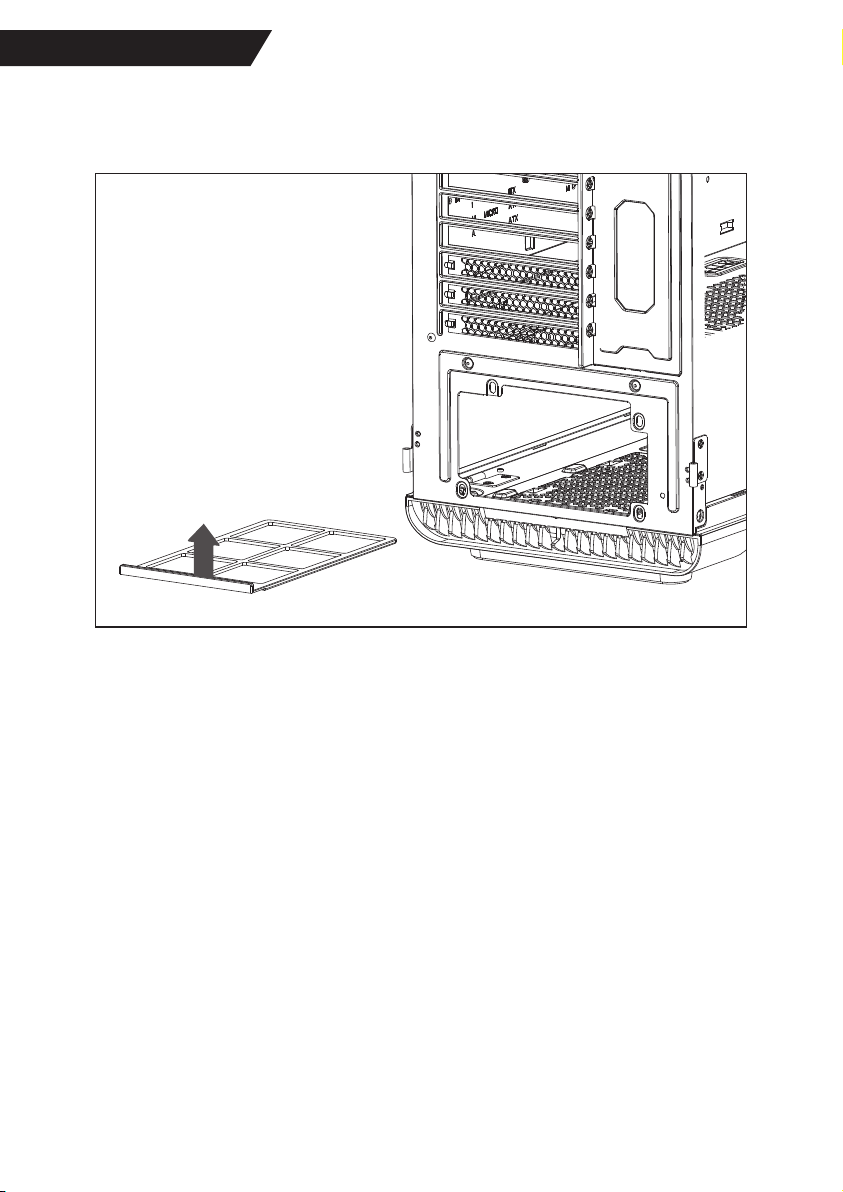
PSU Dust Filter
▪English:
The dust filter for the power supply can be
removed from the rear, and please take care to
note the top and bottom orientation.
▪Japanese:
▪German:
Der Staubschutzfilter für das Netzteil kann von
hinten herausgezogen werden, dabei ist auf die
Ausrichtung oben und unten zu achten.
▪Spanish:
El filtro antipolvo para la fuente de alimentación
se puede extraer desde la parte trasera, y es
importante prestar atención a la orientación
(parte superior e inferior).
▪French:
Le filtre anti-poussière pour l'alimentation peut
être retiré par l'arrière, veillez à bien observer
l'orientation (haut et bas).
▪Czech:
Filtr proti prachu pro zdroj můžete vytáhnout
zezadu, buďte pozorní na horní a dolní orientaci.
▪Portuguese:
O filtro antipoeira da fonte de alimentação pode
ser retirado pela parte traseira, preste atenção à
orientação superior e inferior.
▪ 简体中文:
▪ 繁體中文:
UP

Warranty Policy
English
Thank you for purchasing FSP product!
FSP warrants that the product will be free of defects in material and workmanship, and provides the warranty period-identified on
the product package from the power supply on the date of purchase.
In the event that warranty policy might be different in certain regions; please contact local authorized FSP reseller where the
product is purchased.
The warranty is applied to damages caused through normal use and is void if it is resulted from, but not limited to, the following
situations:
• Wear and tear associated with normal use
• Any modification, abuse, accident, disassembly, misapplication, or unauthorized repair
• Removal of any manufacturer label(s) or sticker(s)
• Any improper operation, including any use not in accordance with any supplied product instructions
• Any other cause which does not relate to a product defect in materials or workmanship
Deutsch
Garantierichtlinie
Vielen Dank für den Kauf eines FSP-Produktes!
FSP garantiert, dass das Produkt keine Material- oder Verarbeitungsfehler aufweist; es gilt die am Produktpaket des Netzteils
angegebene Garantiedauer ab Kaufdatum.
Falls die Garantierichtlinie in bestimmten Regionen abweicht, wenden Sie sich bitte an den örtlichen autorisierten FSP-Händler,
bei dem Sie das Produkt erworben haben.
Die Garantie gilt für Schäden, die bei normaler Benutzung aufgetreten sind; sie gilt nicht/erlischt, falls u. a. eine der folgenden
Situationen vorliegt:
• Verschleiß in Verbindung mit normaler Benutzung
• Jegliche Modifikationen, Missbrauch, Unfälle, Demontage, unsachgemäße Benutzung oder unautorisierte Reparaturen
• Entfernung von Herstelleretiketten oder -aufklebern
• Jegliche unsachgemäße Benutzung, einschließlich jeglicher Nutzung, die nicht mit beigefügten Produktanweisungen
übereinstimmt
• Jegliche andere Ursachen, die nicht mit einem Material- oder Verarbeitungsfehler des Produktes in Verbindung stehen
Français
Politique de garantie
Nous vous remercions pour l’achat d’un produit FSP !
FSP garantit que le produit sera exempt de défauts de matériaux et de fabrication, et fournit la période de garantie indiquée sur
l’emballage du produits d’alimentation à la date d’achat.
Dans le cas où la politique de garantie peut être différente dans certaines régions; veuillez contacter le revendeur agréé FSP où
le produit a été acheté.
La garantie est appliquée aux dommages causés par une utilisation normale et est nulle si elle est résulté, mais sans s’y limiter,
des situations suivantes :
• Une usure associée à une utilisation normale
• Toute modification, tout abus, accident, démontage, toute mauvaise application ou réparation non autorisée
• L’enlèvement d’étiquette(s) ou d’autocollant(s) du fabricant
• Toute opération incorrecte, y compris toute utilisation non conforme aux instructions du produit fourni
• Toute autre cause qui ne se rapporte pas à un défaut de matériaux ou de fabrication du produit
Česky
Záruční podmínky
Děkujeme vám za zakoupení produktu FSP!
Společnost FSP poskytuje záruku, že tento produkt bude bez závad na materiálu a provedení, a poskytuje záruční dobu
uvedenou na obalu produktu ode dne zakoupení zdroje napájení.
Záruční podmínky se mohou v některých regionech lišit; prosím kontaktujte místního autorizovaného prodejce FSP, u kterého
byl produkt zakoupen.
Záruka se vztahuje na škody způsobené běžným používáním a propadá, dojde-li k poškození v některé z následujících situací
(jejichž výčet není vyčerpávající):
• Opotřebení způsobené běžným používáním
• Jakákoli úprava, zneužití, nehoda, demontáž, nevhodné použití nebo neoprávněná oprava
• Odstranění některého štítku/štítků nebo nálepky/nálepek výrobce
• Jakékoli nevhodné používání, včetně nedodržení přiloženého návodu na použití produktu
• Jakákoli jiná příčina, která nesouvisí se závadou na materiálu nebo provedení produktu
Este manual sirve para los siguientes modelos
1
Tabla de contenidos
Otros manuales de Recinto de FSP Technology

FSP Technology
FSP Technology CMT130 Manual de usuario

FSP Technology
FSP Technology CMT210 Manual de usuario

FSP Technology
FSP Technology CMT350 Manual de usuario

FSP Technology
FSP Technology CMT240 Manual de usuario

FSP Technology
FSP Technology CMT330 Manual de usuario

FSP Technology
FSP Technology CMT211 Manual de usuario

FSP Technology
FSP Technology CST110 Manual de usuario

FSP Technology
FSP Technology CMT520 Manual de usuario