Flexijet 3D Manual de usuario

Quick Start
GUIDE

2
Imprint
Version:
Flexijet 3D
03.2021
Copyright© 2021
Flexijet Australia
420 Victoria Street
Brunswick VIC 3056
AUSTRALIA
Tel: +61 1300 077 977
Mobile: +61 414 873 372
Flexijet GmbH
Krellstraße 10
32549 Bad Oeynhausen
GERMANY
Tel: +49 5731 18 660 60
Fax: +49 573118 660 61
All rights reserved. No part of this publicaon may be reproduced, distributed, or transmied in any
form or by any means, including photocopying, recording, or other electronic or mechanical methods,
without the prior wrien permission of the publisher. Violaon of these rights will result in the pursue
of damages. All rights reserved in patents, ulity model and design registraon.
Whilst every eort has been made to ensure the accuracy of the informaon contained in this guide,
no guarantee can be given that all errors and omissions have been excluded. No liability for loss
occasioned to any person acng or refraining from acon as a result of the material in this publicaon
can be accepted by Flexijet GmbH.
Likewise, Flexijet GmbH will not incur any liability for direct damage or consequenal damages resulng
from improper use of the laser. When using the laser, country specic health and safety regulaons
including the warnings in this manual must be observed.
All product names and brand names used are the property of their respecve owners and are not
explicitly marked as such.
Flexijet GmbH reserves the right to make changes to the content without noce.

3
Table of Contents
1 About this manual.....................................4
1.1 Symbols used in this manual........................4
2 Safety informaon ....................................5
2.1Documentaon ..................................5
2.2Laserradiaon ...................................5
2.3 Intended use.....................................6
2.4 Transport and storage .............................7
2.5Environmentalconsideraons.......................7
3 Descripon ..........................................8
3.1 Delivered components ............................8
3.2 Technical data ....................................9
3.3Principlesofoperaon.............................9
4 Device components ..................................10
4.1 Overview of Flexijet 3D ..........................10
4.2 Controls of Flexijet 3D ...........................11
5 Power supply ........................................12
6 Starng Flexijet 3D for the rst me ...................13
6.1InstallingFlexiCADsoware.......................13
6.2SengUpFlexijet3DHardware ...................14
6.3SwitchingtheFlexijet3DOnandO...............15
6.4Preparingforyourrstmeasurement ...............15
7 FlexiCAD General Preferences.........................18
8 The Flexijet LCD Interface ............................19
9 Flexijet Smart Remote App ............................21
9.1HomeScreen ...................................22
9.2 Take a measurement .............................22
9.3 Take a picture ...................................23
9.4Usingthejoysck................................23
9.5 Finer movement of the laser.......................24
9.6Quicksengs...................................24
9.7 Menu..........................................25
10 Example Measurement Procedure......................26
10.1 Create Folders in the Project Explorer Window ......26
10.2 Auto Level and Align the Drawing .................26
10.3 Perform Your First Measurement ..................27
10.4 General Remarks ...............................28
11 Other resources on the USB disk.......................29
12 Flexijet STONE soware ..............................31
DeclaraonofConformity .....................back cover

4
1 About this manual
nDo not use the FLEXIJET 3D before fully reading and understanding this manual.
nAlways keep this manual with the FLEXIJET 3D.
1.1 Symbols used in this manual
The WARNING! symbol indicates an impending danger which can result
in serious injury if the warning is not heeded.
or property damage.
for use and handling of Flexijet 3D.
☛
danger.
General Information
CAUTION!
WARNING!
NOTE
Quick Start GUIDE

5
2 SafetyInformaon
2.1 Documentaon
working with the laser.
2.2 Laserradiaon
GENERAL SAFETY INSTRUCTIONS WHEN HANDLING LASER RADIATION
nLaser beams can damage the eyes.
☛
☛Do not point the laser at people or shine in the eyes.
☛
☛
☛
n
n
n
DANGER!
Do not aim laser beam at people or animals!
WARNING!
WARNING!
LASER RADIATION
DO NOT LOOK DIRECTLY
INTO THE LASER BEAM
LASER CLASS 2
DIN EN 60825-1:2014
P ≤ 1mW
λ: 630-680 nm

title
6
WARNING LABELS
☛
LASER BEAM OPENING
The laser beam exits through the
component. Always keep this clear and
through the opening.
2.3 Intended Use
nFlexijet 3D is a mobile 3D measuring system with which rooms and buildings can be
measured in three dimensions.
n
CAD drawing back onto a work site is also possible.
nIt is preferable that Flexijet 3D is operated in dry indoor spaces. Flexijet 3D can
certainly be used in outdoor scenarios with the aid of the red laser glasses.
Do not
n
n
WARNING!
Quick Start GUIDE

7
n
n
training with Flexijet GmbH or an authorised partner in your region.
nIt is also recommended that regular maintenance be carried out by Flexijet GmbH or
n
2.4 Transport and Storage
2.5 Environmentalconsideraons
of any components.
n
n
be disposed of with household waste. They must be disposed of properly
country or region.
CAUTION!

title
8
3 Descripon
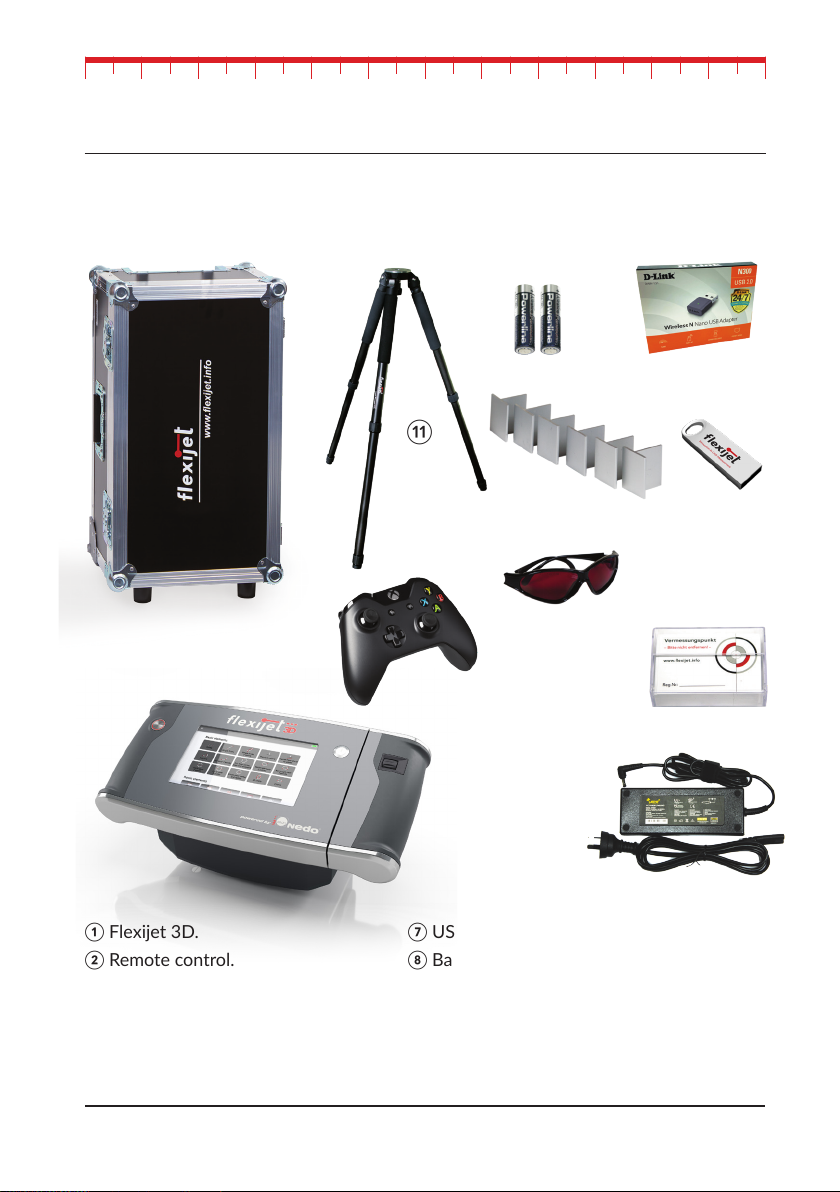
3.1 Delivered Components
①Flexijet 3D.
②Remote control.
③Charger.
④Laser Glasses.
⑤
⑥
⑦
⑧
⑨
⑩
Quick Start GUIDE

9
3.2 Technical Data
3.3 Principleofoperaon
Measuring system Flexijet 3D
Item No. 710100
± 1.8 ° in both axes
Laser Type
according to DIN EN 60825
Power Supply
max. 8hr
Charging Time
Charging Temperature 0° C to + 55° C
Storage Temperature
0° C to + 40° C
Weight 5 kg
370mm x l80mm x 180mm

title
10
4 Device components
4.1 Overview of Flexijet 3D
①
②
③Scroll wheel.
④
⑤
⑥
⑦
⑧
⑨Charging socket
⑩.
Quick Start GUIDE
Este manual sirve para los siguientes modelos
1
Tabla de contenidos
Otros manuales de Instrumento de medición de Flexijet
Manuales populares de Instrumento de medición de otras marcas

Endress+Hauser
Endress+Hauser Proline Promag 50 Especificaciones técnicas

Siemens
Siemens SITRANS F Coriolis FCT030 Manual de lista de piezas

KLINGER
KLINGER CMF V Series Manual de usuario

EXFO
EXFO FTB-2 Manual de operación y mantenimiento

Keysight
Keysight M8290A Manual de usuario

ADTEK
ADTEK MW-5 Manual de usuario