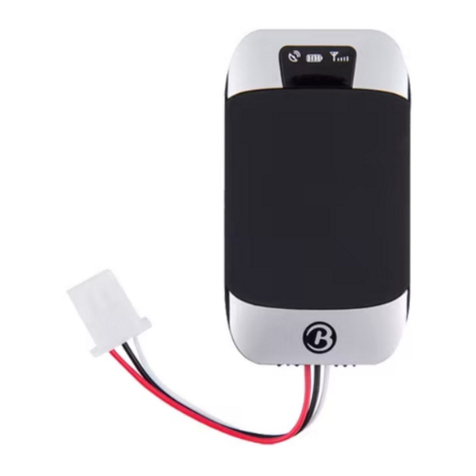
Flexcom ICAR IK205 Manual de usuario

Flexcom Communication Ltd Installation and operating instructions (2021/06/09)
1/23
Installation and operating instructions
ICAR IK205 vehicle, person, package, boat tracking device
Introduction
In developing the products we offer, the manufacturers have acted with the utmost care and in
accordance with international standards.
Warranty
We offer a 12-month warranty on the products, which is valid from the date of purchase. Keep the
invoice or block you received at the time of purchase and / or the warranty card of the device,
because you can only enforce your warranty claim if you have them. During the warranty period, we
will replace any defective main unit, accessory or software of the product in the event of any defect
attributable to a manufacturing, material or software defect. Subsequent repairs to the device or its
accessories are not permitted by the manufacturer due to the design of the device.
The warranty does not cover a product (or accessory) that has been damaged or rendered inoperable
due to attempts to modify or repair the software, physical impact, poor voltage, improper use.
To ensure proper, effective and safe use of the product, read the instruction manual carefully and
keep it for future reference. Flexcom Kommunikációs Kft. Shall not be liable for any damage, product
damage, short-term or long-term health damage that may occur as a result of use, repair, storage
and transport other than those described in this manual.
Rights, trademarks
© 2019, Flexcom Kommunikációs Kft.
All rights reserved. No part of our printed or online publications may be reproduced, distributed or
transmitted in any form or by any means, including photocopying, recording or other electronic and
mechanical methods, without the prior written permission of the publisher. To obtain a permit,
contact your dealer:
Contact
Flexcom

Flexcom Communication Ltd Installation and operating instructions (2021/06/09)
2/23
Flexcom Communication Ltd.
2151 Fót, Szent Imre str. 94. HUNGARY
Email: [email protected]
Website: https://nyomkovetes.net
Office
2151 Fót, Dózsa György str. 34. HUNGARY
Phone: +36 1 769 1005
Mobile 1: +36 70 3333 525
Mobile 2: +36 70 3333 527
Phone service: (Monday-Thursday) 9.00–15.00
Every effort has been made to ensure that the information in our documents is accurate. Flexcom
Kommunikációs Kft. Is not responsible for typographical errors and misspellings.
Flexcom GPS Tracking Solutions, GPS Positioning System, Nyomkovetes.net is a registered trademark
and domain name of Flexcom Kommunikációs Kft. In Hungary. Other company and product names
mentioned herein may be trademarks of their respective companies.
Protection of personal data
The product is a complete product as a combination of hardware and software components. For safe
and correct use, proceed as described in this manual during installation and use. Keep the device or
software out of the reach of unauthorized persons. Our company provides all technical and regulatory
conditions to ensure that data management complies with legal requirements and that your data does
not fall into unauthorized hands. We accept no liability for damage resulting from unauthorized use of
the product and software.
Flexcom

Flexcom Communication Ltd Installation and operating instructions (2021/06/09)
3/23
Formats and notations
The following style settings are used in descriptions, guides, and other documents:
Bold text Name of product components, instructions, options, processes, services, user interface
elements.
Italic text Links to other publications, emphasis.
Courier text System messages, internet addresses, document names.
Warning and cautionary signs:
Tips, advice, ideas.
Document download option.
General attention to information about the product or its operation.
Indication of situations with a lower risk to the user or the product (minor injuries,
inconveniences).
Indication of situations which present a higher risk to the user (serious injury, possibly
death) or which may cause damage or destruction of the product.
Flexcom

Flexcom Communication Ltd Installation and operating instructions (2021/06/09)
4/23
Product description
The device combines several functions of accurate positioning, safety, monitoring, emergency alarms
and full tracking. It supports SMS / GPRS / Internet data transfer functions and can be widely used in
many areas of location-based services, traffic safety and management.
Based on its design and portability, the device was designed by the manufacturer to track vehicles,
containers and ships, so its users are primarily their owners and operators.
Settings that affect the operation of the device can only be changed from another device
(smartphone, computer) using the appropriate application or SMS commands - so users can be sure
that the device always works according to the parameters they specify.
Flexcom

Flexcom Communication Ltd Installation and operating instructions (2021/06/09)
5/23
How to use
After charging, inserting the SIM card and setting up via SMS or mobile phone or PC application, the
device is placed in the desired location. After switching on, the GPS receiver and the SIM card
automatically connect to the GPS / GLONASS satellite and GSM mobile networks (if available) and
start collecting position data, which can be queried using SMS or an Internet application.
To use the features of your device, you need a SIM card, similar to a mobile phone. The device
communicates on the mobile service provider's network with a SIM card, via SMS, or via mobile phone
or PC applications. After inserting the SIM card and charging the battery, you can make the necessary
settings by sending an application or SMS (eg entering the device ID name, frequency of sending
position data, etc.).
When switched on
The device continuously registers position data, which can be queried with a limited number of
SMS commands.
If you have a software subscription, the device sends the position data to the software service
center - the processed results (eg map route display, route event list, real-time tracking) - can
be viewed in the phone or computer application. The subscription software provided by the
distributor for the device greatly expands the range of features of the device. These extensions
are only available in the mobile or PC application.
You can find detailed information on the installation, use, maintenance and decommissioning of the
device in the following sections of the documentation.
Flexcom

Flexcom Communication Ltd Installation and operating instructions (2021/06/09)
6/23
Flexcom

Flexcom Communication Ltd Installation and operating instructions (2021/06/09)
7/23
Technical parameters
Physical characteristics
Parameter Value
Dimensions (mm) W: 47,5, L: 60, H: 24
Weight (g) 102
Humidity 5%-től 95%-ig (none condensing)
Water resistance IP67
Operating temperature from -20C to +65C
Memory
Parameter Value
Built-in No
SD card No
Energia ellátás
Parameter Value
Battery Li-ion polimer 3.7V 5000mAh
Input voltage 5V
Charging 5V 1A via USB
Operating time
Parameter Value
Standby time 25 days
Network
Parameter Value
GNSS GPS / LBS / GLONASS
Type of data traffic GSM / GPRS
SIM card Nano
GSM frequencies 850, 900, 1800 és 1900 MHz
GSM chip MT2503
GSM signal strength measurement Yes
GPS chip MTK2503
GPS sensitivity -162 dbm
GPS accuracy 10 m
Communication
Parameter Value
SMS Yes
TCP Yes
Sensors
Parameter Value
Motion detection Yes
Interface
Flexcom

Flexcom Communication Ltd Installation and operating instructions (2021/06/09)
8/23
Parameter Value
GSM antenna Internal
GPS antenna Internal
Built-in microphone Yes
Built-in speaker ?
Magnetic mounting Yes
Flexcom

Flexcom Communication Ltd Installation and operating instructions (2021/06/09)
9/23
User's guide
Transport and storage
The packaging is designed to protect the product from the usual physical effects during transport. Be
careful to avoid effects other than these.
The packaging of the product is not water, flame and heat resistant and only moderately pressure
resistant. Therefore, do not keep the box in a humid environment, out of the reach of heat-emitting
equipment, or place heavy objects on it.
Installation
The package consists of a box containing the device and its accessories.
Unpacking
Open the box.1.
Remove the product and its accessories.2.
Contents of the package
1 tracking device
1 USB charging cable
Flexcom

Flexcom Communication Ltd Installation and operating instructions (2021/06/09)
10/23
1 installation instructions
Preparing the SIM card
As with mobile phones, a SIM card is required to operate the device. The device communicates with
the mobile service provider's network via SIM card, SMS or mobile phone or PC applications.
You can purchase the card independently from your mobile service provider or, in the
case of a software subscription, from your product distributor. If you received the SIM
card from your dealer, you do not need to make any settings: the card is already set up,
inserted in the device, switched on and ready for use.
If you have received the SIM card from your dealer, do not try to transfer it to another
device (eg phone) and use it! The distributor (service provider) will reimburse the
resulting costs or the correction of the resulting errors.
Settings for your SIM card
If you did not obtain the SIM card from your tracking device vendor, you must set it up before
inserting and using it in the device, which you can do as follows.
Disable SIM card PIN and other functions
Insert the SIM card in your phone.1.
Among the setting functions of the phone2.
turn off the PIN code request, auto-reply and call forwarding options.3.
After turning off the above, insert the card into the tracking device. See the next section for
instructions on how to insert the SIM card.
Setting up data traffic
If you want to operate the device not only via SMS, but also e.g. If you use the software tracking
service provided by your dealer, you must activate GPRS (Internet) data traffic and enter the
appropriate network settings. To do this, you need to send SMS messages from your phone to the
phone number of the SIM card inserted in the tracking device, as shown in the table below.
The factory-set access password for the tracking device in the commands: 123456
Flexcom
Tabla de contenidos
Otros manuales de GPS de Flexcom

Flexcom
Flexcom LK209B Manual de usuario

Flexcom
Flexcom ICAR IK720B Manual de usuario

Flexcom
Flexcom Reachfar V20 Manual de usuario

Flexcom
Flexcom TK306-3G Manual de usuario

Flexcom
Flexcom TKSTAR TK806 Manual de usuario

Flexcom
Flexcom TKSTAR TK905 Manual de usuario

Flexcom
Flexcom TKSTAR TK905B Manual de usuario

Flexcom
Flexcom LK209A Manual de usuario

Flexcom
Flexcom TK108A Manual de usuario

Flexcom
Flexcom LK720A Manual de usuario