Firefly TK-106A Manual de usuario

GSM/GPRS/GPS Vehicle Tracker
TK-106A/B User Manual
Preface
Thank you for purchasing the tracker. This manual shows how to operate the device smoothly
and correctly. Make sure to read this manual carefully before using this product. Please note
that specification and information are subject to changes without prior notice in this manual.
Any change will be integrated in the latest release. The manufacturer assumes no
responsibility for any errors or omissions in this document.

Contents
1. Function Introduction ................................................................................................................................. 4
2. Applications ................................................................................................................................................ 4
3. Hardware Description ................................................................................................................................. 4
4. Accessories ................................................................................................................................................. 5
5.Specifications............................................................................................................................................... 6
6. Operating Instructions ................................................................................................................................ 6
6.1 Terminal Installation ................................................................................................................................. 6
6.2 SIM card installation................................................................................................................................. 8
6.3 Turn on the tracker device ........................................................................................................................ 8
6.4 GSM/GPS LED Indicator ......................................................................................................................... 8
6.5 Initialization .............................................................................................................................................. 8
6.6 Change Password ...................................................................................................................................... 8
6.7 Authorization ............................................................................................................................................ 9
6.8 Single Locating ......................................................................................................................................... 9
6.9 Auto track continuously .......................................................................................................................... 10
6.10Get location in absolute street address ................................................................................................... 10
6.11 Location based service (LBS) ............................................................................................................... 10
6.12 View photos on cell phone .................................................................................................................... 11
6.13 Monitor ................................................................................................................................................. 11
6.14 Modes switch between “track” & “monitor” ........................................................................................ 11
6.15 Storage .................................................................................................................................................. 11
6.16 Data Load ............................................................................................................................................. 12
6.17. Alarms .................................................................................................................................................. 12
6.17.1 Low battery alarm .............................................................................................................................. 12
6.17.2 Power off alarm ................................................................................................................................. 12
6.17.3 SOS .................................................................................................................................................... 12
6.17.4 Geo-fence ........................................................................................................................................... 12
6.17.5 Movement alarm ................................................................................................................................ 13
6.17.6 Over Speed Alarm.............................................................................................................................. 13
6.17.7 Fuel alarm .......................................................................................................................................... 13
6.17.8 Temperature alarm ............................................................................................................................. 13
6.18 Cut off the Oil and Power System ........................................................................................................ 14
6.19 Resume the Oil and Power System ....................................................................................................... 14
6.20 Arm ....................................................................................................................................................... 14
6.21 Disarm .................................................................................................................................................. 14
6.22 Function of Remote Controller (Option for model B) .......................................................................... 15
6.23. Alarms under Arm State ....................................................................................................................... 15
6.23.1 Door alarm ......................................................................................................................................... 15
6.23.2 Shock Sensor Alarm .......................................................................................................................... 15
6.23.3 ACC Alarm ........................................................................................................................................ 15

6.23.4 Photograph ......................................................................................................................................... 15
6.24. Silent Mode .......................................................................................................................................... 16
6.25 Alarms in GSM Blind Area ................................................................................................................... 16
6.26 Check the Vehicle State ........................................................................................................................ 16
6.27 Reset by SMS ....................................................................................................................................... 17
6.28 Check IMEI .......................................................................................................................................... 17
6.29 Terminal (local) Time Setting ............................................................................................................... 17
6.30 GPRS Setting ........................................................................................................................................ 17
6.31 Setting up APN ..................................................................................................................................... 17
6.32 GPRS User Name and password Setup ................................................................................................ 17
6.33 IP and Port Setup .................................................................................................................................. 18
6.34 Modes Switch between “SMS” and “GPRS” ....................................................................................... 18
6.35 Web platform and PC installation tracking software user manual ........................................................ 18
7. Cautions .................................................................................................................................................... 18
8. Faults & the Solutions .............................................................................................................................. 19

1. Function Introduction
1.1 This tracker is a new product based on the GSM / GPRS network and GPS satellite
positioning system, which set multiple functions of security, positioning, monitoring
surveillance, emergency alarms, photograph, fuel&temperature detection and tracking in
its entirety. It can track and monitor remote target by SMS or internet.
1.2 Features
1.2.1 Support both GPS / GSM station positioning ways.
1.2.2 Support SMS/GPRS/Internet Network data transmission (GPRS/Internet
instructions in CD enclosed).
1.2.3 Support GPRS on-line and GPRS re-connected automatically if GPRS drops
1.2.4 Compatible with the original vehicle anti-theft alarm, can be synchronized with the
events alarm and disarm from original car alarm system.
1.2.5 Support SMS / GPRS dual-mode switching
1.2.6 Support configure by remote terminal.
1.2.7 Support for point-to-point, point to group, group-to-group monitoring.
1.2.8 Set multiple functions of security, positioning, monitoring surveillance, photograph,
emergency alarms and tracking in its entirety.
2. Applications
Used widely for positioning and tracking vehicle and other moving objects.
3. Hardware Description
⑴. GSM antenna connector. ⑺. Backup battery switch

⑵. J4 Monitor microphone jack. ⑻. GPS antenna connector
⑶. LED indicator ⑼. Remote Controller receiver antenna(model
B)
⑷. SIM card slot ⑽. J1 14PIN harness port
⑸. SIM card slot Pop-up switch ⑾. J2 Camera port
⑹.SD card slot
4. Accessories
No. Picture Name Note
1
GPS Antenna 3 meters
2
GSM Antenna 3 meters
3
Microphone 1.5 meters
4
Harness 14PIN
5
Relay
12V/40A or 24V/40A ,
depends on the vehicle
6
Shock sensor Optional for Model A and B
7
Siren Optional for Model A and B
8
Remote Controller Optional for Model B

9
Camera
Optional for Model A and B
10
Temperature Sensor Optional for Model A and B
11
Fuel sensor
Optional for Model A and B
and different type depends
on vehicles
5.Specifications
Content Specifications
DIM 85*71*26mm
Weight 170g
Network GSM/GPRS
Band 850/900/1800/1900Mhz
GSM/GPRS
Module Sim900B
GPS Module SIRF3 chip
GPS Sensitivity
-159dBm
GPS Accuracy 5m
GPS Start Time
Cold status 45s
Warm status 35s
Hot status 1s
Applicable
vehicle power
12 V -24V
Backup Battery
Chargeable changeable 3.7V 800mAh Li-ion battery
Storage Temp -40°C to +85°C
Operation
Temp. -20°C to +65°C
Humidity 5%--95% non-condensing
6. Operating Instructions
6.1 Terminal Installation

6.1.1 Please ask the qualified engineers to install.
6.1.2 Do not install it in an environment which is over GSM performance and please pay
attention to fix the antennas in a position with good signals.
6.1.3 Pay attention to make installation location preventing water and dust.
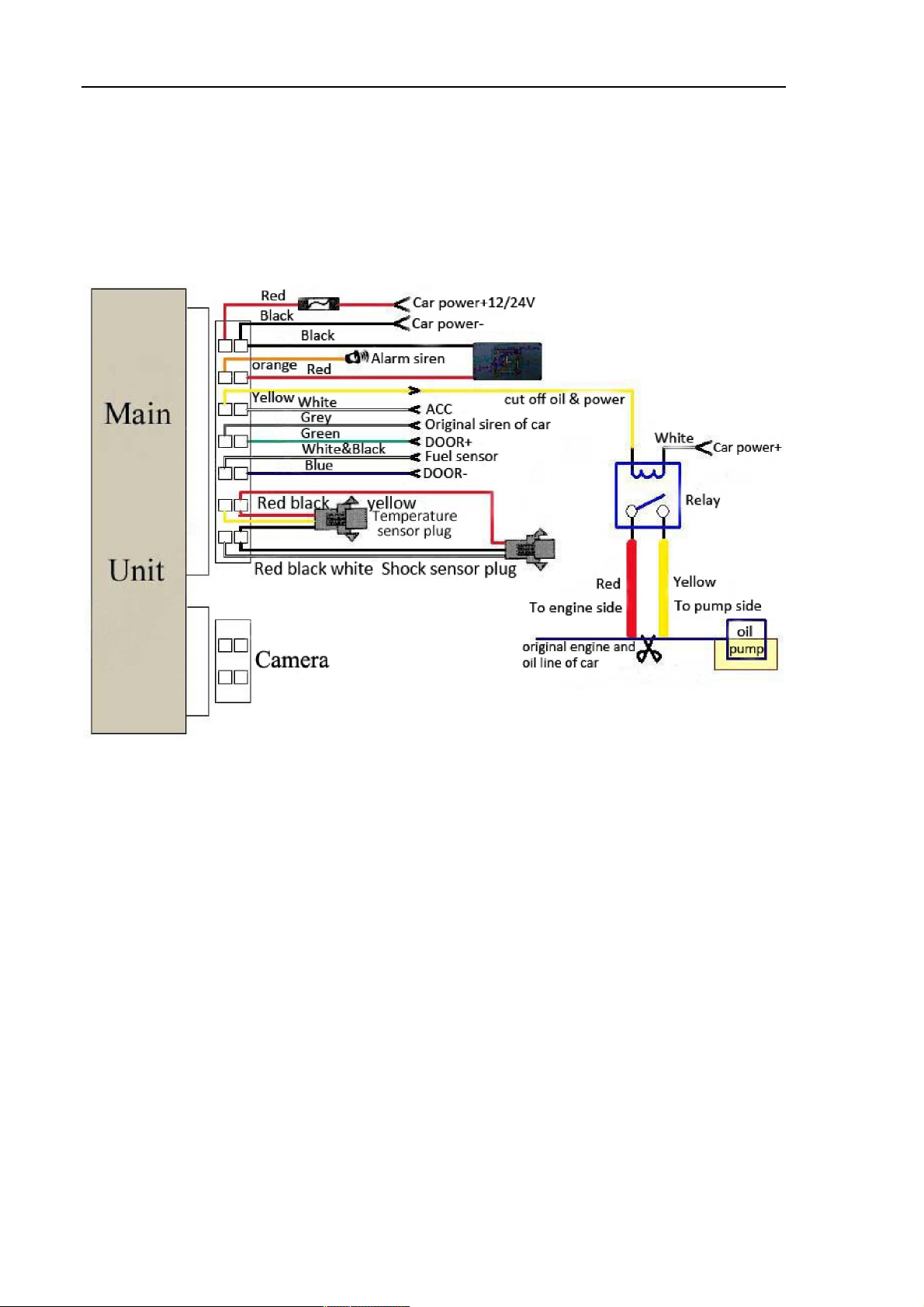
6.1.4 Find the 14PIN harness and insert it into the corresponding holes of the products,
and connect the wires with the original car circuit showing below:
Wiring diagram
6.1.5 Note: The orange wire can be connected to the original car siren; it can also be
connected to the separate siren you buy with the tracker. (Siren is Option)
6.1.6 The tracker is compatible with the original vehicle anti-theft device, in order to
realize the feature, the gray line connects to the original car siren, and then the
tracker device can synchronize the alarm and disarm with the original vehicle
anti-theft device.
6.1.7 Knowing about the type of the door trigger is positive or negative. Please connect
the green wire to the door control circuit if it is positive, and connect blue wire if it is
negative.
6.1.8 Insert the shock sensor plug into the sensor port. (Shock sensor is Optional)
6.1.9 Insert the camera plug into the camera port. (Camera is optional)
6.1.10 Fuel sensor wiring: Check the wiring instructions on the fuel sensor, connect the
red wire to car power+, the black wire to car power- and the white & black wire to
white & black wire on the 14 PIN harness(Fuel sensor port). Fuel sensor is
optional.

6.1.11Insert the temperature sensor plug into the sensor port (Temperature sensor is
Optional)
6.1.12 Insert the external monitor Microphone into the monitor jack.
6.1.13 Connect the GPS and GSM antenna to the right connector, and find an appropriate
place to fix the antennas to make sure good reception.
6.2 SIM card installation
6.2.1 Use a tweezers or a sharp thing to touch the SIM CARD popup switch, the SIM
CARD slot will pop up, take out the SIM card slot to load the SIM card, and then put
the SIM card slot back to its original position after confirm the SIM card in the right
place.
6.2.2 Please make sure that the SIM card is able to execute the function of incoming calls
display, no calls can be diverted and the PIN code is locked. The SMS format must be
TXT format, and can’t recognize the PDU format.
6.3 Turn on the tracker device
6.3.1 Connect the positive and negative wire, red and black ones, with 12V or 24V car
power system, wait for 1 minute after connecting power to wait tracker works
normal, and then turn on the backup battery switch.
6.4 GSM/GPS LED Indicator
6.4.1 Red LED indicator on: No GSM network signals.
6.4.2 Red LED indicator flashes fast (one time each second): GSM Network signal is
normally, and tracker works under SMS mode.
6.4.3 Red LED indicator flashes slowly (one time each three seconds): Tracker works
under GPRS mode.
6.4.4 Green LED flashes slowly: GPS signal is normal.
6.4.5 Green LED indicator off: No GPS signals.
6.4.6 The red and green indicators flash three times alternately: it means tracker has been
detected the SD card.
6.5 Initialization
Send SMS “begin+password” to the unit, it will reply “begin OK” and initialize all
the settings to default factory settings.(default password: 123456)
For example: Send SMS “begin123456”, it will reply “begin ok”. (No quotation marks
“”when sending all the SMS)
6.6 Change Password
6.6.1 Send SMS “password+old password+space+new password” to the unit to change
the password.
For example: send SMS “password123456 888888” to the unit. If succeeded,
“Password ok” will reply to your cell phone.

6.6.2 Keep the new password in mind, or the machine will not work properly if lost the
password.
6.6.3 Note: The new password must be 6 digits of the Arabic numerals, or the
device will not recognize.
6.6.4 Please don’t type “+” character in all commands, space means press the space
keyboard on cell phone.
6.7 Authorization
There are 5 numbers to be allowed to authorize in the tracker at most.
6.7.1 Call and track the tracker device for 10 times from cell phone in success, it will
make the cell phone number as the authorized number automatically, and reply
“add master ok”.
6.7.2 Authorization: Send SMS “admin+password+space+cell phone number” to set up
an authorized number, the other authorized numbers should be set by the first
authorized number, if the number is successfully authorized, the unit will reply”
admin ok” by SMS.
6.7.3 Delete authorization: Send SMS” noadmin+password+space+authorized number” to
delete the authorized number.
6.7.4 If you want to track the target via tracker device when it enters into another country,
you must add the country code before the cell phone number, for example, send
SMS” admin123456 008613322221111” to the device. Note: 13322221111 will be
set up as the authorized number.
6.8 Single Locating
6.8.1 Any number calls the tracker device, it will reply a SMS including the position of
latitude and longitude if authorized number has not been set yet. If authorized
number has been set successfully, the device won’t reply SMS including the
positioning of latitude and longitude when the unauthorized number dials it up.
6.8.2 Dialing the tracker device from the authorized number, it will hang up your calling
and respond to a real-time latitude and longitude information as following:

6.9 Auto track continuously
6.9.1 Send SMS command “fix030s005n+password” to the tracker device, it will report
the Geo-info at 30s intervals for 5 times. (s:second, m:minute, h:hour). This command
must be in 3 digits and the maximum value is 255.
6.9.2 Unlimited times track: Send SMS "fix030s*** n+password" to the device.
6.9.3 Cancel: Send SMS “nofix+password” to the tracker device to cancel the “Auto track
continuously”.
. Note: the interval must be not less than 20s.
6.9.4 When the GPS signal is not good, the latitude and longitude you received is the last
position before going into GPS blind areas, if any bias with the location, pay
attention to the time stamp in the message.
6.10 Get location in absolute street address
6.10.1 You must set up the APN of your local GSM network for the SIM card in tracker
first before using this function, if there is user name and password for GPRS login,
Please refer to 6.31 and 6.32 to configure the APN, user name and password for
GPRS login.
6.10.2 After configure the APN, send “address+password” to device, it will reply SMS
including real street/address name. For example: No.8, Nantou Guankou 2nd Rd.
Nanshan district, Shenzhen, Guangdong, china.
6.11 Location based service (LBS)
When the tracker device doesn’t receive valid GPS signals, tracker will positioning by
location based service(LBS), the messages includes the GPS coordinates of the last position
in SMS mode, but the LAC in message is the current new position, the location can be seen
by input the LAC code in the menu “Manual Track” of web platform
www.gpstrackerxyz.com, you can also send command “address+password” to tracker to get
the newest absolute address and GPS coordinates as well; tracker will automatically switch to
track by location based service in GPRS mode, and actualized on the map of web server with
Este manual sirve para los siguientes modelos
1
Tabla de contenidos
Otros manuales de GPS de Firefly