
Fire Pro 08451 Manual de usuario

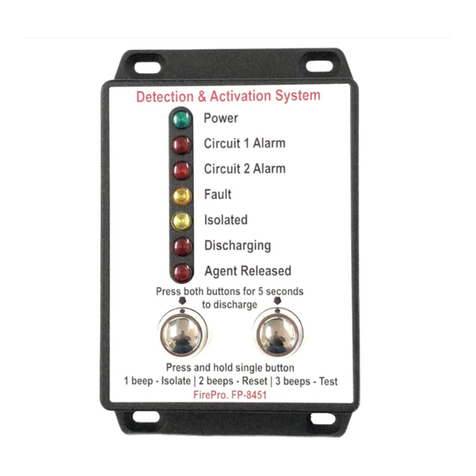
Fire Control Panel - Model 08451
SYSTEM ISOLATION
Rev 1.0
Page | 1
1Introduction
1.1 General Information
All FirePro Fire Extinguishing Aerosol Generators use the latest generation FPC solid compound.
Upon activation, the solid compound is transformed into a rapidly expanding, highly efficient
gas, based on Potassium salts. It does not deplete oxygen levels. The FirePro Aerosol
Generators have a certified life of 15 years, with minimal maintenance required.
Ozone Depletion Potential (O.D.P.) = 0
Atmospheric Life Time (A.L.T.) = 0
Global Warming Potential (G.W.P.) = 0
Non-corrosive & Non-toxic
1.2 Self Activation Temperature
FirePro Condensed Aerosols have a built-in fail-safe activation system ensures operation of the
generators when required, even if everything else fails.
When the temperature of the Aerosol units reaches 300°C the unit will activate
DO NOT Carry out any welding or grinding work in the vicinity of the aerosol units.
1.3 Handling and Storage - when handling the Condensed Aerosol Generators do not:
•Disassemble the unit
•Carry out any welding or grinding work in the
vicinity of the fire extinguishing system
components.
•Exert force or impact which creates
physical or mechanical damage to the
casing.
STORAGE and OPERATIONAL CONDITIONS
•Temperature: –54 and +54°C
•Humidity: maximum 98% RH
•Service life: 15 years (date of manufacture appears on each generator)

Fire Control Panel - Model 08451
SYSTEM ISOLATION
Rev 1.0
Page | 2
2Isolation using the Control Panel
2.1 Isolate Function
Normal Condition
Panel Isolated
To isolate the control panel, press and hold Single Button until a 1 beep and the “Isolated”
LED is illuminated.
•Isolating disables automatic activation. Manual Activation will remain operational only
from the Control Panel –NOT from the remote actuators.
•When isolated, the control panel continues to monitor for alarm and fault, and show the
alarm and fault indications, but will not operate the siren and the automatic discharge.
•When isolated, any change in the detector status, will cause the panel sounder to
operate for 1 second as an alert of the status change, but the panel will remain isolated.
•The isolate function will also silence the siren/strobe and the internal sounder but will not
cancel the alarm or fault indication.
2.2 Restore the panel from Isolate Mode
To restore the control panel to normal operation, press a Single Button and ensure the
“Isolated” LED turns off.
ACTIVTION OF THE SYSTEM FROM THE PANEL REQUIRES
BOTH SWITCHES TO BE PRESSED AND HELD FOR 5 Secs.

Fire Control Panel - Model 08451
SYSTEM ISOLATION
Rev 1.0
Page | 3
3Isolation by Unplugging the FirePro Units
All FirePro Aerosol Generators are fitted with a Deutsch Plug. Unplugging the unit it will
remove it from the System.
Ensure that all units are unplugged in the system as remaining units may be operational.
3.1 Fault Indicators
If a FirePro unit is unplugged a fault will indicate on the control panel.
Normal Condition
Fault Indicator
Fault + Isolation
To silence the internal sounder and any installed siren/strobes that have operated due to an
alarm condition, press and hold a Single Button until a 1 beep and the “Isolated” LED is
illuminated.
3.2 Restore the System
Plug the units back into the system and restore the control panel to normal operation, press a
Single Button and ensure the “Isolated” LED turns off.
Otros manuales para 08451
1
Tabla de contenidos
Otros manuales de Panel de control de Fire Pro
Fire Pro
Fire Pro 08451 Manual de usuario

Fire Pro
Fire Pro 08100 Manual de usuario

Fire Pro
Fire Pro Sigma XT Guía de referencia

Fire Pro
Fire Pro FPC-2 Manual de usuario

Fire Pro
Fire Pro FPC-2 Manual de usuario

Fire Pro
Fire Pro FP-22408 Manual de usuario

Fire Pro
Fire Pro FPX103C Manual de usuario

Fire Pro
Fire Pro FPC-2 Manual de usuario

Fire Pro
Fire Pro FP-08450 Manual de usuario


