
Fieldmann FZH 2020 Manual de usuario

FZH 2020
IRRIGATION TIMER
Thank you for purchasing our products.
If you have any questions, please contact us.

English .......................................................................................................................1–12
Čeština................................................................................................................... 13–26
Slovenčina ........................................................................................................... 27–42
Magyarul ..............................................................................................................43–56
Polski ....................................................................................................................... 57–70
EN
IRRIGATION TIMER USER’S MANUAL
Product overview 1
PRODUCT OVERVIEW
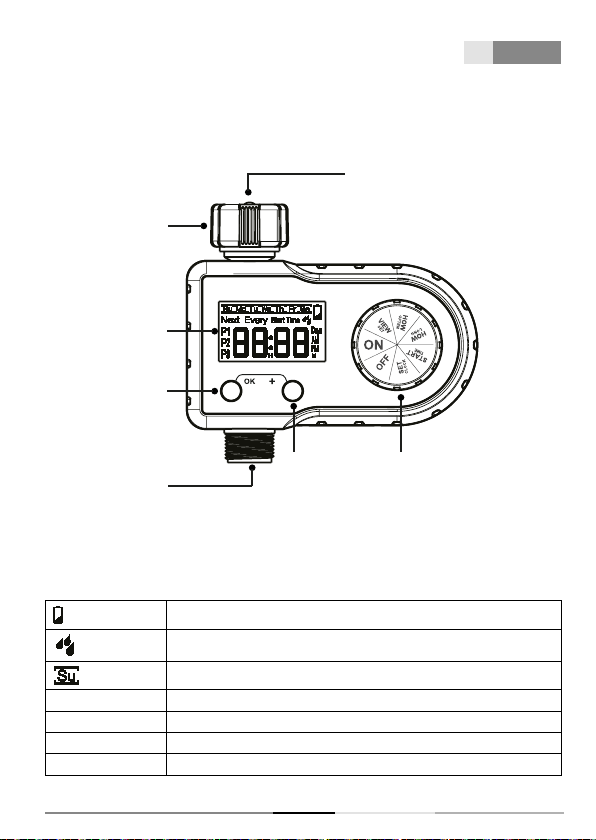
AT A GLANCE
HOSE TAP
CONNECTION
FILTER
DIAL+ BUTTON
OUTLET
OK BUTTON
BIG LCD
SCREEN
• DIAL—Rotate the dial to set your watering schedule and confirm the change.
• OK BUTTON—Press to confirm or cancel time and system setup.
• + BUTTON—Press to adjust time and system setup.
• LCD SCREEN
Low battery indicator
Flashing during watering
The selected day of the week
Every _ Days Interval watering days
Next The time left to the next watering
Start Time The start time of watering
P1/P2/P3 Watering plans for one day

EN 2Product overview
FZH 2020
DIAL POSITION FUNCTION
SET CLOCK Set current time
START TIME Set the time of start watering (Every
watering plan has its own start time)
HOW LONG Set watering duration (1 minute to
3 hours 59 minutes) (Every watering
plan has its own watering duration)
HOW OFTEN Set watering frequency of the week
(3 watering plans share 1 watering
frequency)
VIEW SET View all your settings of 3 plans
ON Start automatic watering based on
your programs
OFF Turn off all watering programs and
shut off the valve
Min/Max Operating Pressure 0.5bar-8bar (7.25 psi-116 psi)
Working Temperature 3 °C -50 °C (37.4 °F -122 °F)
Power By 2 AA (1.5V) alkaline batteries (not included)
Working Voltage DC 2.3V~DC 3.3V
Watering Times Per Day 1 to 3 times a day (Up to 3 watering plans a day)
Watering Days Monday to Sunday OR Every 2/3/4/5/6 days
Watering Duration From 1 minute to 3 hours 59 minutes (4 hours)

EN
IRRIGATION TIMER USER’S MANUAL
Product installation 3
PRODUCT INSTALLATION
INSTALLING THE BATTERIES
Remove the battery compartment on back of the timer.
Install 2 new AA (1.5V) alkaline batteries (not included).
Firmly reinstall the battery back into the timer.
NOTE:
• Firmly restore the battery to ensure water resistance.
• Removed old batteries at the end of the watering
season and disposed of them properly.
• Used or dead batteries must be removed from the
timer and disposed of them properly.
• Do not dispose of batteries in fire. Batteries may
explode or leak.
• Replace batteries when the low battery indicator
appears on displayer.
INSTALLING THE TIMER
Attach the timer to an outdoor hose faucet.
Please turn on the tap after programming the timer.
NOTE:
• When programming the timer, please turn off the tap
to avoid getting wet.
• Do not install the timer with tools. Hand tighten only.
• Keep away from freezing. Timer should be removed to
avoid freezing damage.
• To prolonging life of timer, keep the filter clean and in
place when using the timer

EN 4Programming your timer
FZH 2020
PROGRAMMING YOUR TIMER
STEP 1: SET CLOCK
Turn dial to SET CLOCK.
Hold the „OK“ button to switch time display of 12H or 24H mode.
12H mode: with “AM” and “PM”
24H mode: without “AM“ and “PM”
“ ” flash: Using the „+“ button to set the day of a week and press „OK“ to confirm.
“ 00: ” flash: Using the „+“ button to set hour and press „OK“ to confirm.
“ :00 ” flash: Using the „+“ button to set minute and turn dial to save changes.
Tips:
• Hold the “+” button can increase the time quickly.
• At the end of setting, please turn dial to save changes. If you press “OK” at the end, it will go
back to the first setting.
STEP 2: START TIME

EN
IRRIGATION TIMER USER’S MANUAL
Programming your timer 5
Turn the dial to START TIME.
Using the „+“ button to set the start time and press „OK“ to confirm.
After confirmed the previous plan, press “OK” again to switch to the next plan.
Turn dial to confirm the changes.
To turn off the start time of certain plan, please press the “+” button when setting that plan to
set the start time to “24 : xx” (24H mode) or “12 : xx PM “ (12H mode).
At the same time, a flashing “OFF” will appear on the screen. Then, press “OK” to confirm
turn off that plan.
Tips:
• Hold the “+” button can increase the time quickly.
• If you want to reactivate the “OFF“ plan, please press the „+“ button again at that plan to set
its start time.
• At the end of setting, please turn dial to save changes. If you press “OK“ at the end, it will go
back to the first setting.
STEP 3: HOW LONG
Turn the dial to HOW LONG. ( will display on the screen)
Using the „+“ button to set the watering duration press „OK“ to confirm.
(Watering Duration: from 00 hour 1 minute to 03 hour 59 minutes)
After confirming the previous plan, press “OK” again to turn to set the next plan.
Turn dial to confirm the changes.
To turn off the watering duration of a certain plan, please press the “+” button at that plan to
set the duration to “00 H 00 M”. At the same time, a flashing “OFF” will appear on the screen.
Then, press “OK” to confirm turn off that plan.

EN 6Programming your timer
FZH 2020
Tips:
• Hold the “+” button to increase the time quickly.
• If you want to reactivate the „OFF“ plan, please press the „+“ button again at that plan to set
its start time.
• At the end of setting, please turn dial to save changes. If you press “OK” at the end, it will go
back to the first setting.
STEP 4: HOW OFTEN
Turn the dial to HOW OFTEN.
There are 2 setting modes for watering frequency.
a. Monday to Sunday (the day of the week)
(Watering plans will run every Sunday, Wednesday, Thursday and Friday)
b. Every 2/3/4/5/6 days
(Watering plans will run every 2 days)

EN
IRRIGATION TIMER USER’S MANUAL
Programming your timer 7
Weekday Mode
a. When “hhh” is flashing
Using the „+“ button to select the day of the week, press „OK“ to confirm.
b. When “hhh” always there
The day has been selected. Press “OK” again can cancel the selection.
c. Turn dial to confirm the changes.
Every 2/3/4/5/6 Days Mode
a. Switch to Every 2/3/4/5/6 Days Mode
Press „+“ button to select, press “OK” to confirm.
(“hhh” will flash from “Su” to “Sa” first, and then go to “Every” mode)
b. Using the „+“ button to select the interval watering days of 2/3/4/5/6.
c. Turn dial to confirm the changes.
Note:
• You can only choose one of the 2 setting modes of watering frequency. Once confirm
one of the two, the other will be eliminated.
• At the end of setting, please turn dial to save changes. If you press “OK at the end, it
will go back to the first setting.
STEP 5: VIEW SET
Turn the dial to VIEW SET.
Press “OK button to check the START TIME, HOW LONG and HOW OFTEN settings of the
3 watering plans.
(The start time of P1) (The watering duration of P1) (Watering frequency)

EN 8Programming your timer
FZH 2020
STEP 6: AUTO WATERING
Turn the dial to ON.
(All watering plans being set will run automatically)
During watering:
a. Display the remaining watering time and bbb will flash.
b. Press the „+“ button, and then the current day and time will be displayed.
When not watering:
a. If there is no watering plans being set, it will only display the current day and time.
b. If there are plans being set but not running yet, it will display the current day and time,
and followed by how much time is left to the next watering plan..
Note:
• There is no watering plans being set, which means the start time or watering duration
of all 3 watering plans are turned off.
• To turn off a certain plan, please turn off the start time or watering duration of that
plan. (About how to turn off the start time or watering duration, please refer to the
section [STEP 2: START TIME] and [STEP 3: HOW LONG] of Chapter [PROGRAMMING
YOUR TIMER])
Tabla de contenidos
Idiomas:


