Fiberme FAG410X Manual de usuario

FIBERME Communications LLC.
Configuring FAG410X with Yeastar P-Series

P a g e 1
Table of Contents
OVERVIEW..................................................................................................................... 3
CONNECT P550 TO FAG410X USING PEER SIP TRUNK........................................... 4
Create IVR On P550...................................................................................................................................................4
Create Peer SIP TRUNK On P550 ...............................................................................................................5
Configure Outbound Rule On P550.........................................................................................................................5
Configure Inbound Rule On P550............................................................................................................................6
Connect FAG410X with P550.......................................................................................................................8
Configure FXO Port on FAG410X.................................................................................................................9
Create Port Group on FAG410X.................................................................................................................10
REGISTER FAG410X ON P550 AS AN EXTENSION........................................................11
Create SIP Extension on P550.............................................................................................................................. 11
Configure FAG410X SIP Account as a Registered Extension on P550.......................................................... 11
FAG410X CALL Routing ............................................................................................. 13
Configure IP to Tel on FAG410X .......................................................................................................................... 13
Configure TEL to IP on FAG410X...............................................................................................................14

P a g e 2
Table of Figures
Figure 1: Create IVR 7000 on P550...........................................................................................................................4
Figure 2: Create Peer SIP Trunk on P550.................................................................................................................5
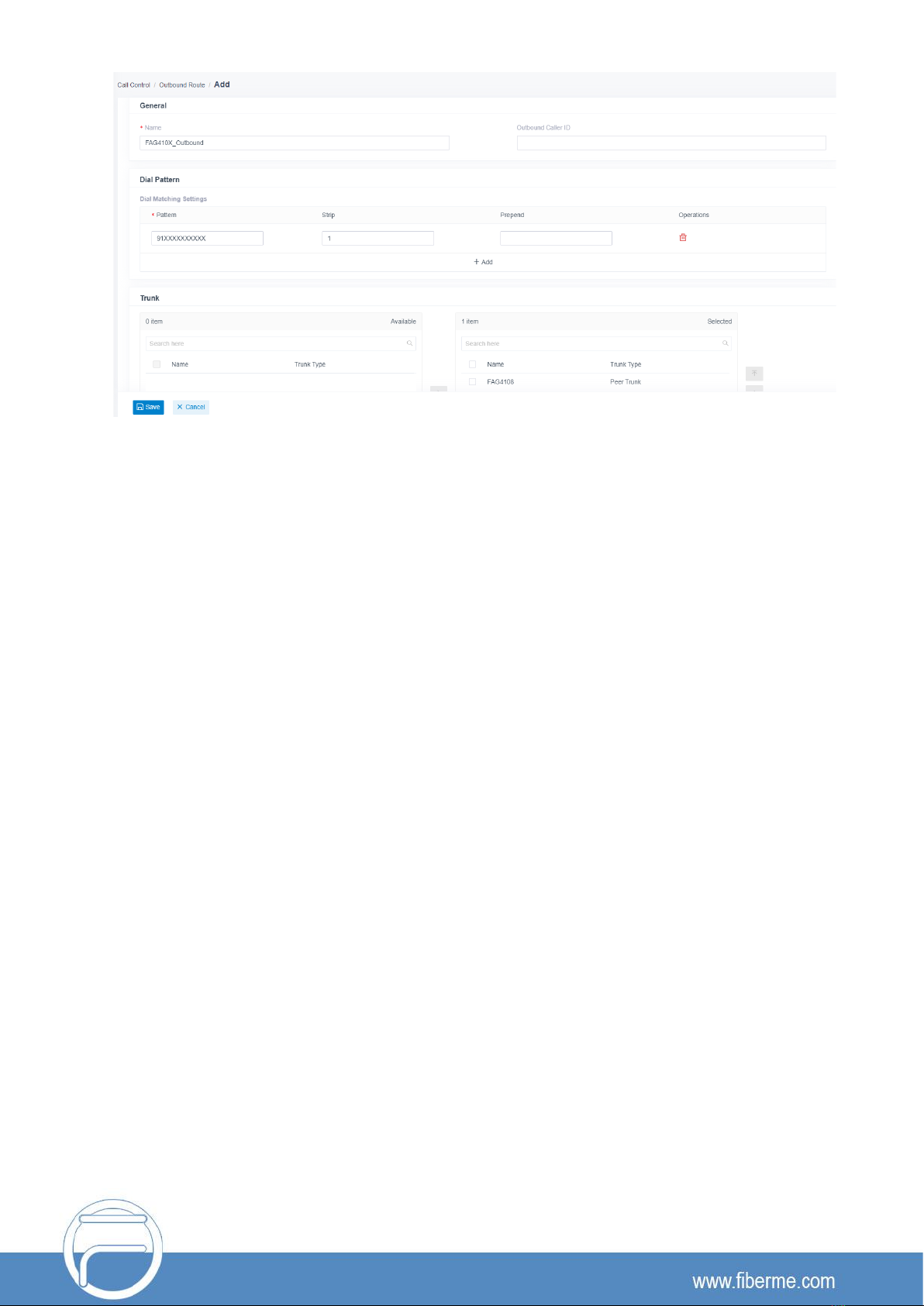
Figure 3: Configure Outbound Rule on P550............................................................................................................6
Figure 4: Configure Inbound Rule on P550...............................................................................................................7
Figure 5: Connect FAG410X with P550: Registrar IP Address..............................................................................8
Figure 6: Connect FAG410X with P550: Register Gateway...................................................................................9
Figure 7: Configure FXO Port on FAG410X: Modify Port.......................................................................................9
Figure 8: Configure FXO Port on FAG410X: Port Configurations .........................................................................9
Figure 9: Create Port Group on FAG410X: Add New..............................................................................................10
Figure 10: Create Port Group on FAG410X: Group Configurations......................................................................10
Figure 11: Create SIP Extension on P550 ................................................................................................................11
Figure 12: FAG410X SIP Account Settings ..............................................................................................................11
Figure 13: FAG410X Registrar IP Address...............................................................................................................12
Figure 14: P550 - SIP Extension Status....................................................................................................................12
Figure 15: FAG410X –IP to TEL................................................................................................................................13
Figure 16: IP to TEL Settings......................................................................................................................................13
Figure 17: FAG410X –TEL to IP................................................................................................................................14
Figure 18: TEL to IP Settings......................................................................................................................................14

P a g e 3
OVERVIEW
This document describes basic configuration to interconnect Yeastar P-Series and FAG410X. In this
document, we are using FAG4108 and Yeastar P550 as an example. The following methodology can be
used for the FAG4104 as well. This is typically applied to the scenario where users would like to add a
FAG410X not only as a remote extension but also as an external PSTN trunk.
There are two ways to set up the P550 IP PBX with the FAG410X.
•
Method 1: Configure FAG410X as a SIP Peer Trunk.
•
Method 2: Register FAG410X on P550 directly as an extension.
Warning:
When using the IVR in P550, please be aware that if "Dial Outbound Routes" option is turned on in IVR
settings and selecting the permitted route, the call into the IVR will be able to dial outbound call using
P550's trunk. Please select properroute for the IVR to control the outbound calls allowed via "Dial
Outbound Routes".

P a g e 4
CONNECT P550 TO FAG410X USING PEER SIP TRUNK
Create IVR On P550
On the P550 web GUI, create an IVR extension under Call Features->IVR.
In IVR settings, if "Dial Extensions" is enabled, the calls dialing into the P550 IVR will be able
to reach the
internal extensions registered to the P550. Also, you can assign the "Key Press Event"
to different
destinations.
Figure 1: Create IVR 7000 on P550

P a g e 5
Create Peer SIP TRUNK On P550
On the P550 web GUI, create a peer SIP trunk under
Extension and Trunk ->Trunk.
In this example, the
FAG410X IP address is 192.168.99.239.
Figure 2: Create Peer SIP Trunk on P550
Configure Outbound Rule on P550
On the P550web GUI, go to
Call Control ->Outbound Route
to create a new outbound rule. This would allow
the extension on the P550 to reach numbers in PSTN network via the peer SIP trunk we just configured.

P a g e 6
Figure 3: Configure Outbound Rule on P550
In this example pattern "91XXXXXXXXXX", 9 is the first dialing digit and it will be stripped off when the call
goes out.
Configure Inbound Rule on P550
On the P550 web GUI, go to Call Control ->Inbound Route to create a new inbound rule. In this
example, we create the DID as 20000, which will be used in the FAG410X call forward setting.

P a g e 7
Figure 4: Configure Inbound Rule on P550
The default destination is configured to IVR. Ensure to select the proper extension for the IVR.

P a g e 8
Connect FAG410X with P550
1.
On the FAG410X web GUI, go to the VoIP->SIP page and enterthe IP address of the P550 that you
are peering with.
Figure 5: Connect FAG410X with P550: Registrar IP Address
2.
Please make sure the Register Gateway option under VoIP-> SIP is set to No. In the following
example, P550 has IP address 192.168.99.11.

P a g e 9
Figure 6: Connect FAG410X with P550: Register Gateway
Configure FXO Port on FAG410X
1. Connect the PSTN line to the FAG410X FXO port.
2. On the FAG410X web GUI, go to the Port->FXO page and press Modify on the FXO port you will
use.
Figure 7: Configure FXO Port on FAG410X: Modify Port
3. Enter the SIP Account Number 20000 to be matched with the DID number we configured in P550
Inbound Route.
Figure 8: Configure FXO Port on FAG410X: Port Configurations
Otros manuales para FAG410X
4
Tabla de contenidos
Otros manuales de Centralita privada de Fiberme
Manuales populares de Centralita privada de otras marcas

Allo.com
Allo.com Nano 2 Manual de usuario

ZYCOD
ZYCOD ZX50 Manual de usuario

Panasonic
Panasonic KX-TDA100BX Manual de usuario

LV switch
LV switch IPPBX800 Manual de instrucciones

Edge-Core
Edge-Core VST3305 Manual de usuario

Panasonic
Panasonic KX-T7625 - Digital Proprietary Speakerphone 24... Manual de usuario

Rauland-Borg
Rauland-Borg Telecenter IV Manual de usuario

Grandstream Networks
Grandstream Networks UCM6208 Manual de usuario

ATCOM
ATCOM IPPBX IP02 Manual de usuario

Panasonic
Panasonic KX-TVS50 - 2 Port Voicemail System Manual de usuario

bintec elmeg
bintec elmeg elmeg hybird 600 Manual de usuario

Panasonic
Panasonic KX-NS300 Manual de usuario