Everet EVP212N Manual de usuario

EVERET EVP212N
12x NDI FHD PTZ Video Camera
User Manual
Version V1.0
(English)

CONTENT
SAFETY GUIDES 2
PACKING LIST 3
QUICK START 3
1. Check all cable connections before power on. 3
2. Dial Switch Settings (at the bottom of the camera) 4
PRODUCT HIGHLIGHTS 5
TECHNICAL SPECIFICATIONS 6
CAMERA INTERFACE 8
CAMERA DIMENSIONS 8
IR REMOTE CONTROLLER 9
VISCA IN(RS232 PORT) 11
VISCA PROTOCOL 13
PART1 CAMERA RETURN COMMAND 13
PART2 CAMERA CONTROL COMMAND 13
PART3 CAMERA CONTROL COMMAND 19
VISCA PAN TILT ABSOLUTE POSITION VALUE 22
VISCA PAN TILT SPEED VALUE 23
PELCO-D PROTOCOL COMMAND LIST 23
PELCO-P PROTOCOL COMMAND LIST 24
OSD MENU 26
UVC CONTROL 29
WEB SETTINGS 29
GETTING STARTED WITH NDI 36
VISCA OVER IP 37
HOW TO USE VISCA OVER IP 37
1 WWW.EVERETIMAGING.COM

SAFETY GUIDES
1.Before operation, please fully read and follow all instructions in the manual.
2.The camera power input range is 100-240 VAC (50-60Hz), ensure the power supply input
within this rate before powering on.
3.The camera power voltage is DC12V/8W. We suggest you use it with the original power
supply adapter or use PoE+ (IEEE802.3at) compatible switch.
4.Please keep the power cable, video cable and control cable in a safe place. Protect all
cables especially the connectors.
5.Operational environment: 0℃-50℃, humidity less than 90%.To avoid any danger, do not
put anything inside the camera, and keep away from the corrosive liquid.
6.Avoid stress, vibration and damp during transportation, storage and installation.
7.Do not detatch the camera housing and cover. For any service, please contact authorized
Everet technicians.
8.Video cable and control cable should be individually shielded, and cannot be substituted
with other cables.
9.Do not direct the camera lens towards strong light, such as the sun or the intensive light.
10.Use a dry and soft cloth to clean the camera housing. Applied with neutral cleaning agent
when there is need to clean. To avoid damage on the camera lens, never use strong or
abrasive cleaning agents on the camera housing.
11.Do not move the camera by holding the camera head. To avoid mechanical trouble, do
not rotate the camera head by hand.
NEVER MOVE THE CAMERA MANUALLY WHEN IT IS WORKING.
12.Put the camera on fixed and smooth desk or platform, avoid leaned installation.
13.Power Supply Polarity (Drawing)
Note:
The video quality may be affected by the specific frequencies of
electromagnetic fields.
Never grasp the head of the camera, and never move the camera by
hand when it is working, otherwise the camera will breakdown.
2 WWW.EVERETIMAGING.COM

PACKING LIST
Check all bellow items when open the package:
Camera
1
Power Adapter
1
Power Cable
1
RS232 Control Cable
1
USB 3.0 Cable
1
Remote Controller
1
QUICK START
1. Check all cable connections before power on.
3 WWW.EVERETIMAGING.COM

2. Dial Switch Settings (at the bottom of the camera)
Dial Switch(ARM)
SW-1
SW-2
Instruction
1
OFF
OFF
Updating mode
2
ON
OFF
Debugging mode
3
OFF
ON
Undefined
4
ON
ON
Working mode
Dial Switch
SW-3
SW-4
Instruction
1
OFF
OFF
reserve
2
ON
OFF
reserve
3
OFF
ON
reserve
4
ON
ON
reserve
Dial Switch (USB)
SW-5
SW-6
Instruction
1
OFF
OFF
Undefined
2
ON
OFF
Working mode
4 WWW.EVERETIMAGING.COM

3
OFF
ON
Updating mode
4
ON
ON
Undefined
PRODUCT HIGHLIGHTS
●Panasonic 1/2.8 inch 5MP sensor providing 1080P60 full HD video
●Wide angle optical lens 72.5 degree field of view, 12x optical zoom, 2x digital zoom
●NDI|HX, HDMI, 3G-SDI, USB video outputs interface
●1080p60 video over IP, H.264, H.265 encoding
●NewTek NDI v4.0 video transmission and control
●White Balance, Exposure, Focus, Iris can be adjusted automatically or manually
●Power over Ethernet (PoE) support: get video, control, tally and power supply with
one CAT5/6 cable
●Built-in tally light
●Special Focusing Algorithm: fast and precise focusing performance when zooming or
moving
●Smooth PTZ mechanical design, accurate pan tilt motor control
●128 presets supported
●Standard Sony VISCA, VISCA over IP, PELCO-P, PELCO-D control protocol; IP VISCA
over both TCP and UDP
●Daisy chain supported, max 7 cameras connected in VISCA protocol
●Image flip function, support upside-down installation
●Supplied with functional IR remote controller
●Fast video format switch: less than 3 seconds
●Supported field upgrade for ISP, ARM, FPGA and USB
●USB3.0 port compatible with USB2.0 output.
●Support RS232/RS485/UVC control
●Standard UVC1.5 protocol, seamlessly compatible with major video conferencing
software and platform
●Support IR transfer function, code of the third party remote controller can be
transferred to the host via VISCA IN port, in case client’s development
●OSD menu in English, IP address, streaming resolution and size can be set in OSD
menu
●Matte Black and White models (W)
●3 year warranty
●IR remote control
5 WWW.EVERETIMAGING.COM

TECHNICAL SPECIFICATIONS
Video Format
HDMI
(v1.4)
1920*1080P60/50/30/25/59.94/29.97/24
1920*1080i60/50/59.94
1280*720P60/50/30/25/59.94/29.97
SDI
1920*1080P60/50/30/25/59.94/29.97/24
1920*1080I60/50/59.94
1280*720P60/50/30/25/59.94/29.97
USB
1920*1080P60/50/30/25(USB3.0)
1280*720P60/50/30(USB3.0)
1280*720P25(USB3.0&USB2.0)
1024*576P30(USB3.0&USB2.0)
960*540P30(USB2.0)
640*360P30(USB2.0)
512*288P30(USB2.0)
NDI
1920*1080@3~60,
1280*720@3~60,
1024*576@3~60,
640*360@30 (low bandwidth mode)
IP
Main Stream: 1920*1080@3~60, 1280*720@3~60,
1024*576@3~60;
Sub Stream: 1280*720@3~60, 1024*576@3~60, 640*360@3~60.
Video Interface
HDMI(V1.4), SDI, NDI|HX, USB3.0, USB2.0
Sensor
1/2.8” 5MP Panasonic CMOS sensor
Zoom
f 3.92~47.32mm(12X), F1.8- 2.8, View Angle: 72.5°(Far)-6.3°(Near)
Rotation Angle
Pan: -170° ~ +170°; Tilt: -30° ~ +90°
Rotation Speed
Pan: 0°~120°/s ; Tilt: 0°~80°/s
Preset:
Remote controller: 10; RS232: 128; Accuracy: 0.1°
Control Port
RS232, RS485, NDI|HX (VISCA over IP), USB3.0(UVC1.5), USB2.0(UVC1.1)
Network Speed
1000M
Video encode
H.264/H.265(default: H.264)
Bit Rate Control
Variable Bit Rate, Constant Bit Rate
6 WWW.EVERETIMAGING.COM

Video Bit Rate
1024Kbps~16384Kbps
IP Protocol
TCP/IP, HTTP, RTSP, DHCP ,RTMP, Onvif(2.4), NDI(V4.0)
Visca over IP(TCP&UDP), HTML5, Visca, Pelco P, Pelco D
POE
Supported
Daisy Chain
Support RS232 serial daisy chain
Minimum Lux
0.1 lux
White Balance
Auto/Indoor/Outdoor/Manual/Auto/Sodium Lamp Auto/Sodium Lamp
Exposure
Auto/Manual/Bright/Shutter/Iris
Focus
Auto / Manual
Iris
Auto / Manual
Electric Shutter
Auto / Manual
Gamma
Supported
WDR
Supported
BLC
Supported
2D/ 3D Noise
Reduction
Supported
Anti Flicker
OFF/50Hz/60Hz
Pan Tilt Flip
Supported
Input Voltage
DC12V/8W PoE+ recommended (IEEE802.3at)
Dimension
220mm×190mm×173mm
Net Weight
1.4KG(3.1LBS)
7 WWW.EVERETIMAGING.COM

CAMERA INTERFACE
1.Camera Lens
2.Camera Base
3.IR Receiver Panel
4.Power Indicator Light
5.Dial Switch
6. Tripod Screw Hole
7. Installation Hole
8. RS232 control port (input)
9. RS232 control port(output)
10. HDMI port
11.3G-SDI port
12, USB port
13, RJ45 port (IP&NDI)
14. DC12V plug
CAMERA DIMENSIONS
8 WWW.EVERETIMAGING.COM

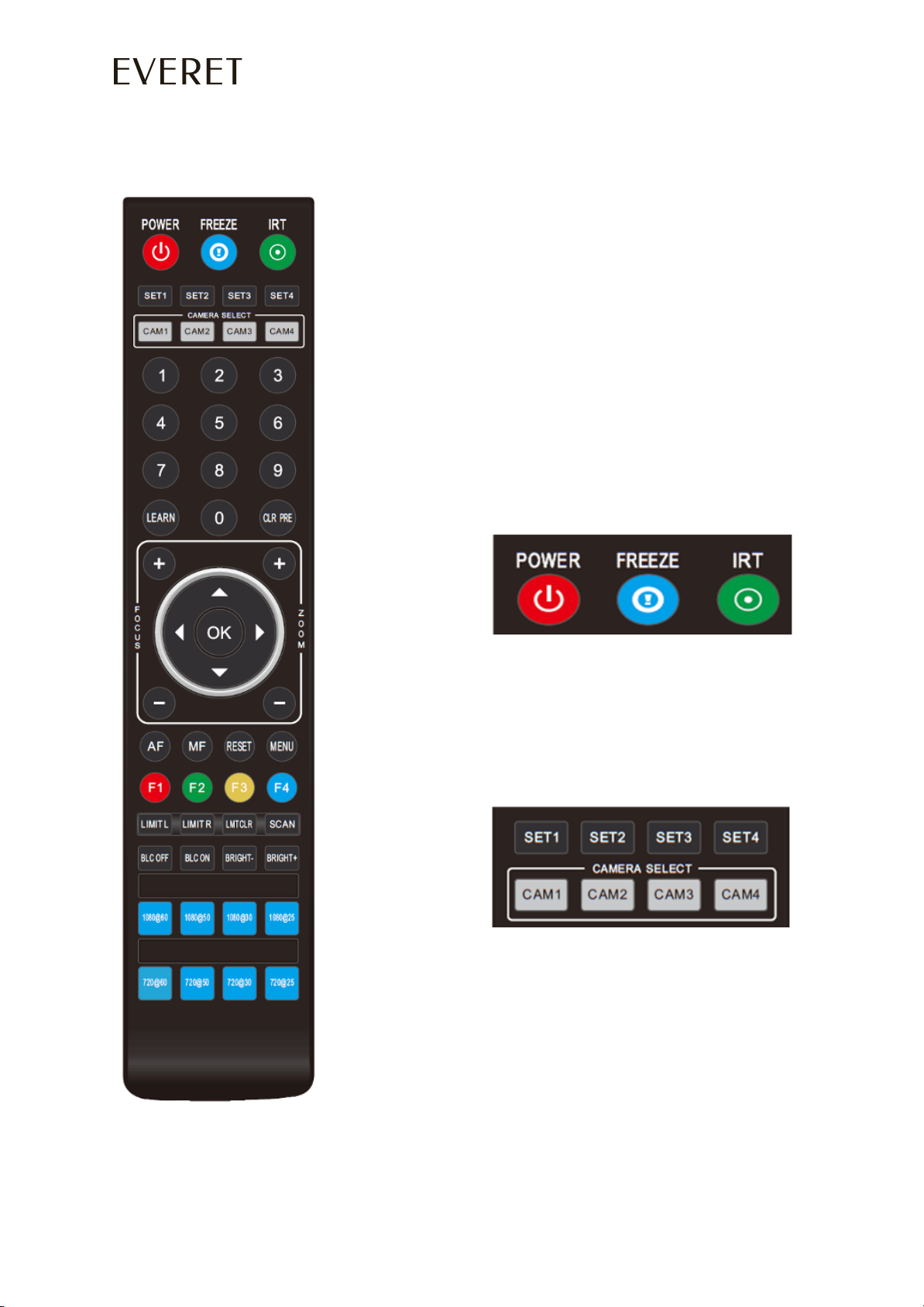
IR REMOTE CONTROLLER
POWER
Under normal working mode, short press
POWER key, to enter standby mode;
Press it again, the camera will do
self-configuration, then go back to HOME
position.
It will go to preset position if power on model
has been set before.
FREEZE (Not Supported in USB)
Short press FREEZE key to freeze/ unfreeze the
image.
IRT (IR Transfer/IR Pass)
Open / close the IR pass function. Once press
the IRT key, the camera will receive and
Pass the IR remote control signal to the
codec/terminal (via VISCA IN port).
SET 1~SET4 ADDRESS SETTING
Long press for 3 seconds until the key light ON,
to set camera address.
CAM1~CAM4(CAMERA SELECTING)
Short press to select the relative camera.
PRESET NUMBER KEY (1-9)
Set preset: long press (3 seconds) the number
key to set preset.
Run preset: Short press the number key to run
preset.
CLR PRE (CLEAR PRESET)
CLR PRE+ number key:
to clear the relative preset.
Long press to clear all presets.
9 WWW.EVERETIMAGING.COM
Tabla de contenidos
Otros manuales de Cámara digital de Everet