Evenflo PreciseRead Manual de usuario

PreciseRead™
Touchless
Forehead Thermometer
©2022 Eveno Company, Inc. 25701715 06/22
Read all instructions before
using this product.
KEEP INSTRUCTIONS FOR
FUTURE USE.

2
Introduction ...............................................................................3
Product Identication ................................................................3
Warnings ...................................................................................4
Important Information Before Use ............................................5
Description of LCD Display .......................................................6
Battery Installation ....................................................................7
Switching Between Fahrenheit or Celsius ................................8
Switching Between Measuring Modes .....................................8
Tips for Measuring Body Temperature .....................................9
Measuring Body Temperature ..................................................9
Measuring Food/Liquid Temperature .....................................11
Memory Function ....................................................................12
Cleaning and Disinfecting .......................................................13
Error Codes .............................................................................13
Technical Specication ...........................................................14
EMC Tables .............................................................................15
Explanation of Symbols ..........................................................17
FCC Statement .......................................................................18
Limited Warranty .....................................................................19
Table of Contents

3
The Eveno PreciseRead Touchless Forehead Thermometer
is intended for home use and the measurement of body
temperature for people of all ages.
1. Accurate: Patented Infrared PreciseRead proximity
sensor (°F/°C)
2. Versatile: 2-in-1 multi-use thermometer measures Body
Temperature and Food/Liquid Temperatures
3. Fast: One-second reading for rapid results
4. Easy to Read: 3 color LCD display for visual fever alert
5. Convenient: Quiet mode for nighttime use
6. Power Saving/Auto Power-Off: Auto Power-Off after idling
to ensure battery life.
7. °F/°C Switchable Function
8. Multi-Memory Recall
9. Fever Alarm: Body Temperature mode ONLY
10. Warning Indication: “Low Battery” symbol and “Lo”/ “Hi”
symbol indicating out of measuring range.
11. Ergonomic Design with Large LCD Display and Buttons
Introduction
Product Identication
1. Memory Button
2. Mode Button
3. Battery Cover
4. Display LCD
5. Power Button
6. Measurement
Sensor
7. PreciseRead
Proximity Sensor

4
WARNING!
• Product is intended to be used by adults.
• This product is not a toy. DO NOT allow children to play
with it.
• Please keep away from children and pets because small
parts may be inhaled or swallowed.
• This product includes 2 AAA batteries.
• Always replace the entire set of batteries at one time.
• RISK OF EXPLOSION!
»NEVER mix old and new batteries, batteries of different
brand types, or incorrect battery type.
»NEVER dispose of batteries near children, heat, or in
normal household waste.
• Properly dispose of used batteries immediately in
accordance with EPA Standards that can be found at
www.epa.gov/recycle.
• Remove batteries when storing product for a long time.
• Never immerse product in water.

5
When using this product, please be sure to follow all the notes
listed below. Any deviation may cause injury or affect the
accuracy of the thermometer.
1. Do not disassemble or repair the thermometer. No
modication of this equipment is allowed.
2. Be sure to clean the thermometer lens before and after
each use. Avoid direct nger contact with the lens.
3. It is recommended that user take three (3) temperature
readings. If they are different, use the highest reading.
4. Do not expose the thermometer to extreme temperature,
very high humidity, or direct sunlight.
5. Avoid dropping the device.
6. Before taking a measurement, the thermometer should be
acclimated to room temperature for 30 minutes.
7. Avoid measuring temperature for 30 minutes after exercise,
bathing, or returning from outdoors. If the patient’s skin is
covered with hair, sweat, or dirt, clean the area and wait 10
minutes before taking a measurement.
8. Please use the thermometer solely for its intended purpose.
9. There are no absolute body temperature standards. Keep
reliable records of your personal temperature to serve as a
reference for judging a fever.
10. Under any circumstances, the temperature result is ON LY
for reference. Before taking any medical action, please
consult your physician.
11. Avoid using this thermometer near an operating cell phone
or microwave oven.
12. For assistance with setup, use or maintainance of this
thermometer, please contact ParentLink at 1-800-233-5921.
13. Report any serious incidents involving this thermometer to
Eveno by calling ParentLink at 1-800-233-5921.
Important Information Before Use

6
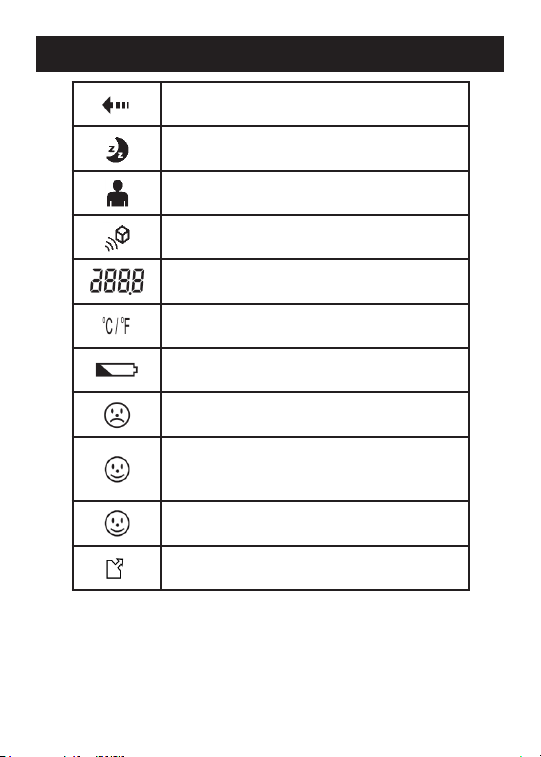
Measuring Sequence In Process
Night Mode (beeps muted)
Body Temperature Mode
Food/Liquid Temperature Mode
Measurement Degree
Temperature Scale (°C or °F)
Low Battery Indicator
Frowning Face with Red Backlight:
Temperature is 100.4ºF (38°C) or higher
Smiling Face with Amber Backlight:
Temperature is 99.5 - 100.3°F (37.5 -
37.9°C)
Smiling Face with Green Backlight:
Temperature is less than 99.5ºF (37.5°C)
Memory Symbol/Temperature Recall
Description of LCD Display

7
WARNING!
• RISK OF EXPLOSION!
»NEVER mix old and new batteries, batteries of different
brand types, or incorrect battery type.
»NEVER dispose of batteries near children, heat, or in
normal household waste.
• Properly dispose of used batteries immediately in
accordance with EPA Standards that can be found at www.
epa.gov/recycle.
• Remove batteries when storing product for a long time.
Battery Installation
Replacing the Battery
Low Battery Indicator: When the battery power becomes low,
the Low Battery Indicator “ ” will appear on the display. The
thermometer can still be used during this time, but the batteries
should be replaced as soon as possible. If the batteries run
out completely, the word “Lo” will be displayed along with the
Low Battery Indicator and the batteries will need to be replaced
before using the thermometer again.
To replace the thermometer batteries:
1. Gently slide the battery cover down to remove.
2. Carefully remove the old batteries and properly discard.
3. Insert two new 1.5V alkaline AAA (LR03) batteries in the
direction indicated in the battery compartment.
4. Slide the battery cover back into place.

8
Your thermometer can display results in degrees Fahrenheit
(°F) or degrees Celsius (°C). To switch from °F to °C and back,
simultaneously hold down the Memory and Mode buttons on the
side of the thermometer until you hear a beep.
Switching Between Fahrenheit or Celsius
Switching Between Measuring Modes
To switch between the thermometer’s four measuring modes
(shown below), press the Mode button on the side of the device.
Switching to Body Temperature and Food/Liquid Temperature
modes will be accompanied by a beep, while the beep is muted
when you choose Body Temperature Night Mode or Food/Liquid
Temperature Night Mode.
NOTE: A Moon symbol “ ” will appear on the LCD in both Night
Modes.
Body
Temperature
Food/Liquid
Temperature
Body
Temperature
Night Mode
Food/Liquid
Temperature
Night Mode
°F °F °F °F

9
• Before taking a temperature measurement, the
thermometer should be acclimated to room temperature for
30 minutes.
• Attempting to take temperature readings from sites on
the body other than the forehead may produce inaccurate
results.
• Avoid measuring temperature for 30 minutes after exercise,
bathing, or returning from outdoors. If the patient’s skin is
covered with hair, sweat, or dirt, clean the area and wait 10
minutes before taking a measurement.
• Readings taken while asleep should not be compared
directly to readings taken while awake, as body temperature
while asleep is typically lower.
• Ensure that the thermometer is held rmly during
measurement and that the patient does not move until
the measurement is complete. Movement can impact the
measurement.
Tips for Measuring Body Temperature
Measuring Body Temperature
1. Press the Power Button to turn on the thermometer. The
unit will run a self-test and the LCD will briey display all
of its symbols during this time. When the device is ready,
“--” will appear on the screen and the thermometer may be
used to take a measurement.
2. Select Body Temperature Mode by pressing and releasing
the Mode button until a “ ” symbol appears on the display.
NOTE: The default setting for the thermometer is set to
Body Temperature.

10
3. Position the thermometer approximately 1 inch (2.5 cm)
from the center of the patient’s forehead with the
sensor aimed between the eyebrows.
4. Press and release the Power Button.
5. Slowly move the thermometer toward or away from the
forehead until you have reached the correct distance.
NOTE: If the thermometer is out of range, the display will
ash in the sequence shown below and the thermometer
will beep until the correct distance is achieved.
6. Once the temperature reading is complete, you will hear a
short beep and the temperature will display on the LED with
a colored backlight and a graphic as indicated below.
Temperature LED Backlight Graphic
less than 99.5ºF (37.5°C) Green
99.5 - 100.3°F
(37.5 - 37.9°C) Amber
100.4ºF (38°C) or higher Red
) ) ) ) ) )
1” (2.5 cm)
) ) ) ) ) )
1” (2.5 cm)
Tabla de contenidos
Otros manuales de Termómetro de Evenflo