
ET NICE E-Pad O2 Active Manual
E-Pad O2Active
Installation And Setup Instructions
TECHNICAL SPECIFICATIONS
Power supply. 3VDC (1 x CR2450 or CR2430 battery)
Battery life. +/- 120 000 operations.
Power saving for enhanced battery life. Built in daylight sensor. LED lighting will only be active in the dark.
Battery low indication. Audible
Channels. 16
Frequency. 433.92MHz.
Transmission format options. ET BLU MIX © and ET BLUE rolling code.
Factory default. ET BLU MIX © on all channels.
Estimated transmission range. Line of sight in a radio clutter free
environment. +/- 200m outdoors and +/- 35m indoors.
Number of digits per code. 4 – 10 digits.
Maximum number of user codes. 100
Ingress protection. IP54
Dimensions. 85 x 75 x 37mm
Weight. 265g
Operating temperature. -10oC to 50oC.
BUZZER INDICATIONS
Buzzer
Key press confirmation. 1 x 500ms
Correct input sequence. Passed. 2 x 500ms
Incorrect input sequence. Failed. 3 x 500ms
All users cleared. 9 x 500ms, followed by 1 x 3s
Programming mode exited. 1 x 1s
Anti-hacking “lockout” active. 5 x 500ms on any key press.
Battery low. 10 x 500ms after valid code entry.
Transmitting. Continuous 250ms while # key held.
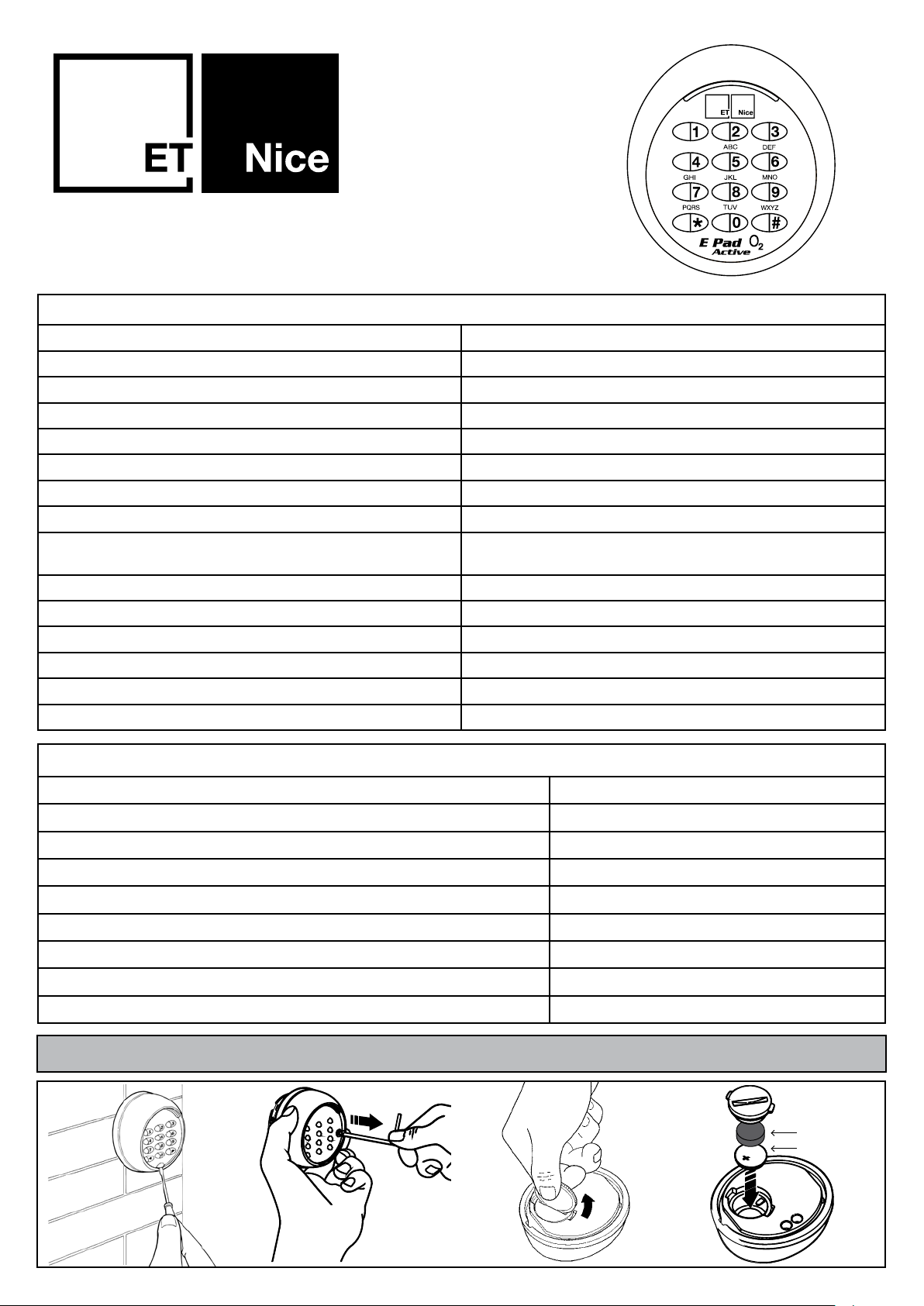
Opening The Battery Compartment And Installing The Battery
Foam pad
Baery
EPADO2ACTIVE_2021_003

Factory Defaulting And Unpairing The E-PAD O2Active From The Receivers
Pairing A Channel Of The E-PAD O2Active With Any ET BLUE Or ET BLU MIX©
Compatible Receiver
Normal Usage Of The E-PAD O2Active
Before Mounting The Keypad In The Final Mounting Position
NB!! No Factory Default Installer Code.
1. Power down by removing the battery.
2. Hold both the * and # channel keys in.
3. While holding in the * and # channel keys, return power by inserting the battery. (Do not release the buttons
until after the LED and buzzer routine has finished)
• LED and buzzer begins flashing and beeping intermittently to warn the factory default is about to occur.
Releasing the buttons or powering down at this point aborts the process.
• LED stops flashing and buzzer silences while the factory default occurs.
• LED and buzzer return on permanently to indicate the factory default and unpairing is complete.
4. Release the * and # keys.
1. Type in any valid user code assigned to the channel that must activate the receiver. (To setup a valid user code
on any channel other than channel 1 used the “Add User - Long Method” depicted in the programming flow
chart on the next page.
2. After typing in the valid user code, hold the # key in to begin transmitting.
3. While holding the # key in, put the receiver into program mode as per normal for that receiver.
4. When the receiver confirms the keypad channel has been programmed into the receiver memory, release the #
key.
1. Type in any valid user code assigned to the channel that must activate the receiver.
2. After typing in the valid user code, hold the # key in to begin transmitting.
3. Release the # key when the receiver activates.
Ensure that all of the receivers paired with any of the 16 channels on the keypad, can be successfully activated by
the keypad from the desired mounting position of the keypad. If one or more of the receivers cannot be activated
because the transmission from the keypad does not reach the receiver, try testing a different mounting position.
Take note of mounting surfaces that can interferre with radio transmissions such as metal surfaces or walls with
multiple electrical circuits installed in them. These should not be selected as suitable mounting positions.
Before entering programming for the first time after a factory default, you will be prompted to setup a new installer
code. To do this complete the following:
Type in * (2 x beeps and the left LED blinking 5 times.Right LED off)
Type in a 4 to 10 digit code, followed by the # key. (2 x beeps and both LEDs will change to static on.)
The new installer code is setup and you are at position 0 in the programming menu options. Consult the flow
chart on the next page from this stage.

Programming Flowchart
Standby Mode
Left Off - Right Off
Programming mode
Left On - Right On
Add User
Quick Method
Left On - Right On
0
*
*
Step 1
Left On - Right x 1/s
# #
4-10
digit
code
Installer
code
Add User
Long Method
Left x 1/s - Right On
1Step 1
Left x 1/s - Right x 1/s
# # Step 2
Left x 1/s - Right x 2/s
User
Address #Step 3
Left x 1/s - Right x 3/s
4-10
digit
code
#
Assign
channel
1-16
Swap A Channel’s
Transmission Format
Left x 4/s - Right On
4Step 1
Left x 4/s - Right x 1/s
# # Format confirmation
Left x 1/s -
Right On = ET Blu Mix
Right Off = ET Blue
Select
channel
1-16
#
1 for
ET Blu
Mix
0 for
ET
Blue
Swap to
One Time Pin Mode
Left x 9/s - Right On
9Step 1
Left x 9/s - Right Off
# #
1 for
OTP
Mode
Clear All User
Addresses
Left x 3/s - Right On
3Step 1
Left x 3/s - Right x 1/s
# Hold # Buzzer beeps 1/sec
and then 1 x 5s tone
Installer
code
Release
#
Clear A User
Address
Left x 2/s - Right On
2Step 1
Left x 2/s - Right x 1/s
# #
User
Address
Changing The
Installer Code
Left x 5/s - Right On
5Step 1
Left x 5/s - Right x 1/s
# #
4-10
digit
code
Programming automatically exits
20s after the last key press. You
can exit manually by repeatedly
pressing the * key until you return
to Standby mode.

Multiple Invalid Code Input Lockout. (Anti-Hacking)
Warranty.
As a security measure, in the case of someone trying to stumble across a valid user code by typing in multiple
random codes, the E-Pad O2Active will enter a mandatory 5 minute lock-out after the fifth consecutive incorrect
code entry. After the 5 minute lock-out has expired, you will be able to use the keypad again. If you know the
installer code, you can type this in prior to the 5 minute time out, to pre-emptively clear the lockout.
In the case of 5 consecutive lock-outs occurring, the E-Pad O2Active has a further security measure whereby it
will lock-out permanently until it is powered down and up again. During lockout any key press results in 5 beep
tones to indicate that it is in “Anti-Hacking Lockout”
Each time a valid user code is inputed, the tally of incorrect codes entered, is zeroed.
1. All goods manufactured by ET Nice (Pty) Ltd carry a 12 month factory warranty from date of invoice.
2. All goods are warranted to be free of faulty components and manufacturing defects.
3. Faulty goods will be repaired or replaced at the sole discretion of ET Nice (Pty) Ltd free of charge. Within
the warranty period.
4. This warranty is subject to the goods being returned to the premises of ET Nice (Pty) Ltd.
5. The carriage of goods is for the customer’s account.
6. This warranty is only valid if the correct installation and application of goods, as laid out in the applicable
documentation accompanying said goods, is adhered to.
7. All warranty claims must be accompanied by the original invoice.
8. All claims made by the end user must be directed to their respective service provider/installer.
The following conditions will disqualify this product from the warranty as laid out above. These conditions are
non- negotiable.
1. Any unauthorized non-manufacturer modifications to the product or components thereof.
2. Any modification to the installation methods described in the installation instructions.
3. Any application or use of the product other than the intended use and application described in the product
documentation.
The following items are not included in the warranty.
• The battery
• Damage resultant of wind and other climatic influences such as lightning strikes.
• Damage due to infestation i.e. Ants nesting…
• Water damage. It is the responsibility of the installer to ensure the product is installed in a location that is
protected from water ingress. The ingress protection rating is specified in the accompanying documentation.
Housings that require that cable entries are made by the installer do not carry an ex-factory ingress protection
rating as it is the responsibility of the installer to seal the cable entry points after installation of the cabling.
Mounting Sequence
1 2 3 4


