
Escort iMiniPlus Manual de usuario

iMiniPlus User Manual Version 2.12.07MP
Copyright © 2016 Cryopak Verification Technologies, Inc. All rights reserved.
i M i n i P l u s
U S E R M A N U A L
Version 2.12.07MP

The information contained within this document regarding ConsolePro software usage is
intended as a guide and does not constitute a declaration of performance. The information
contained in this document is subject to change without notice. Complying with all applicable
copyright laws is the responsibility of the user.
No representation or warranty is given and no liability is assumed by Cryopak Verification
Technologies, Inc. with respect to the accuracy or use of such information or infringement of
patents or other intellectual property rights arising from such use or otherwise.
Copyright © 2016 Cryopak Verification Technologies, Inc. All rights reserved.
www.cryopak.com

i Contents
Contents
1.
Introduction 5
Software Version .................................................................................................................. 5
2.
iMiniPlus Profile 5
iMiniPlus Models ................................................................................................................... 5
iMiniPlus Images ................................................................................................................... 5
System requirements ............................................................................................................ 7
Getting a copy of the ConsolePro software ............................................................................. 8
Installing the USB adaptor cable drivers ............................................................................... 10
Getting a copy of the USB drivers from the web ................................................................... 11
Installing USB Driver Files using Found New Hardware Wizard .............................................. 12
Installing ConsolePro Software ............................................................................................ 12
4.
Quick Start Guide 13
Connecting the serial or USB cable to PC .............................................................................. 14
Connecting the serial or USB cable to the iMiniPlus ............................................................... 14
Launching the software ....................................................................................................... 15
Starting and using the iMiniPlus ........................................................................................... 19
Stopping the iMiniPlus ......................................................................................................... 20
Retrieve information from the iMiniPlus ................................................................................ 20
5.
Preparing iMiniPlus for use 23
Getting an iMiniPlus ready for logging .................................................................................. 23
Password Requirements ...................................................................................................... 24
Program and Configuration Wizard....................................................................................... 24
Details and Changing Password ........................................................................................... 25
Configure Sensors and Alarm Settings .................................................................................. 25
Specification and Alarm ............................................................................................. 26
Alarm Type ............................................................................................................... 26
iMiniPlus Display ........................................................................................................ 28
Enable Display .......................................................................................................... 28
Display Units of measurement .................................................................................... 28
Display change rate ................................................................................................... 28
Checking the time clock ...................................................................................................... 29
Setting the Start, Stop and logging duration ......................................................................... 29
Duration of trip, at least............................................................................................. 29
Interval between each reading ................................................................................... 29
Start new log trip ...................................................................................................... 30
Finish log trip ............................................................................................................ 30
Continuous logging .................................................................................................... 30
Enable stop button in this logger(s) ............................................................................ 30

ii Contents
Summary and Upload Program into iMiniPlus ........................................................................ 30
Program upload Failure ....................................................................................................... 32
6.
Results from iMiniPlus 32
Getting results from iMiniPlus .............................................................................................. 32
Download Wizard ................................................................................................................ 33
Inspecting the information at close range ............................................................................. 35
View Manager..................................................................................................................... 35
Views ....................................................................................................................... 36
Links ........................................................................................................................ 38
Multiple Trip Synchronization Wizard .......................................................................... 39
Analysis .................................................................................................................... 40
View Data in a Graph .......................................................................................................... 43
Data ......................................................................................................................... 44
Sensors .................................................................................................................... 45
2D Graphs ................................................................................................................ 45
Zoom ........................................................................................................................ 46
Legend ..................................................................................................................... 47
Time Zone ................................................................................................................ 47
Colors ....................................................................................................................... 47
Printing the results .............................................................................................................. 48
Sending a file by e-mail direct from Console ......................................................................... 48
Calling up previous results ................................................................................................... 48
Digital signatures ................................................................................................................ 48
7.
Customizing the software 48
General .............................................................................................................................. 49
File .................................................................................................................................... 50
Date .................................................................................................................................. 50
Time .................................................................................................................................. 51
Time zones ......................................................................................................................... 51
2D Graphs .......................................................................................................................... 51
Legend ............................................................................................................................... 52
Products ............................................................................................................................. 53
Communications ................................................................................................................. 53
Languages ......................................................................................................................... 53
Colors ................................................................................................................................ 54
Advanced ........................................................................................................................... 54
8.
Menus and Toolbars 55
Menu commands ................................................................................................................ 56
File Menu .................................................................................................................. 56
Edit Menu ................................................................................................................. 57
Action Menu .............................................................................................................. 59
Window Menu ........................................................................................................... 59
Help Menu ................................................................................................................ 60

Contents iii
Toolbar commands ............................................................................................................. 60
Status bar .......................................................................................................................... 61
Print preview toolbar ........................................................................................................... 61
9.
Working with Networks 62
10.
Getting more information 62
Getting updated software .................................................................................................... 62
Finding your software version .............................................................................................. 62
11.
Warranty 62
12.
Dry Ice iMiniPlus 63
Specifications ..................................................................................................................... 63
13.
Appendix 64
Troubleshooting .................................................................................................................. 64
Changing the Battery .......................................................................................................... 64
14.
Contact details 65


5
1. Introduction
This user manual will take you through the relevant steps so that you will be able to operate your iMiniPlus product.
The chapters in this manual are placed in an order that you will need to follow in order to successfully use the iMiniPlus for
the first time.
This manual covers all the features included in the current version of the ConsolePro software. Therefore, if you find a
feature described within this manual that does not appear in your software and/or a feature within the version of software
being used that is not described in this guide, then we recommend you obtain a newer version of the software and/or a
newer version of this guide
Software Version
v2.12.07
Note: This User Manual is to be used with the above version software (or later) only. If you are using ConsolePro software
version earlier than the above, the content, instruction and features described herein may not be the same. Contact Cryopak
Verification Technologies, Inc. or your nearest distributor for appropriate software and user manual.
2. iMiniPlus Profile
iMiniPlus Models
The iMiniPlus is available in three models.
D range
MP-ST-D-8-L
Internal sensor
Single use
-40°C to +70°C
MP-IN-D-8-L
Internal sensor Multi use -40°C to +70°C
MP-OE-D-8-L
External sensor Multi use -40°C to +70°C
N range (Dry Ice)
MP-ST-N-8-L
External sensor
Single use
-100°C to +40°C
MP-OE-N-8-L External sensor
Multi use
-100°C to +40°C
Internal sensor model has the sensor mounted inside the logger but externalized to the air to allow free movement of air
media across the thermistor head (Model MP-IN-D-8-L)
The other model comes with the same sensor as above but encapsulated inside a stainless steel tip on a 1meter PVC cable.
This sensor assembly is permanently connected to the body of the iMiniPlus (Model MP-OE-D-8-L/ MP-OE-N-8-L / MP-
ST-N-8-L)
The iMiniPlus has a fully functional LCD display and keypad. A summary of these features and functions are summarised
below.
iMiniPlus Images

6
MP-OE-N-8-L / MP-OE-N-8-L
MP-OE-D-8-L
MP-ST-D-8-L
MP-IN-D-8-L
Attachment lug
For fixing to item or wall
Low Battery Icon
Temperature
Latest, Highest, Lowest or
Average
HIGHEST LOWEST
AVERAGE
Displays the high, low and
average recording
STOP Button
Hold for 3 seconds.
START Button
start, mark and scroll
functions
LATEST - Displays the
last logged temperature
MARKED – Bookmark
activation
HIGH ALARM
LOW ALARM
alarm has been triggered
External sensor
For Dry Ice logger
Temperature sensor
Is here
External sensor
For D range
iMiniPlus Profile 7
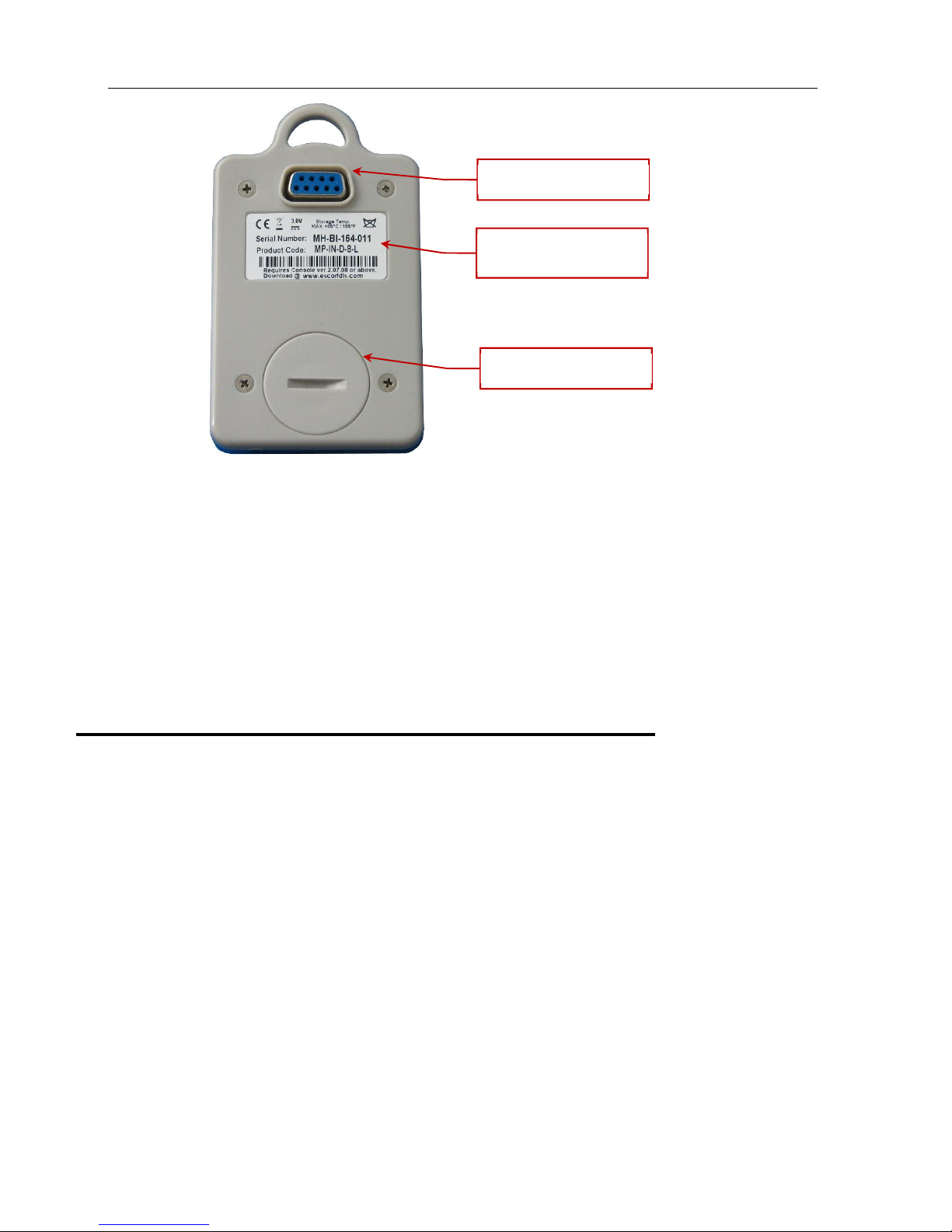
The iMiniPlus comes with water-proof covers for the RS232 connection and the battery.
Make sure that when logger is in use these covers are in place. This is important in wet or dusty environments. If covers are
lost please contact your distributor for a replacement.
3. Installing the Software & USB driver
To operate your iMiniPlus logger you will need to first install the software on your computer. This will allow you to prepare
your iMiniPlus for use, retrieve the readings the iMiniPlus has recorded, and analyse the data. This chapter will take you
through the steps necessary to successful install the software on to your computer so you can begin using your iMiniPlus.
System requirements
To ensure that the software will be able work with your computer, the following lists the minimum specifications required:
Minimum requirements:
Pentium II 233MHz processor
64MB RAM
15MB free disk space
Windows 98, Windows Me, Windows NT, Windows 2000, Windows XP
Internet Explorer 5.0 or later
1 available USB port
800 x 600 screen resolution
256 screen colours.
The recommended specifications are:
Windows 2000, Windows XP, Windows Vista, Windows 7, 8, 8.1 or Windows 10
Internet Explorer 6.0 or later
65535 (16bit), or more, screen colours.
1024 x 768, or higher, screen resolution.
RS232 connection
Identification sticker
with barcode
Battery cover

8
Getting a copy of the ConsolePro software
The software is available on CD from your distributor or downloadable from
www.cryopak.com
site, Data Logging Systems
does not charge for the on-line download of the ConsolePro software or for the updates to the ConsolePro software.
Install the free Console Pro Software using either
1. The Console Pro Software CD or
2. Through the CRYOAPK website
www.cryopak.com
3.
http://www.cryopak.com/files/1613/7599/1145/econsole_21207pro.zip
4. See instructions below for Website Installation
Otros manuales para iMiniPlus
2
Tabla de contenidos
Otros manuales de Registrador de datos de Escort


