Envionic FA845 Manual de usuario

Users manual FA845 version 1.5
Envionic
1
Field Analyzer FA845
Users Manual
Also for the FA720, FA725, FA730 and FA735
www.envionic.com

Users manual FA845 version 1.5
Envionic
2
Contents
Contents ........................................................................................................................................ 2
Introduction .................................................................................................................................. 4
Accessories delivered with the device ...................................................................................... 6
Chapter 1 General ........................................................................................................................ 7
1.1 Switching ON or OFF .................................................................................................... 7
1.2 Micro-SD memory card ................................................................................................. 8
1.3 Choosing what to measure ............................................................................................. 9
1.4 Speaker ........................................................................................................................ 10
1.5 Batteries ....................................................................................................................... 11
1.6 Changing or charging batteries .................................................................................... 12
1.7 Setting time and date ................................................................................................... 13
1.8 Installing a new software version ................................................................................ 13
Chapter 2 RF High frequency electromagnetic field ................................................................. 14
2.1 Measurement with LogPer antenna ............................................................................. 14
2.2 Measurement with omni-directional antenna .............................................................. 15
2.3 Display ......................................................................................................................... 16
2.4 Frequency measurement .............................................................................................. 17
2.5 Hold function ............................................................................................................... 18
2.6 Choosing the measurement unit ................................................................................... 18
2.7 Display signal pulsation ............................................................................................... 19
2.8 Safe values ................................................................................................................... 20
Chapter 3 RF SCAN mode ........................................................................................................ 21
3.1 Spectrum analyzer introduction ................................................................................... 21
3.2 SCAN Display ............................................................................................................. 22
3.3 SCAN Frequency bands .............................................................................................. 23
3.4 SCAN Peak display ..................................................................................................... 24
3.5 Other functions in SCAN mode ................................................................................... 25
3.6 Single frequency measurement .................................................................................... 26
3.7 SCAN mode Hold function ......................................................................................... 27
3.8 Define a list of frequency bands .................................................................................. 28
Chapter 4 RF Expert mode ........................................................................................................ 30
4.1 XPRT Display ............................................................................................................. 30
4.2 XPRT functions .......................................................................................................... 31
4.3 Frequency control ........................................................................................................ 33
4.4 Directly enter Center Frequency .................................................................................. 34
4.5 Changing the SPAN ..................................................................................................... 35
4.6 Directly enter START and STOP frequency ............................................................... 36
Chapter 5 Low frequency electric field ..................................................................................... 37
5.1 Orientation ................................................................................................................... 37
5.2 Measurements .............................................................................................................. 38
5.3 Safe values ................................................................................................................... 39
5.4 Orientation for older devices ....................................................................................... 39
Chapter 6 Low frequency magnetic field .................................................................................. 40
6.1 Measurement ................................................................................................................ 40
6.2 Safe values ................................................................................................................... 41
Chapter 7 Displaying logged measurement results ................................................................... 42
7.1 Display logged measurements on the device itself ...................................................... 42
7.2 Connecting the Micro-SD card to your PC.................................................................. 44

Users manual FA845 version 1.5
Envionic
3
7.3 View measurements with your computer .................................................................... 45
Appendices ................................................................................................................................. 46
Appendix 1 Specifications FA845 .................................................................................... 46
Appendix 2 Conversion from microwatt /m² to milliVolt /meter. .................................... 47
Appendix 3 More information .......................................................................................... 48
Appendix 4 Abbreviations ................................................................................................ 48

Users manual FA845 version 1.5
Envionic
4
Introduction
This manual is intended for the FA845, and also for the FA720, FA725, FA730 and FA735.
But these last four devices do not have all features of the FA845.
The features of the devices can be found in the next table:
FA720 FA725 FA730 FA735 FA845
RF measurement up to 6 GHz ● ● ● ● ●
Spectrum analyzer up to 3.7 GHz ●
Low frequency electric field measurement ● ● ●
Low frequency magnetic field measurement ● ● ●
Data logging on micro-SD memorycard ● ● ●
Software upgrade through micro-SD card ● ● ●
Carrying case included ● ●
For the RF measurement mode, not only the strength, but also the frequency can be measured.
The RF mode can also measure pulsed signals. The pulsation can be heard via the build in
speaker. In the ‘time’ mode, you can view these pulses on the screen.
The spectrum analyzer can measure very low field strengths (and their frequency).
The figures measured are displayed on a clear graphic LCD display.
The low frequency fields are also audible on the speaker, and their waveform is visible on the
screen.
After every 10 second time interval, the maximum measured value in this interval is
determined, and the result is written to a micro-SD memory card. The current time and date are
written together with these measurements. The recorded data can be viewed on the device
itself, or on your PC (as an Excel spreadsheet).
The internal software can be upgraded through the micro-SD card.
Software versions below 2.0 can not be upgraded to versions 2.0 or higher, because the newer devices
have a slightly different internal construction. All devices delivered after september 2015 have the
newer construction and have version 2.0 or higher installed.

Users manual FA845 version 1.5
Envionic
5
The FA845 is a sensitive measurement device that measures three kinds of fields.
The fields measured are:
1) High frequency electromagnetic fields that are emitted by:
- GSM mobile telephones and their base station/ broadcasting masts
- UMTS mobile telephones and their base station/ broadcasting masts
- DECT cordless phone base stations (they emit regardless in use or not)
- DECT cordless telephones
- WLAN (or WIFI) wireless computer networks
- WIMAX wireless network
- wireless video systems
- microwave ovens
- bluetooth wireless systems
- television transmitters
2) Low frequency electric fields (FA 730/735/845 only) that are emitted by:
- Home supply power lines
- 110 or 230 volt wall sockets and connected appliances (also when switched off)
- Out door electric power lines
3) Low frequency magnetic fields (FA 730/735/845 only) that are emitted by:
- Power adapters
- Many 110 / 230 volt appliances
- Alarm clocks
- Transformers of halogen incandescent lamps
- outdoor electric power lines
- electric motors/ engines
Picture: The FA845 or FA735 in its carrying case

Users manual FA845 version 1.5
Envionic
6
Accessories delivered with the device
AL700 LogPer directional
antenna for the range 700 MHz
to 6000 MHz (6 GHz )
Micro-SD memory card of 8
Gigabyte or more
Cardreader to connect the micro-
SD card to the USB port of your
computer
The memory card and cardreader
are only delivered with the
FA725, FA735 and FA845
Two AA Alkaline batteries (or,
optional, two NiMH
rechargeable batteries)
Optional charger for the NiMH
rechargeable batteries. It is
available for several countries
(see Envionic website). The
European version is shown here.
Carrying case
Only delivered with FA735 and
FA845
For other devices it is available
separately.

Users manual FA845 version 1.5
Envionic
7
Chapter 1 General
1.1 Switching ON or OFF
The device is switched on by shortly pressing the little button that is located at the top side.
Pressing the same button again switches the device off.
On/Off switch
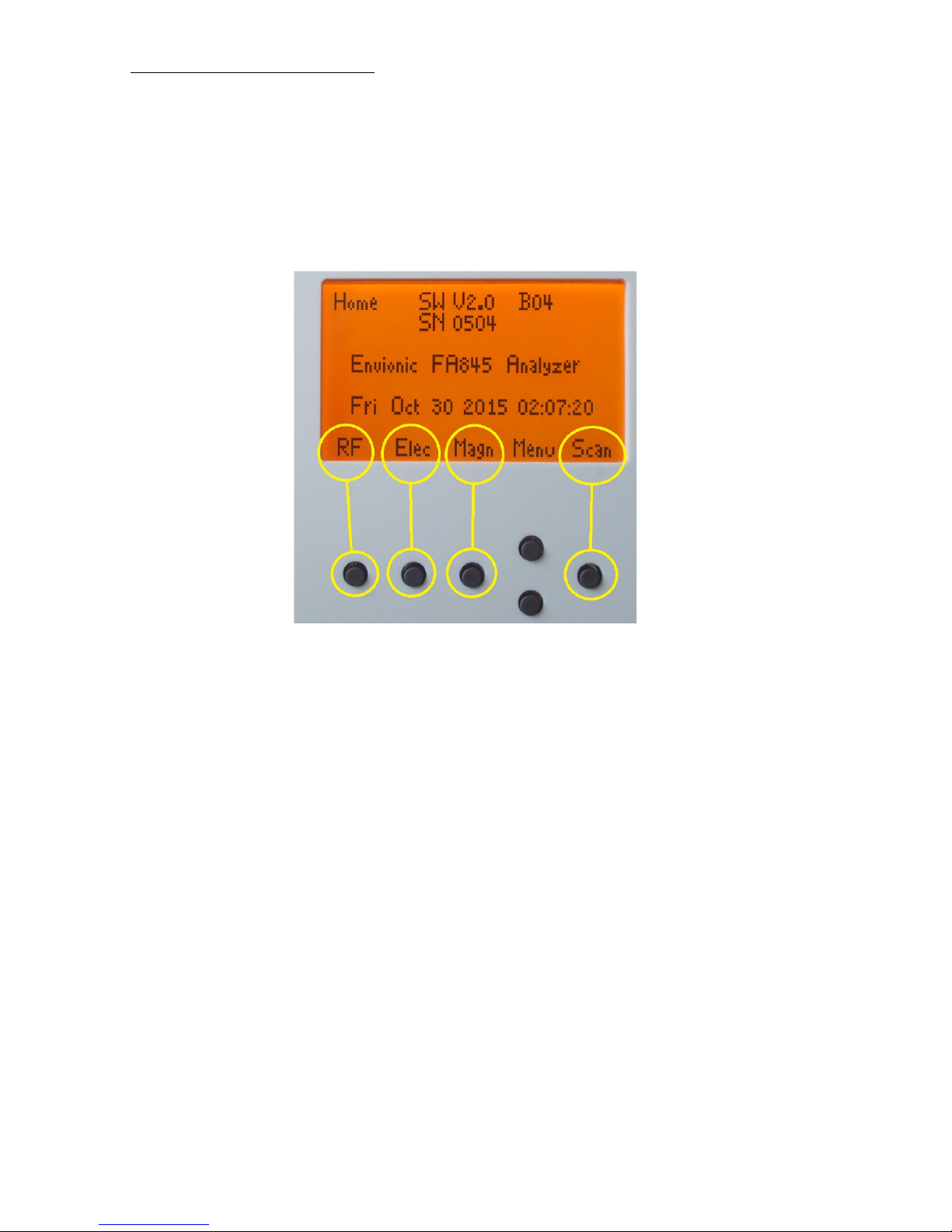
The function of the frontside buttons will be visible on the bottom of the screen as long as the
device is switched on.
On the screen you will see the model number (FA845, FA735, FA730, FA725 or FA720),
software version (Image: V 2.0) and serial number (0504) of the device. This manual describes
software version 2.3.
Screen after power-on ( Home )
The operating state of the meter is always visible at the left top of the screen. Immediately after
switching on, this is 'Home'.
You will also see the current date and time (for FA845, FA735 and FA725). When the date or
time is not correct, you can set these (see section 1.7).

Users manual FA845 version 1.5
Envionic
8
1.2 Micro-SD memory card
The micro-SD memory card should only be placed or removed when the device is switched
off. The card should be placed with its contacts pointing upwards to the top of the device .
You can use your nail to push it the last stretch until it clicks.
Position of the micro-SD memory card
Contacts of the card pointing upwards

Users manual FA845 version 1.5
Envionic
9
1.3 Choosing what to measure
The function of the frontside buttons will be visible on the bottom of the screen as long as the
device is switched on. Directly after switching on, you can choose what you want to measure:
Push the 1st button (“RF”) to measure the high frequency electromagnetic field (chapter 2).
Push the 2nd button (“Elec”) to measure the low frequency electric field (chapter 5).
Push the 3rd button (“Magn”) to measure the low frequency magnetic field (chapter 6).
Push the rightmost button (“Scan”) to start the RF Spectrum Analyzer (chapter 3).
After measuring, you can go back to this screen with the 1st button (“Home”).

Users manual FA845 version 1.5
Envionic
10
1.4 Speaker
After choosing what to measure, you can set the sound to a certain volume with the buttons
"Vol+" and "Vol-". (This does not apply to the SCAN and EXPERT modes.)
During setting of the volume, the volume setting is displayed. It can be set to a value on a scale
from 0 to 8.
For RF, this gives an audible impression of the pulse modulation of the radiation. After some
practice it is possible to identify the kind of radiation by the sound it produces. The strength of
the radiation has not much influence on the sound volume, unless the signals are very weak.
For the low frequency (Elec and Magn) measurements, the sound volume depends on the
strength of the signal.
To make low frequencies (50 or 60 Hz) audible, some higher harmonics are added to the
speaker signal.
Phones connection
One of the two channels of the stereo phones connection provides the sound signal to an
external device. The internal speaker will be switched off when this connection is used.
Este manual sirve para los siguientes modelos
4
Tabla de contenidos
Manuales populares de Instrumento de medición de otras marcas

Endress+Hauser
Endress+Hauser Proline Promag 50 Especificaciones técnicas

Siemens
Siemens SITRANS F Coriolis FCT030 Manual de lista de piezas

KLINGER
KLINGER CMF V Series Manual de usuario

EXFO
EXFO FTB-2 Manual de operación y mantenimiento

Keysight
Keysight M8290A Manual de usuario

ADTEK
ADTEK MW-5 Manual de usuario