Between
0 min., 0.01sec
and
99 min., 59 sec.
Mo
Mo
Mo
Mo
Tu
Tu
Tu
Tu
We
We
We
We
Th
Th
Th
Th
Fr
Fr
Fr
Fr
Sa
Sa
Sa
Sa
Su
Su
Su
Su
Mo
Mo
Mo
Mo
Mo
PRG PRG PRG
PRG
PRG
PRG
PRG
PRG
PRG
Tu
Tu
Tu
Tu
Tu
We
We
We
We
We
Th
Th
Th
Th
Th
Fr
Fr
Fr
Fr
Fr
Sa
Sa
Sa
Sa
Sa
Su
Su
Su
Su
Su
t1.cn t2.cn o.cnF
o.1.cn
o.2.cn
o.1.o.t
o.2.o.t
S.mEm
d.cnF
t1o. n
oFF
Hold
Hold
no
Mo
Mo
Mo
Mo
Mo
Mo
Mo
Mo
Mo
Mo
Mo
Mo
Mo
Mo
Mo
Mo
Mo
Mo Mo
Mo
Mo
Mo Mo
Tu
Tu
Tu
Tu
Tu
Tu
Tu
Tu
Tu
Tu
Tu
Tu
Tu
Tu
Tu
Tu
Tu
Tu Tu
Tu
Tu
Tu Tu
We
We
We
We
We
We
We
We
We
We
We
We
We
We
We
We
We
We We
We
We
We We
Th
Th
Th
Th
Th
Th
Th
Th
Th
Th
Th
Th
Th
Th
Th
Th
Th
Th Th
Th
Th
Th Th
Fr
Fr
Fr
Fr
Fr
Fr
Fr
Fr
Fr
Fr
Fr
Fr
Fr
Fr
Fr
Fr
Fr
Fr Fr
Fr
Fr
Fr Fr
Sa
Sa
Sa
Sa
Sa
Sa
Sa
Sa
Sa
Sa
Sa
Sa
Sa
Sa
Sa
Sa
Sa
Sa Sa
Sa
Sa
Sa
Sa
Su
Su
Su
Su
Su
Su
Su
Su
Su
Su
Su
Su
Su
Su
Su
Su
Su
Su Su
Su
Su
Su Su
Out3
Out3
Out3
Out3
Out3
Out3
Out3
Out3
Out3
Out3
Out3
Out3
Out3
Out3
Out3
Out3
Out3
Out3
Out3 Out3
Out3
Out3
Out3
Out3
Out3
Out3
s
s
s
s
s
s
s
s
s
s
s
s
s
s
s
s
s
s
s
s
s
s
s
s
s
s
sss
s
s
s
s
s
s
s
s
s
s
s
s
s
s
s
s
s
s
s
s
s
s
s
s
s
s
m
m
m
m
m
m
m
m
m
m
m
m
m
m
m
m
m
m
m
m
m
m
m
m
m
m
m m mm
m
m
m
m
m
m
m
m
m
m
m
m
m
m
m
m
m
m
m
m
m
m
m
m
m
m
m
m
m
h
h
h
h
h
h
h
h
h
h
h
h
h
h
h
h
h
h
h
h
h
h
h
h
h
h
Mo
Mo
Mo
Mo
Mo
Mo
Mo
Mo
Mo
Mo
Mo
Mo
Mo
Mo
Mo
Mo
Mo
Mo
Mo
Mo
Mo
Mo
Mo
Mo
Mo
Mo
T
T
T
T
T
T
T
T
T
T
T
T
T
TT
T
T
T
T
T
T
T
T
T
A A A A
A
A
A
A
A
A
A
A
A
A
A
A
A
A
A
AA
A
A
A
A
A
A
A
A
A
PRG PRG PRG PRG
PRG
PRG
PRG
PRG
PRG
PRG
PRG
PRG
PRG
PRG
PRG
PRG
PRG
PRG
PRG
PRG PRG
PRG
PRG
PRG
PRG
PRG
PRG
PRG
PRG
OUT
MODE
OUT
MODE
OUT
MODE
OUT
MODE
OUT
MODE
OUT
MODE
OUT
MODE
OUT
MODE
OUT
MODE
OUT
MODE
OUT
MODE
OUT
MODE
OUT
MODE
OUT
MODE
OUT
MODE
OUT
MODE
OUT
MODE
OUT
MODE
OUT
MODE
OUT
MODE
OUT
MODE
OUT
MODE
OUT
MODE
OUT
MODE
OUT
MODE
OUT
MODE
Tu
Tu
Tu
Tu
Tu
Tu
Tu
Tu
Tu
Tu
Tu
Tu
Tu
Tu
Tu
Tu
Tu
Tu
Tu
Tu
Tu
Tu
Tu
Tu
Tu
Tu
We
We
We
We
We
We
We
We
We
We
We
We
We
We
We
We
We
We
We
We
We
We
We
We
We
We
Th
Th
Th
Th
Th
Th
Th
Th
Th
Th
Th
Th
Th
Th
Th
Th
Th
Th
Th
Th
Th
Th
Th
Th
Th
Th
Fr
Fr
Fr
Fr
Fr
Fr
Fr
Fr
Fr
Fr
Fr
Fr
Fr
Fr
Fr
Fr
Fr
Fr
Fr
Fr
Fr
Fr
Fr
Fr
Fr
Fr
Sa
Sa
Sa
Sa
Sa
Sa
Sa
Sa
Sa
Sa
Sa
Sa
Sa
Sa
Sa
Sa
Sa
Sa
Sa
Sa
Sa
Sa
Sa
Sa
Sa
Sa
Su
Su
Su
Su
Su
Su
Su
Su
Su
Su
Su
Su
Su
Su
Su
Su
Su
Su
Su
Su
Su
Su
Su
Su
Su
Su
h
h
h
h
h
h
h
h
h
h
h
h
h
h
h
h
h
h
h
h
h
h
h
h
h
h
h
h
Start
Start
Start
Start
Start
Start
Start
Start
Start
Start
Start
Start
Start
Start
Start
Start
Start
Start
Start
Start
Start
Start
Start
Start
Start
Reset
Reset
Reset
Reset
Reset
Reset
Reset
Reset
Reset
Reset
Reset
Reset
Reset
Reset
Reset
Reset
Reset
Reset
Reset Reset
Reset
Reset
Reset
Reset
Reset
Gate
Gate
Gate
Gate
Gate
Gate
Gate
Gate
Gate
Gate
Gate
Gate
Gate
Gate
Gate
Gate
Gate
Gate
Gate
Gate
Gate
Gate
Gate
Gate
Gate
t1 ..r
i.flt t1.c..s
t.dir
d.mod
s.Cod
i.typ
d.lth
t2.c.s
o.cn.s
d.cn.s
D.aDr
P.r.Co
bauD
outm
t1A..r
t2 ..r
t2A..r
t1 .l
t1 .H
t2 .l
t2 .H
t1A.l
t1A.H
t2A.l
t2A.H
999. 9
00. 01
pY. Es
up
t1-1
0
npn
10
pY. Es
pY. Es
pY. Es
1
oFF
oFF
0
999. 9
999. 9
999. 9
00. 0
999. 9
00. 0
999. 9
00. 0
999. 9
00. 0
999. 9
1
1
1
1
1
1
1
1
1
1
1
1
1
12
2
1
1
2
2
1
1
2
2
8
8
8
8
8
8
8
8
8
8
8
8
8
8
0
8
8
8
8
8
8
8
8
8
8
8
Out2
Out2
Out2
Out2
Out2
Out2
Out2
Out2
Out2
Out2
Out2
Out2
Out2
Out2
Out2
Out2
Out2
Out2
Out2 Out2
Out2
Out2
Out2
Out2
Out2
Out2
Out1
Out1
Out1
Out1
Out1
Out1
Out1
Out1
Out1
Out1
Out1
Out1
Out1
Out1
Out1
Out1
Out1
Out1
Out1 Out1
Out1
Out1
Out1
Out1
Out1
Out1
T1 L o w e r Limit Value
Timer1 setpoint lower limit
can be adjusted between
0 and t1 .H parameter.
T 1 S c a l e S e l e c t i o n
9 Different time periods can
be selected (See Table 1).
If this parameter changed,
t1.L and t1.H parameters
are changed automatically.
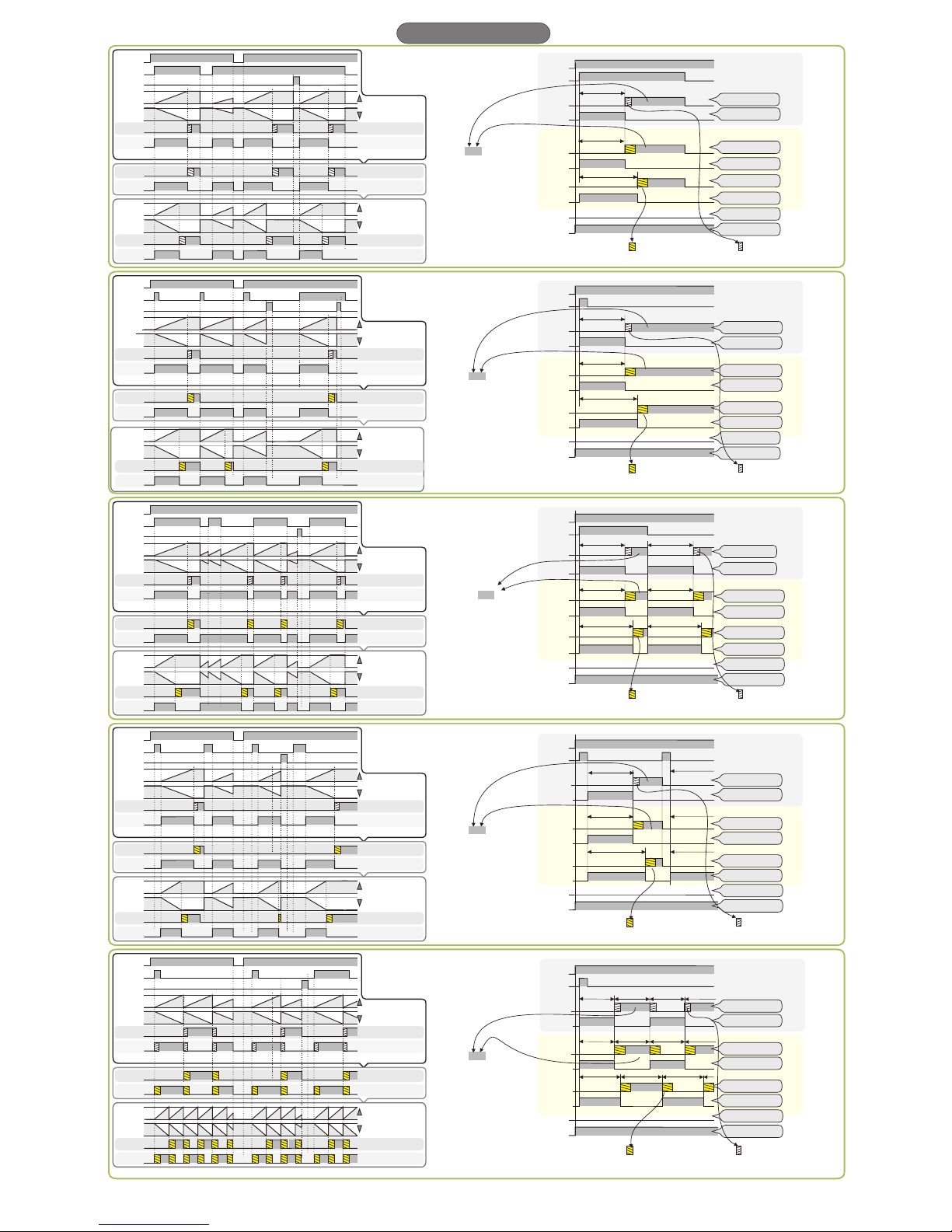
Timer1 Configuration Menu
Ou t mod e Se le ct io n
12 Different Out Mode can
be selected. (See graphic
tables )
for output types
Input Filter
0.001, 020, 050 and 0.100
second values can be selected.
Pulse and void time durations
must be greater than adjusted
i.FLt parameters for Start,
Gate and Reset inputs.
Timer Counting Direction
If up is selected, the timer
is counted up, if dn is
se le ct ed th e ti me r is
counted down.
Indicator Format
Sets the selection for the
desir ed param e ters fro m
indicating on top and bottom
display. (See table 2)
This parameter returns to
t1-1 position when outm,
o.1.cn and o.2.cn parameters
are changed. It must be
readjusted to the desired
position.
Security Menu
For accessing this menu,
this parameter must be entered.
Security code is 4400.
T1 (Timer1) Menu, Security Access Level
If nonE Menu invisible.
If P.YEs Modification can be done.
If P. no Only visible.
T2 (Timer2) Menu, Security Access Level
Menu invisible.
Modification can be done.
Only visible.
If nonE
If P.YEs
If P. no
o.cNF
If nonE
If P.YEs
If P. no
Menu, Security Access Level
Menu invisible.
Modification can be done.
Only visible.
d.cNF
If nonE
If P.YEs
If P. no
Menu, Security Access Level
Menu invisible.
Modification can be done.
Only visible.
Input Type Selection
nPn or PnP values can be
se le c t e d . S ta rt , G at e a n d
Rese t input t ypes w ill b e
changed according to th i s
parameter.
Display Brightness Selection
Display brightness can be
adjusted between 1 and 20.
Device Address
ModBus
Commun i cation
address can be
a d j u s t a b l e
b e t w e e n
1 and 247.
Panel Reset Control
If Off is selected, the
reset button not work.
If on is selected and
reset key is pressed for 1
second, timer is reset.
RS485 Baudrate
If oFF is selected ModBus
communication disable.
2400, 4800, 9600, 19200 and
38400 baudrate values can
be adjusted.
O u t 1 S e t t i n g s
May take the t1.on
an d t1.oF v a l u e s.
(For Out1 behavior type,
see out p ut grap hi c
tables.)
Out1 ON, timer settings
If HoLd is selected,
output is continuously
a c t i v a t e d . C a n b e
adjusted between 0.01
and 99.99 seconds.
(
)
For Out1 behavior type,
see o u t p ut g r a p h i c
tables.
Permanent Memory Parameters
If no is selected, in case of
power failure, timer and
switching (contact) settings
will be loss. If YES is
selected, in case of power
failure, last informations will
be stored and process
continues.
selected as t2.on ,
t2.oF or “Out Mode b"
is selected, this menu
can be visible.
If o.2.cn parameter is PRG
s.cnF
Su
Su
Su
Sa
Sa
Sa
Fr
Fr
Fr
Th
Th
Th
We
We
We
Mo
Mo
Mo
Tu
Tu
Tu
Out3
Out3
Out3
Out2
Out2
Out2
Out1
Out1
Out1
99.99s
t1-1
999.9s
t1.1A
t1-2
t1.2A
9999s
t2-2
9959s
t2.2A
999.9
t1.t2
9999
9959
999.9
9999
Between
0.01 sec. and 99.99 sec.
Timer1
Timer1
Timer2
Timer2
Timer1
Timer1
Timer1
Timer2
T1 set
T2 set
T1A set
T2 set
T2A set
T2A set
Between
0.1 sec. and 999.9 sec.
Between
1 sec. and 9999 sec.
Between
1 min. and 9999 min.
Between
0 hr., 01 min.
and
99 hr., 59 min.
Between
0.1 min. and 999.9 min.
Between
0.1 hr. and 999.9 hr.
Between
1 hr. and 9999 hr.
Parameter
Parameter
Adjustable Value
TOP
Display
BOTTOM
Display
m
h
h
h
m
m
m
PROGRAMMING DIAGRAM
h
s
m
Mo Tu We Th Fr Sa Su
8
m
A
h
1
Parameter Setting Diagram
h h h
t1A.l t1A.l t1A.l t1A.l
s s s
m m m
Mo Mo Mo
OUT
MODE
OUT
MODE OUT
MODE
OUT
MODE
Tu Tu TuWe We WeTh Th ThFr Fr FrSa Sa SaSu Su Su
150. 0
150. 0
160. 0
8 8 8
s s s
m m m
T T T T
A A A
PRG PRG PRG PRG
h h h
1 1 1
If held down key, left two digits of selected parameter flashes and by using keys,
desired values can be adjusted. If pressed key, right two digits are flashes and can be adjusted
like left digits.
If key is pressed and held 0.6 seconds, the value of the selected parameter increases rapidly. If
waited
enough,the value increases a hundred at each step. After 1 second, following the release of the key,
h
t1A.l
s
m
Mo
OUT
MODE
Tu We Th Fr Sa Su
165. 9
8
s
m
T
A
PRG h
1
160. 0
s
3/7
0 0 0 0
0
00000
0
0
0
0
0
0
0
0
0
0
0
0
0
0
0
0
0
0
0
0
0
0
0
0
0
0
0
0
if key is pressed while holding key, the programming mode is entered.
Entering from the Programming Mode to the Running Mode:
If no key is pressed within 20 seconds during Programming Mode, the data is stored automatically and the Running Mode is entered. Alternatively, the same
function occurs first pressing key, Programming Mode is entered. Then keys are pressed, data is recorded and “Running Mode” is entered
Timer2 Configuration Menu Output Configuration Menu Device Configuration Menu Security Configuration Menu
T 1 A S c a l e S el e c t i o n
9 Different time periods can
be selected (See Table 1).
If this parameter changed,
t1A.L a n d t 1 A . H
p a r a m e t e r s
are changed automatically.
T1A Lowe r Limit Value
Timer1A setpoint lower limit
can be adjusted between
0 and t1 .A parameter.
T1 Upper Lim it Val ue
Timer1 setpoint upper limit
can be adjusted between
and
parameters.
t1 .L t1 .r
T1A Up p er Limit Value
Timer1A setpoint upper limit
can be adjusted between
and
parameters.
t1A.L t1A.r
T 2 S c a l e S e l c t i o n
9 Different time periods can
be selected (See Table 1). If
this parameter changed,
t2.L and t2.H parameters
are changed automatically.
T 2 A S c al e S e l ct io n
9 Different time periods
can be selected (See Table
1). I f thi s par ame ter
ch an ge d , t2 A . L a n d
t2A.H parameters are
T2 L o w e r Limit Value
Timer2 setpoint lower limit
can be adjusted between
0 and t2 .H parameter.
T2A Lower Limit Value
Timer2A setpoint lower
limit can be adjusted
between 0 and t2 .A
parameter.
T2 Upper Limit Value
Timer2 setpoint upper limit
can be adjusted between
and
parameters.
t2 .L t2 .r
T2A Upper Limit Value
Timer2A setpoint upper
limit can be adjusted
between and
parameters.
t2A.L t2A.r
O u t 2 S e t t i n g s
May take the
values. (For Out2
behavior type, see output
graphic tables.)
off, t1.on,
t1.oF, t2.on, t2.oF and
P.on
Out2 ON, Timer Settings
If HoLd is selected, output
is continuously activated.
Can be adjusted between 0.01
and 99.99 seconds. (
)
For Out2
be havior type, see output
graphic tables.
In this position, first key is
pressed and than key is
pressed for 4 seconds, d.PAr. is
0
seen on display and the device is
returned to factory settings.
Scale selection table.
TABEL 1
Parameter selection
table to display
TABLE 2
ATTENTION!
According to the
outm and o.2.cn
parameters some
d i s p l a y m o d e s
invisible
EM4401-EN-01-180308
ENDA
TM