
Elecom WRC-1167GHBK3-A Manual de usuario
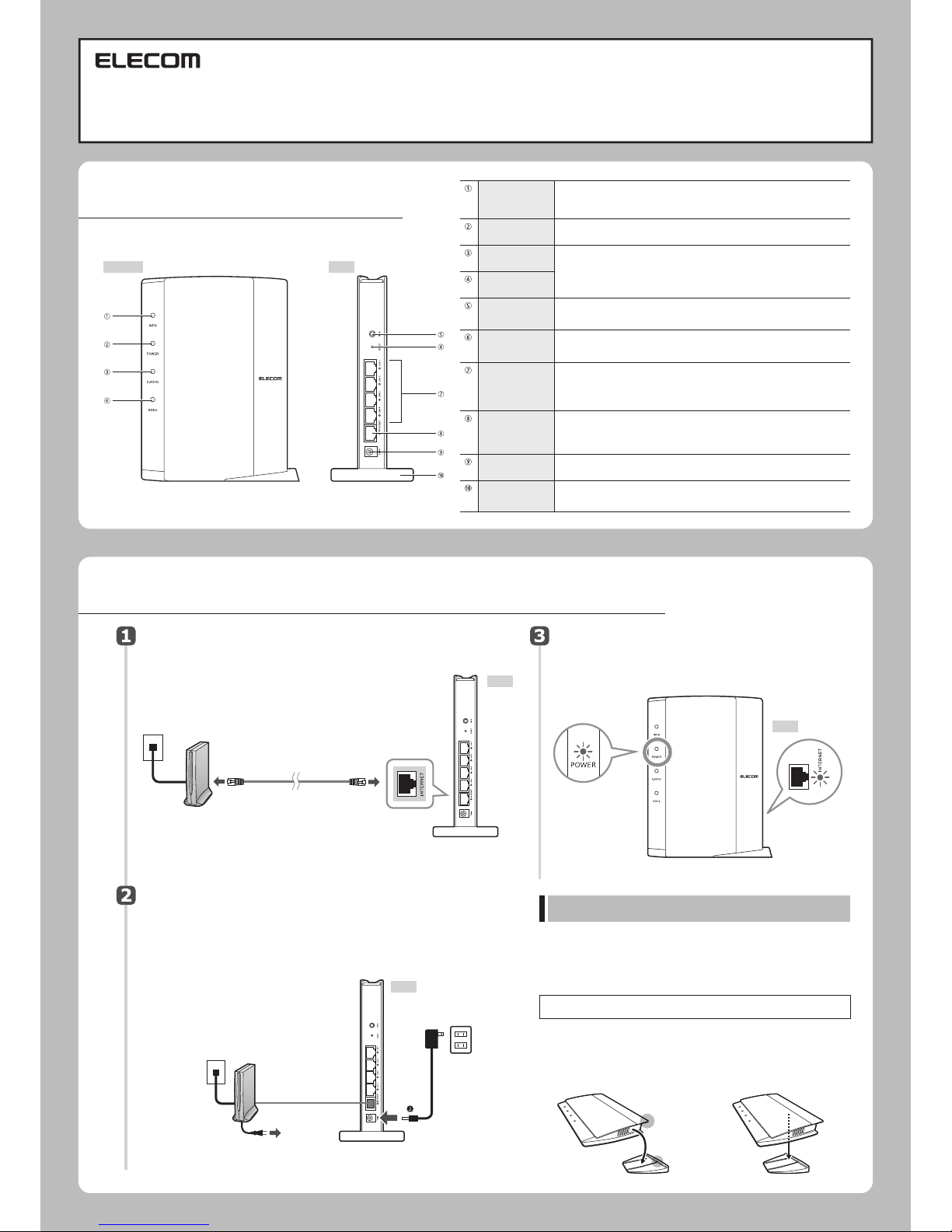
■Nameandfunctionofeachpart
Checkthelitstatusofthelamps.
•Checkthatthelampsonthemodemorsimilardevice
andthisproductarelitcorrectly.
Connectthedevices.
Refertothediagramandwirethedevices.
Terminaldevice
(cableTVmodem,
ONU,CTU,ADSL)
LANcable
INTERNETport(blue)
*Verticalorientation
POWER:Lit
INTERNET:
Blinking
*Thereisno5GWLANlampontheWRC-300FEBK2-A.
❶Connectthepowercableoftheterminaldevice.
・Ifapowerswitchispresent,slidetheswitchtotheonposition.
❷Connecttheincluded
ACadaptertothisproduct.
Turnontheterminaldeviceandthisproduct.
■Usingthisproductinroutermode
Setup Guide
WRC-1167GHBK3-A・WRC-F1167ACF2・WRC-1167FEBK-A・WRC-733FEBK2-A・
WRC-300FEBK2-A
Installationmethodandprecautions
Thestandisnotfixedtotheproduct.Connectthecablestotheproduct,
andthensettheproductintothestand.
Thisproductcanbeinstalledverticallyorhorizontally.Witheitherorienta-
tion,besuretostabilizetheproductbysettingitintotheincludedstand.
Also,witheitherorientation,takemeasurestopreventtheproductfrom
fallingoverandthecablesfrombeingpulledout.Theproductfallingover
orthecablesbeingpulledoutfromtheconnectorswhiletheproductisin
operationmayleadtomalfunctionsordataloss.
◆Verticalorientation
•UsethesidewiththeLEDlampsasthefront.
•Refertotheillustrationandsettheproduct
intotheincludedstandsothatthebackofthe
product fits snugly in the grooves on the
stand.
◆Horizontalorientation
•UsethesidewiththeLEDlampsasthetop.
•Placetheproductontheincludedstandso
that the product is on top of the center,
backpartofthestand,andthenensurethat
theproductissteady.
Thismanualprovidesasummaryofandthespecificationsforthisproductaswellasexplainsthisproduct'susage
precautions.
ItalsocontainsanFAQthatexplainsactionsyoucantakeifyouhaveproblemssuchastheproductmalfunctioning.
NotethatthismanualiscommonfortheWRC-1167GHBK3-A・WRC-F1167ACF2・WRC-1167FEBK-A・WRC-733FEBK2-A・
WRC-300FEBK2-A(whichonlysupports2.4GHz).TheWRC-300FEBK2-Adoesnotsupportthe11ac/11a(5GHz)standards.
Back
Back
Back
❶ToanACoutlet
ACadapter
ACoutlet
WPSlamp
(red)
Blinking:
Off:TheWPSfunctionisnotrunning.
TheWPSsettingbuttonhasbeenpressed,andtheWPSfunctionisrunning.
Thislampblinksonceevery0.5secondforapproximately2minutes.
POWERlamp
(white)
Lit:Theproductison.
Off:Theproductisoff.
2.4GWLANlamp
(white)
5GWLANlamp
(white)
WPSsetting
button
Resetbutton
LANport/
LANlamp
1-4(white)
INTERNETport/
INTERNETlamp
(white)
DCIN
(
powersupplyjack)
Stand
Leftside Back
Theselampsindicatetheconnectionstatusofthe2.4GHzband(11n/g/b)andthe
5GHzband(11ac/n/a).*TheWRC-300FEBK2-Aonlysupportsthe2.4GHzband
(11n/g/b).Thereisno"5GWLANlamp."
Lit:Thecorrespondingbandcanbeused.
Blinking:Thecorrespondingbandisinuse.
Off:Thecorrespondingbandisdisabled.
Usethisbuttonwhenyouareconnectingtheproducttoawirelessslavedevice
(suchasawirelessadapter)thatisequippedwithaWPSfunction.
Tousethisfunction,pressthisbuttonfor2secondsormore.
Whenyoupressthis button for approximately5 seconds, theWPSlamp blinks
andtheproduct'ssettingsareinitialized(returnedtothefactorydefaultvalues).
Donotturnofftheproductuntilthelampstopsblinking.
UsetheseportstoconnectthisproducttoPCsorothernetworkdevicesovera
wiredLAN.ThereisanLEDlampnexttoeachport.
Lit:ThelinktothePCornetworkdeviceconnectedoverawiredLANhasbeen
established.
Blinking:Dataisbeingtransferred. Off:Thecableisdisconnected.
ConnectthecablefromtheWAN(Internet)deviceofthemodem(ONU,CTU,and
othertypes).ThereisanLEDlampnexttotheport.
Lit:ThelinktotheWANdevicehasbeenestablished.
Blinking:Dataisbeingtransferred. Off:Thecableisdisconnected.
ConnecttheACadapterincludedwiththisproducttothisjack.Donotconnect
anyACadaptersotherthantheoneincludedwiththisproduct.
Youcanusethestandincludedwiththisproducttoorientitverticallyor
horizontally.Fordetailsonhowtousethestand,see"Installationmethodand
precautions"below.

Configuring settings from smartphones and tablet PCs Configuring settings from smartphones and tablet PCs
Readtheend-user
licenseagreement,and
thentap"同意"ifyou
havenoproblemswith
theagreement.
Tap"スカイリンクセットアップ"
onthemenu.
Onyourterminal'shome
screen,tapthe[SkyLink
Manager]icon.
Aftertheprofile
installationisfinished,
tap"次へ."
Ifthemessage"インター
ネットが検出されませんでし
た"isdisplayed,tap"手
動設定"toconfigurethe
settings.
BysettingSSIDsbyyourself,you
canpreventvirusinfectionsand
unauthorizeduseinadvance!
◆ThemainSSIDistheoneforthe
networknormallyusedbyyour
family!
◆TheguestSSIDistheoneforthe
networkusedbyyourfriendswhen
theycometovisit!
◆Fromtheviewpointofsecurity,we
recommendthatyouselect"WPA2"
fortheauthenticationmethod!
*Settheauthenticationmethodto"WEP"
whenyouareusingoldmodelsofthe
NintendoDSandthePlayStationPortable.
*WhenmanuallyenteringtheSSIDand
password,youcanenternumbers,alphabet
characters,"-"(hyphen),and""
(underscore).
Searchfor[SkyLinkManager]inthe
"GooglePlaystore,"andtheninstallthis
application.
Tap"簡単設定."
Setupwillstartafterthe
prologuemovie.
Openawebbrowser.
●Ifyoucanconnecttothe
Internet,thesettingsare
complete.
Thiscompletesthe
setupprocedure.
Tap"終了"
Thisscreenprovidesdetailsforthe
supportservices.Tap"次へ"
Ifyouareusingthe
websitefiltersofChild
NetTimer2,setthefilter
functionto"ON,"and
thenenterthelicense
key.Afteryouenterthe
settings,tap"次へ"
*Itmaytakeapproximately3
minutestosearchfortheSSID.
*Amodelnumberdifferingfromthat
ofthisproductmaybedisplayed.
*IftheSSIDisnotdetected,the
screenontherightwillbe
displayed.PresstheWPSbutton
forapproximately5seconds.The
applicationwilldetecttherouter
andretrievetheconnection
profile.Theprofilewillbeinstalled
automaticallyafteritisretrieved.
Theapplicationsearches
fortheSSIDforusein
configuringthesettings.
Waituntilthedetectionis
finished.
Entertheusernameand
passwordthatyouhave
receivedfromyourprovid-
er,andthentap"次へ"
*IfyouareusingaDHCPconnec-
tion,tap"次へ"withoutenteringthe
usernameandpassword.
Configuretheadministra-
toraccountsettings.
Entertheusername
andpassword,andthen
tap"次へ"
Ensurethattheadministrator
setsthe“ユーザー名(Username)”
and"パスワード(Password)"sothat
itisnotpossibleforan
unauthorizedindividualto
connecttoyournetworkand
changethesettings!
*Youcansettheusernameandpasswordto
anyvaluesthatyouwish.
*Youcanenternumbers,alphabet
characters,"-"(hyphen),and""
(underscore)fortheadministratoraccount's
usernameandpassword.
elecom123(入力例)
123elecom(入力例)
Checktheregistereddetails.Ifthere
arenoproblems,tap"次へ"
ネットワークの設定情報が
ここに表示されます。
Selectthenameofa
devicethathasbeen
set,andthentap
"OK."
xx:xx:xx:xx:xx:xx
自動的に
生 成!
Establishingaconnectionusingsimplesetup
"SimpleSetup"isamethodofconfiguringthesettingsthatenablestheusertodosoby
followingconfigurationmovies."SimpleSetup"iseasytouseevenforfirst-timeusers.
*Themovieswillnotbedisplayedonsmartphonesthatarenotreceivingradiowavesorifyouhavenotyet
signedacontractwithyoursmartphone'sserviceprovider.
*Youcanenternumbers,alphabet
characters,"-"(hyphen),and""
(underscore)fortheusernameand
passwordintheproviderinformation.
CheckthesimpleSSID
informationonthescreen,
viewthemovie,andthentap
"次へ."
CheckthewirelessLAN
smoothnavigationinforma-
tiononthescreen,view
themovie,andthen
tap"次へ."
SetthemainSSID.Ifyou
willsetwirelessLAN
smoothnavigation,
selectthecheckbox.To
setsimpleSSID,
tap .
Whenyoutapthis
button,theSSID,pass-
word,andauthentication
methodarecreated
automatically.
SettheguestSSID.Tousethe
guestwirelessLAN,selectthe"
ゲスト無線LANを使う"checkbox,
andthenconfigurethesettings.
ThesameasforthemainSSID,
ifyouwillsetwirelessLAN
smoothnavigation,selectthe
checkbox.Ifyoudonotrequire
aguestSSID,tap"ゲスト不要は次へ"
or"次へ."
*EvenifyouentertheguestSSIDandpassword,they
willbeclearedifyoutap"ゲスト不要は次へ."
•Afteryoufinishconfiguringthe
settingsinroutermode,see"
(12)Supplement:Usingthe
ChildNetTimer2Function."
Therouterrestartsinordertoapply
thesettings.Afterthesettingsare
savedontherouter,tap"次へ."
・ AndroidOS4.0orlater•iOS8.0orlater
・
WindowsXP(SP3orlater)/Vista(SP2orlater)/7(SP1orlater)/8/8.1/10/RT
・
ThisproductonlysupportsMacOSX10.9orlater(onlydevicesthatareequippedwithanIntelCPU).
■Operatingenvironment:
Settingthisproductinroutermode
ThisexplanationusesanAndroidterminal.
WRC-GHBKSeries/WRC-FEBK-ASeriesSetupGuideNovember16,2015,Version2©2015 ELECOMCO.,LTD.ALLRIGHTSRESERVED.
*WerecommendthatyouturntheBluetoothfunctionoffinordertopreventradiowaveinterference.
*Inordertoinstall[SkyLinkManager],yourequireanenvironmentinwhichyoucanconnecttotheInternet.
*PerformSkyLinksetupwithin10minutesofconnectingtheACadapter.
Este manual sirve para los siguientes modelos
7
Tabla de contenidos
Otros manuales de Enrutador de red de Elecom


Manuales populares de Enrutador de red de otras marcas


NETGEAR
NETGEAR FS526T - Switch Manual de usuario

Korenix
Korenix JetNet 5710G Series Manual de usuario

Automated Logic
Automated Logic ZN551 Manual del propietario

Cisco
Cisco ASR 1000 Series Manual del operador

EnGenius
EnGenius ESR-9710 Manual de usuario

Cisco
Cisco 805 Series Instrucciones de funcionamiento y seguridad