
EcoFlow EFM100 Manual de usuario

POWER HUB
EFM100-HUB-HV
User Manual V1.0


EN
Disclaimer
Read this user manual carefully before using the product to ensure that you
completely understand the product and can correctly use it. After reading this user
manual, keep it properly for future reference. Improper use of this product may cause
serious injury to yourself or others, or cause product damage and property loss. Once
you use this product, it is deemed that you understand, approve and accept all the
terms and content in this document. EcoFlow is not liable for any loss caused by the
user's failure to use this product in compliance with this user manual.
In compliance with laws and regulations, EcoFlow reserves the right to nal
interpretation of this document and all documents related to this product. This
document is subject to changes (updates, revisions, or termination) without prior
notice. Please visit EcoFlow's ocial website to obtain the latest product information.

EN
Table Of Contents
Technical Specications
Safety Instructions
EcoFlow App
Getting Started
Product Usage
FAQs
What's in the Box
Care and Maintenance
FCC Statement
System Overview
Product Overview
CAN Bus Connection
Power On/O
DC Output
AC Output
AC Charging
Smart Generator Charging
Solar Charging
Vehicle Alternator Charging
1
2
3
3
3
5
6
8
8
8
9
9
10
10
10
11
12
12
13
13
14
15
15
X-Boost Feature
Bypass Mode
Inverter Mode
Standby Mode

EN
1
Technical Specications
Basic Information
Net Weight 14 kg (31 lbs)
Dimensions (L × W × H) 48 cm × 14 cm × 30 cm (18.9“ x 5.5” x 11.8“)
Wi-Fi Supported (<120 Meters)
Bluetooth (v4.0) Supported (<15 Meters)
Output Spec
Pure sine wave, 3600 W (surge 7200 W, 100 ms),
230 V, 50 Hz (Australian Version: 240 V, 50 Hz)
Linear derating to 1800 W when 40℃ (104°F) < Ambient
Temperature < 60℃ (140°F)
Derating to 3000 W when battery voltage < 49 V
Maximum AC Output
Supported by X-Boost
13.6 V 70 A, maximum power: 1000 W
or 26.4 V 60 A, maximum power: 1600 W
Input Spec
3000 W maximum power, 15 A maximum current,
supported by EcoFlow X-Stream Technology
AC Input Voltage 220–240 V, 50 Hz/60 Hz
PV Input 2/3 15–60 V 30 A, maximum power: 1600 W
Alternator Input
PV Input 1
13–60 V 60 A, maximum power: 1000 W
15–60 V 30 A, maximum power: 1600 W
Battery Port Spec
40-60 V 100 A, supports up to three 2kWh or 5kWh LFP
batteries, which are sold separately.(Not recommended to
use one Power Hub with both a 2kWhLFP and 5kWh battery
at the same time.)
Operating Environment
Operating Temperature –25°C to 60°C (-13°F to 140°F)
Storage Temperature –25°C to 60°C (-13°F to 140°F)
Other
EcoFlow Smart Generator 1800 W maximum charging power, sold separately.
AC Output
DC Output
5200 W
Battery Port (x3)
AC Input Power

EN
2
Safety Instructions
1. SAVE THESE INSTRUCTIONS – This manual contains important safety and operating
instructions
2. Before using battery charger function, read all instructions and cautionary markings on
battery charger, battery, and product using battery.
3. CAUTION – To reduce risk of injury, charge only LiFePO4 type rechargeable batteries.
Other types of batteries may burst causing personal injury and damage.
4. This is a Safety Class I product (supplied with a protective grounding terminal).
Uninterruptible protective grounding must be provided at the AC input and/or output
terminals. Alternatively, the grounding point located externally on the product may
be used. Whenever it is likely that the grounding protection has been damaged, the
product must be turned o and secured against unintended operation; please contact
qualied service sta.
5. To prevent re, short circuits, and electric shocks, do not install this product in
environments with high humidity, high temperature, or conductive contaminants.
6.
Before installing this product, disconnect the main power supply. Do not work with live power.
7. Keep this product away from heat sources, such as res or heating furnaces.
8. Keep this product away from any liquid. Do not immerse this product in water or get it
wet. Do not use this product in rain or humid environments.
9. Do not use this product in environments with strong static electricity or magnetic elds.
10. Do not disassemble this product in any way or pierce it with sharp objects.
11. Do not use wires or other metal objects that may result in a short circuit.
12. Do not use unocial components or accessories. If components or accessories need
to be replaced, purchase them from the EcoFlow ocial sales channels.
13. Strictly comply with the ambient temperature for use in this user manual when using
this product.
14. Do not stack other heavy objects on this product.
15. Do not forcibly block the fan during product use or place the product in an unventilated
or dusty area.
16. Please avoid impact, falls, or severe vibrations when using the product. In case of a
severe external impact, turn o the power supply immediately and stop using the
product. Ensure the product is well fastened during transportation to avoid vibrations
and impacts.
17. If the product falls into water accidentally during use, place it in a safe open area and
stay away from it until it is completely dry. The dried product cannot be reused, and
should be properly disposed according to the method described in the EcoFlow
Battery User Manual. If the product catches re, we recommend that you use the
re extinguishers in the following order: water or water mist, sand, re blanket, dry
powder , and carbon dioxide re extinguisher.
18. If there is dirt on the ports of the product, clean it with a dry cloth.
19. Place this product carefully to prevent damage caused by the product falling over. If
the product falls over and is seriously damaged, power it o immediately.
20. Keep this product out of reach of children and pets.

EN
3
Control, monitor and customize your Power Kits from afar with the
EcoFlow App. Download at:
https://download.ecoow.com/app
Privacy Policy
By using EcoFlow Products, Applications and Services, you consent to the EcoFlow Term
of Use and Privacy Policy, which you can access via the “About” section of the “User” page
on the EcoFlow App or on the ocial EcoFlow website at https://www.ecoow.com/policy/
terms-of-use and https://www.ecoow.com/policy/privacy-policy
Getting Started
EcoFlow App
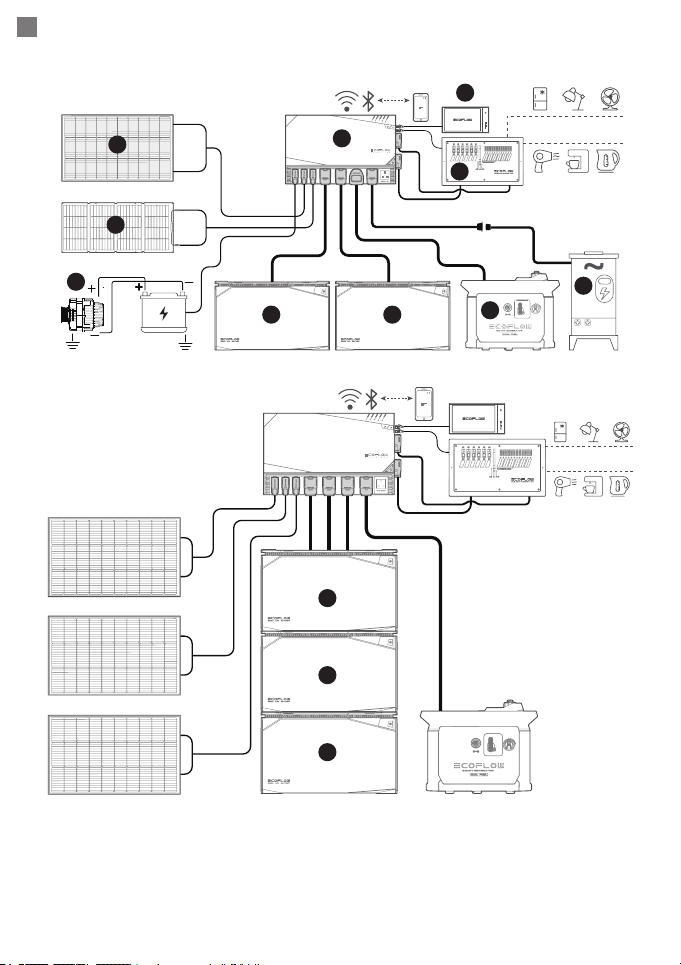
System Overview
1. If the product is installed in an enclosed space, proper ventilation is a MUST
to prevent this product from overheating.
2. For safety reasons, it is recommended to install a Ground Fault Circuit
Interrupter (GFCI), also known as Residual Current Device (RCD) in the
AC input and AC output of the Power Hub. Please
refer to local regulations
regarding grounding of autonomous power systems.
3. Before connecting this product to EcoFlow LFP Battery, ensure that there is
no charging input connected to Power Hub and LFP Battery is powered o.
4.
It is not recommended to use one Power Hub with both 2kWh and 5kWh LFP
battery at the same time.
5. It is not recommended to connect or disconnect LFP battery when the
system is on.
Bluetooth of this product can only be connected with one EcoFlow App
account, if you need to connect the product through another account, you can
reset the Bluetooth through the App or by long pressing the DC button of the
product for 3 seconds.
EN
4
DC Appliance
AC Appliance
O-grid Builds DC Appliance
AC Appliance
4
4
4
2. AC/DC Smart Distribution Panel
6. Shore Power/Grid Power
9. Vehicle Alternator
1. EcoFlow Power Hub
3. Power Kit Console
4.
EcoFlow 2kWh/5kWh LFP Battery
5. EcoFlow Smart Generator
7. Rigid/Flexible Solar Panel
8. Foldable / Portable Solar Panel
8
1
3
4
9
45
6
7
Vehicles
2

EN
5
Product Overview
1. ALT IN / PV IN 1 Port
2. PV IN 2/3 Port
3. Battery 1/2/3 Port /
Smart Generator Port
4. AC IN Port
5. AC OUT Port (10A)
(British Version /
European Version /
Australian Version)
6. Main Power Button
7. DC OUT Button
8. AC OUT Button
9. AC Out Indicator
10. DC Out Indicator
11. AC IN Indicator
12. PV IN 2/3 Indicator
13. ALT IN / PV IN 1 Indicator
14. RJ45 CAN Bus Ports
15. DC Main OUT Port
16. AC Main OUT Port
17. Earth Stud
18. Air Outlet
19. Air Inlet
18
19
6
7
8
9
101113
14
12
15
16
17
14
32 5

EN
6
CAN Bus Connection
To ensure better communication quality, this product comes with two RJ45 CAN
Bus ports, each port can be connected to AC/DC Smart Distribution Panel, Power
Kit Console, or RJ45 CAN bus terminator. Both ports must be connected to stabilize
communication throughout the system. Not doing so will cause the system to
malfunction.
1. When neither the AC/DC Smart distribution Panel nor the Power Kit Console is connected,
two RJ45 CAN Bus terminators must be connected to the Power Hub.
3. When either the AC/DC Smart Distribution Panel or the Control Panel is connected,
one
CAN Bus RJ45 terminator must be connected to the Power Hub.
2. The AC/DC Smart Distribution Panel and the Power Kit Console are connected to the
Power Hub.
1
2
3
Otros manuales para EFM100
1
Tabla de contenidos
Idiomas:
Otros manuales de Cambiar de EcoFlow


