Dwarf Connection DC-LINK ULR1 Manual de usuario

user maNual
ULR1
LR2
X.LiNK-L1

Contents
• Introduction 3
• Safety Precautions 4
• Overview 5
• Characteristics 6
• Description Transmitter 7
• Description Receiver 8
• Operation 9
• Antenna Positioning 10
• Features 10
• Maintenance 15
• Troubleshooting 15
• Technical Specications 16
• Regulatory Information 17
• Notes 19
In all EU member states, operation of 5150-5250MHz is restricted
to indoor use only.
2

Congratulations on purchasing the
DC-LINK video transmission system!
Please read this manual carefully before operating your product. You can also
access this through our website: www.dwarfconnection.com
Also read the safety information enclosed with your DwarfConnection product,
as it contains more detailed information on product and health safety!
The technology contained in this product, including the device itself as well as
related software and trademarks, is protected by law. Any duplication or repro-
duction without the written permission of the copyright owner is prohibited, in
part or in full. All third-party brands or copyrights mentioned in this manual are
the property of their respective owners.
This manual is valid for:
DC-LINK-ULR1, DC-LINK-ULR1.MKII
DC-LINK-LR2, DC-LINK-LR2.MKII
DC-X.LINK-L1, DC-X.LINK-L1.MKII
Warranty
This product has a limited warranty of one year, starting from the date
of purchase. Warranty may be voided by:
• Physical damage of the product
• Any damage caused by improper use, maintenance or storage
• Damage resulting from the use of incorrect power supplies
• Damage not related to the design of the product or the quality
of its manufacture
For more information about warranty procedures please contact your retailer
or simply ask us.
3
EN

Safety Precautions
WARNING: READ BEFORE USE TO REDUCE THE RISK OF PERSONAL INJURY OR PROPERTY
DAMAGE, INCLUDING DAMAGE TO YOUR TRANSMITTER/RECEIVER AND OTHER POTENTIAL
HAZARDS.
HANDLING
Handle your DC-LINK system with care. You may damage the devices if you
disassemble, drop, bend, burn, crush or otherwise subject them to unnecessary
force. Do not use a device with a damaged enclosure. Using a damaged
product may cause injury. Do not expose your devices to liquids of any kind!
This can cause a short circuit and overheating. If your devices do come
into contact with liquids, do not attempt to dry them using an external heat
source. If the device comes into contact with liquid or corrosive chemicals,
immediately turn off the power and remove the power supply. Do not operate
the device near re, gas lines or electrical mains or in high humidity or dusty
surroundings.
Do not block or otherwise impede ventilation slots or unused connectors, as this
may result in a short circuit, re or electric shock.
DC-LINK systems are designed to work in ambient temperatures between
0° and 40°C / 32° to 100°F and should be stored between ambient
temperatures of -20° and 60°C / 0° and 140°F. Ensure sufcient ventilation when
operating your DC-LINK system in warm temperatures to prevent overheating.
Do not leave your devices in places in which the temperature may exceed
60°C / 140°F as this may damage the product or pose a potential re risk.
Keep your device away from heat sources and out of direct sunlight. If your
device becomes too hot, disconnect it from its power source if it is plugged in,
move it to a cooler place, and do not use it until it has cooled. If you accidently
operated your DC-LINK system at temperatures lower than 0° C / 32° F try to
avoid condensation water: Do not allow your device to cool down in the cold!
Put your device in the case immediately after turning it off!
CARE & CLEANING
Unplug the product and power adapter before cleaning, during lightning
storms, or when unused for extended periods of time. Use a clean, soft, and
dry cloth to clean devices and their accessories. Do not use any chemical
detergent, powder, or other chemical agents (such as alcohol or benzene)
to clean the product or accessories.
REPAIR, SERVICE & SUPPORT
Disassembling the devices may cause injury to you or damage to your device.
Do not attempt to repair your DC-LINK system yourself. Opening your device
voids warranty. If devices cease working or have been damaged, contact our
support team.
4

PROLONGED HEAT EXPOSURE
Your DC-LINK system generates heat during normal operation and complies
with applicable surface temperature standards and limits. Avoid prolonged,
direct or indirect skin contact when the devices are in use because exposing
skin to hot surfaces for a long period of time may cause discomfort or burns.
ENVIRONMENTAL RESTRICTIONS
To prevent damage to your DC-LINK system, do not use or store the devices or
accessories in dusty, smoky, damp, or dirty environments. Leaving the devices
in places in which the temperature may exceed 60°C / 140°F may cause da-
mage to the devices or pose a re risk.
RADIO FREQUENCE INTERFERENCE
Observe rules that prohibit the use of wireless technology in certain environ-
ments. Your devices are designed to comply with regulations governing radio
frequency emissions but use of such systems can negatively affect other elect-
ronic equipment.
RECYCLING
Please recycle all packaging, devices and accessories in accordance with U.S.
regulations.
Overview
The DC-LINK-CLR2 is a high-performance WHDI video transmission system which
transmits uncompressed video and audio signals. Maximum transmission range
(line of sight) for the LR2 is 700m / 2,300ft, maximum transmission range for the
ULR1 is 1.200m / 4,000ft.
Due to the conscious decision not to implement DFS (Dynamic Frequency
Selection) the device has a longer range, greater stability and better usability
than comparable systems that DO use DFS.
The transmitter and receiver both have 3G-SDI and HDMI connectors (Plug &
Play). When a video source is attached, the transmitter automatically selects
the input (SDI is prioritized). The receiver’s 3G-SDI and HDMI outputs can be
used simultaneously.
5
EN

Characteristics
• Max. transmission range 300m/1000ft line of sight
• Rapid and reliable connectivity, no need for complex pairing
• Real-time transmission with no latency (< 0.001s)
• Uncompressed transmission. 10-bit, 4:2:2 transmissions via 3G-SDI and HDMI
without format conversion
• Supports formats up to and including 1080p 60Hz
• 2- channel audio transmission, embedded audio transmission
on CH1 & CH2 via SDI and HDMI
• Operates within the license-free 5GHz ISM band, frequency range
from 5.1 to 5.9GHz
• Multicast support 1:1 or 1:n transmissions with up to four parallel systems
• Metadata and Time Code transmission*
• High grade aluminium casing: extremely durable and heat regulating
• Variable Input Voltage from 7,2-18,0V DC allows the system to be operated
with a variety of batteries or power supplies
• Status displays for DC power, video and RSSI signal strength
• 1/4“ tripod mount
Receiver with V-mount plate
• Battery adapter plate (V-mount / NPF) is available as an optional accessory
and can easily be mounted to the back
• Plug-and-Play design. Ready to use without the need for complex
conguration
• 1 Year warranty by manufacturer
* Metadata support available for most cameras and industry standard video assist solutions
(such as QTAKE).
6

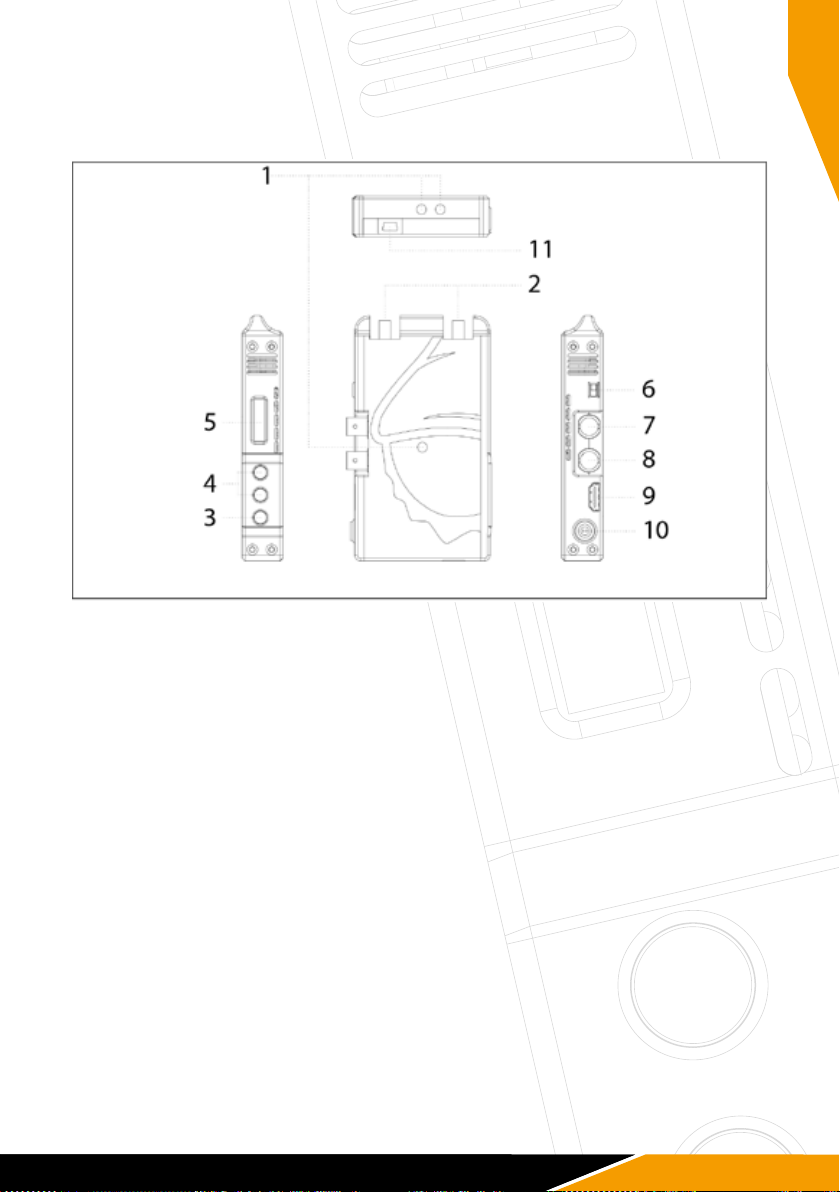
Product Description
ULR1 and LR2 Transmitter
1) 1/4“ Tripod Mount
2) Antenna Connection: SMA (male) Connector
3) Menu Button
4) Control Buttons
5) OLED display
6) Power Switch
7) SDI-IN: 3G/HD/SD-SDI Input, (BNC Female Connector)
8) SDI LOOP-OUT: 3G/HD/SD-SDI Output, (BNC Female Connector)
9) HDMI-IN: HDMI Input (Type A Female Connector)
10) DC-IN: 7,2 – 18,0V DC
11) Mini USB: For rmware upgrade
7
EN

Product Description
ULR1, LR2 and X.LINK-L1 Receiver
1) 1/4“ Tripod Mount
2) RSSI Status Display: Signal Strength
3) Menu Button
4) Control Buttons
5) OLED display
6) Power Switch
7) HDMI-OUT: HDMI Output (Type A Female Connector)
8) Dual SDI-OUT: 3G/HD/SD-SDI Output, (BNC Female Connector)
9) DC-IN: 7,2 – 18,0V DC
10) Mini USB: For rmware upgrade
8

Scope of Delivery
DC-LINK ULR1, DC-LINK-LR2 DC-X.LINK-L1
1x Transmitter 1x Receiver
1x Receiver 6x External antenna
9x External Antenna 1x D-Tap cable 4pin
2x D-Tap cable 4pin 1x Magic arm with 1/4“ screw
2x Power supply 4pin 1x Hotshoe Mount
1x Magic arm with 1/4“ screw Quick Start Guide
1x Hotshoe Mount USB ash drive with product manual
Quick Start Guide
USB ash drive with product manual
Operation
1. Connect the antennas to the SMA male connectors (2) of your devices.
2. There is a 1⁄4“ tripod mount at the base of the transmitter if required.
3. Power your devices with the enclosed power supplies or use the enclosed
D-Tap cables to connect to a battery. Only use 4-pin cables provided by
DwarfConnection to power your DC-LINK system! Other cables might cause
damage of your products!
4. Turn on your devices.
5. Make sure transmitter and receiver are set to the same channel.
Switch channels if necessary. (Find detailed instructions in “Features”)
Signal Distribution
Connect the camera’s SDI or HDMI output to the transmitter’s SDI or HDMI input.
If both SDI and HDMI inputs are active, the transmitter will prioritize the
SDI signal.
Connect the receiver’s SDI or HDMI output to the SDI or HDMI input of the
monitoring/recording device. During active transmission, both the SDI and the
HDMI output on the receiver can be used simultaneously.
Make sure that the antennas are connected rmly, and all other connections
are stable. Only use high quality 7,2 - 18,0V batteries.
9
EN

Antenna Positioning
Position the antennas on transmitter and receiver as shown in the illustration.
This ensures the best possible RF performance.
Install the transmitter and the receiver as high as possible (at least 2 meters
above ground level) to maintain a good line-of-sight. During operation,
try to keep the transmitter and the receiver at similar heights.
Avoid obstacles such as walls, trees, water and steel structures between
transmitter and receiver.
The connection is at its strongest when the at surfaces of the transmitter and
receiver face each other.
Find more information on how to optimize your wireless setup in the WHDI guide
on our website.
10
Este manual sirve para los siguientes modelos
3
Tabla de contenidos
Manuales populares de Transmisor de otras marcas

Dejero
Dejero EnGo 3x Manual de usuario

Rosemount
Rosemount 4600 Manual de usuario

Speaka Professional
Speaka Professional 2342740 Manual de usuario

trubomat
trubomat GAB 1000 Manual de usuario

Teledyne Analytical Instruments
Teledyne Analytical Instruments LXT-380 Manual de usuario

Rondish
Rondish UT-11 Manual de usuario