
Duratech LINK Driver PLP-REM-350 Manual de usuario

English....................Page 3
Nederlands.......Pagina 21
Français...............Page 39
Deutsch...............Seite 57
Español.............Página 75
PLP-REM-350
Manual
LINK Driver
17-11-20

2

3
ENG
Table of contents
Technical specifications
General Specifications
PLP-REM-350 overview
Logic board
Installation Instructions
Single PLP-REM-350 unit
Multiple PLP-REM-350 installation
Operation modes
DIP switch functionalities
Transmitter functions
Operation mode: PLC
Operatio mode: ON/OFF
Replacing transmitter keypad
Pairing the handheld transmitter
DMX 512 communication
Single PLP-REM-350 unit
Multiple PLP-REM-350 installation
RS-485 communication
Single PLP-REM-350 unit
RS-485 command set
RESET procedure
Transmitter battery
Troubleshooting
Pool light wiring instructions
Wiring remark
Page 4
Page 4
Page 5
Page 6
Page 7
Page 8
Page 9
Page 10
Page 10
Page 11
Page 11
Page 12
Page 13
Page 14
Page 15
Page 16
Page 16
Page 17
Page 18
Page 20
...........................................................
.........................................................
..............................................................................
.....................................................
......................................
..................................................................................
....................................................................
............................................................
........................................................
...............................................
.........................................
.....................................................
.....................................
.....................................................
...........................................................................
...................................................................................
.................................................................................
.....................................................................................
..............................................................
.........................................................................................

4
Technical specifications
General specifications
Input Voltage: 230 VAC 50Hz
Output Voltage: 12 VAC
Transformer VA rating: 350VA
Max output Power: 350 VA (12 VAC / 25A)
Max rating relay contact A &B 16A / 250 VAC
Max switching power A & B 4000VA
RF band 868 MHz
Ambient Air Temperature: 0°C to +40°C
Humidity 10% to 90% RH - non condensing
Ingress protection rate: IP54
IEC Protection Class: Class II
PLP-REM-350 overview
12 VAC
Transformer
Integrated toroïdal
Transformer 350VA
Circuit breakers
Logic board
For details:
see next page
12VAC connection
terminals
To connect the pool
lights
PLP-REM-350

5
ENG
Logic board
DMX Address dial
To choose the
DMX start address
CAN bus
12VAC connection
terminals
To connect the pool
lights
DIP switch
To select controller functionalities
RS-485
connection
To connect to
home automation
system
(see page 16)
SD card slot
For firmware updates
DMX input/outpout
The PLP-REM can act
as a DMX receiver with
DMX passthrough
A/B output
For auxiliary circuits
Acts as a SPST
(single-pole, single-
throw) switch
Status LED’s:
(1) General status
Green = OK
Red = error overvoltage or overcurrent
(2) Pairing / RESET status
(3) 12VAC to Pool lamps (Green = ON)
(4) Switch A (Green = ON)
(1)
(2)
(3)
(5)
(4)
(8)
(6)
(7)
(5) Switch B status (Green = ON)
(6) CAN status
(7) RS-485 signal
(8) DMX signal
Pairing / RESET
button
DuraLink RF board
For wireless communication
DuraLink
6
Installation Instructions
Single PLP-REM-350 unit
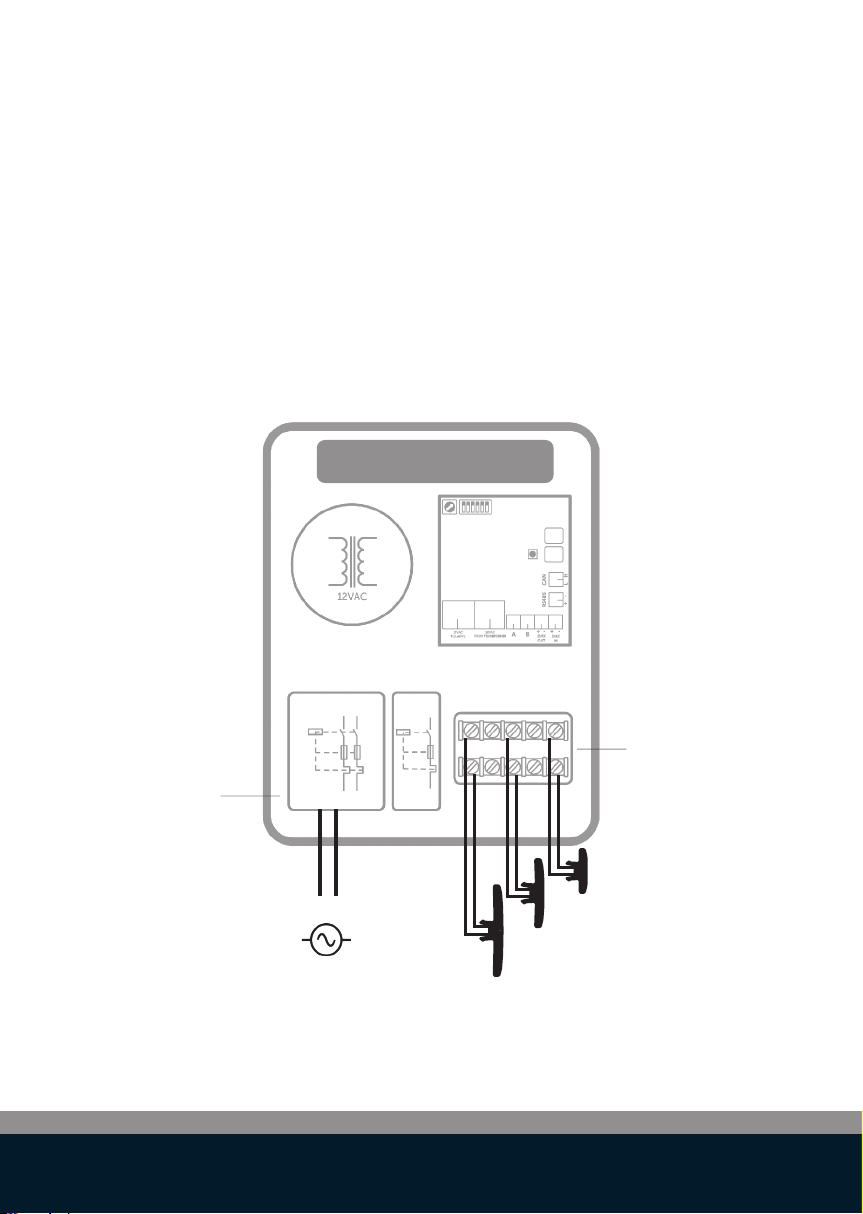
.Connect a 230VAC power source to the 230VAC terminals of the
PLP-REM-350. Connect the pool lights to the 12VAC connection terminal
block in the PLP-REM-350.
.The PLP-REM-350 has a 350VA transformer built in. The total power load
of pool lights (+ cable losses) may not exceed this.
230VAC
Connect the pool
lights to the 12VAC
terminals
Connect the
230VAC power
source to the
circuit breaker
PLP-REM-350

7
ENG
230VAC
230VAC230VAC
Multiple PLP-REM-350 installation
For extended installations (total lamp power > 350VA), multiple PLP-REM-
350’s can be linked together. This way, a perfect synchronisation of all pool
lights is still guaranteed.
The PLP-REM-350’s need to communicate with each other, to ensure all the
lamps are in perfect sync.
Connect the PLP-REM-350’s with each other using the CAN bus:
Connect the CAN terminals of the first PLP-REM-350 with the CAN terminal
of the second PLP-REM-350*.
If more than 2 PLP-REM-350’s are necessary, simply daisy chain each CAN
terminal with the one from the next PLP-REM-350 (see below).
Respect the polarity of the terminals! (CAN L & H)
Next, set the DIP switches on the PLP-REM-350’s to the correct MASTER/
SLAVE setting. The first PLP-REM-350 will be the MASTER. All the others will
be SLAVE’s. Refer to page 9 for Master/Slave DIP switch info.
CAN BUS
set as MASTER set as SLAVE set as SLAVE
* We recommend using a shielded twisted pair cable (min. 0,5mm² - up to 200m) to connect
multiple PLP-REM-350’s using the CAN bus.
In a Master/Slave setup, only the PLP-REM-350 that is set as MASTER
will react to transmitter commands. Any additional transmitters will
need to be paired with this MASTER PLP-REM-350
!
PLP-REM-350
PLP-REM-350 PLP-REM-350

8
ON/OFF PLC
Compatible lamps
Switch lamps ON/OFF YES YES
Change lamp color YES(1) YES(1)
Operate Relay A & B YES YES
Dimming lamps NO YES(1)
DMX control NO YES
RS-485 control YES(2) YES
Dip switch setting DIP 1 ON DIP 1 OFF
Remote keypad type(3)
Operation Modes
The PLP-REM-350 controller has 2 main operation modes:
“ON/OFF control mode” & “PLC control mode”. Each mode has it’s own
functionalities:
1) Only for RGB lamps
2) In ON/OFF control mode, only a few RS-485 commands are available (see p 15)
3) Depending on which control mode is selected, the keypad of the transmitter needs
to be changed

9
ENG
DIP switch functionalities
The DIP switch on the main circuit board of the PLP-REM-350 allows the
user to customise the way the PLP-REM-350 operates.
* Fast DMX setting
Only for Adagio Pro lamps from 2018 and onwards
DIP SWITCH
function setting 1 2 3 4 5 6
Operation Mode ON/OFF ON
PLC OFF
Relay A PULSE mode ON
TOGGLE mode OFF
Relay B PULSE mode ON
TOGGLE mode OFF
Fast DMX setting * FAST ON
STANDARD OFF
DMX NO LOOP ON
LOOP OFF
MASTER/SLAVE mode SLAVE ON
MASTER OFF
ON position
OFF position
CAUTION: Always switch o the main power supply to the
PLP-REM-350 before changing the DIP switches
PLP-REM-350

10
Transmitter functions
Short push (< 1 sec):
Toggle all lamps ON or OFF
Short push:
Go to next color program
Long push:
Auto sync procedure (3)
OPERATION MODE: PLC (default mode)
Short push:
Toggle output A ON/OFF
Long push:
/
Short push:
Toggle output B ON/OFF
Long push:
/
Short push (< 1 sec):
Toggle all lamps ON or OFF (1)
Long push (> 2 sec(2)):
All lamps & “12VAC TO LAMPS” relay are turned OFF (1)
Short push:
Go to next color program
Long push:
Toggle output A ON/OFF
Short push:
Go to the previous color program
Long push:
Toggle output B ON/OFF
Short push:
Select next dimming level:
100% -- 50% -- 25% ---> 100% -- ...
Long push:
Set lamps to Program 1 (blue) & full brightness
(1) Lamp ON or OFF status is memorized after power down
(2) The green LED in the transmitter will light up as soon as you start pressing a button, and will stop
after 2 seconds, so you know exactly when to release the button.
(3) The lamps will be turned o for 30 seconds and then switched ON/OFF 3 times. This will set all
lamps to program 1: blue
OPERATION MODE: ON/OFF
Tabla de contenidos
Idiomas:
Otros manuales de Unidad de control de Duratech

Manuales populares de Unidad de control de otras marcas

Festo
Festo Compact Performance CP-FB6-E Manual de lista de piezas

Elo TouchSystems
Elo TouchSystems DMS-SA19P-EXTME Manual de usuario

JS Automation
JS Automation MPC3034A Manual de usuario

JAUDT
JAUDT SW GII 6406 Series Guía rápida

Spektrum
Spektrum Air Module System Manual de usuario

BOC Edwards
BOC Edwards Q Series Manual de usuario


