
Dotterel Konos Hoja de especificaciones

PRODUCT USER GUIDE
Version 1.0 | March 2022

Welcome to Konos
Konos is a new class of microphone from Dotterel, the global specialists in
acoustics and audio recording for noisy environments.
Our compact 80-element high-fidelity microphone has adjustable directivity
and built in real-time noise filtering to capture clear sound at a distance, even in
the most challenging sonic conditions.
Use this user guide to familiarise yourself with the product; set it up, use it and
troubleshoot. It also contains important instructions for safe handling and
maintenance.
Warm regards,
Shaun Edlin
CEO and Founder, Dotterel Technologies
1

Before you start
To make sure you have a wonderful experience with Konos, please check
that you have been sent a complete product:
Konos microphone
Processor box
Microphone anti-vibration mount
Windsock
External power supply
Slimline Cat5 cable (5m)
Battery charger
4 x Li-ion 18650 batteries
2

Processor Box & Microphone
1
2
3
4
5
6
7
8
Beam width icons Beam output icons
Narrow Front
Medium Rear
Wide Processed
1. Power on/off button
2. Microphone port in processor box
3. DC Power port
4. Balanced XLR output
5. Battery compartment
6. Adjustable directivity dial to change between modes: narrow, medium, wide
7. Toggle switch for Filter (low frequency roll off)
8. Toggle switch for –12dB attenuation
9. Microphone port
3

Power supply
The microphone is powered either using the provided external power supply,
or by a set of four (4) rechargeable Li-ion 18650 batteries housed in the battery
compartment of the processor box.
A set of charged batteries lasts approximately four (4) hours.
Batteries are recharged using the supplied Efest charging unit (provided in the
kit, please follow the separate included Efest documentation).
Setting up your Konos microphone
Slide the foam windsock over the microphone. Mount the microphone on your
stand/boom using the supplied anti vibration mount or a mount of your choice.
1. Twist the battery compartment lid lock (5) clockwise to unlock it, then slide
out the battery compartment. Insert the 4 Li-ion 18650 batteries into the bat-
tery compartment of the processor box.
Ensure the polarity of all the batteries are correct or the microphone will not
work.
Slide battery compartment back in and twist the lid lock counter-clockwise to
secure.
4

2. If mounting the processor box is required, a thread mount is available on the
bottom of the unit.
3. Connect one end of the provided ethernet cables into the ethernet port (9) of
your microphone, and the other end into the ethernet port (2) of processor box.
WARNING:
Do not plug the cable from the processor box into anything other than the
microphone. Power is supplied through this cable and it may damage other
devices.
5

4. Switch the processor box on, by pressing the Power button (1). A ring of green
light will illuminate around it indicating that the unit has been turned on.
Note: The Power button turns off both the battery and the DC power.
5. Check that your microphone is on and working. Plug an audio output device
into the XLR port (4) on the processor box and speak into the microphone. If
there is sound output, then your Konos microphone is working.
6. Test that all three beam width settings are working.
Turn the Adjustable Directivity Dial (6) to each beam width as follows:
a. narrow (60 degrees, captures sound right in front of microphone)
b. medium (100 degrees)
c. wide (180 degrees, any sound source not falling in this beam width
will be rejected).
6
How Konos works
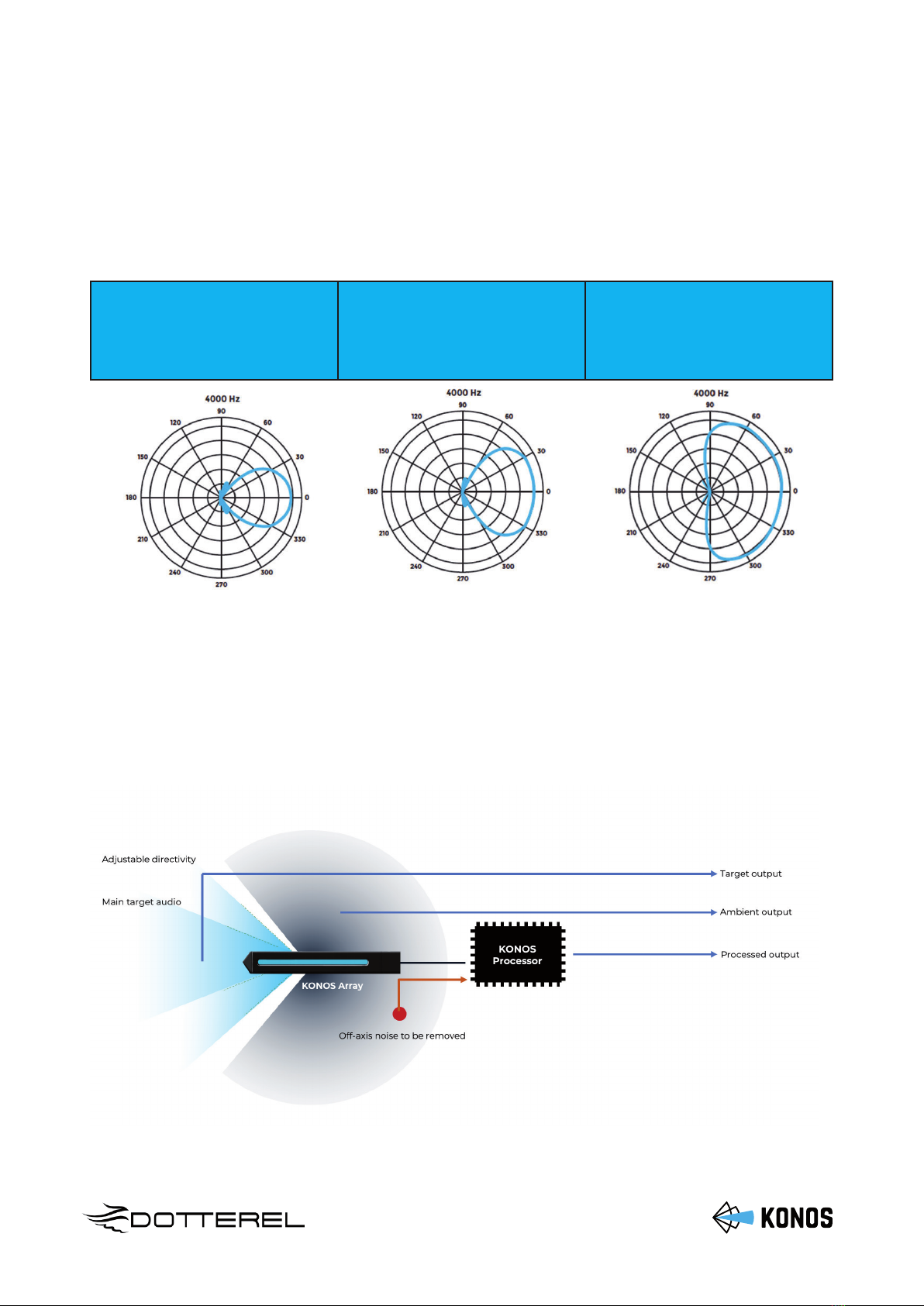
Konos uses arrays of MEMS microphones with intelligent processing to filter
out off-axis noise efficiently and maintain excellent directivity in long ranges.
We provide options of directivity at 60 degree, 100 degree and 180 degrees. The
following polar plots show tight pick-up at these angles.
Narrow (60⁰) Medium (100⁰) Wide (180⁰)
Konos maintains negligible side and rear lobes across low and high frequency
ranges.
The working principle is illustrated in the following diagram.
7

Specifications
Transducer 80 element MEMS microphone array
Frequency response 50Hz – 20,000Hz
Audio output
3x XLR-M balanced outputs
Line level +/- 4VRMS
Front, null and processed
Power External power 24V DC or
Batteries 4 x 18650 Li-ion
Wattage 10W
Operating time on battery power ~ 4 hours
Maximum sound pressure level 117 dBA
Dimensions and weight
Konos array: L 230mm, ф 25mm, ~180g
Konos processor: ~1115g (without bat-
teries)
Operating temperature 10⁰C to 40⁰C
Housing Anodized aluminium
8

Safety and maintenance
• It is important to keep this user guide with the product as it contains important
set-up, safety, maintenance instructions and cautionary information. Always
pass the product along with the user guide to third parties as required.
• Caution: Do not plug the ethernet cable from the processor box’s ethernet port
(2) into any other device other than the microphone. This port supplies 24V DC
power over ethernet (PoE) and is meant only to connect the microphone to the
processor box. Connecting the processor box to any other device may damage
both devices. The microphone should also not be connected to any other device
other than the processor box. Do not attempt to open the product housing on
your own. This will invalidate your warranty.
• Caution: If you need to clean the microphone, use a soft dry cloth. Do not use
any solvents, cleaning products, compressed air or any other propellants.
• Caution: please follow the guidelines for handling the batteries and the external
power supply, as provided in their respective manuals.
• Keep the product away from liquids (as it can fail to function if liquid enters in-
side).
• When handling the microphone, do not attempt to insert any object into the
side slots as this will damage the array elements.
• Do not operate the product if it was damaged during transportation.
• Use 18650 batteries only and remove after use. Replace batteries only when the
unit is powered off.
9
Otros manuales para Konos
1
Tabla de contenidos


