
Disney DDC9000-P Manual de usuario

User’s Guide
Princess Digital Camera
DDC9000-P
FO LD 4.75” x 4.75”

Table of Contents....................................................................................1
Important Information..............................................................................2
FCC Information ................................................................................2
User Information................................................................................2
Location of Controls................................................................................4
Front ..................................................................................................4
Rear...................................................................................................4
Changing the Faceplate..........................................................................5
Getting Started........................................................................................6
Recharging the Battery......................................................................6
Checking the Battery Level ...............................................................6
Using the Necklace ...........................................................................7
Operation ................................................................................................8
Turning the Power On/Off .................................................................8
Taking ASingle Picture......................................................................9
Setting the Self Timer Mode..............................................................9
Setting the Continuous Snapshot Picture Mode .............................10
Taking Three Continuous Pictures ..................................................10
To Delete the Last Picture or Last Continuous Pictures..................11
To Delete All Pictures ......................................................................12
Setting the Image Quality Mode......................................................12
Setting the Frequency Mode ...........................................................13
Reset Button....................................................................................13
Display.............................................................................................13
Computer Connection...........................................................................14
Installing the Camera Software .......................................................14
Uninstalling the Camera Software...................................................16
Uninstalling the Camera Driver ........... ...........................................16
Downloading Photos .......................................................................16
Using Your Camera as a Web Cam ................................................18
Capturing AVI Video Files................................................................18
Using Microsoft Netmeeting ............................................................19
NHJ Photo Manager Tour................................................................19
Troubleshooting Guide..........................................................................20
Specifications........................................................................................21
1
TABLE OF CONTENTS
DDC9000P.qxp 7/15/05 10:39 AM Page 1

FCC INFORMATION
FCC WARNING: This equipment meets the limits for a class B
digital device, pursuant to Part 15 of FCC rules. Only the cable
supplied with the camera should be used. Operation with other
cables is likely to result in interference to radio and TV reception
and could void the user’s authorization to operate this equipment.
This device complies with Part 15 of the FCC Rules. Operation is
subject to the following two conditions:
1) This device may not cause harmful interference.
2) This device must accept any interference received, including
interference that may cause undesired operation.
Changes or modifications not expressly approved by the manu-
facturer may void the user’s authority to operate this equipment.
USER INFORMATION
NOTE: This equipment has been tested and found to comply with
the limits for a class B digital device, pursuant to Part 15 of the FCC
Rules. These limits are designed to provide reasonable protection
against harmful interference in a residential installation. This
equipment generates, uses and can radiate radio frequency energy
and, if not installed and used in accordance with the instructions,
may cause harmful interference to radio communications. However,
there is no guarantee that interference will not occur in a particular
installation. If this equipment does cause harmful interference to
radio or television reception, which can be determined by turning
the equipment on and off, the user is encouraged to try to correct
the interference by one or more of the following measures:
- Reorient or relocate the receiving antenna.
- Increase the separation between the equipment and receiver.
2
I M P O R TANT INFORMAT I O N
DDC9000P.qxp 7/15/05 10:39 AM Page 2

Be sure to observe the following precautions when using the camera:
•This camera works best when used in bright lighting, such
as sunlight or a brightly lit room. Results in dimly lit areas
will vary.
•Never try to take pictures or use the built-in display when
operating a motor vehicle or while walking.
•Never attempt your own repairs. Always leave service to
authorized repair facilities.
•Keep the camera away from water and other liquids, and never
let it get wet. Never use when it is raining or snowing.
•Should foreign matter or water get into the unit, immediately
turn the power off and contact your local authorized service
center.
•Physical damage and malfunction of this unit can cause the
image data stored in its memory to be deleted. Be sure to
always keep backup copies of data by transferring to a
personal computer.
•In an environment with electrostatic discharge, the user may
have to reset the unit.
•Do not leave the camera in places subject to extremely high
temperatures, such as a sealed vehicle or in direct sunlight.
•Do not place the camera in unstable locations, such as a
sloping surface or unstable table where the camera may fall.
•Do not touch or press on the display or lens.
3
I M P O R TANT INFORMAT I O N
DDC9000P.qxp 7/15/05 10:39 AM Page 3

1. Compartment
Cover Flap (Side of
Unit)
2. LED Indicator
3. Camera’s Loop
4. Lens
5. Display
6. Reset Button
(Inside
Compartment)
7. Viewfinder
8. Compartment and
Faceplate
9. Mode/Power ON
Button
10. Shutter/Select
Button
11. USB Jack (Under
Compartment
Cover Flap)
4
L O C ATION OF CONTROLS
FRONT
REAR
DDC9000P.qxp 7/15/05 10:39 AM Page 4

5
CHANGING THE FACEPLATE
A Disney faceplate is included with this unit. To use your own picture,
follow the instructions below.
Place the template over the
desired photograph and have
an adult cut out the picture using
a utility knife or trace the heart
shape and cut out with scissors.
1
Open the Compartment using
your fingernail as shown.
2
Place the new heart-shaped
picture into the faceplate and
shut the compartment.
3
DDC9000P.qxp 7/15/05 10:39 AM Page 5

RECHARGING THE BATTERY
The battery is not replaceable in this unit as it is rechargeable and
does not need replacing. Charge the battery before using for the first
time. To recharge, follow the instructions below:
6
GETTING STA R T E D
Open the Compartment using
your fingernail as shown.
1
Insert the small end of the USB
cable into this camera and the
other end into the USB port on
your computer; a beep will sound
to signal the unit is charging.
When charging for the first time, charge for 10 to 12 hours. After the
initial charging, it will only take one to two hours to charge. This
rechargeable battery can be recharged up to 500 times.
2
CHECKING THE BATTERY LEVEL
Follow the instructions below to check the battery level of the
rechargeable battery:
Press the Mode/Power button once to
turn the unit on. If the battery power is
l o w, the remaining photo counter
number will blink in the display In this
case, recharge the batteries as
described above.
1
DDC9000P.qxp 7/15/05 10:39 AM Page 6
7
GETTING STARTED (CONTINUED)
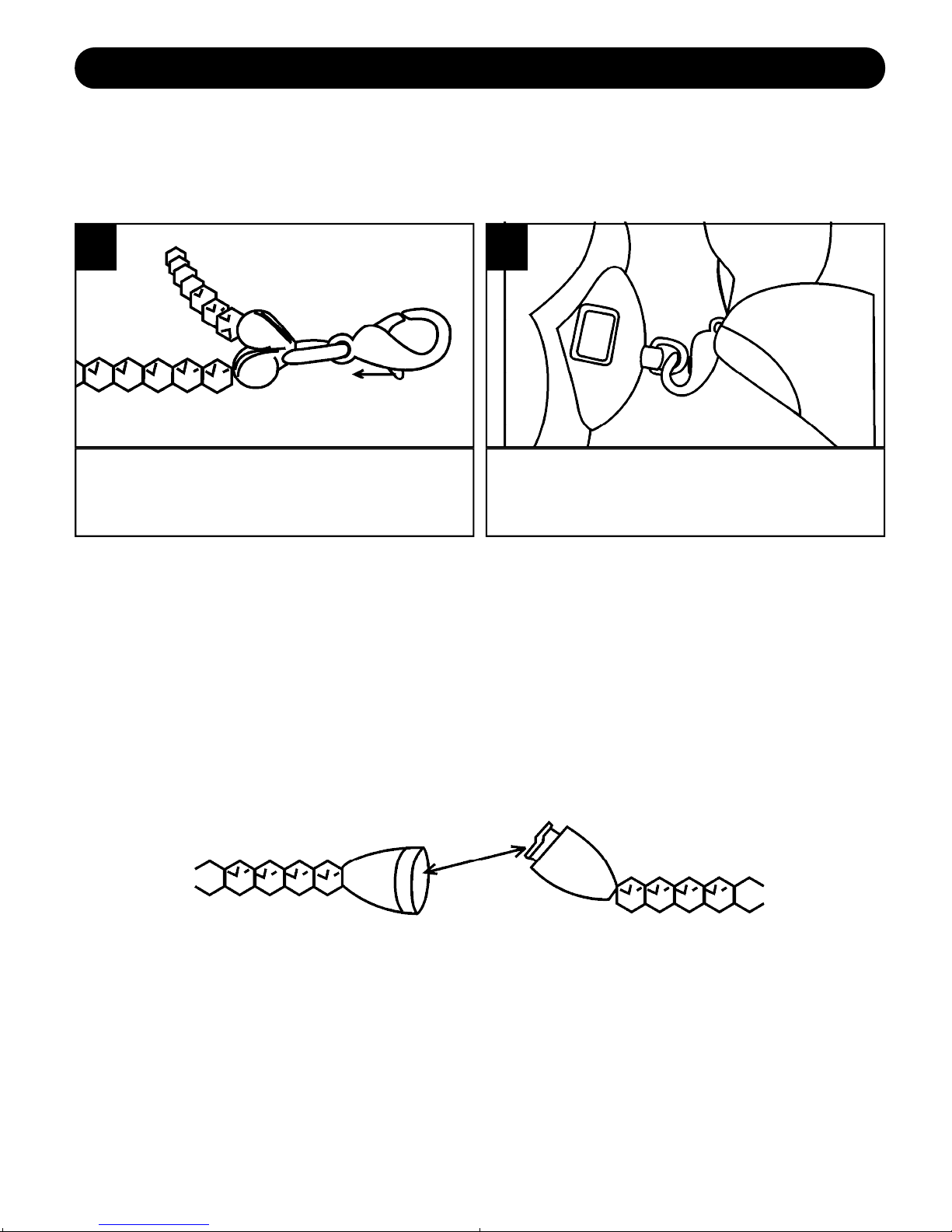
USING THE NECKLACE
You can attach this camera to the supplied necklace as follows:
IMPORTANT SAFETY FEATURE:
The necklace contains a safety strap that will come
apart if a strong pulling force occurs to the necklace.
This is a safety feature for children to prevent
s t r a n g u l a t i o n .
Push the tab on the connector.
1
Connect to the Camera’s loop.
2
DDC9000P.qxp 7/15/05 10:39 AM Page 7

8
O P E R AT I O N
TURNING THE POWER ON/OFF
Press the Mode/Power button 1once
to turn the unit on. To turn the camera
off, press the Mode/Power button 1
until “oF” appears in the display, then
press the Shutter/Select button 2.
1
NOTES:
•The power will automatically turn on when a USB cable is
connected to the computer and turn off when the USB cable is
removed.
• To save the battery power, the unit will automatically turn off after
20 seconds of inactivity, but the pictures will remain in memory.
DDC9000P.qxp 7/15/05 10:40 AM Page 8

O P E R ATION (CONTINUED)
9
Press the Mode/Power button
once to turn the unit on.
The counter (i.e. '25', '18', etc.)
will appear in the display.
1
Press the Shutter/Select button to
take a picture; the LED will blink
once and the counter in the
display will decrease by one.
2
TAKING ASINGLE PICTURE
Turn the camera on as described
on page 8. Press the Mode/Power
button twice to select the Self
Timer mode; “St” will appear in the
display.
1
Within three seconds, press the
Shutter/Select button to select the
Self Timer mode. The LED will
blink and the camera will beep
nine times. On the tenth beep, the
picture will be taken.
2
SETTING THE SELF TIMER MODE
DDC9000P.qxp 7/15/05 10:40 AM Page 9
Tabla de contenidos
Idiomas:
Otros manuales de Cámara digital de Disney


