
Digital Design EVOLUTION II Manual de usuario

1 EVOLUTION 1 SYSTEM MANUAL Issue 1.1 20 Dec 2006
EVOLUTION II
INK JET PRINTERS
INSTALLATION AND OPERATION MANUAL
digital design inc.
67 Sand Park Road
Cedar Grove, NJ 07009
(973) 857-9500
http://www.evolutioninkjet.com/
This manual is for use in operating and maintaining the EVOLUTION 1I Ink Jet
Printer. This includes various optional features, which may not be included in
your basic model printer. For basic start-up instructions, please refer to PART 1
Installation Procedures.
All rights reserved. No part of this document may be reproduced, stored on a
retrieval system, or transmitted in any form, or by any means electronic,
mechanical, photocopying, recording or otherwise, without the prior permission of
Digital Design Inc.
Digital Design Inc. has a policy of continual product improvement. The Company
therefore reserves the right to modify the information contained in this manual
without prior notice.
ALL PRINT CARTRIDGES SUPPLIED BY DIGITAL DESIGN INC.
ARE FACTORY TESTED AND PROFILED TO PRODUCE AN
OPTIMUM AND CONSISTANT CODE. USING OTHER THAN
AUTHORIZED CARTRIDGES WILL CAUSE UNDESIRABLE
RESULTS.
EACH FLASH DATA CARD IS PROFILED EXPLICITELY FOR ITS’
INTENDED PRINTER, AND IS SECURITY LOCKED PROHIBITING
USE IN OTHER THAN THE ORIGINAL PRINTER FOR WHICH IT
WAS PURCHASED. KEEP ALL UPGRADE CARDS IN A SECURE
PLACE.
EVOLUTION II IS A FULLY FEATURED MODEL WITH VARIABLE
FIELD PROGRAMMING AND BARCODE CAPABILITIES.

2 EVOLUTION 1 SYSTEM MANUAL Issue 1.1 20 Dec 2006
EVOLUTION CONTROLLER
GRAPHIC
(WSYWIG)
LCD DISPLAY
EVOLUTION
CONTROLLER
KEYBOARD
PRINT HEAD
CABLE PLUG
NOTE:
THE EVOLUTION
GRAPHIC CONTROLLER
WILL CONTROL THE
EVOLUTION 1 (EV1)
EVOLUTION 2 (EV2)
EVOLUTION SC (EVSC)
THE UPPER LEFT
CORNER OF THE DISPLAY
INDICATES THE SPECIFIC
PRINTER CONNECTED TO
THE HAND HELD
CONTROLLER
EV2 STOPPED
HD 1<- - SPEED= 120
EVOLUTION CODERS
EVOLU

3 EVOLUTION 1 SYSTEM MANUAL Issue 1.1 20 Dec 2006
INSTALLATION AND OPERATION MANUAL 6
PART 1: INSTALLATION PROCEDURES 6
INSTALLING THE EVOLUTION II PRINTING SYSTEM 6
MOUNTING ON PRODUCTION LINE 6
EVOLUTION II MOUNTING OPTIONS 7
After the mounting bracket is configured loosen the locking collar 7A014S and re-locate it
against the horizontal extension bracket and tighten. This allows the user to loosen the
horizontal mounting bracket-locking knob and rotate the assembly without losing the height
adjustment. 8
GROUNDING STRAP INSTALLATION 9
INPUT POWER CONNECTION AND MODIFICATION 9
INSTALLING THE PRINT CARTRIDGE 10
CONNECTING THE CONTROLLER TO THE CARRIAGE 11
CONFIGURING THE PRINTER 12
SYSTEM RESET 12
MULTIPLE PRINT HEADS 14
EVOLUTION II QUICK START 15
CHANGING LANGUAGE PROMPTS 15
ENABLING PRINT MODE 15
HEAD SELECT MODE 15
ENTERING A MESSAGE 16
STORING A MESSAGE 17
LOADING A MESSAGE 18
EVOLUTION II QUICK SETUP 19
PART 2: OPERATION PROCEDURES 1
OVERVIEW CONTROLLER and LCD 1
KEYPAD KEY DESCRIPTIONS 2
TURNING ON THE PRINT STATION FOR THE FIRST TIME 3
CHECKING SYSTEM INFORMATION 3
CHECKING LOADED FONTS 3
CHANGING SYSTEM DATE AND DAY OF WEEK CODES 4
CHANGING SYSTEM TIME AND DATE ROLL OVER TIME 5
PROGRAMMING 7
DEFINITIONS 7
PRINT MODE AND STOPPED “COMMAND” MODE 7
F1 MENU 9
1 = CHARACTER SPACING: 9
2 = EXT. ENCODER: 9
3 = DATE OFFSET: 10
4 = BARCODE TYPE: 10
F2 MENU 12
1 - DIRECTION: 12
2 - PRINT INVERSE: 12
3 – PRODUCT DETECT: 12
4 - AUTO REPEAT: 13
F3 MENU 14
1 – PRODUCT COUNT: 14
2 – shift code: 15
3 – DATE FORMAT: 16
4 – TIME FORMAT: 18
F4 MENU 19
1 - LANGUAGE: 19
2 - INK SUPPLY: 19

4 EVOLUTION 1 SYSTEM MANUAL Issue 1.1 20 Dec 2006
3 – SET UNIT I.D.: 20
4 – LOAD CARD: 21
SETTING PRINT DELAY AND LINE SPEED 24
SETTING LINE SPEED 24
SETTING PRINT DELAY 25
SETTING HEAD ALIGNMENT 25
INPUT, EDIT OR DELETE MESSAGES 26
VARIABLE FIELD FORMAT PRINTING 33
MESSAGE STORAGE 36
STORING A MESSAGE 36
RECALLING A STORED MESSAGE 36
PART 3: MAINTENANCE PROCEDURES 1
SHORT PERIODS OF SHUT DOWN 1
LONG PERIODS OF SHUT-DOWN 2
PRINT CARTRIDGE MAINTENANCE 3
PRINT CARRIAGE MAINTENANCE 5
EXPLODED VIEW OF THE C21002 PRINT CARRIAGE 5
PART 4: TROUBLESHOOTING AND REPAIRS 1
FAULTS 1
PART 5: PARTS LIST AND OPTIONS 1
PART 6: COMMUNICATIONS PROTOCOL 1
DESCRIPTION 2
DATA WORD DEFINITION 2
BAUD RATE 2
DEFINITIONS 2
CABLING FOR EVLINK ENVIRONMENT 2
HARDWARE INTERFACE 3
PHYSICAL CONNECTIONS RS485 print carriage 3
PROTOCOL FORMAT: 3
EVOLUTION PRINTABLE CHARACTER SET 3
SOFTWARE PROTOCOL 4
ERROR CODES 4
COMMANDS: 6
PART 7: OPTION JUMPERS AND CABLING 1
OPTION JUMPER DESCRIPTIONS 1
VSEL J7 1
ENSEL J9 1
PRSEL J10 1
JUMPER LOCATION 2
OPTION CABLING DESCRIPTIONS 3
PART 8: SPECIFICATIONS 1
PRINTER SPECIFICATIONS 1
PRINT CHARACTERISTICS 1
CONTROLLER 1
PRINT CARRIAGE 1
ENVIRONMENTAL CONDITIONS 1
GENERAL 1
DEFAULT SETTINGS 2
APPENDIX A – PRODUCING RELIABLE BAR CODES 3
BARCODE INTEGRITY - 3
CONTRACT RATIO - 3
BAR SEPARATION - 3
QUIET ZONE - 3

5 EVOLUTION 1 SYSTEM MANUAL Issue 1.1 20 Dec 2006
PROGRAMMING BAR CODES: 4
BARCODE TECHNIQUES: 5
BARCODE TYPES 9
USING CHECK CHARACTER: 13

6 EVOLUTION 1 SYSTEM MANUAL Issue 1.1 20 Dec 2006
INSTALLATION AND OPERATION MANUAL
PART 1: INSTALLATION PROCEDURES
INSTALLING THE EVOLUTION II PRINTING SYSTEM
Caution should be taken while installing the EVOLUTION printing system on your
equipment. Digital Design Inc. has taken every precaution to ensure a safe and
accurate instruction set to guide the installer through the installation process.
Follow the operational guidelines in the installation procedures.
VERIFY THAT YOUR EQUIPMENT IS IN PROPER OPERATING
CONDITION.
LOCATE A CONVENIENT POSITION ON YOUR EQUIPMENT.
EVOLUTION II REQUIRES 4-1/2" OF SPACE ON THE PRODUCTION
LINE.
FOLLOW THE INSTALLATION PROCEDURES.
READ CAREFULLY ALL INSTALLATION PROCEDURES BEFORE
PROCEEDING.
INSTALL THE PRINTING SYSTEM ON YOUR EQUIPMENT.
THERE IS NO EXTRA HARDWARE REQUIRED OTHER THEN
THAT SUPPLIED IN THE INSTALLATION KIT.
MOUNTING ON PRODUCTION LINE
Locate the supplied mounting template
and affix in a convenient location on the
production line. Spot and drill both
mounting holes for a 5/16” bolt. NOTE:
the user may also thread the side of the
conveyer using a 5/16” tap.
Fasten the mounting bracket to the
conveyer using the supplied mounting
hardware and ensuring that the supplied
ground strap is located securely beneath
either of the two mounting bolts, and that
conductivity to earth ground is less than 1 ohm. This ensures a proper path for
static discharge, should the need arise.
7 EVOLUTION 1 SYSTEM MANUAL Issue 1.1 20 Dec 2006
EVOLUTION II MOUNTING OPTIONS
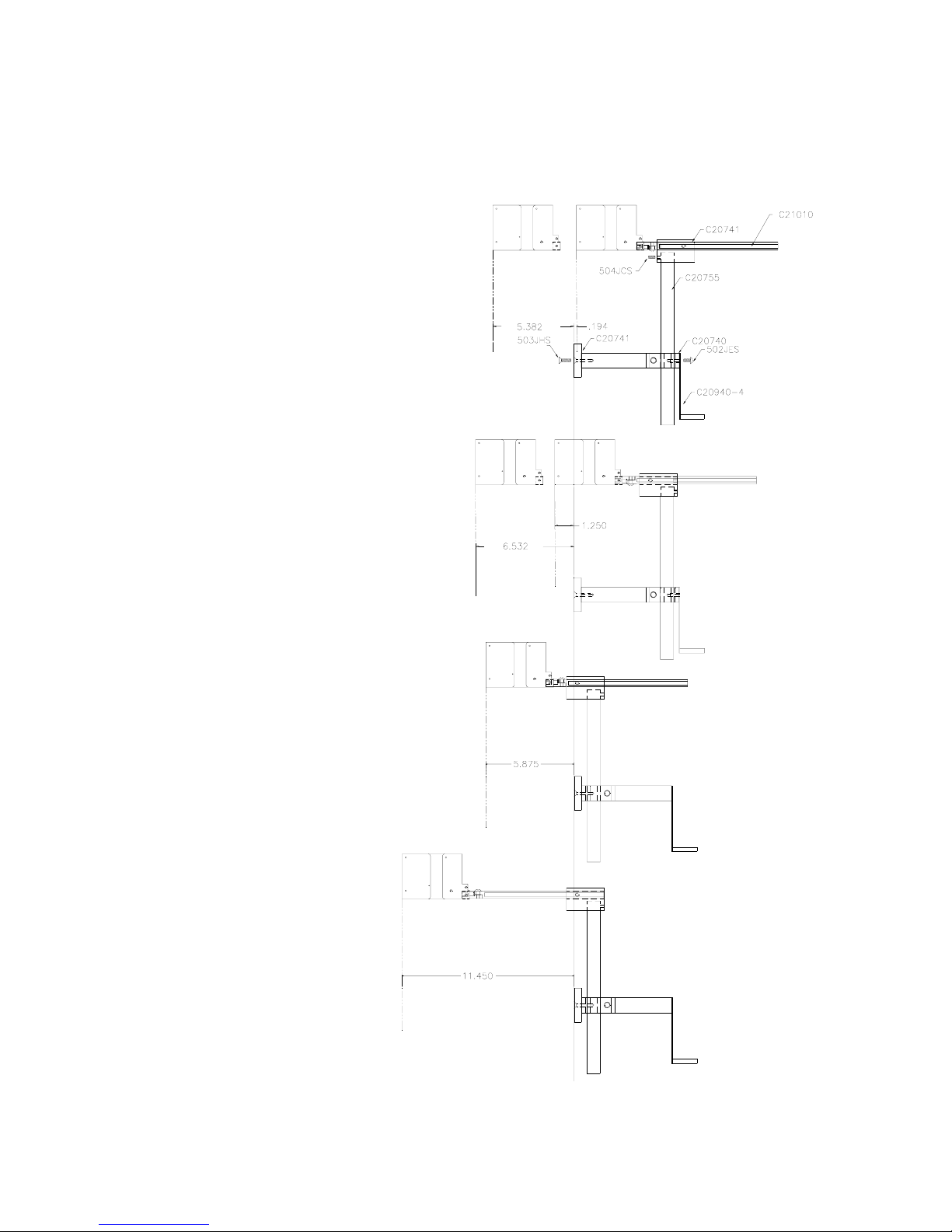
The EVOLUTION II mounting bracket assembly C21010 has a number of
possible mounting configurations, which allows adaptability to a variety of
production equipment.
The top cross slide
bracket C20741 may be
rotated 180 deg by
loosening the included
setscrew 504JCS and
rotating the bracket. This
allows the print head to be
extended by just over 1”.
Although this is not a
significant amount it might
be helpful.
Refer to the first two
pictorials to identify the
various components of the
mounting bracket system
C21005.
Rotating the horizontal
mounting bracket C20740
may further increase
extension into the
production line. The
mounting centers for both
the base block C20741
and controller holder
C20940-4 are identical.
Remove the two 502JHS
flat head screws from the
base block and the two
502JES button head
screws, rotate the bracket
and replace both the base
block and controller
holder.
The above procedure
allows for a print head
displacement from .625”
before the production line
to 11.450” into the
production line.

8 EVOLUTION 1 SYSTEM MANUAL Issue 1.1 20 Dec 2006
Vertical height adjustment
for the EVOLUTION II print
head is accomplished by
loosening the included
hand knob 5993K41.
Note that the hand knob
may be mounted on either
side of the horizontal
mounting bracket
depending on the
orientation of the bracket.
It should also be noted
when rotating the cross
slide assembly it is
necessary to move the
smaller hand knob
57715K16 to the other
side of the bracket so it
aligns with the flat on the
horizontal extension rod.
After the mounting bracket
is configured loosen the
locking collar 7A014S and
re-locate it against the
horizontal extension
bracket and tighten. This
allows the user to loosen
the horizontal mounting
bracket-locking knob and
rotate the assembly
without losing the height
adjustment.

9 EVOLUTION 1 SYSTEM MANUAL Issue 1.1 20 Dec 2006
GROUNDING STRAP INSTALLATION
INPUT POWER CONNECTION AND MODIFICATION
Insert the power plug to the available power source. The supplied power supply
will is universal and will auto detect 100/240 VAC 50-60hZ.
No other adjustments are necessary.
INSTALL STRAP
UNDER 5/16”
SCREW. ENSURE
CONDUCTIVITY TO
EARTH GROUND IS
LESS THAN 1 OHM

10 EVOLUTION 1 SYSTEM MANUAL Issue 1.1 20 Dec 2006
INSTALLING THE PRINT CARTRIDGE
Remove the protective film from the face of the print head and retain the film.
This protective film may be re-applied to store partially used cartridges. If it is
necessary to remove the print head and store for a long period of time, it is best
to re-apply the plastic film, and place the cartridge in a closeable plastic bag.
Rotate the Print Head Release mechanism to the rear of the print head so that it
is free for insertion of the print cartridge. Push the print cartridge in and down to
insert it into the print carriage. Gently lift the locking arm and press forward
against the print cartridge. A snap will be felt as the locking mechanism presses
the cartridge into the correct position.
NOTE: EACH PRINT CARTRIDGE HAS BEEN PROFILED
AT THE FACTORY. THIS PROCEDURE DETERMINES
THE OPTIMAL OPERATING CHARACTERISTECS FOR
EACH INDIVIDUAL CARTRIDGE. USING ANY OTHER
PRINT CARTRIDGE WILL HAVE UNDESIRABLE
RESULTS.
NOTE: WHEN A NEW CARTRIDGE IS INSTALLED,
BOTH THE RED AND GREEN LIGHT WILL FLASH
TWICE INDICATING A CORRECT INSTALLATION.
THE USER MUST REMEMBER TO RESET THE INK
LEVEL UNDER THE F4 FUNCTION KEY MENU.
Tabla de contenidos
Otros manuales de Impresora de Digital Design


